
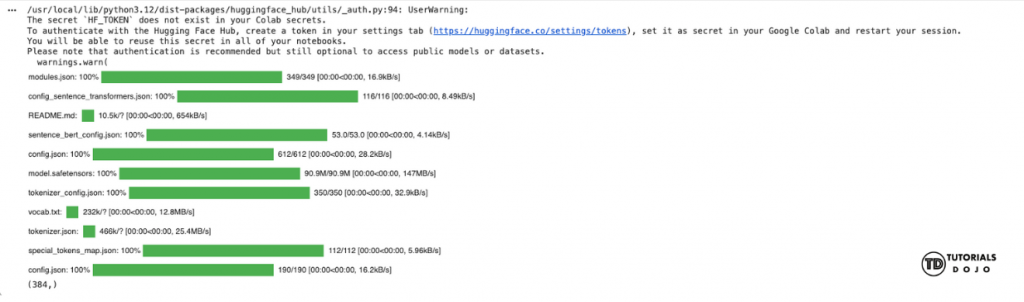
Document embeddings are one of the simplest ways to give machines an understanding of text, and in our previous article, Document Embeddings Explained: A Guide for Beginners, we explored how they turn entire documents into dense numerical vectors that capture meaning and context. Now that you understand what embeddings are and why they’re useful for tasks like semantic search, classification, and clustering, this tutorial will show you how to generate them in practice using Python. Whether you’re working with short paragraphs, long articles, or a collection of documents, the steps in this guide will help you create embeddings that you can analyze, compare, and use in real applications. This guide will walk you through the process of generating document embeddings using Python and a pretrained transformer model. Even if you’ve never worked with embeddings before, you’ll see how easy it is to convert text into meaningful numerical vectors that can be used for search, similarity comparison, clustering, and many other AI applications. By the end of this article, you will be able to: Before we dive into the guide on how to generate simple document embeddings with Python, make sure you have the following ready: After installing, you can immediately import the libraries in the next cell. Now that the required libraries are imported, the next step is to load a pretrained transformer model. In this tutorial, we use all-MiniLM-L6-v2, a lightweight model from the SentenceTransformers library. This model has been trained to generate dense vector representations of text that capture semantic meaning, making it ideal for tasks like semantic similarity, clustering, and search. After you run the code, you should see this output. The next step now that the model is loaded and working is to make a simple sentence dataset that we can practice on. You can make your own list of sentences or copy the following code. With our simple dataset, we can now start generating their document embeddings with this code. This code will first encode the data using the pretrained model and print out the shape of the generated embeddings. The code should give you this output. We can also inspect the first embedding vector with this code. It should output a list of floating-point values. It should give you this matrix as an output. Each value in the similarity matrix shows how closely two sentences are related in meaning, with 1 meaning identical, 0 meaning unrelated, and values in between indicating partial similarity. From this matrix we can then try to extract which pair of sentences is the most similar to each other using this code. In this tutorial, we generated document embeddings using Python and a pretrained transformer model. We converted sentences into numerical vectors, computed cosine similarity to measure how closely they relate, and identified the most similar sentence pairs. These steps form the foundation for tasks like semantic search, clustering, and text analysis, giving you a practical starting point to work with embeddings on your own data. A copy of the Google Colab script can be accessed through this link. Now that you understand how to generate document embeddings and measure similarity between sentences, you can explore more advanced applications through these articles: Mastering Cloud-Based Semantic Search: Advanced Cloud Search Architectures Made Easy. This article explains how to build cloud-based semantic search systems that find content by meaning rather than exact keywords, using vector embeddings and managed cloud services.
Objectives

Prerequisites
!pip install sentence-transformers scikit-learn
Generating the Document Embeddings
Importing the libraries
from sentence_transformers import SentenceTransformer
from sklearn.metrics.pairwise import cosine_similarity
Loading the pretrained model
model = SentenceTransformer('all-MiniLM-L6-v2')
sample_text = "Artificial intelligence is transforming businesses."
embedding = model.encode(sample_text)
print(embedding.shape)
Preparing your data
# Example documents
documents = [
"Artificial intelligence is transforming businesses.",
"Machine learning allows computers to learn from data.",
"Python is a popular programming language for AI applications.",
"Deep learning models require large amounts of data.",
"AI can help automate repetitive tasks and improve efficiency."
]
Generate the embeddings
# Generate embeddings for all documents
embeddings = model.encode(documents)
# Check the shape of the embeddings array
print("Embeddings shape:", embeddings.shape)
Embeddings shape: (5, 384)
print("First embeddings vector: ", embeddings[0])
Compare similarity
# Compute cosine similarity between all embeddings
similarity_matrix = cosine_similarity(embeddings)
# Print the similarity matrix
print(similarity_matrix)
[[1. 0.527647 0.3797139 0.31519628 0.44177282]
 [0.527647 1.0000001 0.3662578 0.4742912 0.46388942]
 [0.3797139 0.3662578 1. 0.19788864 0.42667586]
 [0.31519628 0.4742912 0.19788864 0.9999999 0.26827574]
 [0.44177282 0.46388942 0.42667586 0.26827574 1.0000001]]
import numpy as np
# Set diagonal to -1 so we ignore similarity of a sentence with itself
np.fill_diagonal(similarity_matrix, -1)
# Find the index of the maximum similarity
most_similar_idx = np.unravel_index(np.argmax(similarity_matrix), similarity_matrix.shape)
# Print the most similar pair
i, j = most_similar_idx
print("Most similar sentences:")
print("Sentence 1:", documents[i])
print("Sentence 2:", documents[j])
print("Similarity score:", similarity_matrix[i][j])
Most similar sentences:
Sentence 1: Artificial intelligence is transforming businesses.
Sentence 2: Machine learning allows computers to learn from data.
Similarity score: 0.527647
Summary
Next Steps

References
🔥 $1.99 eBooks and $4.99 Video Claude Reviewers

Turn Your Team Into Cloud-Ready Professionals Today

Learn AWS with our PlayCloud Hands-On Labs

$2.99 AWS and Azure Exam Study Guide eBooks

Learn GCP By Doing! Try Our GCP PlayCloud

Learn Azure with our Azure PlayCloud

FREE AI and AWS Digital Courses

FREE AWS, Azure, GCP Practice Test Samplers


Subscribe to our YouTube Channel

Follow Us On Linkedin


Written by: Jaime Lucero




