
GitHub Marketplace Cheat Sheet
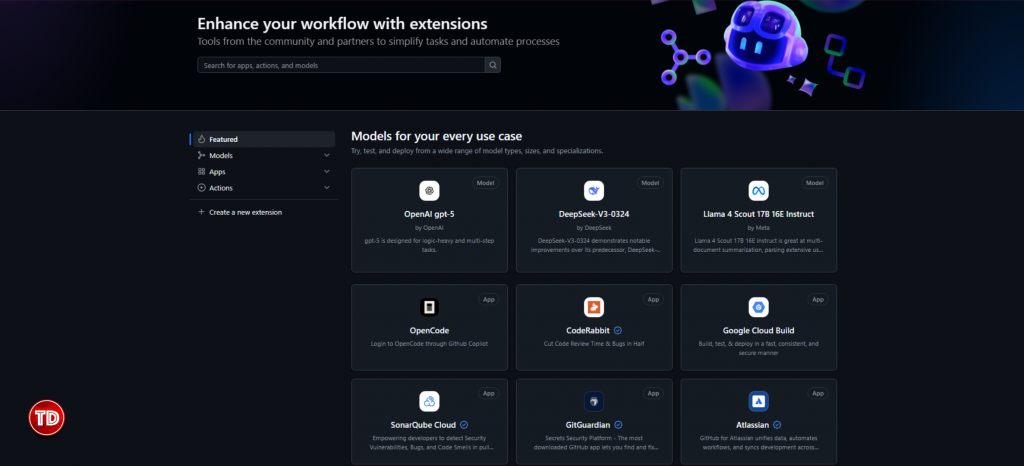
GitHub Marketplace is a platform where developers can discover, purchase, and integrate tools that extend GitHub’s functionality. It allows app creators to list their GitHub Apps and Actions for developers to use or purchase, reaching millions of GitHub users directly within their workflow.
Key Concepts
| Term | Definition |
| GitHub App | Preferred app type with fine-grained permissions and short-lived tokens. Can act on behalf of users or independently. |
| OAuth App | Older app type that can only act on behalf of a user. GitHub Apps are generally preferred. |
| Listing | The public page for your app on Marketplace, including name, description, pricing, and installation instructions. |
| Pricing Plan | Cost model for your app (Free, Flat-rate, Per-unit). |
| Publisher Verification | A verified badge indicating GitHub has confirmed your organization’s identity. |
| Marketplace Badge | Visual indicator of an app’s quality, security, and compliance with Marketplace standards. |
| Installation | When a user grants your app access to their account and repositories. |
| Authorization | When a user grants your app permission to act on their behalf (separate from installation). |
| Webhook | HTTP callback that notifies your app of Marketplace events (purchases, plan changes, cancellations). |
For App Users: Installing and Managing Apps
Finding Apps on Marketplace
-
Navigate to GitHub Marketplace or click the Marketplace link in the top-left corner of any GitHub page.
-
Browse by category or search for specific apps.
Installing an App on Your Personal Account
-
Go to the app’s Marketplace page.
-
Under “Pricing and setup,” select a plan (e.g., Free, Buy, or Try free for 14 days).
-
Click the corresponding button (e.g., Install it for free, Buy with GitHub, or Try free for 14 days).
-
Under “Review your order,” confirm your personal account is selected.
-
If paid, review or add payment method (credit card or PayPal).
-
Click Complete order and begin installation.
-
If the app requests repository access, choose All repositories or Only select repositories.
-
Review permissions and click Install.
Installing an App on an Organization Account
-
Who can install? Organization owners. Enterprise owners (with credit card) who are also org owners can install.
-
Repository admins can install only if the app requests no organization permissions and no “repository administration” permission, and only for repos they admin. Owners can restrict this.
Steps:
-
Go to app’s Marketplace page, select a plan, click Buy with GitHub.
-
Under “Review your order,” select the organization from the dropdown.
-
Add or review payment method.
-
Click Complete order and begin installation.
-
Choose repository access (All or Only select).
-
Review permissions and click Install.

Installation vs. Authorization
- Installation grants access to organization/repository resources.
- Authorization grants the app permission to act on your behalf (access user data like email). You can install without authorizing, and vice versa.
Approving Updated Permissions
-
When a GitHub App you have installed requests additional permissions, GitHub will notify you if the app is installed on your personal account or on an account that you own.
-
You can choose whether to accept the additional permissions.
-
If you do not approve the additional permissions, the GitHub App will still retain its current permissions.
-
The GitHub App may not function as expected if you do not approve the additional permissions.
-
If the app is authorized but not installed, or if the GitHub App only requested additional account permissions (not repository/organization permissions), GitHub will not notify you. Instead, the GitHub App will prompt you to reauthorize the app directly to enable the new account permissions.
For App Developers: Creating and Listing Apps
Before you can list your app on GitHub Marketplace, you must meet specific requirements that apply to all listings, whether free or paid. Additional requirements apply if you plan to offer paid plans.
Requirements for all listings (free and paid):
All apps must comply with the GitHub Marketplace Developer Agreement, which you read and accept during the submission process. Your listing must include valid contact information for the publisher, a relevant description of what the application does, and a clearly defined pricing plan. You must also provide a valid link to a privacy policy and a method for users to receive support, either through a valid support link or a support email address. Any additional links in your listing, such as Terms of Service or a Status Page, must resolve to working and relevant pages.
Your app must deliver value to customers and integrate with the GitHub platform in a meaningful way beyond simple authentication. The app must be publicly available in Marketplace, meaning it cannot be in public preview or available by invite only. From a technical standpoint, you must configure webhook events that notify your application of any plan changes or cancellations using the GitHub Marketplace API.
In terms of branding, any use of GitHub logos must follow the GitHub guidelines. Your listing must include a logo, feature card, and screenshots that meet the recommendations provided in Writing a listing description for your app. Finally, all descriptions must be well written and free of grammatical errors to maintain a professional appearance.
Additional requirements for paid apps:
If your app offers paid plans, it must be owned by an organization that has completed the publisher verification process. Publisher verification ensures GitHub has a way to contact you, that two-factor authentication is enabled for your organization, and that your organization’s domain has been verified.
For GitHub Apps, your app must have a minimum of 100 installations. For OAuth apps, a minimum of 200 users is required. Your app must handle all GitHub Marketplace purchase events, including new purchases, upgrades, downgrades, cancellations, and free trials. It must support both monthly and annual billing options for paid subscriptions. While GitHub handles the actual payment collection, your app must use the Marketplace purchase events to manage subscription logic and access accordingly.
Drafting a Listing
Create a new draft GitHub Marketplace listing:
-
You can only create draft listings for apps that are public.
-
To create a draft listing:
-
In the upper-right corner of any page on GitHub, click your profile picture, then click Settings.
-
In the left sidebar, click Developer settings.
-
In the left sidebar, click either OAuth Apps or GitHub Apps (depending on your app type).
-
Select the app you want to add to GitHub Marketplace.
-
On the app settings page, scroll down to the Marketplace section and click List in Marketplace (or Edit Marketplace listing if you already have a draft).
-
Once you create a new draft listing, you’ll see an overview of sections that need to be completed before your listing is ready.
-
Editing your listing:
-
After creating a draft, you can modify information anytime.
-
If your app is already approved and published, you can edit information and images but cannot change existing published pricing plans.
Submitting your app:
-
Once your listing is complete, go to the Overview page.
-
Read and accept the GitHub Marketplace Developer Agreement.
-
Click Submit for review.
-
After submission, an onboarding expert will contact you with additional information about the onboarding process.
Setting Pricing Plans
| Plan Type | Description | Example |
| Free | No cost, ideal for open source or basic versions | Basic tier with limited features |
| Flat-rate | Fixed monthly price | $10/month for full access |
| Per-unit | Price based on number of users or repositories | $1/user/month, $5/repo/month |
Configuring Webhook for Plan Changes
The GitHub Marketplace event webhook can only be set up from your application’s GitHub Marketplace listing page.
Creating a webhook:
-
Click Webhook in the left sidebar of your GitHub Marketplace listing page.
Webhook configuration options:
-
Payload URL: The URL of the server that will receive the webhook POST requests.
-
Content type: Choose how webhook deliveries are sent.
-
application/json– delivers the JSON payload directly as the body of the POST request. -
application/x-www-form-urlencoded– sends the JSON payload as a form parameter calledpayload. -
GitHub recommends using
application/json.
-
-
Secret: Setting a webhook secret allows you to ensure that POST requests sent to the payload URL are from GitHub. When set, you’ll receive
X-Hub-SignatureandX-Hub-Signature-256headers in the webhook POST request. -
Active: By default, webhook deliveries are “Active.” You can disable during development by deselecting “Active.” You must select “Active” before submitting your app for review.
After configuring:
-
After you configure the webhook, you can handle the
marketplace_purchaseevent types in your app.
Viewing webhook deliveries:
-
Once configured, you can inspect POST request payloads from the Webhook page of your application’s GitHub Marketplace listing.
-
GitHub does not resend failed delivery attempts. Ensure your app can receive all webhook payloads sent by GitHub.
Selling Your App
Pricing Plans for Marketplace Apps

-
Free plans: Available to all users without payment.
-
Paid plans: Users billed monthly through GitHub.
-
Trial periods: Free trials (typically 14 days) for paid plans.
-
Plan changes: Users can upgrade, downgrade, or cancel anytime.
API and Webhooks
REST Endpoints
| Endpoint | Purpose |
GET /marketplace_listing/plans |
List all plans for your app |
GET /marketplace_listing/plans/:plan_id/accounts |
List all accounts subscribed to a plan |
GET /marketplace_listing/accounts/:account_id |
Get subscription for an account |
GET /user/marketplace_purchases |
Get purchases for the authenticated user |
Webhook Events
| Event | Description |
marketplace_purchase |
Triggered for purchases, plan changes, cancellations |
marketplace_purchase.purchased |
New subscription created |
marketplace_purchase.changed |
Plan upgraded or downgraded |
marketplace_purchase.cancelled |
Subscription cancelled |
marketplace_purchase.pending_change |
Future plan change scheduled |
marketplace_purchase.pending_change_cancelled |
Pending change cancelled |
Best Practices
For App Users: Secure and Effective App Usage
-
Review permissions before installing: On the installation page, you’ll see a list of requested permissions. Click each permission to see exactly what the app can do (e.g., “Read access to code” allows the app to view your repository contents). If any permission seems excessive, consider denying installation or contacting the developer.
-
Limit repository access: When installing, choose “Only select repositories” instead of “All repositories” to minimize the blast radius if the app is compromised. You can later adjust this in the installed app settings.
-
Monitor installed apps: Periodically review the apps installed on your account or organization. Go to Settings > Installed GitHub Apps (or organization settings) to see what apps have access, what permissions they have, and which repositories they can access. Revoke access if an app is no longer needed.
-
Keep authorization in mind: Some apps may require you to authorize them separately after installation. Authorizing gives the app access to your user data (e.g., email, profile). Only authorize if you trust the app and need that functionality.
-
Respond to permission update requests: When an app requests new permissions, read the explanation carefully. If you don’t approve, the app may lose functionality. If unsure, contact the app developer before approving.
For App Developers: Building Trust and Reliability
Security Practices:
-
Use GitHub Apps over OAuth Apps: GitHub Apps have fine-grained permissions and short-lived tokens, reducing risk if tokens are leaked.
-
Request minimal permissions: Only ask for the permissions absolutely necessary for your app’s functionality. Users are more likely to trust and install apps with limited scope.
-
Store tokens securely: Never hardcode tokens in your app. Use environment variables or secure vaults.
-
Validate webhook signatures: To ensure incoming webhooks are genuinely from GitHub, verify the signature using your webhook secret.
-
Regularly audit your app’s access: Review the permissions your app requests and remove any that are no longer needed. Update your app to use the latest GitHub API versions.
-
Handle rate limits: Implement proper backoff and retry logic for API calls to avoid being blocked.
-
Protect user data: Follow data protection best practices, encrypt sensitive data in transit and at rest.
Customer Experience Practices:
-
Provide clear documentation: Include a detailed README in your app’s repository with installation steps, configuration instructions, and common use cases.
-
Offer a demo or trial: If your app has a paid plan, provide a free trial (e.g., 14 days) so users can evaluate before purchasing.
-
Set up a support channel: Provide a support email or link to an issue tracker. Respond promptly to inquiries.
-
Monitor your app’s performance: Use metrics from Marketplace (views, installations) and your own analytics to understand user engagement and identify issues.
-
Keep your app updated: Stay current with GitHub API changes and new features. Update your listing description and screenshots as your app evolves.
-
Communicate permission changes: If your app will request new permissions, explain why in your release notes or via a blog post to maintain user trust.
Troubleshooting Common Issues
| Problem | Likely Cause | Solution |
| Listing rejected | Missing requirements or incomplete information | Review the requirements carefully. Ensure your app has a public repository, complete listing details, and follows security best practices. Update and resubmit. |
| Webhooks not received | Incorrect URL, secret mismatch, or server issues | Verify the webhook URL in your app settings. Check that your server is reachable and returns a 200 OK. Validate the secret and signature handling. Test with a tool like curl to simulate GitHub’s request. |
| Customer can’t install app | Permission issues or misconfigured setup URL | Ensure your app’s installation URL is correctly set. If the app requires organization permissions, only owners can install; check if the user has the right role. If repository admins are blocked, the org owner may have restricted installations. |
| Plan changes not reflected | Webhook handling error or delayed processing | Confirm you are receiving and correctly processing marketplace_purchase webhooks. Check the payload to see if it’s an upgrade/downgrade. If using the API, query the account’s subscription directly. |
| Payment not received | Billing information incomplete or payment issue | In your app settings, under “Marketplace,” verify that your payout details (bank account or PayPal) are correct. Check your transaction history for any failed payouts. Contact GitHub Support if needed. |
| App installation fails due to permissions | The app requests permissions that the user’s account doesn’t have (e.g., admin access to a repository they don’t own) | Guide the user to ensure they have the necessary permissions on the target repositories. Suggest they install the app with a narrower repository selection. |
| User reports missing features after upgrade | App may require additional permissions not yet approved | The user may have declined the permission update. Instruct them to check for pending permission requests in their installed apps list. |
| Unable to approve permission update | The notification link may expire or the user may not have admin rights | The user should go directly to Settings > Installed GitHub Apps, find the app, and look for a banner or button to review pending permissions. Only users with admin access to the account/organization can approve. |
References
https://docs.github.com/en/apps/github-marketplace
https://docs.github.com/en/webhooks
🤖 $3.74 ONLY for Claude eBooks and Get 25% OFF All Claude Reviewers

Turn Your Team Into Cloud-Ready Professionals Today

Learn AWS with our PlayCloud Hands-On Labs

$2.99 AWS and Azure Exam Study Guide eBooks

Learn GCP By Doing! Try Our GCP PlayCloud

Learn Azure with our Azure PlayCloud

FREE AI and AWS Digital Courses

FREE AWS, Azure, GCP Practice Test Samplers


Subscribe to our YouTube Channel

Follow Us On Linkedin


Written by: Joshua Emmanuel Santiago




