
Last updated on March 3, 2026
In the early days of GenAI, creating a video was like launching a Lambda function with no database—every time you ran it, the AI “forgot” what the character looked like, what they were wearing, or even the laws of physics in the previous scene.As we hit 2026, the industry has moved toward Stateful Video Generation. This isn’t just “generating clips”; it’s Architecting a Latent Space where your creative assets remain persistent across an entire production.Let’s expand on this transformation the “Tutorial Dojo” way, breaking down the technical architecture and the shift in production philosophy. To achieve professional-grade results in 2026, you must move beyond the “chat box” and start thinking like a Systems Architect. Treating AI generation as a series of disconnected prompts is a “Single Point of Failure” for any production. Here is the expanded technical stack required for maintaining Stateful Consistency in high-end multimedia production. In a stateless world, your protagonist is a variable that changes with every render. In a stateful world, your character is a Persistent Data Asset. The Tech (LoRA & IP-Adapter): Low-Rank Adaptation (LoRA) allows you to inject a small, specialized “sub-module” of weights into a Large Diffusion Model. Instead of retraining the whole model (which is slow and expensive), you “bake” just the unique features of your character—scars, hair texture, or bone structure—into this lightweight file. The Workflow: When you call the model, you mount this LoRA like an EBS Volume. The AI now has a “hardwired” reference for what the character looks like, regardless of the prompt. Dojo Insight: Think of this as your Static S3 Bucket. No matter how many times you “request” an image, the source asset (the character’s identity) remains the same. You aren’t asking the AI to “imagine” a person; you are telling it to “render” a specific entity from your database. The biggest “Exam Trap” in AI video is Inter-frame Jitter—where pixels drift randomly between frames, causing a shimmering, “dream-like” mess. The Tech (Temporal Attention & Optical Flow): New architectures use Temporal Attention Layers. These layers don’t just process Frame $n$ in isolation; they calculate the mathematical relationship between Frame $n-1$ and Frame $n+1$. The Technical Fix: By utilizing Optical Flow—the pattern of apparent motion of objects—the AI ensures that the “energy” of a moving arm is transferred correctly to the next frame. If a character moves their arm, the AI maintains the “State” of the fabric, ensuring the sleeve doesn’t turn into a bird or a cloud mid-swing. Dojo Insight: This acts as your Load Balancer. It ensures the “computational load” of the pixels is distributed smoothly across time, preventing a “Traffic Spike” of random noise that breaks the visual logic. If you like a shot but need a minor change, you shouldn’t “Reboot” the whole generation. You need to perform a Patch Update. The Tech (Deterministic Seeds): Every AI generation starts with a “Seed”—a block of random noise. By locking the Seed, you ensure the starting point of the math is identical every time. Latent Walking: Once the Seed is locked, editors move through the Latent Space (the multi-dimensional “map” of all possible images) by slightly adjusting specific Prompt Weights. Scenario: You have a “Golden Render” of a man drinking coffee. He looks perfect, but the script calls for him to look angry instead of happy. Stateless Way: You change the prompt to “angry man drinking coffee” and hit generate. The AI gives you a totally different man in a different kitchen. (FAIL). Stateful Way: You keep the Seed and the Character LoRA locked. You only apply a “Delta” (a small change) to the expression vector. The man, the coffee, and the kitchen stay 100% the same; only his eyebrows and mouth shift. (PASS). In 2026, the biggest mistake a creator can make is treating a 60-second cinematic sequence like a single “magic trick.” If you try to jam your entire vision into one prompt, you’re essentially asking the AI to juggle 100 variables at once—character, lighting, physics, and camera work. Usually, it drops them all. To produce “Hollywood-grade” results, you must adopt the State Block methodology. Here is how we expand those core “Pro” tactics. Instead of one massive prompt, we treat the video like a Modular Application. You build it in layers, ensuring each “State” is locked before moving to the next. Step 1: Environment State (The Infrastructure): Define the world first. Use a prompt focused solely on location, lighting, and “world physics” (e.g., “Cyberpunk alleyway, rain-slicked asphalt, flickering neon, 8k, volumetric fog”). Step 2: Character State (The Identity Lock): Once you have the background, “mount” your character into the scene. Using Identity Anchoring (LoRAs), you ensure the person standing in that alleyway is your specific protagonist, not a generic AI model. Step 3: Motion State (The Logic): Now, apply the action. Rather than describing the walk, you use Trajectory Mapping to tell the character exactly where to move within the pre-defined environment. If a prompt is a “suggestion,” ControlNet is a hard requirement. It provides the spatial “blueprint” for the AI. Depth Maps: Tells the AI exactly how far objects are from the camera. This prevents characters from accidentally “walking through” walls or floating. Canny Edges: High-contrast outlines that act as “coloring book lines.” Use this when you have a specific product or architectural shape that cannot change, regardless of the style the AI applies. Dojo Insight: Think of ControlNet as AWS CloudFormation. You aren’t manually clicking buttons; you are providing a template that the environment must follow. In the old days, if a 10-second clip had one “glitchy” hand, you’d re-render the whole thing (wasting credits and time). In 2026, we use In-Painting. The Workflow: You select the specific “failed” area (e.g., a distorted logo on a shirt) and apply a mask. You then run a “localized” generation for only those pixels while the rest of the frame remains frozen. Pro-Tip: Always mask the shadows too! Leaving a shadow of an object you’ve “In-Painted” away is a “Failing Grade” in professional production. In production, “luck” is not a strategy. End-to-End (E2E) Seed Tracking is your version control system. Why it Matters: Every “Golden Render” (the perfect shot) is generated from a specific mathematical starting point—the Seed. The Discipline: If you find the perfect “Vibe” for Episode 1, you must document the Seed, the Model Version, and the Prompt Weights. The Result: Six months later, when you need to shoot Episode 2, you don’t have to “guess” how to get that lighting back. You simply “re-deploy” using the tracked Seed as your base image. The 2026 job market is bifurcating. On one side, you have the “Prompt Users” who will struggle with the “AI Hallucination” tax. On the other, you have the Multimedia Engineers who treat latent space like a database—querying specific identities, enforcing temporal load-balancing, and using ControlNets as the structural scaffolding for their vision. https://help.openai.com/en/articles/12593142-sora-release-notes https://blog.google/innovation-and-ai/technology/ai/veo-3-1-ingredients-to-video/
Core Concept: Stateless vs. Stateful Workflows
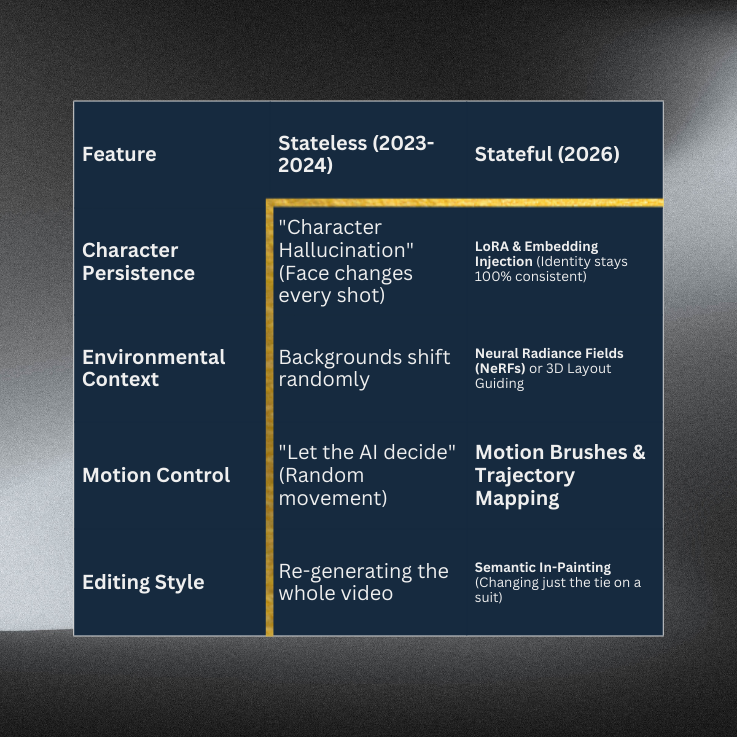
The “Solution Architect” Stack for Stateful Video
1. Identity Anchoring: The “Database” of Characters
2. Temporal Consistency: The “Load Balancer” of Motion

3. Seed Management & Latent Walking: The “Configuration Management”
Tutorial Dojo’s “Cheat Sheet” for Semantic Video Editing
The “State Block” Workflow: Divide & Conquer
Key Term: ControlNet (The Scaffolding)
Key Term: In-Painting (The Surgical Patch)
Key Term: E2E Seed Tracking (The Version Control)

References:
🤖 $3.74 ONLY for Claude eBooks and Get 25% OFF All Claude Reviewers

Turn Your Team Into Cloud-Ready Professionals Today

Learn AWS with our PlayCloud Hands-On Labs

$2.99 AWS and Azure Exam Study Guide eBooks

Learn GCP By Doing! Try Our GCP PlayCloud

Learn Azure with our Azure PlayCloud

FREE AI and AWS Digital Courses

FREE AWS, Azure, GCP Practice Test Samplers


Subscribe to our YouTube Channel

Follow Us On Linkedin


Written by: Daniel Gerodias




