
Amazon SageMaker Canvas is a visual machine learning service that allows users to build, train, evaluate, and generate predictions from machine learning models without writing code. Instead of programming machine learning algorithms, users interact with a graphical interface that guides them through the ML process.
SageMaker Canvas is part of Amazon SageMaker Studio, which enables collaboration between business users and data scientists. The main goal of SageMaker Canvas is to democratize machine learning, allowing users of different skill levels to create ML models.
SageMaker Canvas is designed for users who want to apply machine learning but may not have programming experience.
Typical users include:
-
Business analysts
-
Data analysts
-
Domain experts
-
Beginners learning machine learning
These users can build models using a visual interface instead of code.
Key Features
1. No-Code Machine Learning
SageMaker Canvas provides a visual interface where users can create machine learning models without coding.
Users can:
-
import datasets
-
select the target column to predict
-
train machine learning models
-
evaluate model accuracy
-
generate predictions

Canvas handles the complex machine learning tasks behind the scenes.
2. Automated Model Training (AutoML)
SageMaker Canvas uses Amazon SageMaker Autopilot to automatically build and optimize models.
Autopilot performs several ML tasks automatically, including:
-
data preprocessing
-
feature engineering
-
algorithm selection
-
hyperparameter tuning
-
model evaluation
This process is known as AutoML (Automated Machine Learning).
3. Access to Ready-to-Use AI Models
SageMaker Canvas also provides access to pre-built AI models that can be used immediately.
These models are available through:
-
Amazon Bedrock
-
AWS JumpStart
These models support tasks such as:
-
text generation
-
summarization
-
question answering
-
document analysis
This allows organizations to quickly integrate generative AI and foundation models into their workflows.
Built-in AI Service Integrations
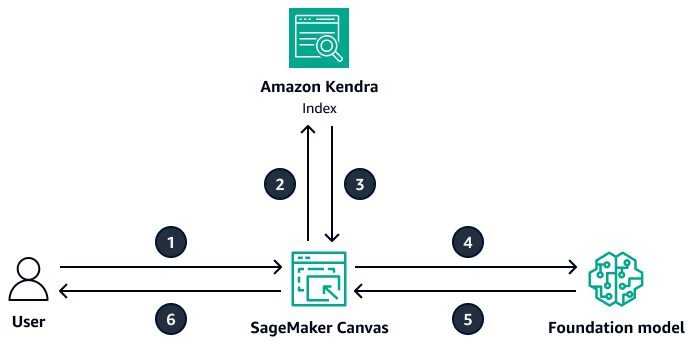
Amazon Sagemaker Canvas Architecture
SageMaker Canvas integrates with several AWS AI services that provide pre-trained machine learning models.
1. Image and Video Analysis
Canvas integrates with Amazon Rekognition, which enables image analysis tasks such as object detection, facial recognition, and image classification.
2. Text Analysis
Canvas integrates with Amazon Comprehend, which enables natural language processing capabilities such as sentiment analysis and entity detection.
3. Document Processing
Canvas integrates with Amazon Textract, which allows users to extract structured data from documents such as invoices, forms, and scanned PDFs.
Data Preparation
Before building machine learning models, datasets must be cleaned and transformed. SageMaker Canvas integrates with SageMaker Data Wrangler, which allows users to visually prepare datasets.
Using Data Wrangler, users can:
-
clean datasets
-
transform columns
-
handle missing values
-
create new features
Proper data preparation helps improve the performance of machine learning models.
Machine Learning Model Types
SageMaker Canvas supports several types of machine learning models.
| Model Type | Example Use Case |
|---|---|
| Classification | Detect spam emails |
| Regression | Predict product prices |
| Time Series Forecasting | Forecast product demand |
| Computer Vision | Classify images |
| Natural Language Processing | Analyze customer feedback |
Common Use Cases
Organizations use SageMaker Canvas to solve different business problems.
Common examples include:
-
Predicting customer churn
-
Forecasting product demand
-
Predicting equipment failures
-
Analyzing customer feedback
-
Extracting data from business documents
Because Canvas requires no coding, these solutions can be built quickly by business teams.
Key Advantages
SageMaker Canvas provides several benefits:
-
No coding required – allows beginners to build ML models
-
Automated machine learning – AutoML simplifies model development
-
Integrated AWS ecosystem – connects with multiple AI services
-
Visual interface – simplifies complex machine learning workflows
-
Collaboration support – integrates with SageMaker Studio
Amazon SageMaker Canvas Cheat Sheet References
https://docs.aws.amazon.com/sagemaker/latest/dg/canvas.html
🚀 30% OFF All Azure Reviewers

Turn Your Team Into Cloud-Ready Professionals Today

Learn AWS with our PlayCloud Hands-On Labs

$2.99 AWS and Azure Exam Study Guide eBooks

Learn GCP By Doing! Try Our GCP PlayCloud

Learn Azure with our Azure PlayCloud

FREE AI and AWS Digital Courses

FREE AWS, Azure, GCP Practice Test Samplers


Subscribe to our YouTube Channel

Follow Us On Linkedin


Written by: Franchesca Asignacion




