
The Kubernetes and Cloud Native Security Associate (KCSA) certification is designed for individuals looking to demonstrate their understanding of securing Kubernetes clusters and cloud-native environments. Candidates should have a foundational knowledge of Kubernetes, cloud-native technologies, and how to implement basic security measures, including access control, container security, and threat mitigation.
The exam covers key areas such as securing Kubernetes components, understanding the threat model for cloud-native applications, and ensuring data protection and privacy within a Kubernetes environment. It’s ideal for those who work with Kubernetes and want to deepen their security expertise to better manage and protect cloud-native applications.
For more information about the KCSA exam, you can check out this exam skills outline. This study guide will provide comprehensive review materials to help you pass the exam successfully.
KCSA Exam Domains
Below are the exam domains for the Kubernetes and Cloud Native Security Associate (KCSA) certification exam. These domains represent the core competencies candidates are expected to demonstrate in securing Kubernetes clusters and cloud-native environments. Candidates must understand how to secure Kubernetes components, manage access control, mitigate security risks, and ensure data protection within a cloud-native ecosystem.
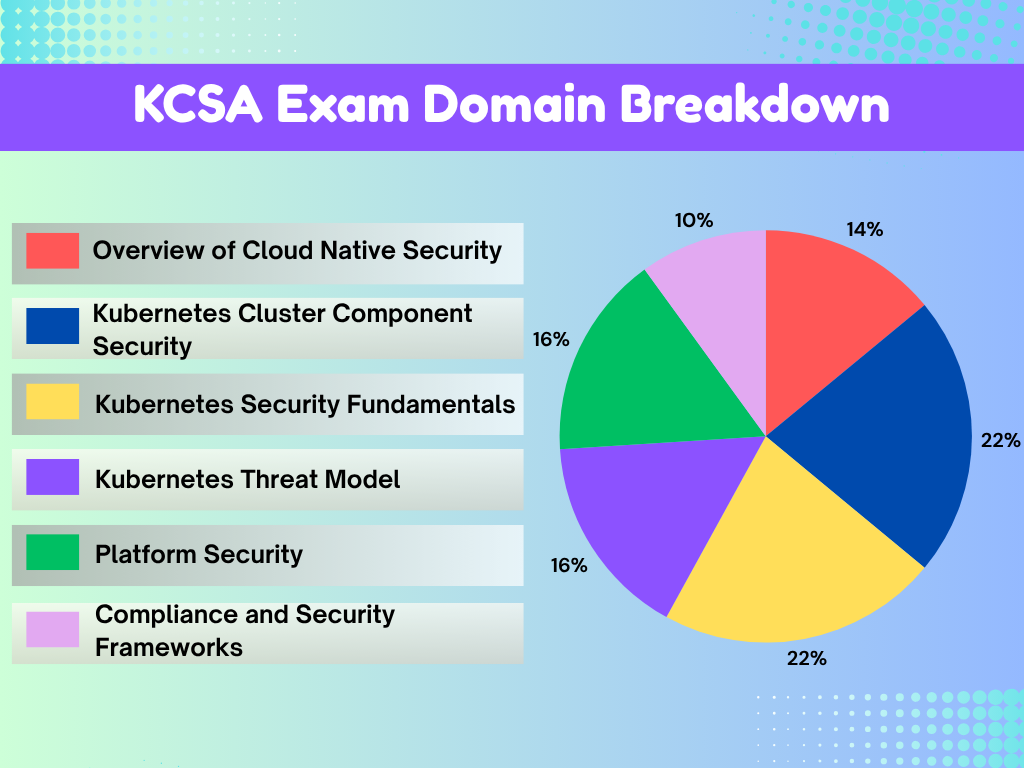
- Overview of Cloud Native Security – 14%
- Kubernetes Cluster Component Security – 22%
- Kubernetes Security Fundamentals – 22%
- Kubernetes Threat Model – 16%
- Platform Security – 16%
- Compliance and Security Frameworks – 10%
KCSA Study Materials
Before attempting the Kubernetes and Cloud Native Security Associate KCSA certification exam, it is highly recommended to review the following study materials. These resources are designed to help candidates understand the key concepts, tools, and security best practices for securing Kubernetes clusters and cloud-native environments. By studying these materials in advance, candidates can strengthen their knowledge of Kubernetes architecture, access control, risk mitigation, and data protection within cloud-native ecosystems.
- Tutorials Dojo’s Kubernetes Cheat Sheets — Quick reference guides that summarize key Kubernetes services and concepts commonly covered in certification exams.
- Kubernetes Practice Exams — Our very own set of practice exams that are designed to help evaluate your readiness for the certification and identify topics that require further study.
- Kubernetes Official Documentation and Learning Resources:
Kubernetes Services to Focus on for the KCSA Exam
Here is the list of Kubernetes services to focus on for your Kubernetes and Cloud Native Security Associate (KCSA) exam:
Kubernetes API Server
- Understand the role of the API server in managing communication within the Kubernetes cluster.
- Learn how to secure the API server using authentication and authorization methods to control access to cluster resources.
Kubelet
- Learn how the Kubelet interacts with the API server and manages containers on nodes.
- Understand security practices for the Kubelet, including client certificate enforcement and securing Kubelet communication.

Pod Security Standards
- Focus on Pod Security Standards for defining security requirements for running containers.
- Understand how these standards enforce best practices for workloads, including network policies, security contexts, and resource constraints.
Secrets Management
- Master Kubernetes Secrets to securely manage sensitive information like passwords, tokens, and keys within the cluster.
- Learn how to encrypt and manage access to these secrets to prevent unauthorized access.
Network Policies
- Understand how Network Policies control traffic flow between pods in a Kubernetes environment.
- Learn how to implement security best practices, such as restricting pod communication and isolating workloads.
KCSA Key Exam Topics by Domain
Overview of Cloud Native Security
- Understand the core concepts of the 4Cs of Cloud Native Security: Cloud, Code, Containers, and Configuration.
- Learn about cloud provider and infrastructure security to protect resources and networks.
- Understand the importance of security controls and frameworks to manage risks and secure cloud-native applications.
- Explore isolation techniques for network segmentation and container security.
- Secure artifact repositories and container images to prevent vulnerabilities.
- Learn about workload and application code security to protect applications from development to production.
Kubernetes Cluster Component Security
- Secure Kubernetes components such as the API Server, Kubelet, and Controller Manager.
- Learn security practices for KubeProxy, etcd, and Scheduler to protect the control plane.
- Ensure the security of container runtimes and networking within clusters.
- Manage client security and storage security in Kubernetes environments.
Kubernetes Security Fundamentals
- Learn about Pod Security Standards and how they enforce security requirements for workloads.
- Understand Pod Security Admission to enforce runtime security policies.
- Explore authentication and authorization methods to secure cluster access.
- Protect secrets and manage data encryption within the cluster.
- Apply isolation and segmentation practices to secure workloads and prevent unauthorized access.
- Implement audit logging and network policies to enhance security and monitor activity.
Kubernetes Threat Model
- Understand Kubernetes trust boundaries and data flow across components.
- Protect sensitive data with persistence security measures.
- Defend against Denial of Service (DoS) attacks targeting components.
- Recognize risks from malicious code execution and compromised applications.
- Secure Kubernetes from network attacks and unauthorized access.
- Prevent privilege escalation within the environment.
Platform Security
- Secure the software supply chain and ensure container image safety.
- Manage image repositories and vulnerabilities.
- Use observability tools to monitor clusters and detect threats.
- Leverage service meshes for secure microservice communication.
- Manage PKI (Public Key Infrastructure) for secure communications.
- Implement admission control to enforce policies during resource creation.
Compliance and Security Frameworks
- Apply compliance frameworks such as GDPR and HIPAA to Kubernetes environments.
- Understand threat modeling frameworks to identify and mitigate security risks.
- Ensure supply chain compliance across the development pipeline.
- Use automation and tooling to manage security and compliance at scale.
KCSA Important Skills to Focus on
Cloud Native Security Infrastructure Setup
- Understand the capabilities of Kubernetes and its core components, such as the API Server, Kubelet, Scheduler, and etcd.
- Implement role-based access control (RBAC) to manage secure access and maintain cluster integrity.
- Manage authentication and authorization to control access to Kubernetes resources.
- Secure container runtimes and ensure proper communication between pods, services, and network policies.
Cluster Component Security Management
- Secure Kubernetes components including Pod Security, Scheduler, Controller Manager, and Kube Proxy.
- Implement network policies to control traffic between pods.
- Ensure secure management of etcd to protect data integrity.
Workload and Application Security
- Understand Pod Security Standards and apply Pod Security Admission policies.
- Secure Secrets and sensitive data within the cluster.
- Implement isolation and segmentation to reduce security risks.
Kubernetes Security Optimization and Quality Evaluation
- Apply security best practices to manage risks and vulnerabilities.
- Ensure data privacy and protection for sensitive workloads.
- Use audit logging and monitoring tools for continuous compliance.
Collaboration and Workflow Security Management
- Use observability tools like Prometheus and Grafana to monitor cluster health.
- Collaborate securely by managing access and enforcing policies.
- Implement RBAC to restrict access within the environment.

Security and Compliance Frameworks
- Understand compliance frameworks such as GDPR and HIPAA.
- Apply supply chain security practices to protect the software lifecycle.
- Automate security workflows to improve scalability and compliance.
Validate Your KCSA Exam Readiness
If you feel confident after going through the suggested materials above, it’s time to put your knowledge of different Kubernetes concepts and services to the test. For top-notch practice exams, consider using the Tutorials Dojo’s Kubernetes and Cloud Native Security Associate KCSA Practice Exams.
These practice tests cover the relevant topics that you can expect from the real exam. It features multiple-choice questions with one correct answer and three incorrect responses (distractors). Each question includes a detailed explanation and reference links to help you understand why the correct answer is the best solution. After taking the exams, you’ll see areas to improve, allowing you to focus your study efforts. Together with our cheat sheets, we’re confident that you’ll be able to pass the exam and have a deeper understanding of how Kubernetes technologies work.

KCSA Sample Practice Test Questions:
Question 1
In a Kubernetes environment, how do containers within the same Pod establish communication over the network?
- Containers within a Pod are isolated and cannot communicate over the network.
- Containers within a Pod share a common network namespace, enabling communication over the network.
- Containers within the same Pod communicate using different network namespaces for isolation.
- Containers in the Pod use the host’s network namespace for network communication.
Correct Answer: 2
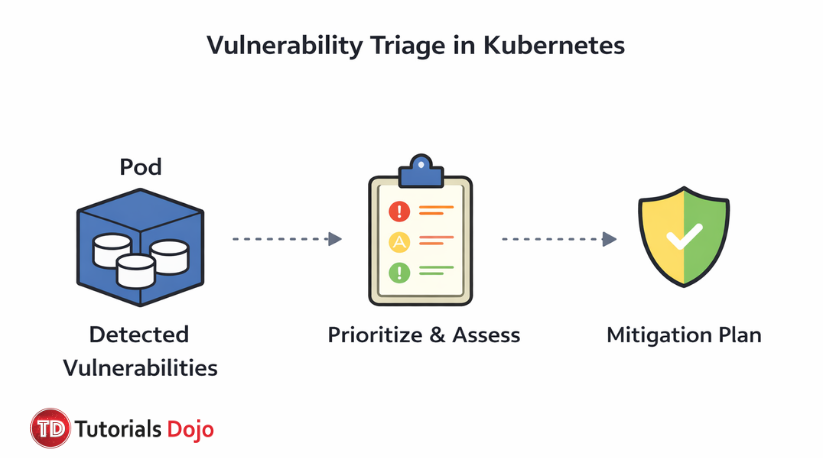
In Kubernetes, containers within the same Pod are configured to share a common network namespace, allowing them to easily communicate using localhost. This shared network namespace provides a unified IP address and port space, enabling containers to communicate without needing additional network setup. This behavior is fundamental to the Pod model, where tightly coupled containers (such as those running together in a microservice) communicate seamlessly within the same Pod.
Hence, the correct answer is: Containers within a Pod share a common network namespace, enabling communication over the network.
The option that says: Containers within a Pod are isolated and cannot communicate over the network is incorrect because containers in the same Pod are not primarily isolated in terms of network communication. They just share the same network namespace and can communicate through localhost without the need for additional configuration.
The option that says: Containers within the same Pod communicate using different network namespaces for isolation is incorrect because in a single Pod, all containers simply share the same network namespace. Using separate namespaces would isolate the containers, which is not the case for containers within the same Pod in Kubernetes.
The option that says: Containers in the Pod use the host’s network namespace for network communication. is incorrect because containers in the Pod’s default configuration share the Pod’s network namespace, not the host’s. The host network namespace is only used if the Pod is explicitly configured to run in the host network.
References:
https://kubernetes.io/docs/concepts/workloads/pods/
https://kubernetes.io/docs/concepts/overview/working-with-objects/namespaces/
Check out these Kubernetes Cheat Sheets:
Question 2
Which STRIDE attack type targets a Kubernetes cluster when a user attempts to deny performing an action, making it difficult to trace activities for accountability?
- Information Disclosure
- Tampering
- Elevation of Privilege
- Repudiation
Correct Answer: 4
In the STRIDE threat model, repudiation refers to a situation in which an attacker or even a legitimate user performs an action but later denies having done so, and the system lacks sufficient evidence to prove otherwise. This type of threat undermines non‑repudiation, a core security property that ensures actions within a system can be attributed to the correct actor. Without strong logging, audit trails, or digital signatures, activities within a Kubernetes cluster could be difficult to trace, allowing malicious actors to deny their involvement in harmful operations such as unauthorized configuration changes or resource manipulation.
In practice, a repudiation threat becomes particularly relevant in distributed environments like Kubernetes, where many components (such as kubelets, controllers, or API clients) interact across dynamic networks. If these interactions are not logged in a tamper‑resistant way, an attacker could delete or alter logs, or simply deny having initiated a particular command, making security investigations and accountability nearly impossible. STRIDE explicitly includes repudiation to highlight this type of risk when modeling security threats in systems.
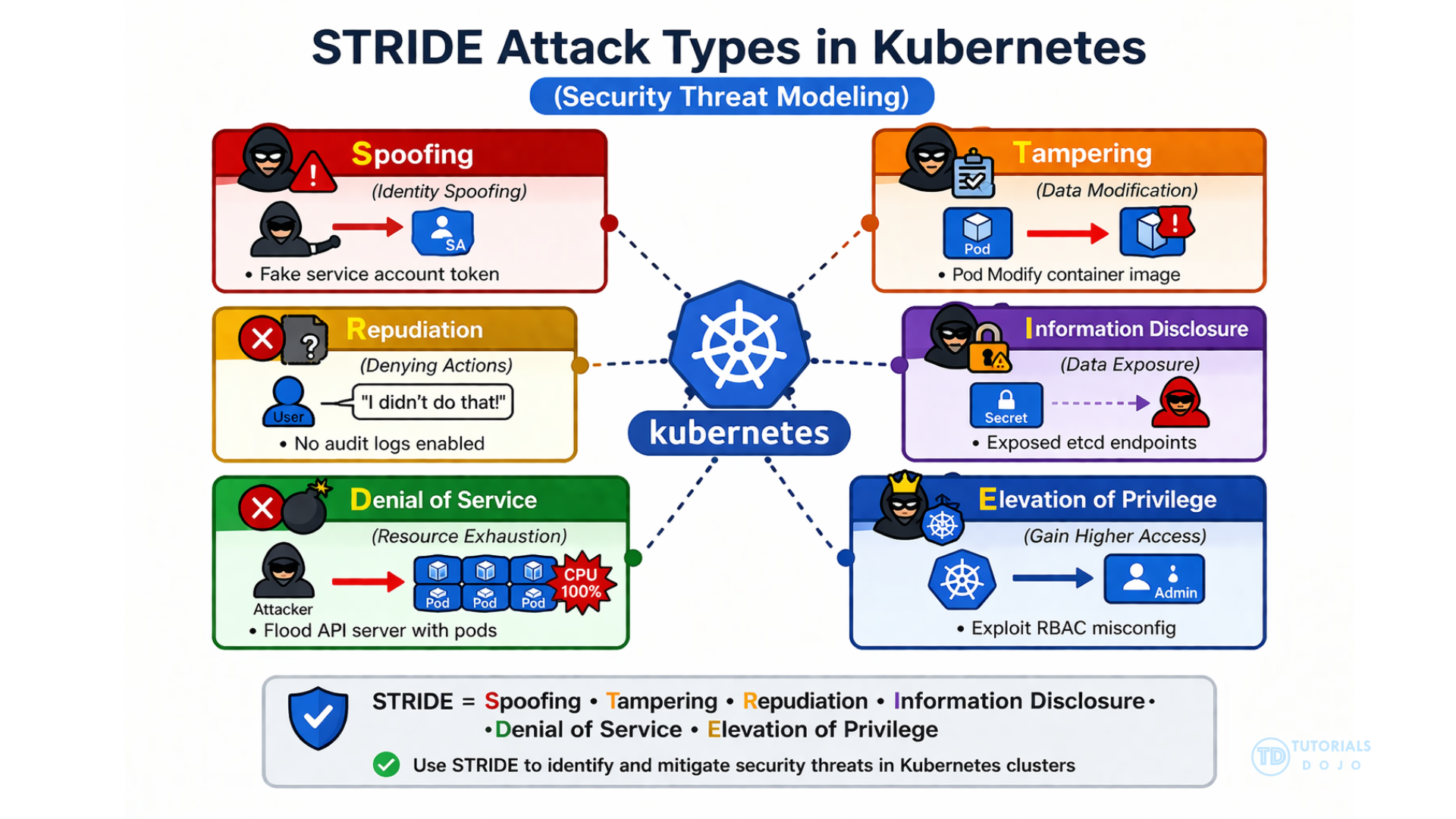
To mitigate repudiation threats in Kubernetes and other systems, security architects are encouraged to implement detailed audit logging, secure timestamping, and robust authentication mechanisms. These controls help ensure that every action is recorded with enough context (who, what, when) to prevent actors from successfully denying their behavior. Proper configuration and protection of log data make it much more difficult for attackers to exploit log data for repudiation.
Hence, the correct answer is: Repudiation.
Information Disclosure is incorrect because it primarily involves exposing sensitive data to unauthorized parties. While it poses a serious threat within a Kubernetes cluster, it does not address situations in which a user refuses to perform an action. It is only about data exposure, not accountability or traceability.
Tampering is incorrect because it involves just modifying or corrupting data or resources within a system without authorization. Although tampering can be part of malicious activity, it only refers to changing data and does not inherently involve denying actions or making accountability difficult, which is the focus of repudiation.
Elevation of Privilege is incorrect because it is typically about bypassing permission controls to perform restricted operations. While dangerous, it does not address the concept of denying performed actions or affecting audit trails, so it is not the correct answer in the context of STRIDE repudiation.
References:
https://learn.microsoft.com/en-us/azure/security/develop/threat-modeling-tool-threats
https://owasp.org/www-community/Threat_Modeling_Process
Check out these Kubernetes Cheat Sheets:
For more Kubernetes practice exam questions with detailed explanations, check out the Tutorials Dojo Portal:
Final Remarks
Success in the KCSA exam requires both conceptual knowledge and practical experience in securing Kubernetes clusters and cloud-native environments. Focus your preparation on the official CNCF materials and reinforce your understanding through hands-on practice with securing Kubernetes components like the API Server, Kubelet, and Etcd. Additionally, familiarize yourself with best practices in role-based access control (RBAC), network policies, and Secrets management to protect workloads and sensitive data. Practice exams will help assess your readiness and highlight areas for improvement. By following this focused study approach, you will be well-prepared to earn the Kubernetes and Cloud Native Security Associate certification. Good luck with your preparation!
⚡10% OFF Practice Exam and eBook Bundles

Turn Your Team Into Cloud-Ready Professionals Today

Learn AWS with our PlayCloud Hands-On Labs

$2.99 AWS and Azure Exam Study Guide eBooks

Learn GCP By Doing! Try Our GCP PlayCloud

Learn Azure with our Azure PlayCloud

FREE AI and AWS Digital Courses

FREE AWS, Azure, GCP Practice Test Samplers


Subscribe to our YouTube Channel

Follow Us On Linkedin


Written by: Lois Angelo Dar Juan




