
Claude API Cheat Sheet
Claude API is Anthropic’s developer platform for building AI-powered applications, agents, automation workflows, and conversational systems using Claude models. It operates through the Messages API, where applications send structured conversations, tool definitions, images, and system prompts to Claude, then receive structured responses back. The same API powers chat assistants, coding agents, internal copilots, research tools, customer support bots, and multimodal AI applications across web apps, mobile apps, backend services, and automation pipelines.
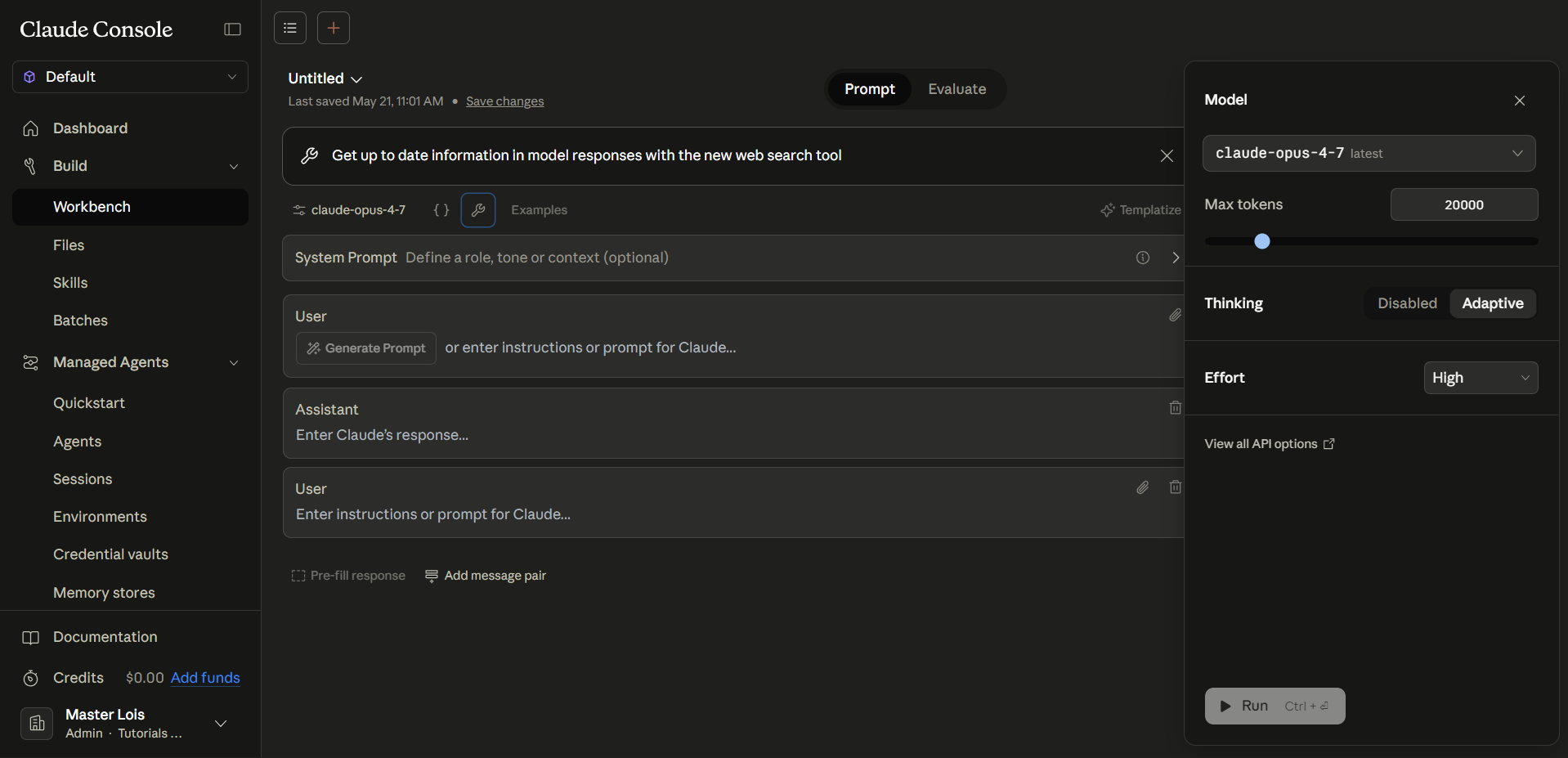
Claude API Key Features
- Build conversational applications – Create AI chatbots, copilots, tutors, support agents, internal assistants, and multi-turn conversational systems using the Messages API.
- Use structured conversations – Send alternating user and assistant turns with system prompts, long context windows, images, and tool definitions.
- Call external tools – Define functions using structured JSON schemas; Claude can request tool execution and continue the conversation after receiving results.
- Create agentic workflows – Build autonomous loops where Claude gathers context, calls tools, analyzes outputs, and decides the next action until the task is complete.
- Stream responses in real time – Receive tokens incrementally instead of waiting for the full response, useful for chat interfaces and low-latency user experiences.
- Process images and documents – Send screenshots, diagrams, PDFs, and other visual content alongside text for multimodal reasoning and analysis.
- Use prompt caching – Reuse large prompts, tool definitions, and repeated context to reduce latency and lower token costs on repeated requests.
- Run large asynchronous workloads – Use the Message Batches API for bulk summarization, classification, extraction, and offline AI processing.
- Generate structured outputs – Produce JSON-compatible outputs, tool arguments, classifications, summaries, and schema-aligned responses.
- Build coding and automation agents – Combine Claude with tools, APIs, databases, MCP servers, browsers, or internal systems for autonomous workflows.
Claude API Core Components
The architectural pieces that make Claude API work:
- Model – The Claude LLM performing reasoning and generation, typically Sonnet, Opus, or Haiku depending on the workload.
- Messages API – The primary API endpoint used for sending conversations and receiving Claude responses.
- System prompt – High-level instructions defining Claude’s behavior, role, formatting rules, and constraints.
- Messages array – The conversation history containing alternating user and assistant turns.
- Content blocks – Structured message components such as text, images, tool calls, and tool results.
- Tool use system – Lets Claude request external function execution through structured tool calls.
- Tool definitions – JSON-schema-based descriptions of functions Claude is allowed to use.
- Tool results – Structured outputs returned after the application executes a requested tool.
- Streaming API – Event-based incremental response delivery for real-time applications.
- Prompt caching – Cached reusable prompt prefixes that reduce repeated token costs and latency.
- Batch API – Asynchronous processing system for large-scale offline workloads.
- Context window – Holds the conversation history, system prompt, images, tool calls, and uploaded context.
- Stop reasons – Structured response signals such as
end_turn,tool_use, andmax_tokens. - SDKs – Official Anthropic libraries that simplify authentication, retries, streaming, and request handling.
How Claude API works
The request-response loop
- Claude API works through a repeating request-response cycle between the application and Claude.
- Instead of Claude directly executing actions on its own, the application continuously exchanges structured requests and responses with the model until the task is complete.
- The application is responsible for sending context, executing tools or API calls, storing conversation history, and returning results back to Claude when needed.
The workflow typically follows these steps:
1. Send context – The application sends the request to Claude through the Messages API. This may include:
- system prompts
- conversation history
- tool definitions
- images or documents
- the latest user request
2. Claude analyzes the request – Claude reasons over the provided context, determines what information is available, and decides what to do next.
3. Claude generates a response or requests a tool – Claude may:
- generate a direct response
- ask for clarification
- return a structured
tool_userequest if external information or actions are needed

4. The application processes the result – The application receives Claude’s response and decides the next action. This may involve:
- displaying the response to the user
- executing a requested tool or API call
- storing data
- sending additional context back to Claude
5. Return tool results to Claude – If Claude requested a tool, the application executes the real function or API call and sends the result back using a structured tool_result.
6. Claude continues reasoning – Claude uses the newly returned information to continue the workflow and generate the next response.
7. Repeat until completion – The cycle continues until Claude returns a final response with a stop reason such as end_turn.
A quick example – A user asks, “What’s the weather in Manila?” The application sends the request along with a get_weather tool definition. Claude determines that external weather data is needed and returns a tool_use request for get_weather. The application calls the real weather API, sends the returned forecast back as a tool_result, and Claude then generates the final answer for the user.
Not every workflow requires tools – A simple summarization request may be completed in a single request-response cycle. More advanced agents and automation workflows may repeat this loop many times before the task is finished.
Building with Claude API
Five common ways developers build applications with Claude API:
a. Tool Use
Claude can call external tools and APIs using structured tool definitions. Applications execute the actual function or API call, then return the result back to Claude.
Common use cases include:
- database queries
- weather APIs
- Slack and Jira integrations
- internal enterprise tools
b. Structured Outputs
Claude can generate structured responses such as:
- JSON
- classifications
- extracted fields
- formatted summaries
This is useful for automation workflows, backend systems, and document processing pipelines.
c. Retrieval-Augmented Generation (RAG)
Applications can retrieve relevant documents or knowledge first, then provide the results to Claude for grounded responses.
Common sources include:
- PDFs
- company documents
- vector databases
- internal knowledge bases

d. Agentic Workflows
Claude can power multi-step workflows where the model:
- gathers context
- calls tools
- analyzes results
- decides the next action
This is commonly used for coding assistants, research agents, and automation systems.
e. Production Integration
Claude API can be integrated into:
- backend services
- web applications
- mobile apps
- serverless workflows
- CI/CD pipelines
Production systems often combine Claude with databases, authentication systems, monitoring tools, and caching layers.
Pricing
Claude API uses token-based pricing, where developers are billed separately for input tokens and output tokens. Pricing varies depending on the Claude model used and the type of workload being processed. Anthropic also offers additional cost optimizations through prompt caching and batch processing.
Note: Pricing changes regularly. Numbers below reflect what’s published on the official Anthropic pages as of mid-May 2026. Always verify at https://claude.com/pricing before purchasing.
Pay-as-you-go API (via Anthropic Console)
Separate from subscriptions. No monthly minimum. Published per-million-token rates as of mid-May 2026:
| Model | Input ($/MTok) | Output ($/MTok) | Best for |
|---|---|---|---|
| Haiku 4.5 | $1.00 | $5.00 | Fast and lightweight workloads |
| Sonnet 4.6 | $3.00 | $15.00 | General production applications |
| Opus 4.6 / 4.7 | $5.00 | $25.00 | Advanced reasoning and complex workflows |
Additional pricing features
- Prompt caching – Reusing cached prompts, tool definitions, and repeated context can reduce input costs by up to ~90% for supported workloads.
- Batch processing – The Message Batches API supports asynchronous workloads and may reduce processing costs by around 50% compared to standard API requests.
- Separate from Claude subscriptions – Claude API pricing is independent from Claude Pro, Max, Team, and Enterprise subscription plans.
Cost-control tips
- Use prompt caching for reusable prompts and tool definitions.
- Avoid sending unnecessary conversation history.
- Use smaller models for lightweight workloads.
- Stream long responses instead of generating excessive outputs.
- Split large workflows into smaller subtasks to reduce context size.
References
https://platform.claude.com/docs/en/home
https://platform.claude.com/docs/en/api/messages
https://platform.claude.com/docs/en/build-with-claude/working-with-messages
https://platform.claude.com/docs/en/agents-and-tools/tool-use/how-tool-use-works
https://platform.claude.com/docs/en/build-with-claude/structured-outputs
https://platform.claude.com/docs/en/about-claude/pricing
⚡10% OFF Practice Exam and eBook Bundles

Turn Your Team Into Cloud-Ready Professionals Today

Learn AWS with our PlayCloud Hands-On Labs

$2.99 AWS and Azure Exam Study Guide eBooks

Learn GCP By Doing! Try Our GCP PlayCloud

Learn Azure with our Azure PlayCloud

FREE AI and AWS Digital Courses

FREE AWS, Azure, GCP Practice Test Samplers


Subscribe to our YouTube Channel

Follow Us On Linkedin


Written by: Lois Angelo Dar Juan




