
Last updated on July 13, 2026
Continuous Integration and Continuous Delivery/Deployment (CI/CD) is the backbone of modern software teams. It’s not just a buzzword for your resume — it’s the automated pipeline that takes code from “it works on my machine” to “it works in production, reliably, every time.” Understanding CI/CD deeply, not just using it, is one of the clearest markers separating a junior developer from a senior one.
The Basics: CI vs CD
Continuous Integration (CI) is the practice of frequently merging code changes into a shared repository, where each merge automatically triggers a build and a suite of tests. The goal is to catch bugs early, before they pile up and become expensive to fix.
Continuous Delivery extends CI by automatically preparing every change for a release — the code is always in a deployable state, but a human still presses the button to ship it.
Continuous Deployment goes one step further: every change that passes the pipeline is automatically released to production, with no human gate at all.
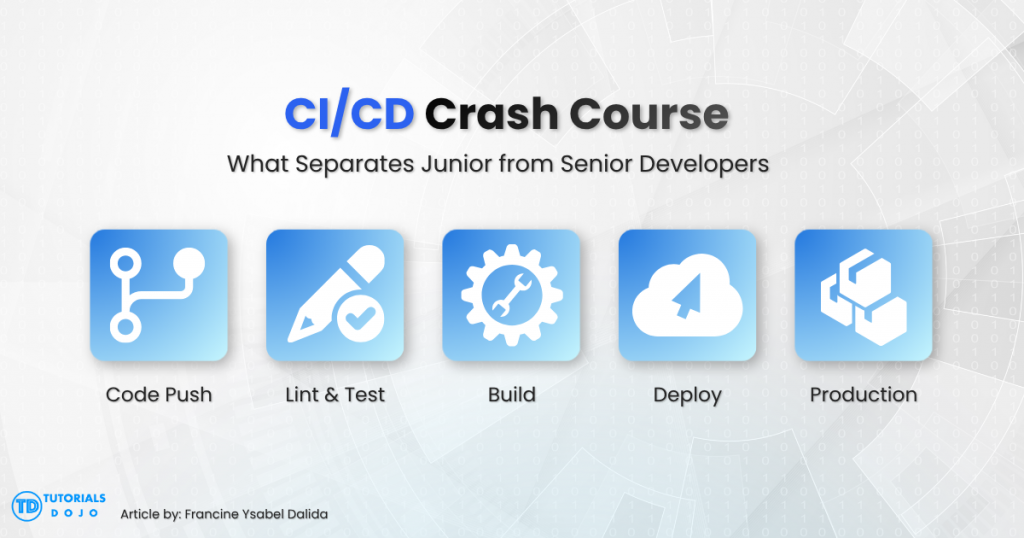
A typical pipeline looks like this: code is pushed, the pipeline pulls it, installs dependencies, runs linting, runs unit tests, runs integration tests, builds an artifact (like a Docker image), and finally deploys it to a staging or production environment.
What a Junior Developer Understands
A junior developer typically understands CI/CD at the surface level. They know that:
- Pushing code triggers a pipeline.
- Green checkmarks mean tests passed; red means something broke.
- You shouldn’t merge a pull request if the pipeline is failing.
- There’s a .yml or config file somewhere (GitHub Actions, GitLab CI, Jenkinsfile) that defines the steps.
This is enough to function day-to-day, but it treats the pipeline as a black box — something to satisfy rather than something to actively design, debug, and optimize.
What Separates a Senior Developer
A senior developer treats the pipeline as a system they own, not a tool they merely use. The differences show up in a few key areas.
1. They Design Pipelines, Not Just Use Them

Seniors think about pipeline architecture: which steps should run in parallel, which should be cached, which environments need their own pipeline stage, and where to place quality gates. They know that a slow pipeline kills team velocity, so they actively work to keep build and test times short through caching dependencies, splitting test suites, and avoiding unnecessary rebuilds.
2. They Understand Failure Modes Deeply
Juniors see a failing pipeline and re-run it, hoping it passes. Seniors investigate why it failed: was it a flaky test, an environment difference, a race condition, or a genuine bug? They distinguish between deterministic failures (the code is actually broken) and non-deterministic ones (the test or infrastructure is unreliable), and they fix the root cause instead of just retrying.
3. They Think About Rollback and Recovery
Senior developers don’t just ask “how do we deploy this?” — they ask “how do we undo this if it goes wrong?” This means designing for rollbacks, feature flags, blue-green or canary deployments, and database migrations that are backward-compatible. A junior ships forward; a senior plans for failure before it happens.
4. They Own Testing Strategy, Not Just Test Existence
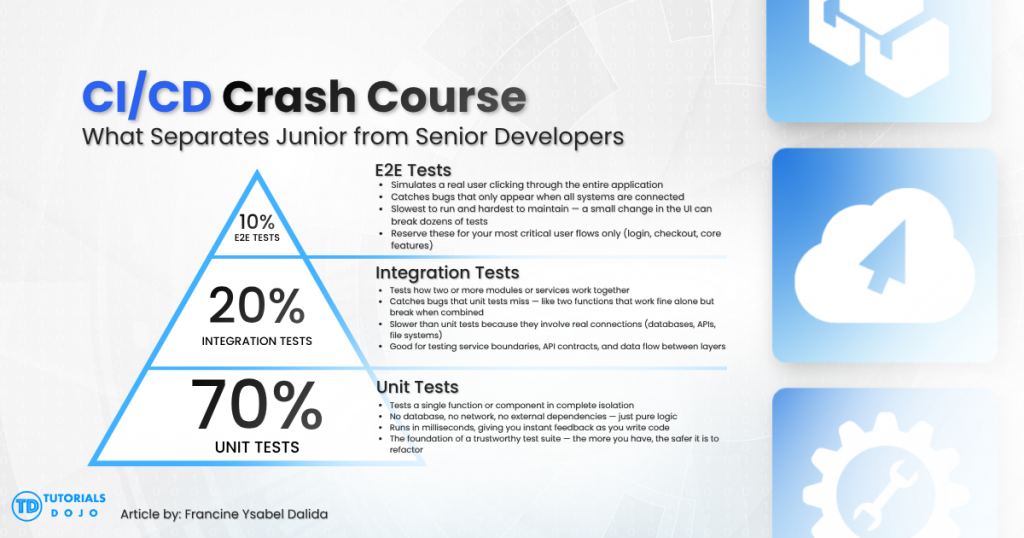
A junior writes tests because the pipeline requires a passing test stage. A senior thinks about what kind of tests belong at each stage of the pipeline: fast unit tests early, slower integration tests later, and end-to-end tests sparingly because they’re expensive and brittle. Seniors understand the testing pyramid and design pipelines that reflect it, rather than running every test on every push regardless of cost.
5. They Treat Pipeline Code as Production Code
Pipeline configuration (YAML files, scripts, infrastructure-as-code) is real code and deserves the same care: version control, code review, and incremental changes. Juniors often treat pipeline files as throwaway configuration they copy-paste from Stack Overflow. Seniors refactor, document, and test their pipelines just like application code.
6. They Understand the Business Impact
Perhaps the biggest gap: seniors connect CI/CD decisions to business outcomes. A pipeline that takes 40 minutes instead of 5 slows down every developer on the team, every day. A deployment process with no rollback plan turns a small bug into a multi-hour incident. Seniors weigh these tradeoffs explicitly; juniors often don’t realize these tradeoffs exist.
A Simple Mental Model
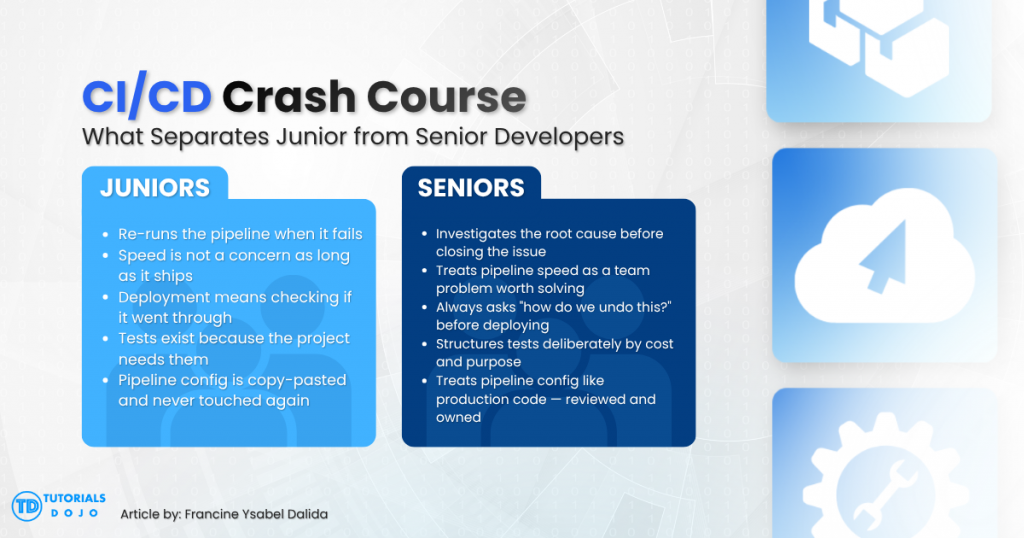
|
Aspect |
Junior Mindset |
Senior Mindset |
|
Pipeline failure |
“Let me re-run it” |
“Let me find the root cause” |
|
Pipeline speed |
Not a priority |
Actively optimized |
|
Deployment |
“Did it deploy?” |
“Can we roll it back fast?” |
|
Tests |
“Tests exist” |
“Tests are structured by cost and purpose” |
|
Pipeline config |
Copy-paste, rarely touched |
Reviewed, refactored, owned |
Hands-On: A Real CI/CD Pipeline (GitHub Actions)
Reading about pipelines only gets you so far — here’s an actual working example you can adapt. This is a GitHub Actions workflow for a Node.js app that lints, tests, builds, and deploys.
# .github/workflows/ci-cd.yml
name: CI/CD Pipeline

# Trigger this pipeline on every push to main and on all pull requests targeting main
on:
  push:
    branches: [main]
  pull_request:
    branches: [main]

jobs:
  # STAGE 1: Quality gate — nothing moves forward if this fails
  lint-and-test:
    runs-on: ubuntu-latest
    steps:
      - name: Checkout code
        uses: actions/checkout@v4

      - name: Set up Node.js
        uses: actions/setup-node@v4
        with:
          node-version: '20'
          cache: 'npm'        # Cache node_modules between runs to speed up the pipeline

      - name: Install dependencies
        run: npm ci             # ci = clean install from lockfile; faster and more reliable than npm install

      - name: Run linter
        run: npm run lint       # Catch style and syntax issues before tests even run

      - name: Run unit tests
        run: npm test -- --coverage   # --coverage generates a report we can upload below

      - name: Upload coverage report
        uses: actions/upload-artifact@v4
        with:
          name: coverage-report
          path: coverage/       # Store the report so it can be reviewed or tracked over time

  # STAGE 2: Build — only runs if lint-and-test passed
  build:
    needs: lint-and-test        # Explicit dependency: this job waits for stage 1 to succeed
    runs-on: ubuntu-latest
    steps:
      - name: Checkout code
        uses: actions/checkout@v4

      - name: Build Docker image
        # Tag the image with the git commit SHA for exact traceability — no "latest" ambiguity
        run: docker build -t myapp:${{ github.sha }} .

      - name: Save image as artifact
        # Export the image to a file so the deploy job can pick it up without rebuilding
        run: docker save myapp:${{ github.sha }} -o myapp.tar

      - name: Upload image artifact
        uses: actions/upload-artifact@v4
        with:
          name: docker-image
          path: myapp.tar

  # STAGE 3: Deploy — only runs on main branch, never on pull requests
  deploy:
    needs: build
    if: github.ref == 'refs/heads/main'   # Guard: PRs are tested but never deployed
    runs-on: ubuntu-latest
    steps:
      - name: Download image artifact
        uses: actions/download-artifact@v4
        with:
          name: docker-image

      - name: Load and push image
        run: |
          docker load -i myapp.tar
          # Authenticate using secrets — never hardcode credentials in pipeline files
          echo "${{ secrets.REGISTRY_PASSWORD }}" | docker login -u "${{ secrets.REGISTRY_USER }}" --password-stdin myregistry.com
          docker tag myapp:${{ github.sha }} myregistry.com/myapp:${{ github.sha }}
          docker push myregistry.com/myapp:${{ github.sha }}

      - name: Deploy to production
        # Trigger the deployment by calling an external webhook with the exact image SHA
        run: |
          curl -X POST "$DEPLOY_HOOK_URL" \
            -H "Authorization: Bearer ${{ secrets.DEPLOY_TOKEN }}" \
            -d '{"image": "myapp:${{ github.sha }}"}'
A few things worth noticing as a developer trying to level up:
- lint-and-test runs before build, and build runs before deploy — this is the quality gate pattern. Nothing gets deployed unless everything before it passed.
- npm ci instead of npm install — ci installs exact versions from the lockfile and is faster/more reliable in pipelines, a detail juniors often miss.
- The deploy job only runs if: github.ref == ‘refs/heads/main’ — pull requests get tested but never deployed, only merges to main do.
- Secrets (REGISTRY_PASSWORD, DEPLOY_TOKEN) are never hardcoded — they’re injected from the repo’s encrypted secrets store.
A Simple Rollback Script
Seniors plan for failure. Here’s a minimal example of a rollback step you could add to the pipeline above, or run manually:
#!/bin/bash #rollback.sh —redeploythe previous known-good image set -e # Exit immediately if any command fails — don't silently continue on errors # Get the commit SHA one step before the current HEAD # This assumes the last deploy corresponds to the previous commit PREVIOUS_SHA=$(git rev-parse HEAD~1) echo "Rolling back to commit $PREVIOUS_SHA" # Call the same deploy webhook used in the pipeline, just with the older image SHA curl -X POST "$DEPLOY_HOOK_URL" \ -H "Authorization: Bearer $DEPLOY_TOKEN" \ -d "{\"image\": \"myapp:${PREVIOUS_SHA}\"}" # Reminder: triggering the rollback is step one — always confirm the app is healthy afterward echo "Rollback triggered. Verify health checks before closing the incident."
The point isn’t the exact script — it’s the habit: know how to undo a deploy before you need to, not while production is on fire.
Step-by-Step: Building Your First Pipeline
If you’ve never set one up, here’s a practical path:
- Start local. Make sure npm test, npm run lint, and npm run build (or your language’s equivalents) work reliably on your own machine first. A pipeline just automates commands that should already work.
- Add a CI-only job. Create .github/workflows/ci.yml (or .gitlab-ci.yml, or a Jenkinsfile) that only runs lint + test on every push and pull request. Don’t touch deployment yet.
- Make it required. In your repo settings, require the CI check to pass before a pull request can be merged. This is what actually enforces the discipline.
- Add caching. Cache dependency installs (node_modules, ~/.m2, pip cache, etc.) so the pipeline doesn’t reinstall everything from scratch every run.
- Split slow tests out. If you have end-to-end or integration tests, run them in a separate, later job so fast feedback (lint/unit tests) isn’t blocked by slow feedback.
- Add a build stage. Once tests are trustworthy, add a job that builds a deployable artifact (Docker image, compiled binary, static bundle).
- Add deployment, gated by branch. Only deploy from main (or a release branch), and only after build succeeds.
- Add a rollback plan. Before you fully trust the pipeline, write down (or script) how you’d undo a bad deploy.
- Monitor and iterate. Track pipeline duration and flaky test rate over time. A pipeline you never revisit will quietly get slower and less trustworthy.
This progression — local, then CI-only, then gated merges, then build, then deploy, then rollback — mirrors how most real teams mature their pipelines, and walking it yourself is one of the fastest ways to close the junior-to-senior gap described above.
Getting Started

If you’re a junior developer wanting to grow into this mindset, the fastest path is to stop treating the pipeline as someone else’s responsibility. Read your team’s pipeline configuration end to end. Ask why each step exists. Try breaking something locally and tracing how the pipeline would have caught it. Volunteer to fix a flaky test instead of just re-running it. Over time, the pipeline stops being a black box and becomes a tool you actively shape — and that shift in ownership is, in many ways, the real definition of seniority.
References
Foundational Theory
- Martin Fowler. Continuous Integration.
Hands-On Practice
- GitHub. GitHub Actions Quickstart.
Testing Strategy
- Martin Fowler. TestPyramid.
Advanced Deployment
- Google SRE Book. Release Engineering.
Video Reference
🔔 20% OFF All Reviewers + 10% OFF PlayCloud’s First Billing Use Code: TDPLAYCLOUD-101326

Turn Your Team Into Cloud-Ready Professionals Today

Learn AWS with our PlayCloud Hands-On Labs

$2.99 AWS and Azure Exam Study Guide eBooks

Learn GCP By Doing! Try Our GCP PlayCloud
Learn Azure with our Azure PlayCloud
FREE AI and AWS Digital Courses

FREE AWS, Azure, GCP Practice Test Samplers


Subscribe to our YouTube Channel

Follow Us On Linkedin


Written by: Francine Ysabel B. Dalida