
Last updated on February 20, 2026
Azure Service Bus Cheat Sheet
- A fully managed message broker service.
- It allows you to decouple applications and services.
- Provides a reliable and secure platform for asynchronous data and state transfer.
- Enables you to deliver messages to multiple subscribers and fan-out message delivery to downstream systems.
Features
- Message Sessions for implementing first in, first out (FIFO) and request-response patterns to ensure the order of messages in the queue.
- Autoforwarding allows you to remove messages from a queue or subscription and transfer it to a different queue or topic (must be in the same namespace).
- A dead-letter queue holds the messages that can’t be delivered to any receiver.
- It supports a scheduled delivery of messages.
- You can set aside a message using message deferral.
- With client-side batching, you can delay the sending of messages for a certain period of time.
- Autodelete on idle enables you to set an idle interval to automatically delete a queue. Five minutes is the minimum duration.
- Duplicate detection allows you to resend the same message and discard any duplicate copies.
- Batch deletion: Delete multiple messages at once from queues or subscriptions when they expire or are no longer needed.
- Partitioned namespaces (Premium tier): Namespaces can span three availability zones for higher resilience and performance.
- JMS 2.0 support (Premium tier): Fully compliant with Java Message Service 2.0 API for enterprise messaging.
- AMQP 1.0 protocol: Primary wire protocol, enabling interoperability with other AMQP-compliant brokers like ActiveMQ or RabbitMQ.Transaction support: Group multiple operations (send, receive, defer) into an atomic transaction for once-only processing.
- You can continue the operation of your environment in a different region or datacenter with geo-disaster recovery.

Components
- A container for all messaging components is called a namespace.
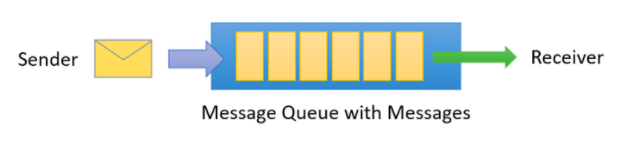
- You send and receive messages from queues (point-to-point communication).
- Multiple queues and topics are supported in a single namespace, and namespaces often serve as application containers.
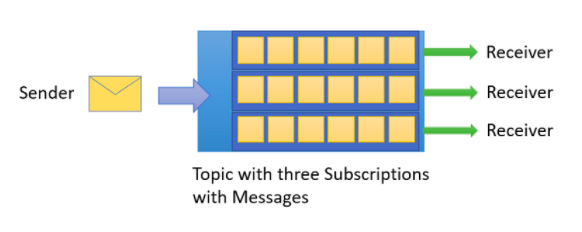
- Topics also allow you to send and receive messages and mainly used in publish/subscribe scenarios. It contains multiple independent subscriptions called entities.
- To filter specific messages, you can use rules and filters to define conditions that trigger optional actions.
Security
- Shared Access Signatures (SAS) guards access to Service Bus based on authorization rules.
- You can authenticate and authorize an application to access Service Bus entities such as queues, topics, subscriptions, and filters using Azure AD.
- Create a security identity using Managed identities for Azure resources and associate that identity with access-control roles to grant custom permissions for accessing specific Azure resources.
- Supports AMQP 1.0 and HTTP/REST protocols for secure communication.
Planned Maintenance & Reliability
-
During planned maintenance, namespaces are moved to redundant nodes with the latest updates. The move typically completes within 30 seconds.
-
Client SDKs automatically disconnect and reconnect. Implement robust retry logic in production applications to ensure transparency.
-
Service health alerts: Configure alerts in the Azure portal to receive notifications for planned maintenance or service issues.
-
Resource health: Check the Resource Health window in the Azure portal for current status and downtime reasons in the Health History section.
Geo-Replication (Premium Tier)
-
Geo-Replication enables data processing to continue operating in a different Azure region during regional downtime.
-
Provides enterprise-grade disaster recovery and business continuity.
-
Now generally available for Premium tier namespaces.
Pricing
- You are charged based on the following:
- The number of operations
- The number of AMQP connections or HTTP calls
- For hybrid connections, you are charged based on the number of listeners.
- With Windows Communication Foundation (WCF) relays, you are charged based on the message volume and relay hours.
Azure Service Bus Cheat Sheet Resources:
https://azure.microsoft.com/en-us/services/service-bus/
https://docs.microsoft.com/en-us/azure/service-bus-messaging/service-bus-messaging-overview
🌸 25% OFF All Reviewers on our International Women’s Month Sale! Save 10% OFF All Subscriptions Plans & 5% OFF Store Credits/Gift Cards!

Learn AWS with our PlayCloud Hands-On Labs

$2.99 AWS and Azure Exam Study Guide eBooks

New AWS Generative AI Developer Professional Course AIP-C01

Learn GCP By Doing! Try Our GCP PlayCloud

Learn Azure with our Azure PlayCloud

FREE AI and AWS Digital Courses

FREE AWS, Azure, GCP Practice Test Samplers


Subscribe to our YouTube Channel

Follow Us On Linkedin


Written by: Jon Bonso




