Understanding Security Groups and Network Access Control Lists (NACLs) in AWS
Home » Others » Understanding Security Groups and Network Access Control Lists (NACLs) in AWS
Understanding Security Groups and Network Access Control Lists (NACLs) in AWS
Last updated on August 26, 2024
Security within cloud environments is a critical consideration, and AWS offers robust tools to ensure that your cloud infrastructure remains secure. Two critical components in AWS for managing security are Security Groups and Network Access Control Lists (NACLs). These tools act as virtual firewalls, controlling the traffic that enters and exits your Virtual Private Cloud (VPC). While they serve similar purposes, they operate differently and are used in distinct scenarios to provide layered security.
Security Groups: Instance-Level Security
Security Groups in AWS are designed to control inbound and outbound traffic at the instance level. They are stateful, meaning that if a rule allows an inbound request, the response to that request is automatically allowed, regardless of the outbound rules. This stateful nature simplifies managing traffic rules for instances, ensuring seamless communication for approved connections.
Key Features of Security Groups
Stateful Nature: This means that if you allow inbound traffic on a specific port, the corresponding outbound traffic is automatically permitted, eliminating the need for separate outbound rules. Security Groups are also highly scalable, allowing you to apply the same set of rules to multiple instances within a Virtual Private Cloud (VPC)
Instance-Level Control: Security Groups are primarily associated with Elastic Cloud Compute (EC2) instances but can also be applied to other AWS resources such as Elastic Load Balancers, RDS database instances, and more.
Immediate Rule Application: Changes to Security Group rules are applied immediately to all associated instances.
Default Deny: By default, Security Groups deny all inbound traffic and allow all outbound traffic unless specified otherwise.
Network Access Control Lists (NACLs): Subnet-Level Security
NACLs provide an additional layer of security at the subnet level within a VPC. Unlike Security Groups, NACLs are stateless, meaning each packet is evaluated independently. For return traffic to be allowed, corresponding rules must be explicitly set for both inbound and outbound traffic. This stateless nature allows for more granular control but requires careful management of rules.
Key Features of NACLs
Stateless Nature: Each packet is individually evaluated, requiring explicit rules for both inbound and outbound traffic.
Subnet-Level Control: NACLs operate at the subnet level, affecting all instances within the subnet.
Ordered Rules: Rules are processed in numerical order, allowing for a layered strategy in traffic control.
Blocking Specific IPs: Effective for blocking specific IP addresses or ranges before they reach the instances.
Demonstrating the Nature of Security Groups and NACLs
Understanding the nature of Security Groups and Network Access Control Lists (NACLs) is crucial for effectively managing AWS security. Let’s delve into a practical scenario using the default VPC to illustrate these concepts.
We will use the default VPC and an EC2 instance within this VPC. Then, we will configure the Security Groups and NACLs to control traffic and host a simple web server.
Step-by-Step Guide
Launch an EC2 instance with the following configuration:
Name: MyWebServer
Instance Type: t2.micro
AMI: Amazon Linux 2023 AMI
Key pair: Create a new key pair (if you have not created one yet).
Network: Use the Default VPC
Subnet: Default subnet
Public IP: Enabled
Firewall (security groups): Check all checkboxes
Allow SSH traffic from: My IP
Allow HTTPS traffic from the internet
Allow HTTP traffic from the internet
User Data:
#!/bin/bash
# Update the package list
yum update -y

# Install Apache HTTP Server
yum install -y httpd

# Start the Apache service
systemctl start httpd

# Enable Apache to start on boot
systemctl enable httpd

# Create a simple web page
echo "<h1>Welcome to the MyWebServer</h1>" > /var/www/html/index.html
Testing and Observations
Test SSH Access and HTTP Connection
SSH Access Verification: Utilize an SSH client to initiate a connection to the “MyWebServer” instance. This step tests the configuration of the Security Group and NACL, which govern access to the server.
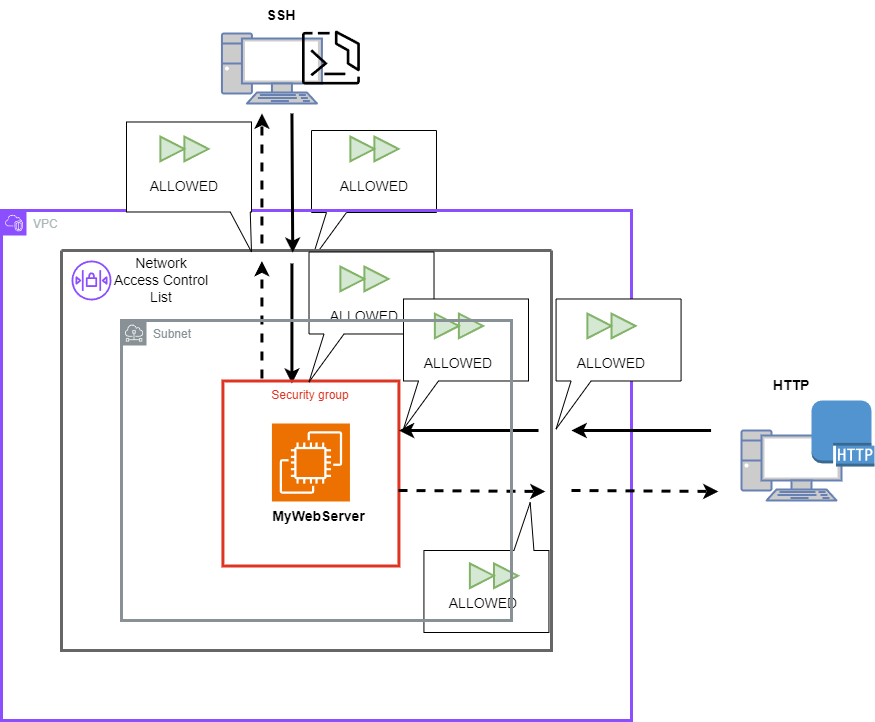
A successful connection to “MyWebServer” via SSH indicates that the Security Group settings are properly configured to allow inbound SSH traffic (port 22). The diagram shows that both the NACL and Security Group settings permit this traffic (denoted by green arrows), ensuring that SSH requests can reach and return from the server without being blocked.
HTTP Connection Check: Open a web browser and navigate to the public IP address of “MyWebServer” to verify the HTTP connection. This step assesses the ability of HTTP traffic to reach the web server.
Successful HTTP access confirms that the Security Group settings are correctly configured to allow inbound HTTP traffic on port 80. As visualized in the diagram, both the NACL and the Security Group have rules in place to allow HTTP traffic (shown by green arrows), demonstrating that HTTP requests are permitted to and from the server.
Modify Inbound/Outbound Rules of NACLs
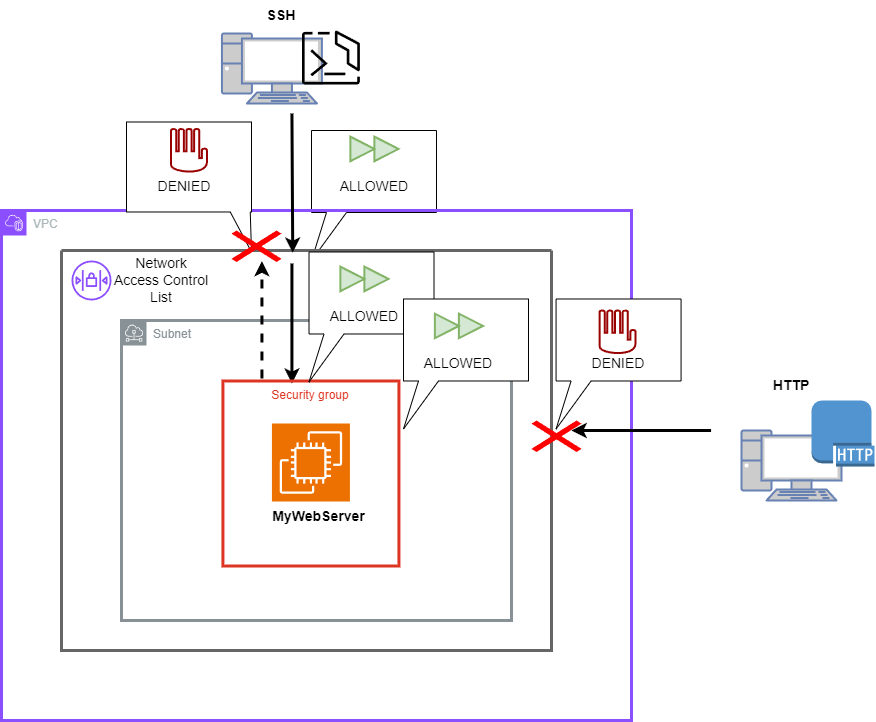
Deny All Outbound SSH Traffic in the NACL configuration: Deny all outbound traffic of SSH by modifying the NACL outbound rule. Then, attempt to reconnect via SSH. The connection should fail due to the stateless nature of NACLs blocking return traffic. This demonstrates the stateless nature of NACLs, where each packet is treated independently and must match both inbound and outbound rules to successfully traverse the network. As shown in the diagram below, attempts to reconnect via SSH after this rule modification will fail, highlighting the necessity of explicit return traffic rules in stateless systems.
Deny All Inbound HTTP Traffic in the NACL configuration: Following the modification for SSH, all inbound HTTP traffic is also denied by updating the NACL settings. This change ensures that any HTTP request initiated towards the web server inside the subnet will be blocked, as depicted by the red cross on HTTP traffic shown in the diagram below. This setup is crucial to demonstrate that without specific inbound rules allowing HTTP traffic, the NACL will block all incoming HTTP requests, regardless of security group settings, which may otherwise allow such connections. The diagram shows the denied HTTP access, reinforcing the role of NACLs in providing an additional layer of traffic filtration.
Security Group Restrictions
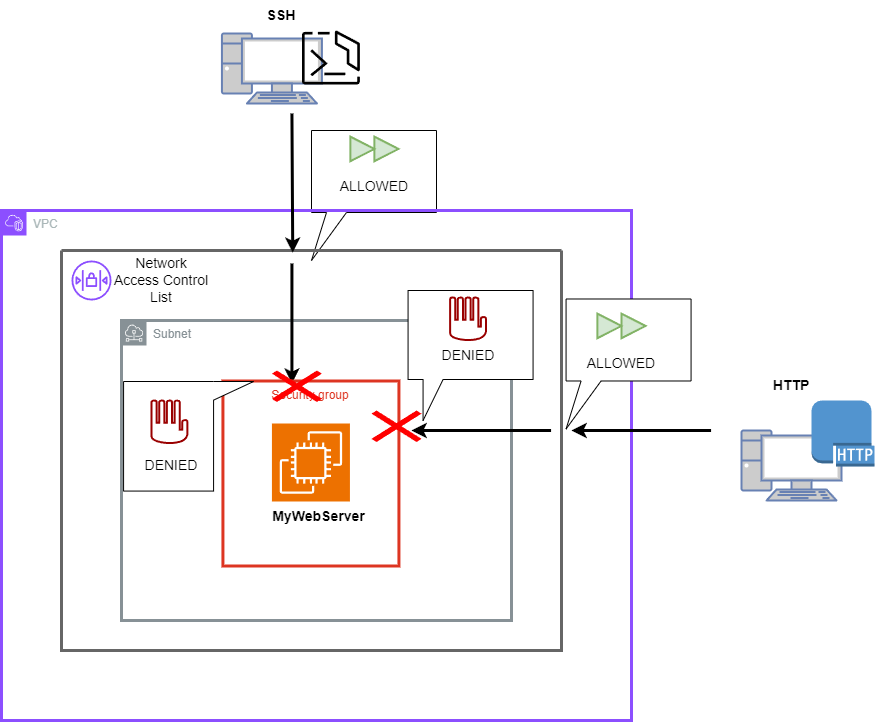
Deny All Inbound SSH Traffic in the Security Group configuration. Then, similar to Test SSH Access and HTTP Connection section, attempt to connect to “MyWebServer” using an SSH client. The connection attempt should fail. This failure occurs despite the NACL allowing SSH traffic because the Security Group associated with “MyWebServer” explicitly denies SSH access. This configuration verifies that Security Group rules take precedence at the instance level, blocking unwanted SSH connections even when broader network permissions are granted.
Deny All Inbound HTTP Traffic in the Security Group configuration. Then, similar to Test SSH Access and HTTP Connection section, use a web browser to try accessing “MyWebServer” via its public IP address. The HTTP connection attempt should be unsuccessful. Similar to the SSH test, this result is expected because, although the NACL allows HTTP traffic, the Security Group denies all inbound HTTP requests on port 80. This setup confirms that the Security Group’s rules are effectively protecting the server from unauthorized web traffic.
Conclusion
Through this article, we have explored the functionalities and operational roles of Security Groups and NACLs in AWS. These tools offer complementary security mechanisms that work together to protect our AWS environment. Security Groups manage traffic at the instance level with stateful rules, while NACLs provide stateless, granular control at the subnet level. Mastery of these tools enables a proactive approach to network security, ensuring that enterprises can leverage the full potential of cloud computing while mitigating risks effectively.
⚡10% OFF Practice Exam and eBook Bundles
Turn Your Team Into Cloud-Ready Professionals Today
Learn AWS with our PlayCloud Hands-On Labs
$2.99 AWS and Azure Exam Study Guide eBooks
Learn GCP By Doing! Try Our GCP PlayCloud
Learn Azure with our Azure PlayCloud
FREE AI and AWS Digital Courses
FREE AWS, Azure, GCP Practice Test Samplers
Subscribe to our YouTube Channel
Follow Us On Linkedin
Written by: Neil Rico
Neil, fueled by a passion for technology, now dedicates himself to architecting and optimizing cloud solutions, particularly within the dynamic realm of Amazon Web Services (AWS). He's always learning because life is a journey of discovering and growing.
AWS, Azure, and GCP Certifications are consistently among the top-paying IT certifications in the world, considering that most companies have now shifted to the cloud. Earn over $150,000 per year with an AWS, Azure, or GCP certification!
Follow us on LinkedIn, YouTube, Facebook, or join our Slack study group. More importantly, answer as many practice exams as you can to help increase your chances of passing your certification exams on your first try!
Around 95-98% of our students pass the AWS Certification exams after training with our courses.
200k+
students
Over 200k enrollees choose Tutorials Dojo in preparing for their AWS Certification exams.
~4.8
ratings
Our courses are highly rated by our enrollees from all over the world.
What our students say about us?
I’m deeply impressed by the quality of the practice tests from Tutorial Dojo. They are extremely well-written, clean and on-par with the real exam questions. Their practice tests and cheat sheets were a huge help for me to achieve 958 / 1000 — 95.8 % on my first try for the AWS Certified Solution Architect Associate exam. Perfect 10/10 material. The best $14 I’ve ever spent!
S. M. Shoaib
Khulna, Bangladesh
Given the enormous number of students and therefore the business success of Jon's courses, I was pleasantly surprised to see that Jon personally responds to many, including often the more technical questions from his students within the forums, showing that when Jon states that teaching is his true passion, he walks, not just talks the talk. I much respect and thank Jon Bonso.
Rowan Williams
Brisbane, Australia
The explanation to the questions are awesome. Lots of gap exposed in my learning. I used the practice tests along with the TD cheat sheets as my main study materials. This is a must training resource for the exam.
Using the practice exam helped me to pass. I think I wouldn't have passed if not for Jon's practice sets.
Jessica Chen
Guangzhou, China
I can say that Tutorials Dojo is a leading and prime resource when it comes to the AWS Certification Practice Tests. I also tried other courses but only Tutorials Dojo was able to give me enough knowledge of Amazon Web Services. My favorite part of this course is explaining the correct and wrong answers as it provides a deep understanding in AWS Cloud Platform. The course I purchased at Tutorials Dojo has been a weapon for me to pass the AWS Certified Solutions Architect - Associate exam and to compete in Cloud World. A Big thank you to Team Tutorials Dojo and Jon Bonso for providing the best practice test around the globe!!!