
Last updated on July 13, 2026
AI agents can now write code, browse the web, and run for hours without a human watching. Ask one to build a feature, and it might open ten files and call five tools. It can make a hundred small decisions before it ever shows you a result. That is a different animal from a chatbot answering one question. In my experience following this shift, it also breaks the old playbook for controlling AI behavior.
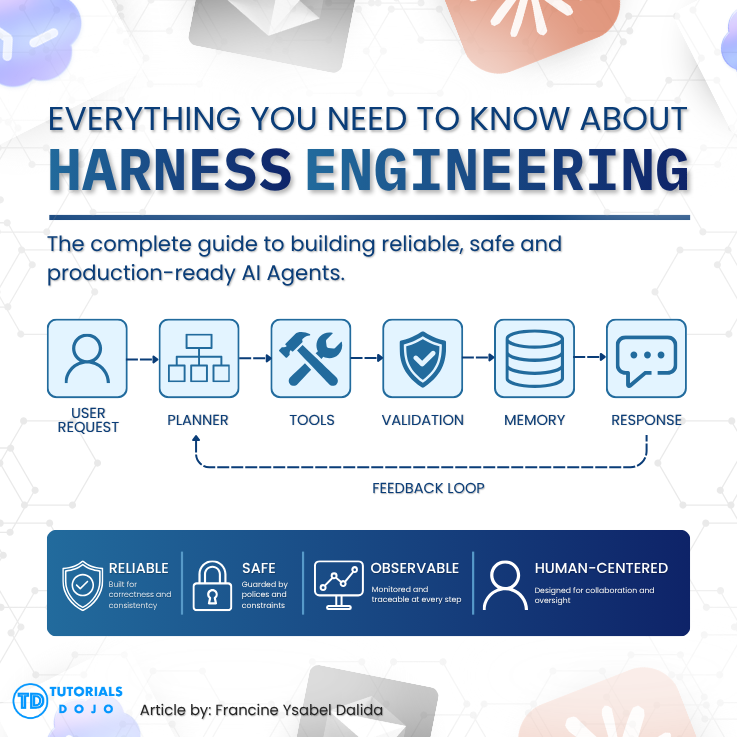
For a while, prompt engineering was the go-to answer. Write a clearer instruction, add a few examples, and the model behaves. That still works for single-turn tasks. But once an agent starts operating across many steps on its own, a clever prompt cannot do much after execution begins. You need something that governs the agent’s entire environment: what it can access, how it checks its own work, and when it stops. That something is called harness engineering, and this guide walks through what it is, why it emerged, and how to start building one.
What Is Harness Engineering?
The term traces back to Mitchell Hashimoto, co-creator of Terraform. He described a habit he built while working with AI coding agents. Every time an agent made a mistake, he engineered a permanent fix into its environment instead of simply re-prompting it. He called this “engineering the harness.” Within weeks, both OpenAI and Anthropic published engineering posts expanding on the idea, and the term stuck across the industry.
Harness engineering is the discipline of designing the execution environment around an AI agent. That includes the tools it can call, the information it can retrieve, and the rules that constrain it. It also includes the feedback loops that let it catch and correct its own mistakes. Martin Fowler, whose writing helped formalize the idea, describes a harness as a system of “guides” that steer an agent before it acts. He pairs these with “sensors” that help the agent self-correct after it acts, distinguishing between deterministic computational controls like linters and tests and inferential controls that rely on LLM-based semantic judgment. Put simply, the harness is everything around the AI agent except the model itself.
Harness Engineering vs. Prompt Engineering
Prompt engineering optimizes a single exchange: the phrasing, structure, and examples inside one instruction. Harness engineering is broader in scope and different in kind. It shapes whether an agent can operate reliably across hundreds of decisions over multiple hours. Nobody supervises every step along the way.
Here is a useful analogy. If prompt engineering is telling a driver to turn right, harness engineering is the road itself. It is the guardrails, the traffic signs, and the systems that let many vehicles navigate safely at once. Prompting was enough as long as agents handled short, single-turn tasks. But autonomous, multi-step agent work exposed a real gap. Agents have no memory between sessions, they produce confident-sounding wrong answers, and unrestricted tool access turns small mistakes into real damage. None of that gets fixed with a better prompt. It requires engineering the system the agent runs inside.
The Problem Harness Engineering Solves
Without a harness, an AI agent tends to work well in a demo and then fail unpredictably in production. A few recurring failure patterns explain why this happens so often. Language models rarely say “I don’t know.” Instead, they generate plausible-sounding answers that are sometimes simply wrong. Without a verification step, that error propagates silently through the rest of the task.
Common Failure Patterns
Tool misuse is another frequent problem. An agent with unrestricted shell or database access can delete files or leak credentials. Nothing stops it if the boundaries were never set. Context management creates a separate headache entirely. As an agent’s context window fills up, it can start wrapping up tasks prematurely, not because the work is done, but because it senses the limit approaching.
Multi-step workflow drift compounds these issues over time. Left alone, an agent tends to copy whatever patterns already exist in a codebase, including the bad ones. That habit quietly compounds architectural debt. Scale multiplies small errors further still: one agent making an occasional mistake is manageable, but ten agents running in parallel can create cascading failures that are hard to trace. Debugging becomes guesswork without structured logs of what an agent did and why.
Anthropic’s engineering team frames the core challenge slightly differently. They focus on helping agents make consistent progress across multiple context windows. Structured environments, progress-tracking artifacts, and clean state handoffs between sessions are built to solve exactly that problem. Each of these pieces addresses a different failure mode, but together they form the foundation of a working harness.
Core Concepts of Harness Engineering
Every harness, simple or elaborate, is built from a small set of recurring building blocks. Understanding each one separately makes it much easier to design your own.

Tool Orchestration
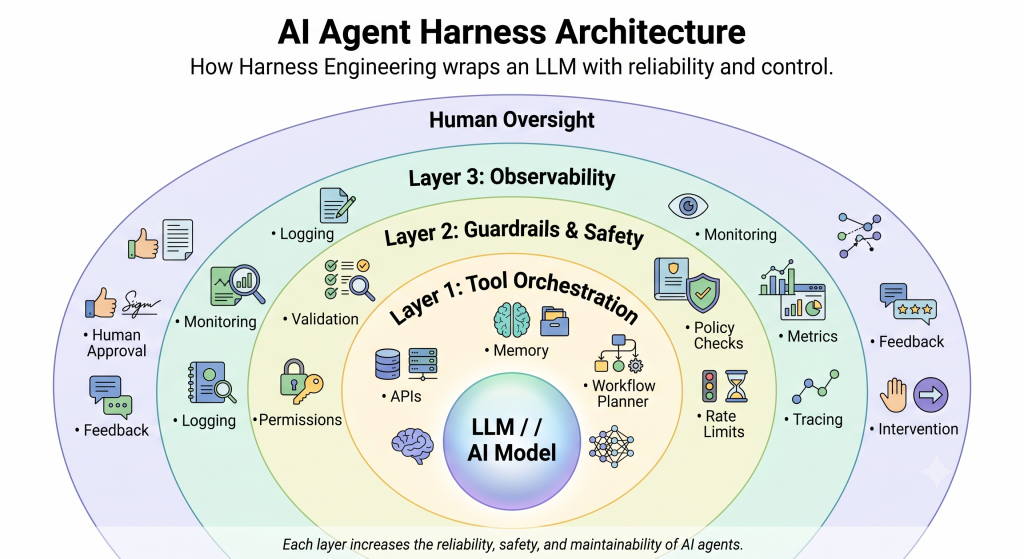
This defines which tools an agent can call, how it invokes them, and what permissions each one requires. File access, shell commands, APIs, and databases all fall under this umbrella. A well-orchestrated tool layer is explicit about boundaries. The agent knows exactly what it can do, what it cannot do, and what needs a human’s sign-off first. For example, an agent might have read access to an entire repository but write access only to one designated feature branch.
Guardrails and Safety Constraints
Guardrails are the deterministic rules that keep an agent inside safe territory. Permission boundaries, output validation, architectural rules, and rate limits all belong here. Counterintuitively, tighter constraints tend to produce more reliable agents rather than less capable ones. OpenAI’s Codex team found their agents performed better once they operated inside strict, linter-enforced architectural boundaries. A custom linter that blocks any commit violating a one-way dependency rule is a simple, concrete example.
Error Recovery and Feedback Loops
Production agents will fail. The real question is whether they recover gracefully afterward. This layer covers retry logic, self-verification before an agent commits its own work, and rollback mechanisms. It also covers loop detection for when an agent gets stuck repeating itself. The payoff can be substantial: LangChain used traces to understand agent failure modes at scale and iteratively improved their coding agent by 13.7 points, from 52.8% to 66.5%, on Terminal Bench 2.0, all without touching the underlying model. A simple example is an agent that re-runs the test suite after every change and only proceeds once it passes.
Observability and Human Checkpoints
You cannot improve what you cannot see. Observability means logging every tool call, tracking token usage and cost, and recording decision points as they happen. It also means surfacing anomalies before they cascade into bigger failures. This is the difference between a research prototype and a production system that people actually trust.
Full autonomy is rarely the right default, which is why human-in-the-loop checkpoints matter so much. This concept covers where and how humans get consulted, from an explicit approval gate before a destructive command runs, to periodic review on longer tasks. The goal is not micromanagement. It is placing human judgment exactly where a mistake would be most costly. Any agent action that touches production infrastructure, for instance, might require an explicit approval click before it proceeds.
Harness Engineering in Practice
The clearest illustration comes from OpenAI’s Codex team. Over five months, a small team built and shipped an internal beta product with zero lines of manually written code, and the repository eventually reached on the order of a million lines of code across application logic, infrastructure, tooling, documentation, and internal developer utilities. Roughly 1,500 pull requests were merged along the way.
The OpenAI Codex Experiment
Their first instinct was one giant AGENTS.md file containing every rule and convention. That approach failed quickly. A bloated instruction file crowded out the actual task at hand. Documentation went stale within weeks, and a flat file could not be mechanically checked for accuracy. The fix was to shrink AGENTS.md down to roughly 100 lines that function as a map rather than a rulebook. It points to a structured docs directory of design decisions and specs, with linters verifying the cross-links stayed valid.
AGENTS.md itself has since become an open, tool-agnostic standard, described as a README for agents. It is a predictable place, separate from a human-facing README, where a project documents setup commands and coding conventions. It is now used across tens of thousands of repositories and supported by tools including Codex, GitHub Copilot, Cursor, and Gemini-based agents. Governance now sits under the Linux Foundation’s Agentic AI Foundation, which gives the format some long-term stability.
Other Real-World Implementations
Other implementations show the same pattern from different angles. Claude Code enforces its harness through a permission model that defaults to read-only until a user grants explicit approval. It also uses reversible file edits through automatic snapshots and a hooks system for injecting custom scripts at key points. Cursor takes a different route with version-controlled rules files that apply persistent, file-pattern-specific instructions without repeated prompting.
Anthropic’s own research tested a three-agent harness against a single solo agent building a 2D game engine. The three-agent setup used a separate Planner, Generator, and Evaluator working together. The solo agent shipped something that technically ran but had broken core logic underneath. The three-agent harness, at roughly twenty times the cost, shipped a fully playable game instead. The separation mattered because agents are systematically bad at grading their own work. Even on objective pass or fail tasks, a lone agent will often talk itself into approving flawed output.
Building Your First Agent Harness
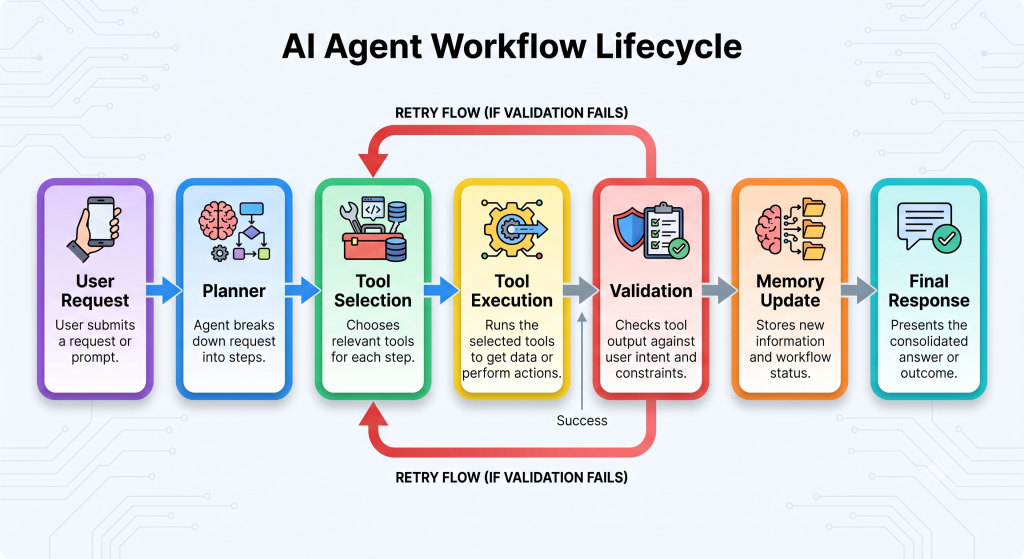
You don’t need a million-line codebase to benefit from any of this. A simple harness can follow one basic loop. First, a user request enters the system, ideally with clear scope and success criteria attached. Then a planner breaks that request into an ordered set of steps. For each step, the agent picks from its available, permission-bounded tools before it executes anything.
Once a tool actually runs, whether that means a file edit, an API call, or a search, automated checks confirm the output is correct. Tests, linters, or an evaluator agent can all serve this purpose. Relevant state then gets persisted so the next step, or the next session, has the right context available. Finally, the agent reports back with enough of a trail that a human can audit what happened.
A practical starting sequence draws from common practice across current guides. Start by defining the agent’s scope in writing, covering what it should and should not do. Create a machine-readable config file such as AGENTS.md next. Set up a minimal write-test-fix feedback loop, and add guardrails that start restrictive and loosen gradually over time. Log every tool call for observability, and decide upfront which actions require human approval before they run.
Tools and Frameworks for Harness Engineering
Several agent frameworks now provide harness building blocks out of the box. State management, tool routing, memory, and checkpointing all come built in. Teams don’t have to build every piece from scratch anymore. The table below summarizes a few of the most common options and where each one tends to fit best.
| Framework | Primary Use Case | Best Suited For |
|---|---|---|
| OpenAI Agents SDK | Handoff-based single- and multi-agent apps | Fast, opinionated starts on OpenAI-native stacks |
| LangGraph | Stateful, graph-based multi-step workflows | Regulated workflows needing audit trails |
| LangChain | General-purpose LLM application framework | Prototyping across many model providers |
| CrewAI | Role-based multi-agent collaboration | Multi-agent prototypes built in an afternoon |
| AutoGen | Conversational multi-agent debate | Research-style multi-agent reasoning tasks |
| Mastra | TypeScript-native agent orchestration | JS/TS teams avoiding a Python-first stack |
| Google ADK | Hierarchical, multimodal agent systems | Multimodal agents on GCP-native deployments |
None of these frameworks replace harness engineering on their own. They are scaffolding for it, nothing more. The discipline still involves deciding what guardrails, feedback loops, and checkpoints a specific agent actually needs. A framework only reduces how much of that work gets built by hand.
Career and Skills: What Harness Engineers Do
Harness engineering is emerging as a distinct responsibility, especially at companies building agent-powered products. It blends traditional software engineering with AI-specific skills in a fairly unusual way. Day to day, harness engineers design the environments agents operate in and write configuration files like AGENTS.md. They build and tune feedback loops, and they review agent logs to find recurring failure patterns.
Core technical skills include prompt and context engineering for writing effective agent instructions. API and tool-interface design matters too, so agents can call functions reliably. Distributed systems knowledge helps with coordinating parallel agent execution across a team’s infrastructure. Observability practices, error-handling patterns, and security engineering for permission boundaries round out the technical list.
Soft skills matter just as much as the technical ones. Harness engineers need to think in systems rather than single instructions. They also need to communicate clearly about risk and failure modes to non-technical stakeholders. Staying comfortable with a fast-moving, still-forming set of best practices helps too. As OpenAI’s Codex team put it, a software team’s primary job is shifting from writing code to designing environments and specifying intent. As more of the actual coding gets delegated to agents, the leverage moves to whoever designs the system the agent runs inside.
Conclusion
Harness engineering is not a replacement for prompt engineering. It’s what comes after it. Once an agent makes dozens or hundreds of decisions autonomously, the quality of a single instruction stops being the bottleneck. What matters instead is the tools it can reach and the guardrails that keep it safe. The feedback loops that catch its mistakes matter just as much, along with the checkpoints where a human still gets the final say.
The core idea is simple to state and hard to master. Harness engineering is about designing reliable AI systems, not just writing better prompts. As models keep improving, parts of today’s harnesses will become unnecessary overhead and get stripped away over time. But the underlying discipline, building the scaffolding that lets autonomous agents earn trust, is likely to shape how software gets built for years to come.
References

Official Documentation
Technical Articles
- Martin Fowler (Birgitta Böckeler). Harness Engineering for Coding Agent Users.
- Milvus. Harness Engineering: The Execution Layer AI Agents Actually Need.
- LangChain. The Best AI Agent Frameworks in 2026.
Industry Insights
⏳ Get 30% OFF on Microsoft Azure and GitHub Reviewers this Black Friday Sale!

Turn Your Team Into Cloud-Ready Professionals Today

Learn AWS with our PlayCloud Hands-On Labs

$2.99 AWS and Azure Exam Study Guide eBooks

Learn GCP By Doing! Try Our GCP PlayCloud
Learn Azure with our Azure PlayCloud
FREE AI and AWS Digital Courses

FREE AWS, Azure, GCP Practice Test Samplers


Subscribe to our YouTube Channel

Follow Us On Linkedin

Written by: Francine Ysabel B. Dalida