Google quietly rolled out Lyria 3 inside Gemini, and it lets anyone generate 30-second music tracks from a text prompt, complete with vocals, lyrics, and instrumentals. It’s free, it’s surprisingly good, and most people don’t even know it’s there.
I spent an afternoon messing around with it. Here’s how it works and where it starts to fall apart.
What Is Lyria 3?
Lyria 3 is Google DeepMind’s music generation model. It lives inside the Gemini app. You don’t need to download anything extra or visit a separate site. Just open Gemini and ask it to make a track.
Here’s what it can do:
- Generate 30-second up to 3-minute tracks from a text prompt. You describe the genre, mood, instruments, and vocal style, and it builds a full clip with vocals, lyrics, and arrangement.
- Templates. There’s a gallery of starting points if you don’t know what to prompt. Pick one, customize it, and you’ve got a track.
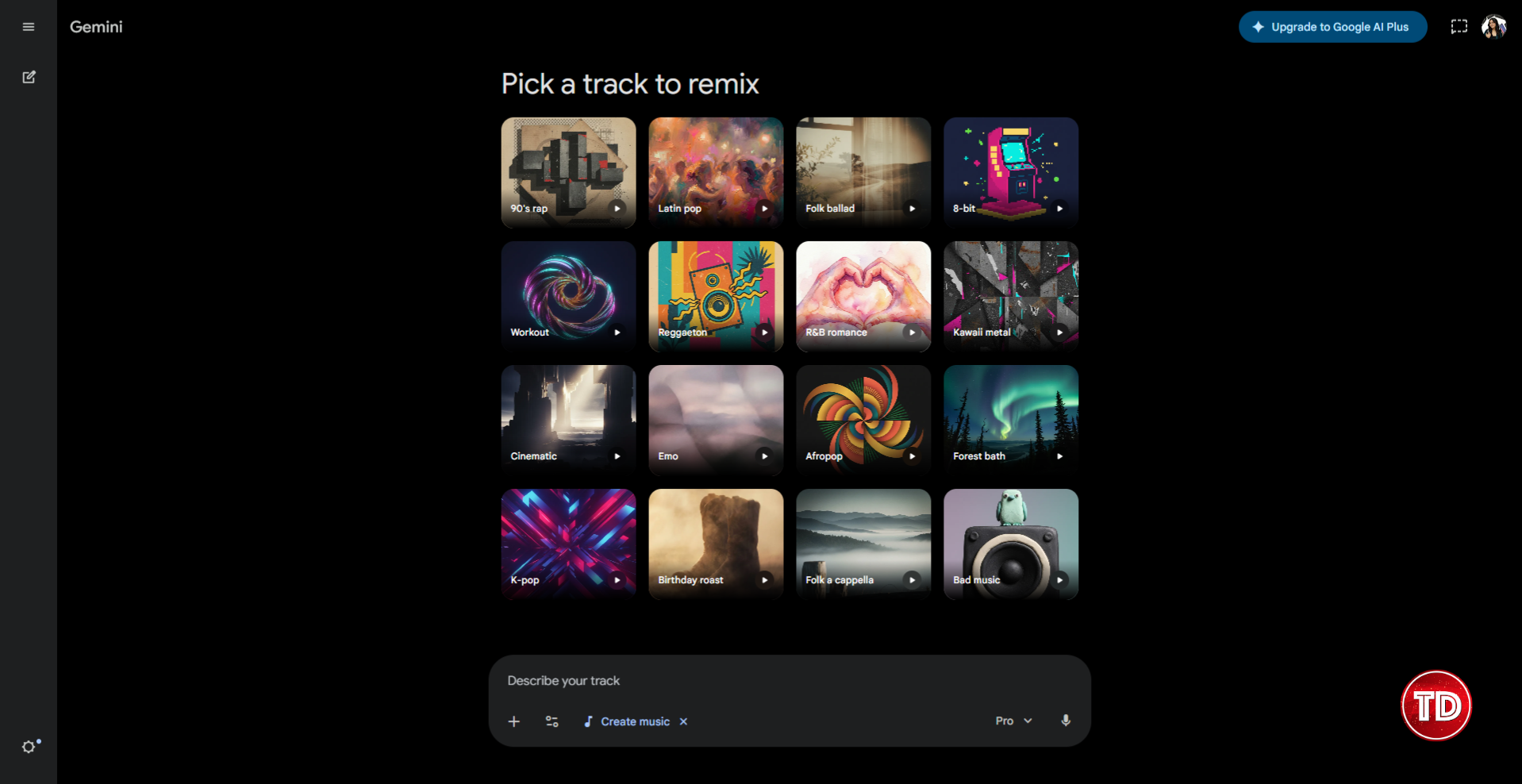
- Turn photos into songs. Upload a photo or video, add a prompt, and Lyria 3 creates a track with lyrics that match the moment.
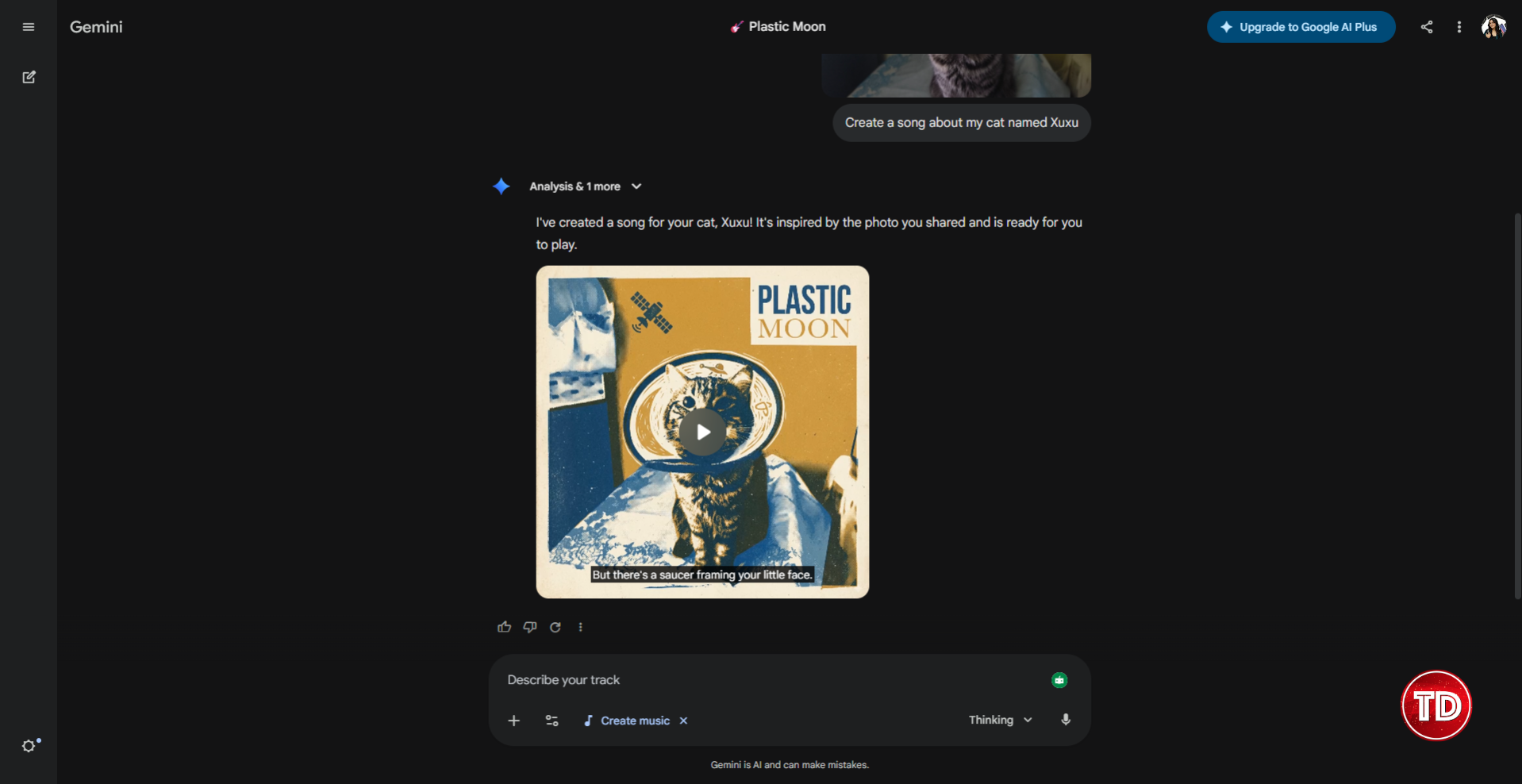
- Generate album cover art. Each track comes with AI-generated cover art to match the mood and style of your music.
- Downloads. You can export your tracks as MP3 or MP4 files and share them wherever.

The key thing: Lyria 3 is free. You don’t need a Gemini Advanced subscription to use it. Just open the app and go.
How to Use Lyria 3 in Gemini
Step 1: Open Gemini
Head to gemini.google.com/music or just open the Gemini app. You’ll see the music generation option. You need to be 18+ and in a supported country to access it.
Step 2: Write Your Prompt
This is where the magic happens, or doesn’t, depending on how specific you are. Vague prompts give you generic results. Specific prompts give you something actually usable.
Here’s what Google recommends including:
- Genre and era. Don’t just say “pop.” Say “80s synth-pop” or “indie folk” or “lo-fi hip-hop.”
- Tempo and rhythm. “Upbeat and danceable” or “slow ballad” or “driving beat.”
- Instruments. “Acoustic guitar and soft piano” or “distorted bassline and fuzzy guitars.”
- Vocals. Specify gender, texture, and range. “Airy female soprano” or “deep male baritone” or “raspy rocker.”
- Lyrics. You can describe a topic (“about a road trip with friends”) or write your own using structure tags like [Verse], [Chorus], and [Bridge].
Here’s an example of a solid prompt:
A Sabrina Carpenter-style bubbly pop track with a catchy, laid-back groove. Bright synths, punchy bass, and a crisp drumbeat. Playful, sweet female vocals sing lyrics about ditching the textbooks, closing the laptop, and finally letting yourself do absolutely nothing.
Step 3: Hit Generate and Wait
Lyria 3 takes a few seconds to generate your clip. It’ll spit out a 30-second track, or up to 3 minutes if you use thinking or pro mode, with the generated lyrics displayed alongside the audio. If you don’t like it, tweak your prompt and regenerate. There’s no multi-turn editing. Each generation is a fresh attempt.
Step 4: Download and Share
Happy with the result? Download it as MP3 or MP4. Use it as background music for a Reel, a podcast intro, a TikTok, or just send it to a friend because you made them a personalized jingle about their cat.
What Lyria 3 Gets Right
It’s genuinely fun. There’s something satisfying about typing a few sentences and hearing a full track 10 seconds later. The vocals are coherent, the arrangement makes sense, and it actually sounds like music, not a robotic mess. The instrumental from my Sabrina Carpenter-inspired prompt actually sounded like something you’d hear on one of her tracks.
Photo-to-music is a neat trick. I uploaded a photo of my cat wearing an e-collar after surgery, and it gave me a spacey, satellite-themed track about my little astronaut cat. It even generated an artsy AI album cover that honestly felt way deeper than it had any right to be.
Genre range is impressive. I threw everything at it: lo-fi hip-hop, bossa nova, 8-bit chiptune, Motown, metal. It handled most genres surprisingly well. The 8-bit one was especially fun.
It’s actually free. No credit system, trial that expires in 3 days, or “upgrade to generate more than one track.”
Where Lyria 3 Falls Short
No editing. You can’t say “make the chorus more energetic” or “swap the guitar for a synth.” Each generation is a one-shot deal. If you don’t like the result, you start over with a new prompt. That can get frustrating fast.
Vocals are hit-or-miss. Sometimes they’re great: clear, expressive, well-timed. Other times they sound slightly off, like the AI is singing with a mouthful of something. Instrumental-only prompts tend to be more consistently good.

Watermarked. Every track is embedded with Google’s SynthID watermark, so AI-generated audio can be identified. This is invisible to listeners but worth knowing if you’re planning to use the output commercially.
Who Is Lyria 3 Actually For?
- Content creators who need quick background music or jingles for Reels, TikToks, or YouTube Shorts without dealing with licensing.
- People who want personalized tracks: birthday songs, inside jokes, custom soundtracks for memories.
- Anyone curious about AI music who wants to try it without signing up for another platform.
- Developers who want to experiment with the Lyria 3 API through Google AI Studio (that’s a whole other rabbit hole).
It’s not for producers or musicians looking for studio-quality output. At least not yet.
Wrapping Up
Lyria 3 isn’t trying to replace your Spotify playlist. It’s a fun, free tool that turns text into surprisingly decent music clips. The fact that it’s baked right into Gemini, with no extra app, no credits, no paywall, makes it the lowest-friction way to try AI music generation right now.
References
https://deepmind.google/models/lyria/
🤖 $3.74 ONLY for Claude eBooks and Get 25% OFF All Claude Reviewers

Turn Your Team Into Cloud-Ready Professionals Today

Learn AWS with our PlayCloud Hands-On Labs

$2.99 AWS and Azure Exam Study Guide eBooks

Learn GCP By Doing! Try Our GCP PlayCloud

Learn Azure with our Azure PlayCloud

FREE AI and AWS Digital Courses

FREE AWS, Azure, GCP Practice Test Samplers


Subscribe to our YouTube Channel

Follow Us On Linkedin


Written by: Ostline Casao