
Last updated on December 2, 2025
GitHub Copilot Cheat Sheet
GitHub Copilot is an AI-powered code completion tool designed to help developers write code faster. It provides intelligent code suggestions based on the context of your code, comments, and files. It supports multiple programming languages and integrates with popular IDEs, including Visual Studio Code, JetBrains, and others.
-
Generates code suggestions (from single lines to full functions)
-
Context-aware (understands surrounding code and comments)
-
Supports multiple languages (e.g., Python, JavaScript, Java, C++, etc.)
-
Works within IDEs (VS Code, JetBrains, Visual Studio, etc.)
Plans
GitHub Copilot offers various pricing tiers, including free and paid options for individuals and businesses.

GitHub Copilot Features
| Feature Area |
Capabilities |
| Code Suggestions & Autocompletion |
– Inline and block-level code completions: Suggests code snippets from simple completions to entire functions. |
| Natural Language to Code |
– Translate comments into code: Convert English comments into working code. |
| Test Generation & Code Review |
– Unit test generation: Automatically generate unit tests based on existing code. |
| Chat & Agent Mode |
– Chat interface: Interact in a chat-like interface to ask questions, get explanations, or request bug fixes. |
| Multi-File / Project-Wide Context |
– Context across files: Understands multiple files and broader project context for coherent suggestions. |
| IDE and Workflow Integration | – IDE support: Works in VS Code, JetBrains IDEs, Neovim, and more. – Web and CLI support: Integrates with GitHub’s web interface and command-line tools. – Collaborative workflows: Supports team collaboration on projects. |
| Admin & Enterprise Features |
– Policy management: Admins control which features/models are available. |
| Security & Governance |
– Responsible use: Ensures ethical and compliant use of AI-generated code. |
Slash Commands
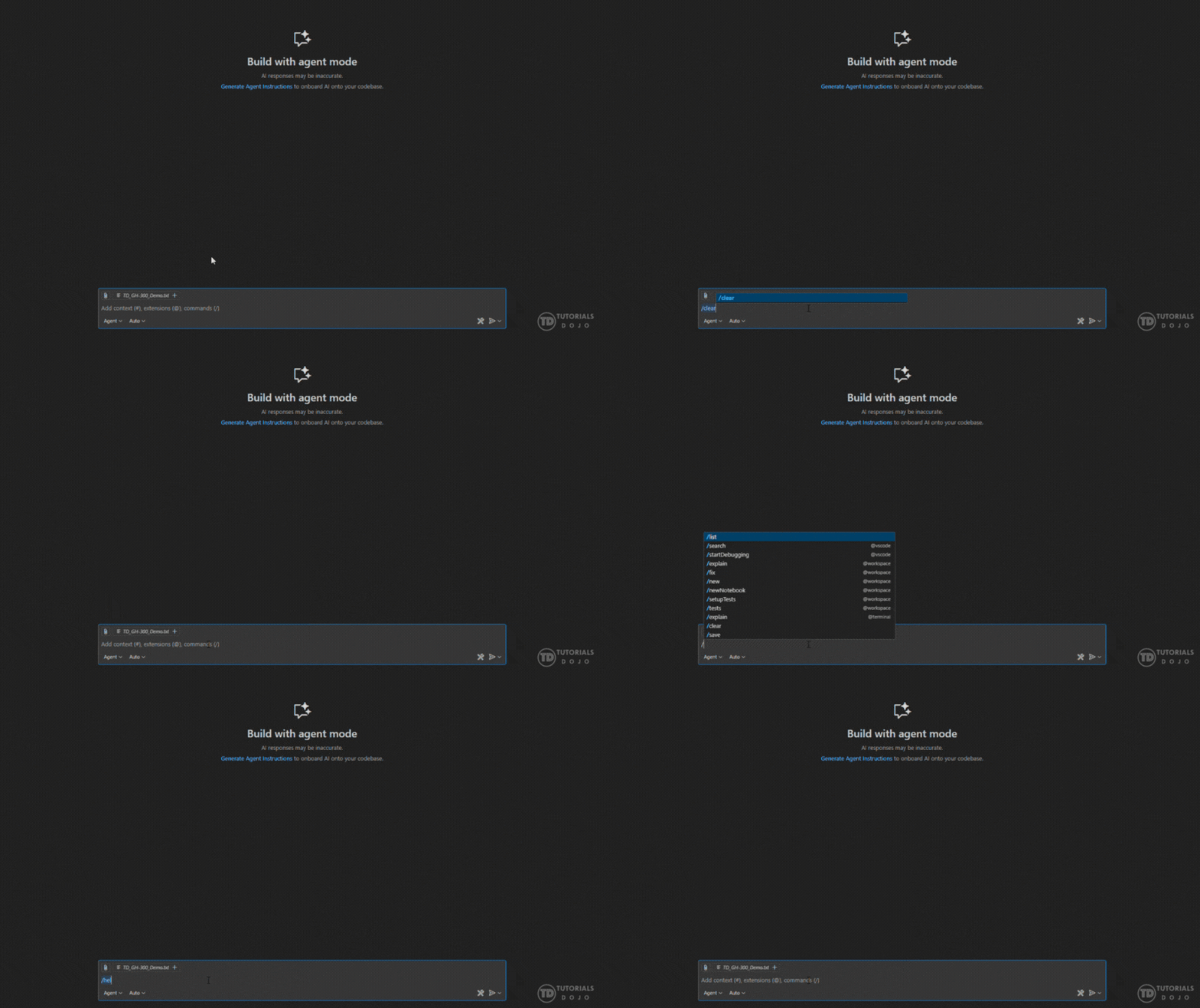
Slash commands in GitHub Copilot provide an efficient way to perform tasks quickly within the IDE or chat interface. Typing a slash (/) allows users to execute commands that can simplify workflow management or generate tasks autonomously.
How to Access Slash Commands:
-
Type / in the chat box to see a list of available commands.
-
Execute a command directly by typing the command name.

| Slash Commands |
Description |
|
/clear |
Clear the current chat conversation. |
|
/delete |
Delete a conversation. |
|
/new |
Start a new conversation/project. |
|
/rename |
Rename the current conversation. |
|
/explain |
Ask Copilot to explain the selected code. |
|
/fix |
Propose a fix for problems in selected code. |
|
/fixTestFailure |
Find and fix a failing test. |
|
/tests |
Generate unit tests for the selected code. |
|
/help |
Show quick reference/help. |
|
/doc |
Add a documentation comment for the selected symbol. |
|
/optimize |
Analyze and improve the performance of selected code. |

Chat Variables
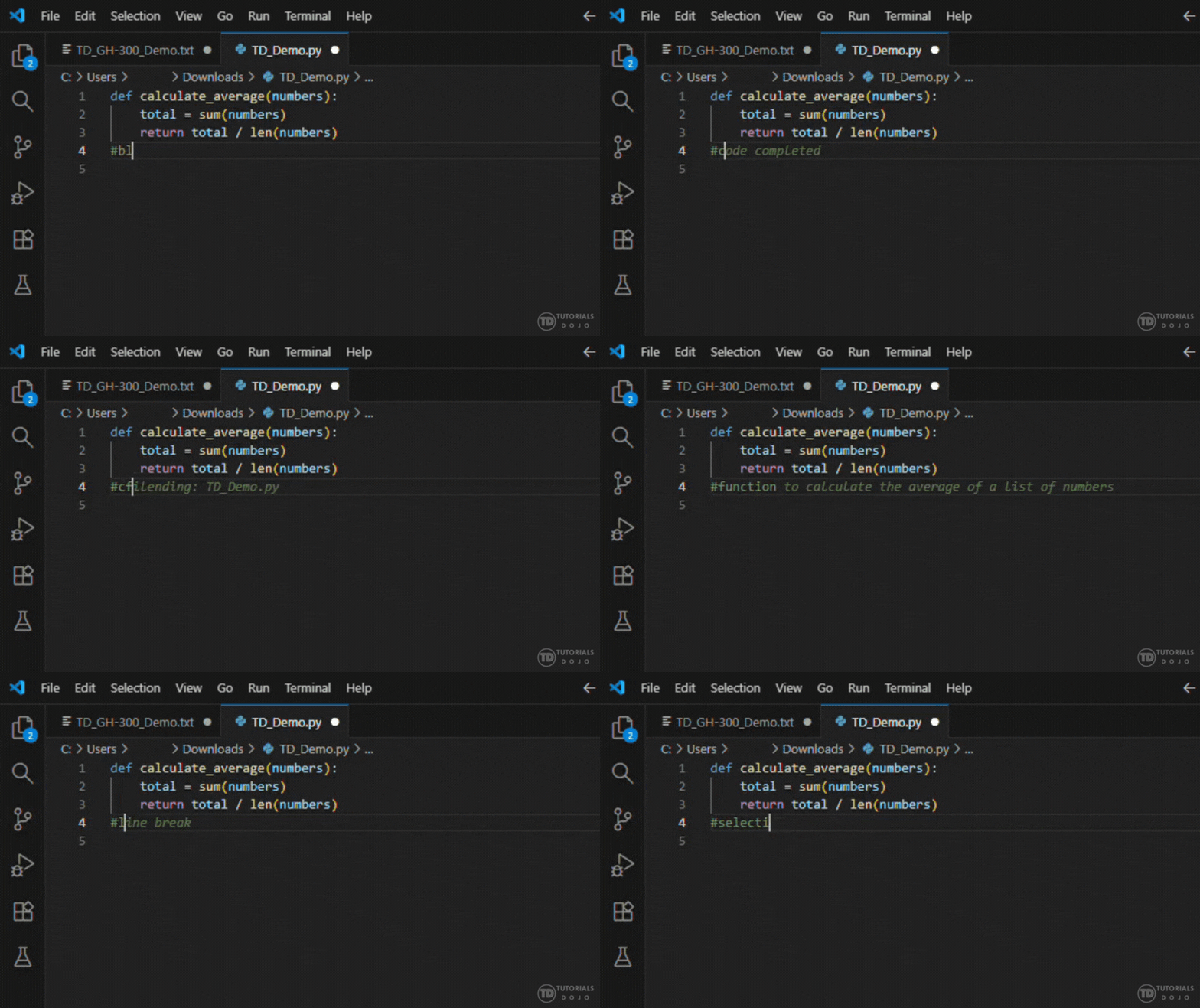
GitHub Copilot supports the use of Chat Variables to enhance your interactions with the tool, making it easier to refer to specific parts of your code or project when communicating with Copilot. These variables can be used to specify the context of the code you’re working on.
How to Access Chat Variables:
-
Usage: These variables can be used directly in the chat interface to communicate your needs more effectively with Copilot.
-
Example: If you’re asking Copilot to refactor a function, you might use: Refactor the code in #function to improve readability. It will prompt Copilot to analyze and refactor the specific function you’re working on.
By utilizing these variables, GitHub Copilot can better comprehend the context of your work and offer more precise and relevant suggestions.
| Chat Variables |
Description |
|
#block |
Current block of code. |
|
#class |
Current class. |
|
#comment |
Current comment. |
|
#file |
Entire file content. |
|
#function |
Current function or method. |
|
#line |
Current line of code. |
|
#project |
Entire project context. |
|
#selection |
Currently selected text. |

Chat Participants
GitHub Copilot enables users to utilize mentions within the chat interface, much like mentions in messaging apps or social media. Participants will allow you to directly reference GitHub Copilot in the chat, ensuring that your request or query gets its attention. This is particularly useful for requesting help with specific pieces of code or clarifying issues when interacting with Copilot.
How to Access Chat Participants:
-
Trigger a Mention: To mention Copilot in the chat, you type the @ symbol followed by Copilot’s name (e.g., @Copilot). This tags Copilot, notifying it to respond to the specific task you’re asking for.
-
Requesting Specific Help: You can ask Copilot particular questions or request help with any part of your code by tagging it directly. Copilot will respond based on the context of the code you’re working with.
-
Context Awareness: When you mention Copilot with @, it uses the context of your surrounding code or the files you are currently working on. Copilot can provide specific answers, code completions, or suggestions based on this context.
| Chat Variables |
Description |
| @azure | Azure-related services and cloud configurations. |
| @github | GitHub-specific features (e.g., issues, PRs). |
| @vscode | VS Code commands and settings. |
| @workspace | Project code context. |
| @terminal | Context about the VS Code terminal. |


How GitHub Copilot Works
GitHub Copilot utilizes advanced AI models, such as those developed by OpenAI (specifically Codex), to comprehend context and provide code suggestions. Here’s how it works:
-
Context Gathering: Copilot analyzes your code, comments, and even the files you have open to gain context.
-
AI Model: It utilizes deep learning models trained on vast amounts of open-source code, enabling it to predict subsequent lines of code, entire functions, or even generate comments and documentation.
-
Real-Time Suggestions: As you type, Copilot provides suggestions that are highly relevant to your current task. These suggestions can range from simple completions to entire function implementations.
-
Multi-language Support: It works across a broad range of programming languages by recognizing the syntax and context of each language.
-
Chat Interface: You can interact with Copilot through a chat interface, asking it to explain, fix, or refactor your code.
-
Learning Over Time: The more you use Copilot, the more it adapts to your coding style and project-specific needs, providing more relevant suggestions.
Supported IDEs & Tools
GitHub Copilot integrates seamlessly with:
-
Visual Studio Code
-
JetBrains IDEs (e.g., IntelliJ, PyCharm)
-
Neovim
-
GitHub Web Interface
-
Command-Line Tools (CLI)
Security and Privacy

GitHub Copilot is committed to ensuring that the use of AI-generated code is both responsible and secure:
-
Code Privacy: Copilot ensures that your private code remains protected.
-
Compliance: Adheres to best practices for security and governance in AI usage.
Conclusion
GitHub Copilot is a powerful tool for developers, providing intelligent code suggestions, natural language understanding, and workflow automation. Its integration with IDEs and extensive language support make it an essential tool for streamlining development processes and improving productivity.
REFERENCES
https://docs.github.com/en/copilot/get-started/quickstart
https://docs.github.com/en/copilot/get-started/what-is-github-copilot
https://docs.github.com/en/copilot/get-started/plans
🔥 $1.99 eBooks and $4.99 Video Claude Reviewers

Turn Your Team Into Cloud-Ready Professionals Today

Learn AWS with our PlayCloud Hands-On Labs

$2.99 AWS and Azure Exam Study Guide eBooks

Learn GCP By Doing! Try Our GCP PlayCloud

Learn Azure with our Azure PlayCloud

FREE AI and AWS Digital Courses

FREE AWS, Azure, GCP Practice Test Samplers


Subscribe to our YouTube Channel

Follow Us On Linkedin


Written by: Ace Kenneth Batacandulo




