
AWS Fault Injection Service Cheat Sheet
A fully managed chaos engineering service that help you improve the resilience and performance of your AWS applications by injecting controlled faults into your environment.
It allows you to simulate real-world failures such as instance interruptions, pod crashes, network issues, and service throttling.
Features
- No infrastructure maintenance required as it is a managed chaos engineering platform.
- Provides pre-built fault actions for EC2, EKS, ECS, RDS, DynamoDB, EBS, ELB, and many others.
- Uses experiment templates for repeatable, automated resilience tests.
- Supports tag-based targeting and granular resource selection.
- Has built-in guardrails: stop conditions, minimum/maximum duration, and controlled blast radius.
- Integrates with Amazon CloudWatch, CloudTrail, IAM, EventBridge, and Systems Manager.
- You can create custom fault actions via SSM Automation or SSM commands.

Key Concepts
- Experiment: A single run of a chaos test. Specifies the actions, targets, stop conditions, and duration.
- Experiment Template: A reusable configuration that defines how faults are injected. Can be version-controlled and automated.
- Actions
- Defines the fault to be injected. Such as:
- Stopping or rebooting EC2 instances
- Inducing CPU/memory stress on EC2/EKS/ECS
- Killing ECS tasks or Kubernetes pods
- Adding network latency, packet loss, or blackhole traffic
- Triggering RDS failover
- Throttling DynamoDB
- Injecting EBS I/O latency or volume degradation
- Defines the fault to be injected. Such as:
- Targets
- Specifies the AWS resources affected by actions. Can be defined using:
- Tags (most common)
- ARNs
- Resource property filters
- Specifies the AWS resources affected by actions. Can be defined using:
- Stop Conditions
- CloudWatch Alarms that automatically halt experiments when thresholds are breached. Prevents uncontrolled failures.
Example High-Level Architecture Diagram
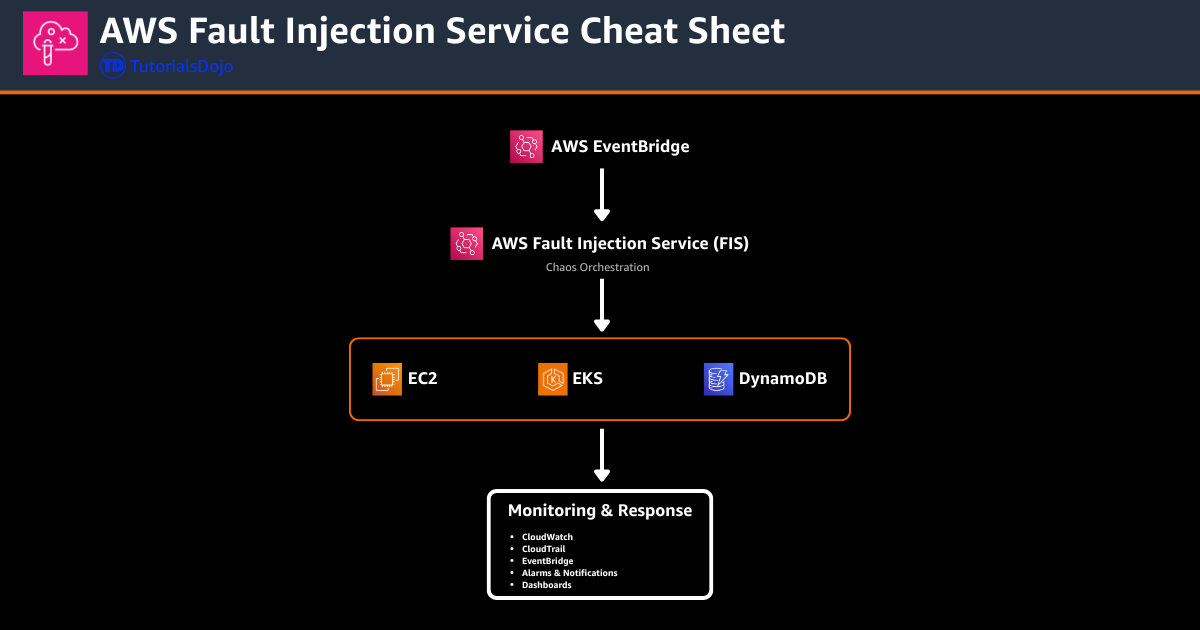
Experiment Structure Overview
- Actions: The specific faults to be injected (e.g., reboot instance, kill pod, add network delay).
- Targets: The selected AWS resources identified by tags, ARNs, or filters.
- Stop Conditions: CloudWatch alarms that halt the experiment if system health declines too far.
- Duration & Timing: Defines how long the fault occurs and ensures controlled test windows.
- Experiment Templates: A reusable definition that packages all actions, targets, and guardrails into a single configuration.
Monitoring & Observability
- CloudWatch provides real-time metrics to observe system degradation and recovery during experiments.
- CloudTrail logs all experiment runs, template changes, and user actions for auditing.
- EventBridge can trigger notifications, automate workflows, or start follow-up tests after an experiment completes.
- Logs and experiment output can be routed to S3, CloudWatch Logs, or third-party monitoring tools.
- Alarms tied to stop conditions ensure observability-driven safety mechanisms.
Best Practices
- Use tags to precisely control which resources can be targeted by FIS.
- Always include stop conditions based on meaningful health metrics.
- Start with a small blast radius and expand gradually.
- Run experiments first in staging before applying them in production.
- Version your experiment templates for repeatability and rollback.
- Combine FIS with Auto Scaling, load balancers, and multi-AZ setups for meaningful resilience tests.
Security
- IAM policies controls access, determining who can create or run experiments.
- Supports resource-level permissions to restrict which AWS resources FIS can target.
- All FIS activity is logged in CloudTrail.
- Includes built-in safety controls: time limits, stop conditions, and controlled targeting.
- Logs and sensitive data can be encrypted using AWS KMS.
Pricing
- An experiment charges per minute that it runs
- Based on the specific fault actions used, pricing varies
- No charge for creating or storing experiment templates
- No charge for canceled or failed experiment runs
- AWS resources affected by the experiment incurs cost
References
https://docs.aws.amazon.com/fis/latest/userguide/what-is.html
https://docs.aws.amazon.com/fis/latest/userguide/fis-actions-reference.html
https://aws.amazon.com/fis/faqs/
🚀 30% OFF All Azure Reviewers

Turn Your Team Into Cloud-Ready Professionals Today

Learn AWS with our PlayCloud Hands-On Labs

$2.99 AWS and Azure Exam Study Guide eBooks

Learn GCP By Doing! Try Our GCP PlayCloud

Learn Azure with our Azure PlayCloud

FREE AI and AWS Digital Courses

FREE AWS, Azure, GCP Practice Test Samplers


Subscribe to our YouTube Channel

Follow Us On Linkedin


Written by: Waffen Sultan

Waffen Sultan is a software developer and open-source contributor passionate about AI-assisted development, Web3, and building tools that improve developer workflows. He has experience in frontend engineering, smart contracts, and API development, and is currently exploring the next generation of AI-powered IDEs and agentic systems.



