
Last updated on February 13, 2026
GitHub Mobile Cheat Sheet
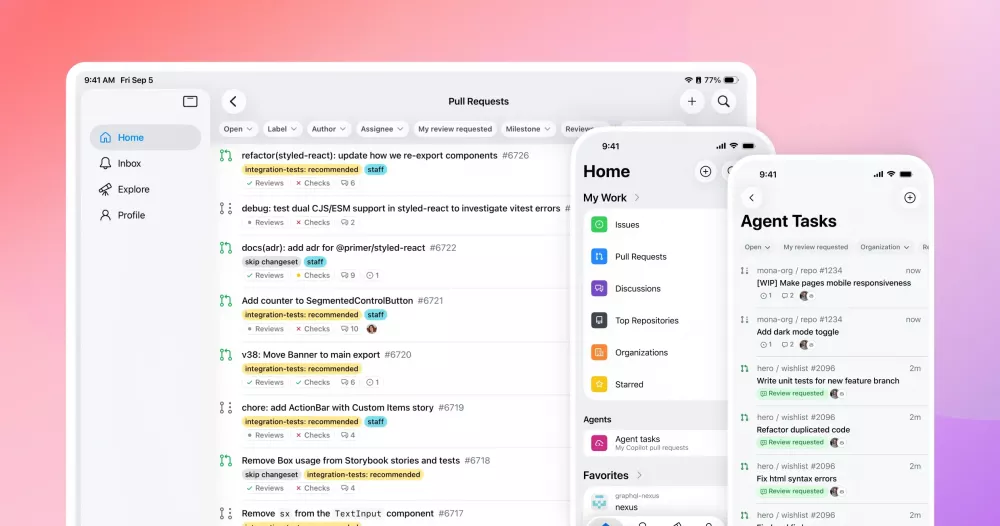
GitHub Mobile is an official Android and iOS application that allows you to triage, collaborate, and manage your work on GitHub from anywhere. It provides a secure way to stay connected to your projects, manage notifications, review code, and interact with your team directly from your mobile device, integrating high-impact work into your daily workflow.
Core Capabilities
The following actions are supported within the GitHub Mobile app:
- Manage, triage, and clear your notifications.
- Read, review, and collaborate on issues and pull requests.
- Edit files within pull requests.
- Search for, browse, and interact with users, repositories, and organizations.
- Receive a push notification when someone mentions your username.
- Search through code within a specific repository.
- Secure your GitHub.com account by using the app as a method for two-factor authentication.
- Verify your sign-in attempts on unrecognized devices.
- Use GitHub Copilot Chat to ask and receive answers to coding-related questions.
- Assign issues to GitHub Copilot to generate a pull request.

Installation & Setup
- Download: Install “GitHub Mobile” from the Apple App Store for iOS or the Google Play Store for Android.
- Social Login (Limited Availability): You can sign in using Google or Apple as a social login provider, but only if your GitHub account was originally created using that same provider. This feature is only for GitHub Free and GitHub Enterprise Cloud users.
- Multiple Account Support: You can be signed into multiple accounts simultaneously, including accounts on GitHub.com, GitHub Enterprise Cloud (
SUBDOMAIN.ghe.com), and GitHub Enterprise Server.- To add an account, long-press the Profile tab at the bottom of the app and tap Add Enterprise Account.
- To switch between active accounts, long-press the Profile tab and select the desired account.
- To sign out, long-press the Profile tab, swipe left on the account name, and tap Sign out.
Key Features in Detail
Notifications & Collaboration
- Stay informed of required actions through push notifications.
- Triage and clear notification queues from your mobile device.
- Fully participate in issues and pull request conversations: read, comment, and review.
Code Search & Review
- Use global search to find code snippets across GitHub.
- Review pull request diffs, add comments, and approve or request changes.
- Make quick, direct edits to files from within an open pull request.
GitHub Copilot Integration
- Copilot Chat: Converse with Copilot in natural language to break down concepts, get code explanations, or guide you through unfamiliar code in both public and private repositories.
- Agent Tasks: Manage Copilot coding agent tasks centrally within the mobile app. Start new tasks and monitor progress.
- Automated Code Review: Assign Copilot to analyze a pull request from your phone. It will suggest improvements to catch bugs and ensure best practices.
- Generate PRs from Issues: Assign an existing issue to Copilot. The agent will create a ready-to-review pull request, which you can then refine, approve, and merge from within the mobile app.
Security & Authentication
- The app can serve as a secure, trusted method for two-factor authentication (2FA) on GitHub.com.
- Receive and verify sign-in attempts for unrecognized devices directly through the app.
Configuration & Settings
Language Support
GitHub Mobile is available in the following languages: English, Spanish, Japanese, Brazilian Portuguese, Simplified Chinese, Korean, and German. The app defaults to your device’s language if it is supported. You can change the language within the GitHub Mobile Settings menu.
Universal Links on iOS
- Universal Links are automatically enabled. Tapping any GitHub link will open it directly in the GitHub Mobile app instead of Safari.
- To Disable: Long-press any GitHub link and tap “Open”. Future links from the same GitHub instance will open in Safari.
- To Re-enable: Long-press a GitHub link and tap “Open in GitHub.”
Enterprise & Advanced Configuration
- GitHub Enterprise Cloud (with Data Residency): Requires GitHub Mobile app version iOS 1.182.0 or Android 1.178.0 at a minimum.
- GitHub Enterprise Server:
- Prerequisites: You must have GitHub Mobile version 1.4 or later installed. Your GitHub Enterprise Server instance must be version 3.0 or greater, and the enterprise owner must have enabled mobile support.
- Note: Push notifications on Enterprise Server use background fetch and may be delayed. The app may not work if your enterprise requires VPN access.
Feedback & Previews
- Providing Feedback: Submit feature requests or feedback via the GitHub Community forums.
- Leaving iOS Previews: If testing a public preview release via TestFlight, you can leave at any time. Open the TestFlight app, tap “GitHub” under “Apps,” and tap “Stop Testing” at the bottom of the page.
References
https://docs.github.com/en/get-started/using-github/github-mobile
🔥 $1.99 eBooks and $4.99 Video Claude Reviewers
Turn Your Team Into Cloud-Ready Professionals Today

Learn AWS with our PlayCloud Hands-On Labs

$2.99 AWS and Azure Exam Study Guide eBooks

Learn GCP By Doing! Try Our GCP PlayCloud

Learn Azure with our Azure PlayCloud

FREE AI and AWS Digital Courses

FREE AWS, Azure, GCP Practice Test Samplers


Subscribe to our YouTube Channel

Follow Us On Linkedin


Written by: Joshua Emmanuel Santiago




