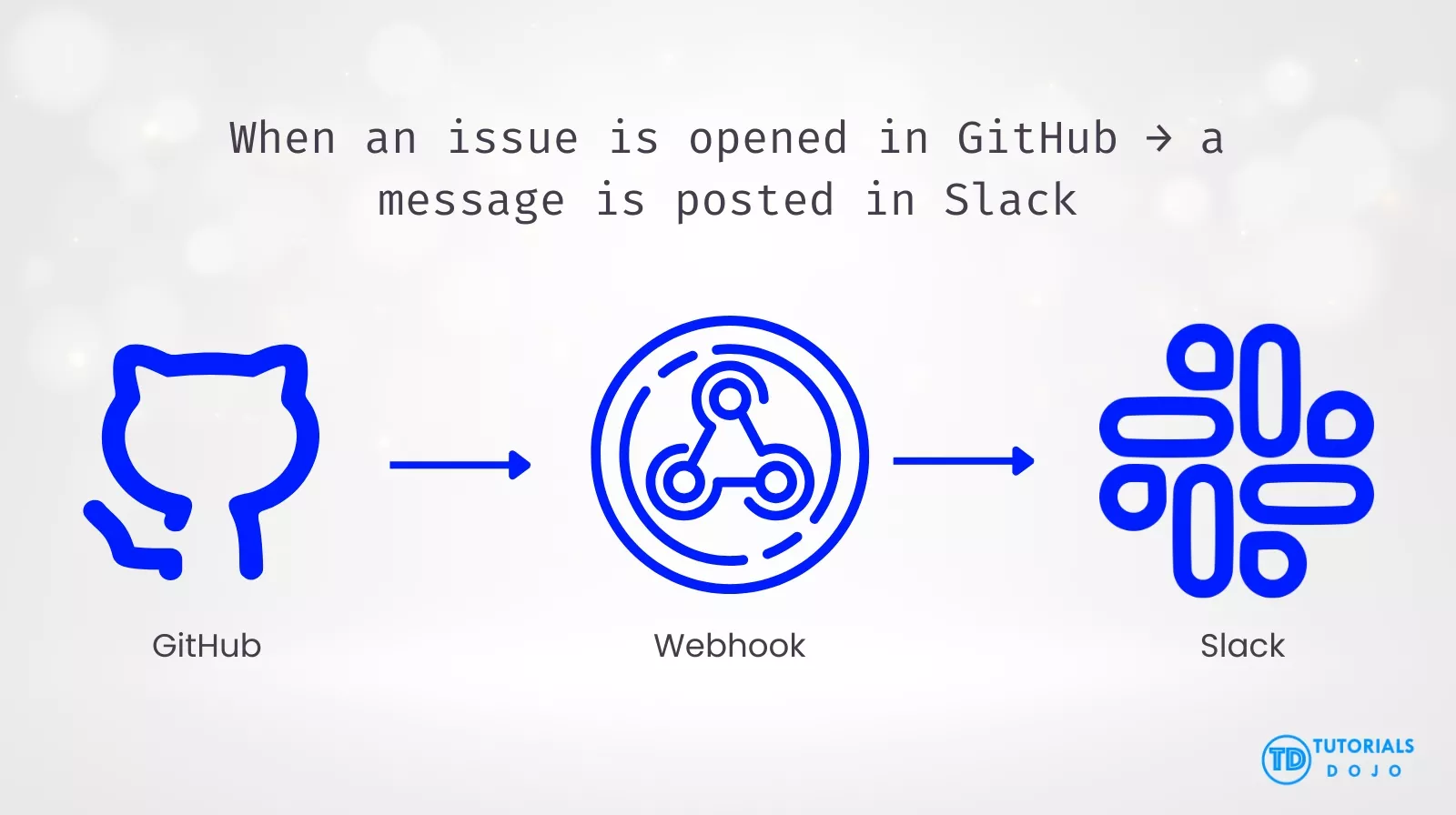
GitHub integrations are tools and applications that extend GitHub functionality by connecting repositories, organizations, and events with external services.
They help:
Automate workflows
Improve collaboration
Sync data across tools
Trigger actions inside or outside GitHub based on events
Example:
Where to Find Integrations
GitHub Marketplace
The GitHub Marketplace is the main hub for integrations and includes:
GitHub Apps
OAuth Apps
GitHub Actions
Custom Actions
Integrations can also be distributed directly by creators outside the Marketplace.
Featured GitHub Integrations
Category
Integration
What It Does
Key Capabilities
Editor Tools
GitHub for Visual Studio
Integrates GitHub repositories directly into Visual Studio
Manage repositories, commits, branches, and pull requests without leaving Visual Studio
GitHub for Visual Studio Code
Enables GitHub collaboration features inside VS Code
Review and manage pull requests, comment on issues, and track repository activity within Visual Studio Code
Project Management Tools
Jira Cloud and GitHub Integration
GitHub for Visual Studio
Scans commits and pull requests, automatically links GitHub references, and adds metadata to Jira issues
Team Communication Tools
Slack and GitHub Integration
Connects GitHub activity with Jira issues
Real-time notifications for issues, PRs, commits, discussions, releases, GitHub Actions, and deployments; supports issue management from Slack
Microsoft Teams and GitHub Integration
Bring GitHub notifications and actions into Teams
Subscribe to repositories, manage issues and PRs, approve deployments, and receive mentions in Microsoft Teams
AI-Enhanced Communication
GitHub Copilot Coding Agent for Teams
Provides AI-assisted coding within Microsoft Teams
Enables AI-powered coding help, code suggestions, and contextual assistance directly in team conversations
Building GitHub Integrations
Integrations are tools that extend GitHub by enabling automation and interaction with repositories, issues, pull requests, and projects.
These tools can perform actions within GitHub, such as opening issues, commenting on pull requests, or managing projects. They can also trigger actions outside of GitHub in response to GitHub events, enabling event-driven workflows across external systems.
Types of Integrations
Type
Description
GitHub Apps
Run on the developer’s server or device
GitHub Actions Workflows
Event-driven automation inside GitHub
Custom Actions
Reusable code executed by workflows
APIs Used by Integrations
GitHub provides two main APIs:
REST API – Resource-based, straightforward
GraphQL API – Flexible queries, fewer requests
Used to:
Fetch repository data
Create or update issues
Manage pull requests and projects
Webhooks
Notify integrations when events occur
Examples:
Issue opened
Pull request merged
Workflow completed
Enables real-time, event-driven automation
Publishing Integrations
If the integration is a:
GitHub App
GitHub Action
Custom Action
It can be published to GitHub Marketplace for discovery and reuse.
Integrations with AI
GitHub supports generative AI integrations
Developers can prototype with AI models directly on GitHub
Often combined with Actions or Apps for automation and insights
GitHub Developer Program
What Is It?
A program for developers and companies building tools that integrate with GitHub.
Benefits
Developer recognition
Enterprise testing licenses
Visibility for integrations
Eligibility Requirements
To join, you must have:
An integration (production or in development) using GitHub APIs
A support contact email for GitHub users
Promotion Tips
Use GitHub or Octocat branding
Publish blog posts or videos
Showcase how the integration works with GitHub
CONCLUSION
GitHub integrations play a critical role in extending GitHub’s core capabilities beyond source control. By connecting repositories, organizations, and events with external tools, integrations enable automation, collaboration, and event-driven workflows both inside and outside GitHub.
Whether using GitHub Apps, GitHub Actions, custom actions, APIs, or webhooks, integrations allow teams to:
Streamline development and delivery pipelines
Improve visibility and communication across tools
React in real time to repository events
Embed AI-driven capabilities into workflows
With discovery through GitHub Marketplace and support from the GitHub Developer Program, integrations can scale from simple automations to enterprise-grade platforms. Understanding how integrations are built, published, and used is essential for modern DevOps, platform engineering, and cloud-native development.
Turn Your Team Into Cloud-Ready Professionals Today
Learn AWS with our PlayCloud Hands-On Labs
$2.99 AWS and Azure Exam Study Guide eBooks
Learn GCP By Doing! Try Our GCP PlayCloud
Learn Azure with our Azure PlayCloud
FREE AI and AWS Digital Courses
FREE AWS, Azure, GCP Practice Test Samplers
Subscribe to our YouTube Channel
Follow Us On Linkedin
Written by: Ace Kenneth Batacandulo
Ace is AWS Certified, AWS Community Builder, and Cloud Consultant at Tutorials Dojo Pte. Ltd. He is also the Co-Lead Organizer of K8SUG Philippines and a member of the Content Committee for Google Developer Groups Cloud Manila. Ace actively contributes to the tech community through his volunteer work with AWS User Group PH, GDG Cloud Manila, K8SUG Philippines, and Devcon PH. He is deeply passionate about technology and is dedicated to exploring and advancing his expertise in the field.
AWS, Azure, and GCP Certifications are consistently among the top-paying IT certifications in the world, considering that most companies have now shifted to the cloud. Earn over $150,000 per year with an AWS, Azure, or GCP certification!
Follow us on LinkedIn, YouTube, Facebook, or join our Slack study group. More importantly, answer as many practice exams as you can to help increase your chances of passing your certification exams on your first try!
Around 95-98% of our students pass the AWS Certification exams after training with our courses.
200k+
students
Over 200k enrollees choose Tutorials Dojo in preparing for their AWS Certification exams.
~4.8
ratings
Our courses are highly rated by our enrollees from all over the world.
What our students say about us?
I’m deeply impressed by the quality of the practice tests from Tutorial Dojo. They are extremely well-written, clean and on-par with the real exam questions. Their practice tests and cheat sheets were a huge help for me to achieve 958 / 1000 — 95.8 % on my first try for the AWS Certified Solution Architect Associate exam. Perfect 10/10 material. The best $14 I’ve ever spent!
S. M. Shoaib
Khulna, Bangladesh
Given the enormous number of students and therefore the business success of Jon's courses, I was pleasantly surprised to see that Jon personally responds to many, including often the more technical questions from his students within the forums, showing that when Jon states that teaching is his true passion, he walks, not just talks the talk. I much respect and thank Jon Bonso.
Rowan Williams
Brisbane, Australia
The explanation to the questions are awesome. Lots of gap exposed in my learning. I used the practice tests along with the TD cheat sheets as my main study materials. This is a must training resource for the exam.
Using the practice exam helped me to pass. I think I wouldn't have passed if not for Jon's practice sets.
Jessica Chen
Guangzhou, China
I can say that Tutorials Dojo is a leading and prime resource when it comes to the AWS Certification Practice Tests. I also tried other courses but only Tutorials Dojo was able to give me enough knowledge of Amazon Web Services. My favorite part of this course is explaining the correct and wrong answers as it provides a deep understanding in AWS Cloud Platform. The course I purchased at Tutorials Dojo has been a weapon for me to pass the AWS Certified Solutions Architect - Associate exam and to compete in Cloud World. A Big thank you to Team Tutorials Dojo and Jon Bonso for providing the best practice test around the globe!!!