
The AB-730 Microsoft Certified AI Business Professional certification exam is designed for individuals who want to demonstrate their ability to use generative AI tools to improve productivity, support business decision-making, and enhance everyday workflows. Candidates are expected to understand how AI-powered experiences—such as Microsoft 365 Copilot—assist in creating, summarizing, and analyzing business content across various applications.
A foundational understanding of Microsoft 365 applications is expected for this role, including familiarity with tools such as Word, Excel, PowerPoint, Outlook, and Microsoft Teams. Candidates should be comfortable performing common business tasks, such as drafting content, summarizing information, generating insights, and collaborating with others, using AI assistance. In addition, candidates should understand responsible AI practices, including data protection, privacy, and how AI systems use organizational data securely.
For more information about the AB-730 exam, you can check out this exam skills outline. This study guide will provide comprehensive review materials to help you pass the exam successfully.
AB-730 Exam Domains
Below are the exam domains, or “Skills Measured,” for the AB-730 Microsoft Certified AI Business Professional certification exam. These domains represent the core competencies that candidates are expected to demonstrate when using generative AI-powered tools within the Microsoft ecosystem to enhance productivity, support business outcomes, and assist in decision-making.
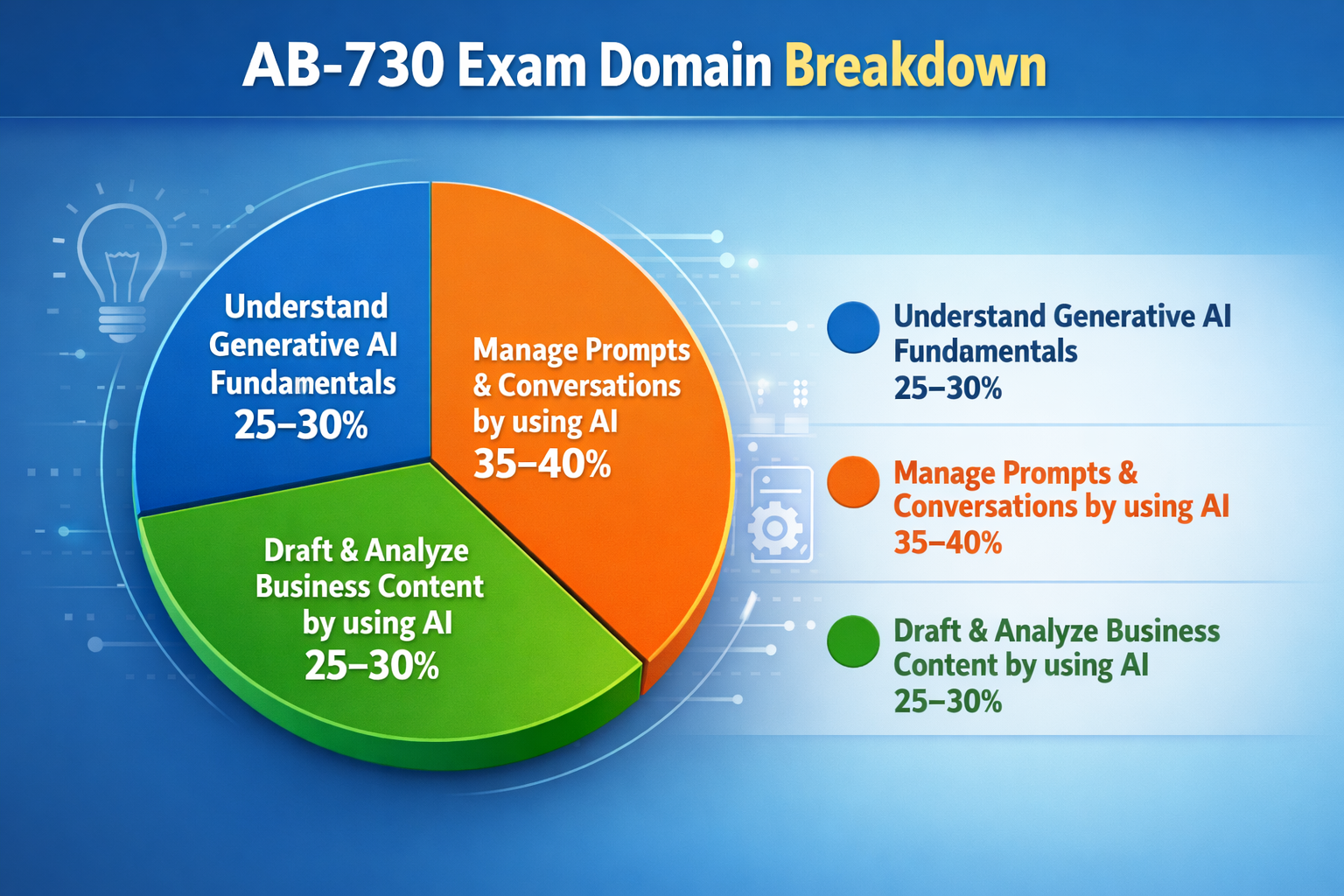
- Understand generative AI fundamentals (25–30%)
- Manage prompts and conversations by using AI (35–40%)
- Draft and analyze business content by using AI (25–30%)
AB-730 Study Materials
Before attempting the AB-730 Microsoft Certified AI Business Professional certification exam, it is highly recommended to review the following study materials. These resources are designed to help candidates understand the key concepts, tools, and services that are commonly evaluated in the certification. By studying these materials in advance, candidates can strengthen their knowledge of machine learning operations, automation, and deployment practices within the Microsoft ecosystem.
- Tutorials Dojo’s Azure Cheat Sheets — Quick reference guides that summarize key Azure services and concepts commonly covered in certification exams.
- Azure PlayCloud Hands-On Labs — Guided labs that allow you to practice deploying and managing Azure resources in a real environment.
- Azure Practice Exams — Our very own set of practice exams that are designed to help evaluate your readiness for the certification and identify topics that require further study.
- Microsoft Official Documentation and Learning Resources:
- Artificial Intelligence overview
- Generative AI documentation
- Microsoft 365 Copilot documentation
- Microsoft 365 documentation
- Microsoft Q&A | Microsoft Docs
- Microsoft 365 Copilot community hub
Microsoft 365 community hub - Microsoft Learn – Microsoft Tech Community
- Exam Readiness Zone
- Microsoft Learn Show
- Azure Blog
- Azure Free Account — Enables you to explore Azure services and gain hands-on experience while preparing for the exam.
Azure Services to Focus on for the AB-730 Exam
Here is the list of Azure services that you have to focus on for your upcoming AB-730 Microsoft Certified AI Business Professional:
Microsoft 365 Copilot
- Understand Copilot integration across Microsoft 365 apps (Word, Excel, PowerPoint, Outlook, Teams).
- Configure and manage Copilot settings, ensuring AI works within organizational policies.
- Manage data privacy and security to ensure AI-generated responses comply with organizational guidelines.
- Enable AI-driven content creation, summarization, and analysis across applications.

Microsoft Graph
- Leverage Microsoft Graph for integrating organizational data into Copilot workflows.
- Understand how Copilot uses Microsoft Graph to provide contextual, AI-driven responses based on business data.
Copilot Agents
- Creating, configuring, and sharing AI agents within the Microsoft 365 ecosystem
- Managing agent settings, prompts, and capabilities to optimize workflows and content creation
Copilot Studio
- Leverage Copilot Studio to design and customize AI models and agents tailored to specific business needs.
- Configure and fine-tune AI agents to optimize their performance and functionality, ensuring they align with organizational workflows and goals.
- Manage and orchestrate workflows, enabling efficient content creation and enhancing productivity with AI-powered tools across Microsoft 365 apps.
Microsoft Entra ID
- Configure identity and access management (IAM) for Copilot to ensure secure and compliant use of AI tools within the organization
- Implementing role-based access control (RBAC) for managing access permissions for AI-driven tasks
AB-730 Key Exam Topics by Domain
Understand Generative AI Fundamentals
- Understand generative AI capabilities across Microsoft 365 apps like Word, Excel, PowerPoint, Outlook, and Teams
- Learn how Microsoft 365 Copilot utilizes organizational data securely to generate AI-driven responses using Microsoft Graph
- Understand how AI models in Microsoft 365 help enhance productivity through context-aware tasks
- Explore the difference between a chat experience and an agent experience in AI-driven applications
Manage Prompts and Conversations by Using AI
- Create and manage effective prompts for Microsoft 365 Copilot to support content generation, summarization, and task automation
- Understand how to schedule, share, and save prompts for efficiency and repeatability
- Manage and organize conversations within Copilot, including renaming, deleting, and saving chats for future reference
- Create and manage Copilot agents, including configuring settings, defining capabilities, and using templates
- Share Copilot agents within teams to facilitate collaboration and ensure business alignment
Draft and Analyze Business Content by Using AI
- Leverage Copilot to draft business documents and communications, either from scratch or by generating content based on existing documents
- Generate management summaries and insights from large documents or meeting notes to support decision-making
- Facilitate seamless data transfer and insights movement between Microsoft 365 apps, enhancing business workflows
- Use Copilot in meetings and collaboration, generating summaries, managing meeting agendas, and providing follow-up tasks
- Collaborate using Copilot Pages to enhance team productivity, share content, and store knowledge
AB-730 Important Skills to Focus on
Generative AI Infrastructure Setup
- Understand the capabilities of Microsoft 365 Copilot and its integration across apps like Word, Excel, PowerPoint, Outlook, and Teams.
- Manage Copilot settings and ensure secure access to organizational data using tools like Microsoft Entra ID.
- Implement role-based access control (RBAC) and data protection measures for secure use of generative AI tools.
Business Content Generation and Management
- Create and manage prompts for Microsoft 365 Copilot to streamline content creation, summarization, and task automation.
- Manage and organize conversations within Copilot to enhance productivity.
- Generate business documents and communications using Copilot’s AI-driven capabilities.
- Move data and insights seamlessly between Microsoft 365 apps to support business workflows.
Generative AI Optimization and Quality Evaluation
- Apply responsible AI practices and assess the quality of AI-generated content using metrics like relevance, coherence, and groundedness.
- Ensure data privacy and security while using Copilot to generate or analyze business content.
- Use Copilot Pages to collaborate and share content while maintaining control over sensitive information.
Collaboration and Workflow Management
- Use Copilot for meetings to assist with agenda management, summary generation, and task assignment.
- Create and manage Copilot agents for personalized AI interactions within business workflows.
- Implement role-based access control (RBAC) and data protection measures for secure use of generative AI tools.
Generative AI Infrastructure Setup
- Understand the capabilities of Microsoft 365 Copilot and its integration across apps like Word, Excel, PowerPoint, Outlook, and Teams.
- Manage Copilot settings and ensure secure access to organizational data using tools like Microsoft Entra ID.
- Monitor and optimize AI-powered workflows to ensure efficient collaboration and content delivery.
Validate Your AB-730 Exam Readiness
If you feel confident after going through the suggested materials above, it’s time to put your knowledge of different Azure concepts and services to the test. For top-notch practice exams, consider using the Tutorials Dojo’s AB-730 Microsoft Certified AI Business Professional Practice Exams.
These practice tests cover the relevant topics that you can expect from the real exam. It also contains different types of questions, such as single-choice, multiple-response, hotspot, yes/no, and drag-and-drop. Every question on these practice exams has a detailed explanation and adequate reference links that help you understand why the correct answer is the most suitable solution. After you’ve taken the exams, it will highlight the areas you need to improve. Together with our cheat sheets, we’re confident that you’ll be able to pass the exam and have a deeper understanding of how Azure works.
AB-730 Sample Practice Test Questions:
Question 1
You frequently use the same prompt in Microsoft 365 Copilot to summarize your daily emails. You want to avoid retyping the prompt every day.

What should you do after successfully running the prompt?
- Copy the prompt text into a OneNote page.
- Hover over the prompt and select the bookmark icon to save it.
- Schedule the prompt to run each morning automatically.
- Add the prompt to a Copilot notebook.
Correct Answer: 2
The Copilot Prompt Gallery is Microsoft’s built-in feature for managing reusable prompts within Microsoft 365 Copilot. It serves as a centralized catalog where users can find Microsoft-curated prompts, as well as save and organize their own. Saving prompts is an ideal way to streamline your daily tasks. If you frequently use a specific prompt, you can save it for future use, eliminating the need to retype it each time, to help make your workflow easier and more organized. The Prompt Gallery organizes saved prompts under three tabs — Microsoft prompts (curated by Microsoft), Your prompts (privately saved by the user), and Team prompts (shared with a Microsoft Teams group).
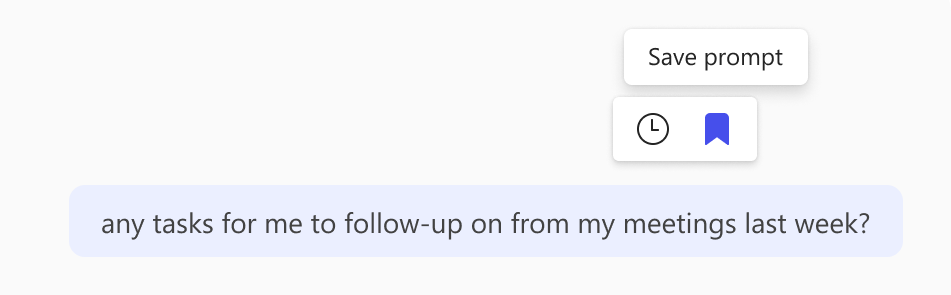
The scenario describes a user who wants to avoid retyping a frequently used prompt, making the Save Prompt feature the most direct and purpose-built solution. Once the prompt has successfully run, hover over the prompt to reveal the bookmark icon, then click Save prompt. This will add the prompt to the Your prompts tab in the Copilot Prompt Gallery. You will also have the option to edit the title of the prompt, for example, giving it a more descriptive name like “Daily Email Summary and Action Items” to make it easier to identify later. This is the official, supported method for preserving and reusing prompts natively within Copilot, requiring no additional tools or apps.
Hence, the correct answer is: Hover over the prompt and select the bookmark icon to save it.
The option that says: Copy the prompt text into a OneNote page is incorrect because OneNote is simply a note-taking application and has no integration with Microsoft 365 Copilot. Copying a prompt there does not save it inside Copilot, and the user would still need to manually retype or paste the prompt every time they want to use it, which defeats the purpose of the scenario.
The option that says: Schedule the prompt to run each morning automatically is incorrect because scheduling a prompt is not the same as saving it for on-demand reuse. Scheduling is primarily designed to run a prompt automatically at a set time without user intervention, it does not solve the problem of avoiding retyping when the user wants to run the prompt manually at any time of their choosing.
The option that says: Add the prompt to a Copilot notebook is incorrect because a Copilot notebook is designed to organize reference materials and group related conversations, not to store reusable prompts. Adding a prompt to a notebook does not make it retrievable or reusable from the Prompt Gallery, and it cannot be run again with a single click the way a saved prompt can.
References:
https://support.microsoft.com/en-us/topic/how-to-save-prompts-55373730-2627-46a5-b0d8-772abe22dba4
https://learn.microsoft.com/en-us/copilot/microsoft-365/copilot-prompt-gallery
Check out this Microsoft 365 Copilot Cheat Sheet:
Question 2
You use Microsoft 365 Copilot Chat for daily tasks. You need to discuss sensitive information without allowing Copilot to retain, reuse, or reference the conversation. The discussion must also not appear in chat history.
Which action should you take to meet this requirement?
- Disable Copilot memory settings for the entire organization.
- Use a standard Copilot chat, then remove the conversation from the chat history afterwards.
- Start a temporary chat session in Copilot Chat.
- Clear Copilot memory after completing the conversation.
Correct Answer: 3
Temporary Chat in Microsoft 365 Copilot is a feature that allows users to start a conversation without using or updating Copilot’s memory. In this mode, Copilot does not retain personalized information from the interaction, and the conversation is not saved in chat history or made available for future reference. This capability is designed to give users more control over privacy and personalization while still enabling them to use Copilot for one-time or sensitive discussions. Temporary Chat ensures that the interaction remains isolated from Copilot’s ongoing context, preventing any stored preferences or prior data from influencing or being influenced by the session.
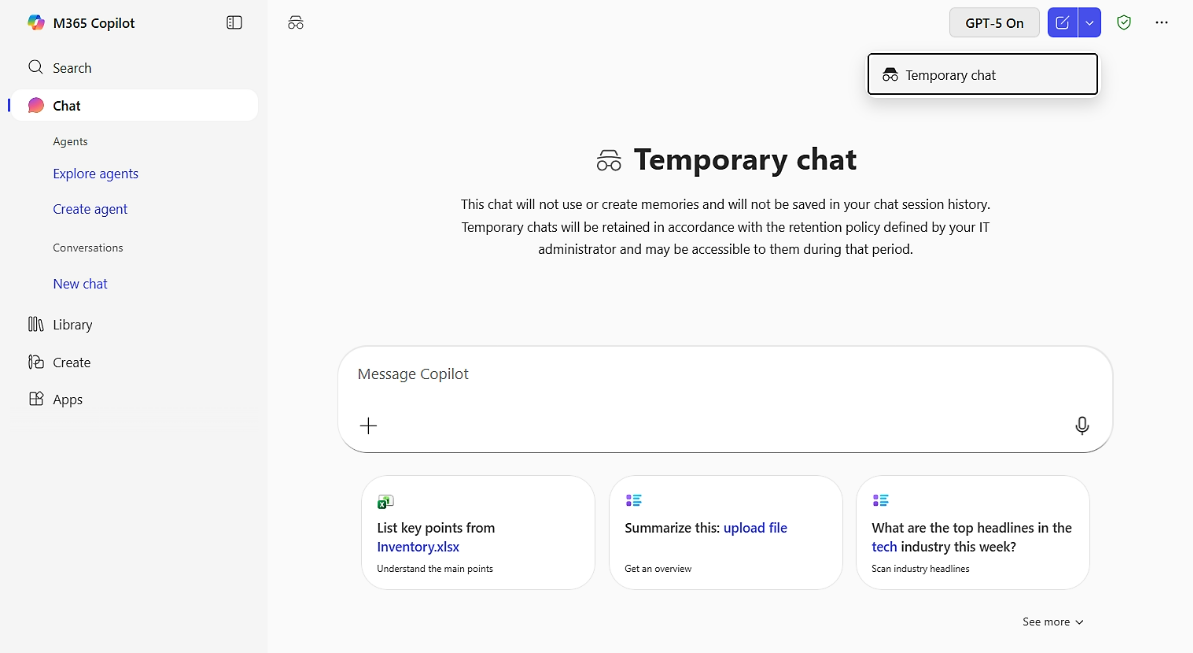
The scenario requires a way to discuss sensitive information without allowing Copilot to retain, reuse, or reference any part of the conversation, while also ensuring that the discussion does not appear in chat history. Temporary Chat directly satisfies these requirements because it prevents memory usage from the start and avoids storing the conversation in the user’s accessible history. Unlike approaches that attempt to delete or manage stored data after the interaction, this feature ensures that no data is persisted in Copilot’s memory or visible chat history in the first place, making it the most appropriate solution for handling sensitive or one-time discussions.
Hence, the correct answer is: Start a temporary chat session in Copilot Chat.
The option that says: Disable Copilot memory settings for the entire organization is incorrect because this change primarily affects personalization across all users and sessions, which is unnecessary when the requirement is limited to preventing retention of a single conversation.
The option that says: Use a standard Copilot chat, then remove the conversation from the chat history afterwards is incorrect because this approach typically removes only the visible record from the user interface, while the interaction may still be processed or retained according to organizational data retention policies.
The option that says: Clear Copilot memory after completing the conversation is incorrect because this action simply removes stored preferences or learned context after the interaction has already occurred, and it does not prevent the conversation from being recorded in chat history or used during the session.
References:
https://www.microsoft.com/en-us/microsoft-365/roadmap/copilotchat
Check out this Microsoft 365 Copilot Cheat Sheet:
For more Azure practice exam questions with detailed explanations, check out the Tutorials Dojo Portal:


Final Remarks
Success in the AB-730 exam requires both conceptual knowledge and practical experience in using generative AI tools like Microsoft 365 Copilot to enhance business workflows. Focus your preparation on the official Microsoft Learn materials and reinforce your understanding through hands-on practice with Microsoft 365 Copilot, Microsoft Graph, and Copilot Agents. Additionally, familiarize yourself with data protection and responsible AI practices to ensure AI-generated content aligns with organizational policies. Practice exams will also help assess your readiness and identify areas for improvement. By following this focused study approach, you will be well-prepared to earn the Microsoft Certified AI Business Professional certification. Good luck with your preparation!
🔥 $1.99 eBooks and $4.99 Video Claude Reviewers
Turn Your Team Into Cloud-Ready Professionals Today

Learn AWS with our PlayCloud Hands-On Labs

$2.99 AWS and Azure Exam Study Guide eBooks

Learn GCP By Doing! Try Our GCP PlayCloud

Learn Azure with our Azure PlayCloud

FREE AI and AWS Digital Courses

FREE AWS, Azure, GCP Practice Test Samplers


Subscribe to our YouTube Channel

Follow Us On Linkedin


Written by: Lois Angelo Dar Juan




