Ends in
00
days
00
hrs
00
mins
00
secs
ENROLL NOW

🐰 25% OFF Easter Sale! Use code TDPLAYCLOUD-04022026 for 10% OFF ALL PlayClouds Subscription & 5% OFF gift cards!

From Render to Revenue: Automating Your Creative Workflow with AWS and Python

Home » BLOG » From Render to Revenue: Automating Your Creative Workflow with AWS and Python

From Render to Revenue: Automating Your Creative Workflow with AWS and Python

As a content creator, your value lies in your vision, not in the three hours you spend renaming files, transcoding 4K footage into proxies, or manually uploading clips to five different social platforms.

In the industry, we call the repetitive, soul-crushing tasks “undifferentiated heavy lifting.” In this article, we’ll show you how to use Python and AWS Step Functions to build an automated pipeline that handles the “boring stuff,” giving you more time to focus on the craft.

The “Creative Bottleneck” Problem

Most multimedia artists follow a manual path:

render-to-revenue-featured-image

  1. Shoot/Generate: Create the raw assets.
  2. Organize: Manually rename IMG_9421.mp4 to Scene1_Take1.mp4.
  3. Process: Open a transcoder to create smaller files for editing.
  4. Distribute: Upload to various platforms one by one.

If any of these steps fail or take too long, your creative momentum dies. Automation changes the game.

The Solution: A Serverless Media Pipeline

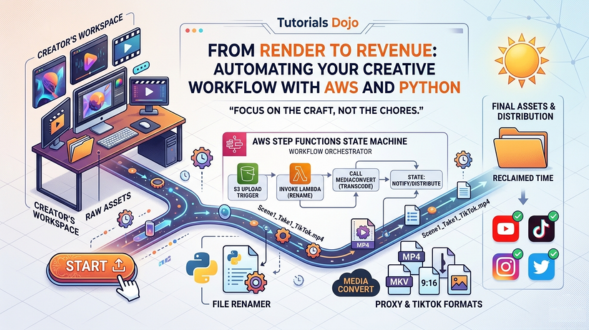
We can build a system where you simply drop a file into a folder, and the cloud does the rest. Here is the architecture:

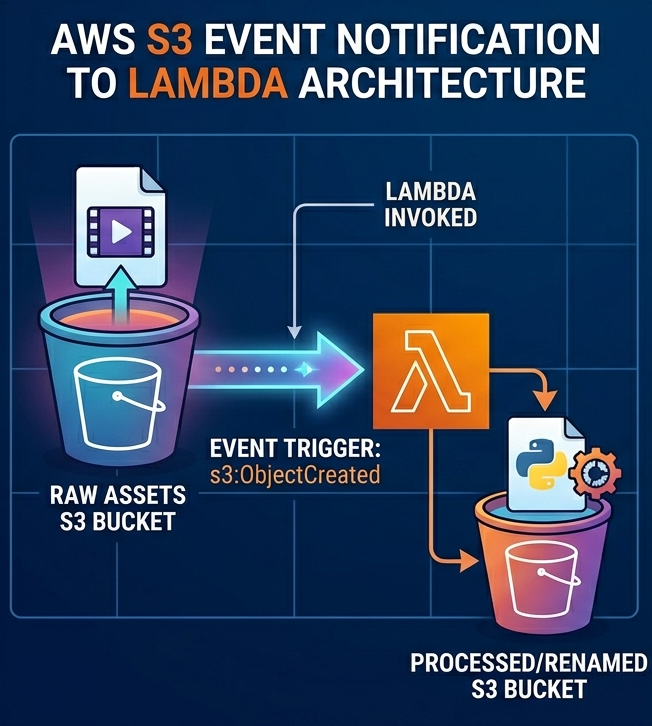
1. The Trigger: Amazon S3

You upload your raw footage to an Amazon S3 bucket. This acts as your “Inbox.” The moment a file lands, it triggers a notification.

2. The Brain: AWS Step Functions

Think of AWS Step Functions as your “Production Manager.” It’s a visual workflow orchestrator that tells different services what to do and in what order. If the transcoding fails, Step Functions can “retry” the task or send you an alert.

Tutorials dojo strip

3. The Muscles: AWS Lambda & MediaConvert

  • AWS Lambda (Python): A small script runs to rename your files based on metadata or timestamps.
  • AWS Elemental MediaConvert: This is a pro-grade tool that automatically changes your 4K raw video into a TikTok-ready 9:16 format or a low-res proxy for your editor.

Step-by-Step: Automating File Renaming with Python
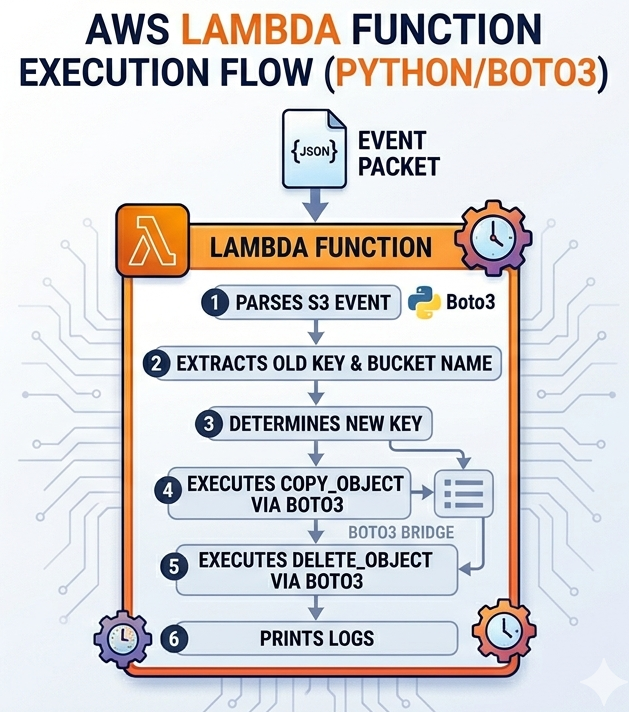
Here’s a simple look at how a Python Lambda function can clean up your files automatically. This script triggers whenever a new file is uploaded to your S3 bucket.


import boto3

import os

def lambda_handler(event, context):

    s3 = boto3.client('s3')

    # Get the bucket and file name from the event

    bucket = event['Records'][0]['s3']['bucket']['name']

    old_key = event['Records'][0]['s3']['object']['key']

    # Define your new naming convention (e.g., Project_Date_Filename)

    new_key = f"processed/ProjectX_{old_key}"

    # Copy the object to the new name and delete the old one

    s3.copy_object(Bucket=bucket, CopySource={'Bucket': bucket, 'Key': old_key}, Key=new_key)

    s3.delete_object(Bucket=bucket, Key=old_key)

    print(f"Renamed {old_key} to {new_key}")

Why This Matters for the “Modern Creator”

By implementing a “Dojo-style” automated workflow, you gain three major advantages:

  • Consistency: Every file is named and formatted exactly the same way, every time. No more “Final_v2_REAL_FINAL.mp4.”
  • Scalability: Whether you upload 1 video or 1,000, the cloud handles it all simultaneously.
  • Cost-Efficiency: With AWS Serverless, you only pay for the seconds it takes to process your files. If you aren’t creating, you aren’t paying.


Final Thought: Master the Tools, Free the Talent

The most successful creators in the AI era won’t just be the ones who can prompt the best—they will be the ones who build systems to handle the volume. Using AWS to automate your workflow isn’t just a technical skill; it’s a creative superpower.


Sources:

🐰 25% OFF Easter Sale! Use code TDPLAYCLOUD-04022026 for 10% OFF ALL PlayClouds Subscription & 5% OFF gift cards!

Tutorials Dojo portal

Learn AWS with our PlayCloud Hands-On Labs

$2.99 AWS and Azure Exam Study Guide eBooks

tutorials dojo study guide eBook

New AWS Generative AI Developer Professional Course AIP-C01

AIP-C01 Exam Guide AIP-C01 examtopics AWS Certified Generative AI Developer Professional Exam Domains AIP-C01

Learn GCP By Doing! Try Our GCP PlayCloud

Learn Azure with our Azure PlayCloud

FREE AI and AWS Digital Courses

FREE AWS, Azure, GCP Practice Test Samplers


SAA-C03 Exam Guide SAA-C03 examtopics AWS Certified Solutions Architect Associate

Subscribe to our YouTube Channel

Tutorials Dojo YouTube Channel

Follow Us On Linkedin

Written by: Daniel Gerodias

Multimedia Arts Student at MMCL | Filmmaker & Visual Storyteller > I’m a storyteller at heart, currently honing my craft in Film at Mapúa Malayan Colleges Laguna. My work sits at the intersection of cinematic tradition and modern multimedia, focusing on directing and the technical nuances of post-production. I believe every frame is an opportunity to innovate, and I’m constantly exploring how new media can elevate the art of the moving image.

AWS, Azure, and GCP Certifications are consistently among the top-paying IT certifications in the world, considering that most companies have now shifted to the cloud. Earn over $150,000 per year with an AWS, Azure, or GCP certification!

Follow us on LinkedIn, YouTube, Facebook, or join our Slack study group. More importantly, answer as many practice exams as you can to help increase your chances of passing your certification exams on your first try!

View Our AWS, Azure, and GCP Exam Reviewers Check out our FREE courses

Our Community

~98%
passing rate
Around 95-98% of our students pass the AWS Certification exams after training with our courses.
200k+
students
Over 200k enrollees choose Tutorials Dojo in preparing for their AWS Certification exams.
~4.8
ratings
Our courses are highly rated by our enrollees from all over the world.

What our students say about us?