
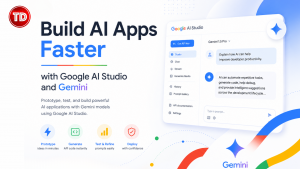
Artificial intelligence has become an essential part of modern software development. It helps developers build applications that understand natural language, generate content, analyze documents, write code, and automate complex tasks. While large language models (LLMs) make these features easier to use, integrating them into real applications still takes time. Developers must configure API authentication, choose the right model, design prompts, and set up supporting infrastructure before they can start building.
Google AI Studio simplifies this process. It provides a browser-based environment where developers can test Gemini models without writing integration code first. They can prototype prompts, compare responses, generate API code, and explore multimodal features in minutes. Combined with the Gemini API, Google AI Studio helps developers move from experimentation to production much faster.
What Is Google AI Studio?
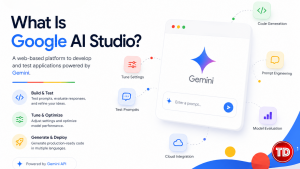
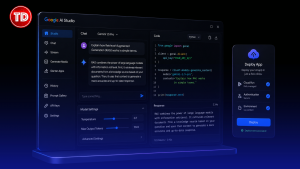
Google AI Studio is Google’s web-based platform for developing and testing applications powered by Gemini. It acts as an interactive playground where developers can test prompts, evaluate model responses, adjust generation settings, and generate production-ready code in several programming languages.
Instead of replacing traditional integrated development environments (IDEs), Google AI Studio works alongside them. Developers can refine prompts before adding them to backend services or client applications. This approach saves development time and makes prompt engineering much easier.
Because the platform connects directly to the Gemini API, developers can move from prototype to production without redesigning their application architecture.
Understanding Gemini Models
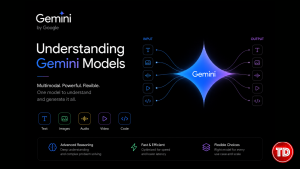
Gemini is Google’s family of multimodal foundation models. These models can understand and generate text, images, audio, video, and code. Unlike earlier language models that focused mainly on text, Gemini can process several types of input within a single model.
Developers can choose from different Gemini models based on their application needs. Some models focus on advanced reasoning, while others provide faster responses or lower operating costs. This flexibility makes Gemini suitable for chatbots, document analysis, software development, workflow automation, and many other AI-powered applications.
Why Developers Use Google AI Studio
One of Google AI Studio’s biggest advantages is its fast development workflow. Developers can test prompts, change generation settings, and instantly see how those changes affect the output. This process helps teams improve prompts before deploying them in production.
The platform also makes collaboration easier. Teams can share prompt templates, review API examples, and use consistent settings across projects. Instead of building temporary testing tools, developers can focus on solving business problems while Google AI Studio handles the experimentation environment.
Exploring Prompt Engineering
Prompt engineering has a major impact on AI-generated responses. Google AI Studio provides an environment where developers can improve prompts without changing application code.

Developers can modify system instructions, user prompts, temperature values, token limits, and safety settings. They can quickly compare the results and identify prompt patterns that produce reliable responses. This process reduces trial and error and helps teams create better AI-powered features.
From Prototype to Production
One of Google AI Studio’s most useful features is automatic code generation. After testing prompts, developers can export API examples for Python, JavaScript, Go, and Java.
These examples already include authentication, request formatting, and model configuration. As a result, developers spend less time writing boilerplate code and more time building application features.
Because the generated code follows Google’s official API specifications, it also serves as a reliable reference when developing larger production systems.
Building Modern AI Applications
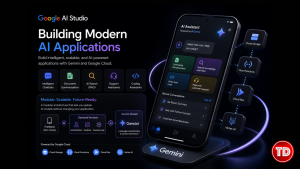
Google AI Studio supports many AI-powered development projects. Developers can build intelligent chatbots, document summarization tools, AI-powered search systems using Retrieval-Augmented Generation (RAG), customer support assistants, educational applications, and coding assistants.
Many organizations combine Gemini with services such as Cloud Storage, Cloud Functions, Cloud Run, and Vertex AI. Backend services manage authentication, databases, and business logic, while Gemini handles language understanding and content generation.
This modular architecture allows developers to update or replace AI models without changing the rest of the application.
Integrating Gemini with Existing Development Stacks
The Gemini API provides REST endpoints and official SDKs, making integration straightforward. Developers often connect Gemini with backend frameworks such as Express.js, FastAPI, Spring Boot, ASP.NET Core, and Django.
Frontend applications built with React, Angular, Vue.js, Flutter, or Android usually communicate with backend services instead of accessing Gemini directly. This approach protects API keys and centralizes prompt management and business logic.
Many organizations also combine Gemini with vector databases such as Pinecone, Weaviate, or ChromaDB. This setup allows Retrieval-Augmented Generation (RAG) systems to produce responses based on company knowledge.
Performance and Cost Considerations
Although Google AI Studio makes development easier, developers should still evaluate production requirements. Different Gemini models vary in reasoning ability, response speed, context window size, and operating cost.
Applications that need real-time responses often benefit from lower-latency models. Research or analysis tools may perform better with more advanced reasoning models, even if they respond more slowly.
Developers should test several models using realistic workloads. They should also optimize prompts to reduce token usage and improve response consistency.
Best Practices for Production Applications
Building successful AI applications requires more than selecting a powerful model. Developers should protect API keys, validate user input, monitor model performance, handle API failures, and log AI interactions.
Prompt templates should also be stored with the application’s source code. This practice makes updates easier as project requirements change. Teams should regularly evaluate response quality because AI models improve over time and may behave differently after updates.
A modular architecture also makes it easier to adopt newer AI models in the future.
The Future of AI Development with Gemini
As multimodal AI continues to improve, platforms such as Google AI Studio are becoming an important part of software development. Developers can now prototype, test, and deploy AI features using familiar cloud development practices.
Google continues to expand the Gemini ecosystem with better reasoning, larger context windows, agent-based workflows, and stronger cloud integration. Developers who learn Google AI Studio today will be well prepared to build the next generation of AI-powered applications.
Key Takeaways
Google AI Studio makes AI development faster by providing a browser-based environment for testing Gemini models, refining prompts, and generating production-ready API code. It removes much of the complexity involved in AI integration, allowing developers to focus on building features instead of setting up infrastructure.

When combined with the Gemini API and modern backend frameworks, Google AI Studio provides an efficient workflow for building chatbots, document analysis tools, coding assistants, Retrieval-Augmented Generation (RAG) systems, and enterprise AI applications. As generative AI becomes a standard part of software development, learning Google AI Studio and Gemini will be a valuable skill for developers building scalable and future-ready solutions.
References
- Google AI Studio Documentation: https://ai.google.dev/
- Gemini API Documentation: https://ai.google.dev/gemini-api/docs
- Google Cloud Vertex AI Documentation: https://cloud.google.com/vertex-ai/docs
- Google Cloud Architecture Center: https://cloud.google.com/architecture
- LangChain Documentation: https://python.langchain.com/docs/
🔥 $4.99 Claude Certified Architect Foundations CCAR-F Practice Exams

Turn Your Team Into Cloud-Ready Professionals Today

Learn AWS with our PlayCloud Hands-On Labs

$2.99 AWS and Azure Exam Study Guide eBooks

Learn GCP By Doing! Try Our GCP PlayCloud

Learn Azure with our Azure PlayCloud

FREE AI and AWS Digital Courses

FREE AWS, Azure, GCP Practice Test Samplers


Subscribe to our YouTube Channel

Follow Us On Linkedin


Written by: Precious Grace Deborah Manucom




