
Last updated on August 11, 2026
The Claude Certified Associate – Foundations (CCAO-F) certification is designed for professionals who use Claude to support everyday business, communication, research, and productivity activities. It measures a candidate’s ability to write effective prompts, work with Claude’s built-in features, assess generated content, and apply AI responsibly within common workplace processes.
The exam focuses on practical decision-making in realistic scenarios. Candidates are expected to know how to break down complex tasks, refine prompts, verify outputs, choose suitable Claude models and product features, configure Projects and knowledge sources, and incorporate Claude into existing workflows. The exam also evaluates awareness of privacy, data sensitivity, AI limitations, and situations that require human review or escalation to more technical specialists.
For additional details about the CCAO-F exam, candidates can refer to the official exam guide. It contains the complete exam structure, domain coverage, scoring information, candidate expectations, and preparation recommendations.
CCAO-F Exam Domains
The exam domains for the Claude Certified Associate – Foundations (CCAO-F) certification outline the practical knowledge and skills needed to use Claude effectively in business and productivity settings. Candidates are expected to know how to create and improve prompts, evaluate and verify generated outputs, select appropriate Claude models and features, configure Projects and knowledge sources, integrate Claude into existing workflows, apply responsible AI and data-handling practices, troubleshoot weak results, and recognize when human review or technical escalation is required.
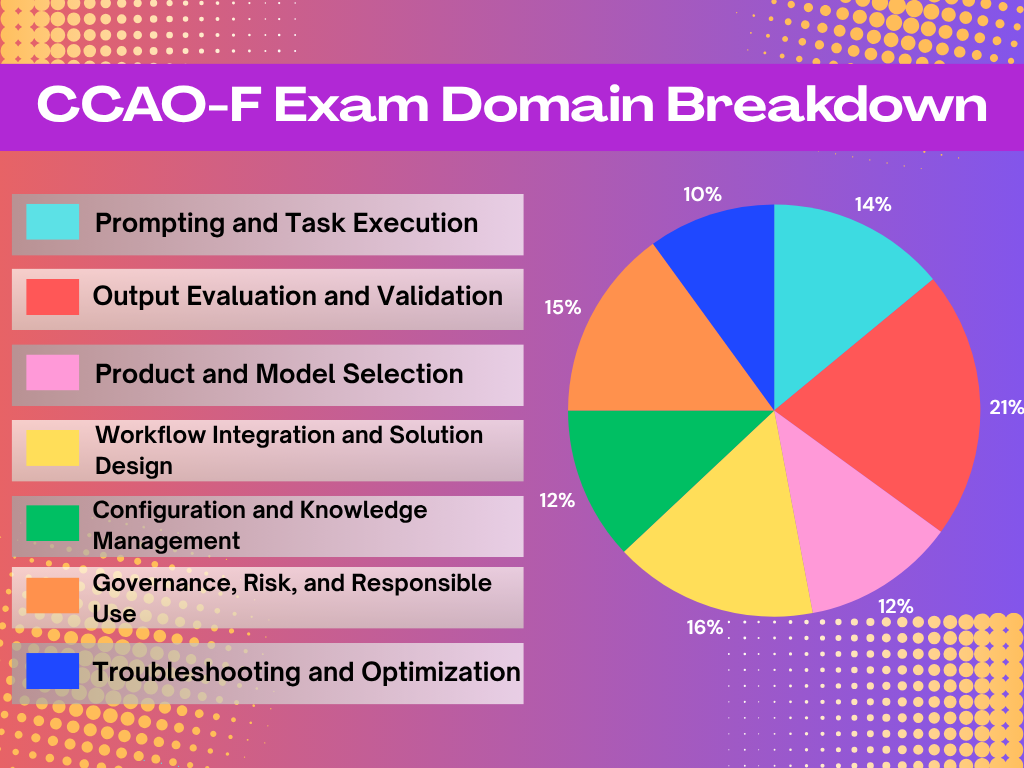
- Prompting and Task Execution – 14%
- Output Evaluation and Validation – 21%
- Product and Model Selection – 12%
- Workflow Integration and Solution Design – 16%
- Configuration and Knowledge Management – 12%
- Governance, Risk, and Responsible Use – 15%
- Troubleshooting and Optimization – 10%
CCAO-F Study Materials
Before taking the Claude Certified Associate – Foundations (CCAO-F) certification exam, candidates should review the following study materials. These resources can help develop the practical knowledge needed to use Claude effectively in professional workflows, including writing structured prompts, evaluating generated content, selecting suitable models and features, configuring Projects and knowledge sources, improving processes, and applying responsible AI practices.
- Tutorials Dojo’s Claude Certified Associate Foundations CCAO-F Practice Exams
- Claude Certified Associate – Foundations Certification Page
- Claude Certified Associate – Foundations Certification Exam Guide
- Claude Certified Associate – Foundations Certification Prep Course
Claude Features to Focus on for the CCAO-F Exam
Here is the list of Claude features to focus on for the Claude Certified Associate – Foundations (CCAO-F) exam:
Claude Chat
- Understand how to use Claude Chat for business and productivity activities such as analysis, research, drafting, and brainstorming.
- Learn how to create structured prompts, break complex requests into smaller tasks, refine instructions, and improve responses through iteration.
Claude Projects
- Understand how Claude Projects organizes related conversations, instructions, and knowledge sources within a dedicated workspace.
- Learn how to configure project instructions, upload relevant knowledge, and maintain the information Claude uses for recurring tasks and workflows.

Claude Research Mode
- Understand when research mode is appropriate for tasks that require gathering, reviewing, and organizing information.
- Learn how to select research mode instead of a standard chat based on the nature and complexity of the task.
Claude Artifacts
- Understand how Artifacts can be used as an output format for content that needs to be viewed, refined, or developed separately from the main conversation.
- Learn when to present information as an Artifact rather than as an inline response or structured data.
Claude Models
- Understand the differences among the Claude Haiku, Sonnet, and Opus model families.
- Learn how to select a suitable model by balancing task complexity, output quality, processing speed, and cost.
Claude Memory
- Understand how memory considerations affect the context Claude can use across tasks and conversations.
- Learn when to continue an existing conversation, summarize prior information, restart a conversation, or preserve important context for future use.
CCAO-F Key Exam Topics by Domain
Domain 1: Prompting and Task Execution
- Prompt structure: Write clear prompts that provide the necessary context, instructions, constraints, and expected output.
- Complex task planning: Break large or complicated requests into smaller steps that Claude can complete more effectively.
- Prompt improvement: Refine the approach based on the response and adapt prompts for research, analysis, drafting, or brainstorming.
Domain 2: Output Evaluation and Validation
- Quality assessment: Review generated content for accuracy, completeness, consistency, relevance, and suitability for the intended audience.
- Verification and human review: Identify unsupported claims, bias, or conflicting information and determine when external validation or expert review is necessary.
- Output refinement and presentation: Compare, edit, and organize responses using an appropriate format, such as inline content, structured data, or Artifacts.
Domain 3: Product and Model Selection
- Feature selection: Choose among Claude Chat, Projects, research mode, and Artifacts based on the nature of the task.
- Model selection: Understand the general differences among Haiku, Sonnet, and Opus and match the model to the required speed, quality, complexity, and cost.
- Context management: Decide when to continue a conversation, summarize earlier information, preserve useful context, or begin a new chat.
Domain 4: Workflow Integration and Solution Design
- Use-case analysis: Examine business requirements and identify tasks or processes that Claude can support or improve.
- Workflow development: Apply Claude to research, planning, process improvement, solution development, and iterative refinement.
- Stakeholder alignment: Communicate the expected value, practical limitations, risks, and required human involvement in a Claude-supported workflow.
Domain 5: Configuration and Knowledge Management
- Project setup: Configure Claude Projects with clear instructions and relevant reference materials.
- Knowledge and connector management: Organize and maintain uploaded content and connected sources, including Google Drive and Gmail.
- Configuration maintenance: Keep instructions, knowledge sources, and project settings accurate as requirements and source information change.
Domain 6: Governance, Risk, and Responsible Use
- Use-case judgment: Recognize activities that are suitable for Claude and those that require human expertise or should not use AI.
- Privacy and compliance: Consider data sensitivity, confidentiality, regulatory obligations, and organizational policies before using information with Claude.
- Responsible AI practices: Account for ethical concerns such as bias, misinformation, transparency, and the potential consequences of AI-generated content.
Domain 7: Troubleshooting and Optimization
- Problem diagnosis: Identify whether poor results are caused by unclear instructions, missing context, unsuitable source material, or an ineffective approach.
- Corrective adjustments: Improve results by revising prompts, supplying better context, changing the format, or restructuring the task.
- Workflow optimization: Evaluate feedback and outcomes to make Claude-supported processes more efficient, reliable, and effective.
CCAO-F Important Skills to Focus on
Structured Prompting and Task Decomposition
- Create prompts that clearly communicate the task, relevant context, constraints, and expected output.
- Break complex requests into smaller stages so Claude can complete each part more accurately and consistently.
Prompt Iteration and Adaptation
- Review Claude’s initial response and refine the prompt when the result is incomplete, unclear, or unsuitable.
- Adjust prompting techniques based on whether the task involves research, analysis, drafting, or brainstorming.
Output Evaluation and Verification
- Assess Claude-generated content for accuracy, completeness, consistency, relevance, and possible bias.
- Identify hallucinations or unsupported claims and verify important information through reliable sources or human review.
Claude Feature and Model Selection
- Choose between Chat, Projects, research mode, and Artifacts according to the task and desired output.
- Select Haiku, Sonnet, or Opus by considering task complexity, response quality, speed, and cost.
Project Configuration and Knowledge Management
- Configure Claude Projects with clear instructions and relevant knowledge sources.
- Maintain uploaded files, connected sources such as Google Drive and Gmail, and project instructions so Claude works with accurate and current information.
Workflow Design and Process Improvement
- Identify business processes where Claude can support research, planning, content creation, analysis, or decision-making.
- Integrate Claude into existing workflows while retaining appropriate review, approval, and escalation steps.
Responsible Use and Risk Management
- Protect sensitive information by considering privacy, confidentiality, regulatory requirements, and organizational AI policies.
- Recognize inappropriate or high-risk use cases and determine when a task should be escalated to a human expert or technical specialist.
Troubleshooting and Optimization
- Diagnose weak outputs caused by unclear prompts, missing context, conflicting instructions, outdated knowledge, or an unsuitable approach.
- Improve performance by restructuring the task, revising instructions, changing the output format, or selecting a more appropriate Claude feature or model.

Validate Your CCAO-F Exam Readiness
If you feel confident after reviewing the suggested materials above, it is time to put your knowledge of different Claude concepts, features, and workflows to the test. For high-quality practice exams, consider using Tutorials Dojo’s Claude Certified Associate – Foundations CCAO-F Practice Exams.
These practice tests cover key topics from the CCAO-F exam and include multiple-choice and multiple-response questions with correct answers and closely related distractors. Each question provides a detailed explanation and reference links to help candidates understand why the correct answer is the most appropriate solution. After completing the exams, candidates can identify areas that need improvement and focus their study efforts on weaker topics.
By thoroughly reviewing the official exam guide and combining it with Tutorials Dojo’s practice tests, candidates can strengthen their exam readiness, improve their understanding of Claude features and responsible AI practices, and become better prepared to pass the CCAO-F certification exam.
CCAO-F Sample Practice Test Questions:
Question 1
An operations associate uses a single prompt to extract key fields from incoming invoices into a structured list that feeds a downstream process. The extracted data is accurate every time, but the formatting is not: one run returns a table, the next returns bullet points, and another returns a paragraph. The inconsistent structure keeps breaking the downstream step.
What should the associate do to resolve this?
- Add one or two examples of the exact output format, or specify the required format explicitly.
- Switch to the most capable, highest-cost model to improve the output’s consistency.
- Add an instruction telling Claude to always be consistent and well-structured.
- Break the single extraction into several smaller, sequential prompts.
Correct Answer: 1
Troubleshooting a poor output starts with diagnosing the specific symptom before applying a fix. When the content of a response is correct but its structure varies from one run to the next, the cause is almost always that the prompt never defined the target format, so the model is free to present the same data differently each time. The reliable remedy is to make the format explicit: provide one or two examples that show the exact structure you want (few-shot examples), or state the format directly, such as asking for a table with named columns. Examples are especially effective for locking in structure because the model closely follows the pattern it is shown.
 In this scenario, the extracted data is already accurate, so accuracy is not the problem, the only failure is the shifting format that breaks the downstream step. That points precisely to a missing format specification. Showing the model a sample of the desired list, or explicitly instructing it to return the fields as a fixed structure, gives every run the same concrete target to match, which resolves the inconsistency at its source.
The broader troubleshooting skill here is matching the remedy to the diagnosed cause. A format problem needs a format fix. Reaching for a heavier or unrelated change wastes effort and can introduce new issues without addressing why the output varies.
Hence, the correct answer is: Add one or two examples of the exact output format, or specify the required format explicitly.
The option that says: Switch to the most capable, highest-cost model to improve the output’s consistency is incorrect because the content is already accurate, which means model capability is not the bottleneck. A more powerful model does not enforce a particular layout, so the format can still drift from run to run, and the switch adds unnecessary cost and latency without solving the actual problem.
The option that says: Add an instruction telling Claude to always be consistent and well-structured is incorrect because it is too vague to be actionable. It never tells the model which format to be consistent with, so the output can remain a table one time and bullet points the next while still technically being “well-structured.” Effective prompting primarily states or shows the specific format you want rather than asking for consistency in the abstract.
The option that says: Break the single extraction into several smaller, sequential prompts is incorrect. Task decomposition is simply the fix for overloaded or unreliable multi-part tasks, not for formatting. The single extraction task already works and returns accurate data, so splitting it into steps adds latency and complexity without changing how the final output is structured.
References:
https://claude.com/blog/best-practices-for-prompt-engineering
Check out these Claude Cheat Sheets:
https://tutorialsdojo.com/other-cheat-sheets/claude-cheat-sheets/
Question 2
A learning and development associate needs Claude to turn several onboarding notes into an employee handbook. Managers must be able to edit, update, and reuse the handbook outside the conversation. Which output format best meets this requirement?
- Produce a CSV file that arranges the handbook content into rows for spreadsheet-based analysis.
- Create a Markdown artifact that displays the handbook in a separate workspace for editing and reuse.
- Generate structured JSON that stores each handbook section as fields for automated system processing.
- Return the handbook inline in the chat, requiring managers to copy and revise the response manually.
Correct Answer: 2
Claude Artifacts are designed for substantial, self-contained content that can stand on its own outside the surrounding conversation. An artifact appears in a dedicated window beside the main chat, making it appropriate for content that users may need to edit, expand, reference, or reuse later. Supported artifact types include Markdown documents, plain-text documents, diagrams, code, and interactive content.
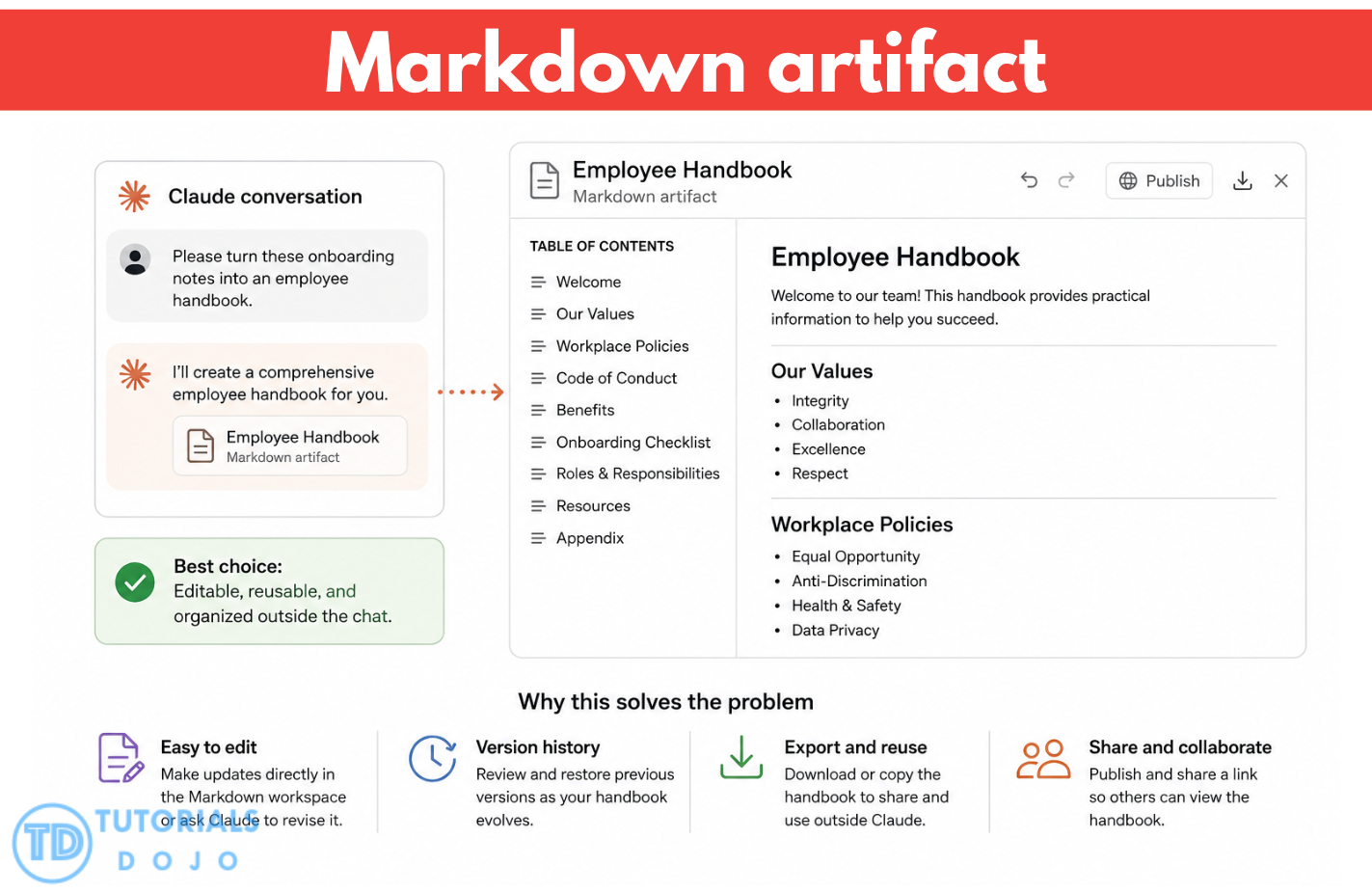
A Markdown artifact is particularly useful for organized, human-readable documents because it can present information through headings, sections, lists, and other clear formatting. Users can ask Claude to revise the artifact, make targeted edits directly within a Markdown document, and move between earlier versions through the version selector. The completed content can also be copied or downloaded for use outside the original conversation.
This approach resolves workflows that require an editable and reusable deliverable by separating the finished content from ordinary conversational responses. Instead of repeatedly copying an inline answer or regenerating the entire document whenever information changes, users can continue refining the same organized artifact in its dedicated workspace. Therefore, creating a Markdown artifact is the correct solution because it supports structured presentation, continued editing, version management, and reuse beyond the chat.
Hence, the correct answer is: Create a Markdown artifact that displays the handbook in a separate workspace for editing and reuse.
The option that says: Produce a CSV file that arranges the handbook content into rows for spreadsheet-based analysis is incorrect because CSV is primarily suited to tabular information that needs spreadsheet-based processing or analysis. A handbook contains connected sections, headings, lists, and explanatory text, so arranging the content as rows would make it less natural to read and revise than a Markdown artifact. Claude Artifacts are designed for substantial, standalone content that users may modify, expand, or reference later.
The option that says: Generate structured JSON that stores each handbook section as fields for automated system processing is incorrect because structured JSON is typically appropriate when an application requires machine-readable data that conforms to an expected schema. Although JSON could separate the handbook into fields, the scenario requires a human-readable document that managers can edit and reuse, rather than data intended for validation, application integration, or automated processing.
The option that says: Return the handbook inline in the chat, requiring managers to copy and revise the response manually is incorrect because an inline response would simply keep the handbook within the conversational flow. Claude provides Artifacts specifically for substantial, self-contained content that benefits from a dedicated workspace and continued modification. Using an inline response would therefore make ongoing editing and reuse less convenient than maintaining the handbook as a Markdown artifact.
References:
https://support.claude.com/en/articles/9487310-what-are-artifacts-and-how-do-i-use-them
https://support.claude.com/en/articles/9547008-publish-and-share-artifacts
https://support.claude.com/en/articles/12111783-create-and-edit-files-with-claude
Check out these Claude Cheat Sheets:
https://tutorialsdojo.com/other-cheat-sheets/claude-cheat-sheets/
Check out our other practice exam offerings for AWS, Azure, and Google Cloud, featuring detailed explanations, by visiting the Tutorials Dojo Portal:


Final Remarks
Success in the CCAO-F exam requires both a solid understanding of Claude concepts and practical experience using its features in real-world tasks. Focus your preparation on structured prompting, output evaluation, model and feature selection, workflow integration, project configuration, and responsible AI use. Strengthen your skills by practicing task decomposition, prompt refinement, fact-checking, knowledge management, and troubleshooting weak responses. Additionally, become familiar with Claude Projects, Artifacts, research mode, connectors, Memory, Skills, and Code Execution. Practice exams can help assess readiness and identify areas that require further review. By following this focused study approach, candidates can build the knowledge and confidence needed to earn the Claude Certified Associate – Foundations certification. Good luck with your preparation!
📚 $2.99 USD Starting Price — Save 40% on All eBooks

Turn Your Team Into Cloud-Ready Professionals Today

Learn AWS with our PlayCloud Hands-On Labs

$2.99 AWS and Azure Exam Study Guide eBooks

Learn GCP By Doing! Try Our GCP PlayCloud

Learn Azure with our Azure PlayCloud

FREE AI and AWS Digital Courses

FREE AWS, Azure, GCP Practice Test Samplers


Subscribe to our YouTube Channel

Follow Us On Linkedin


Written by: Lois Angelo Dar Juan