
In late 2025, most developers were still using AI coding assistants as glorified autocomplete engines: press Tab, accept a suggestion, and move on. By mid-2026, the same tools are reviewing pull requests, triaging incidents from PagerDuty alerts, posting summaries to Slack, and assigning reviewers based on time zones, all without a human touching the keyboard.
At the center of this transformation is Cursor, an AI-native IDE that has evolved far beyond a VS Code fork with an LLM bolted on. With the introduction of Cursor Automations, Background Agents, BugBot Autofix, and deep support for the Model Context Protocol (MCP), Cursor has effectively redrawn the line between “AI helps you code” and “AI runs workflows you define.”
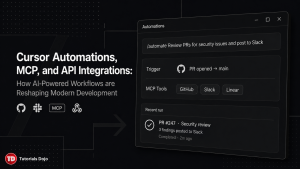
What Are Cursor Automations?
Cursor Automations, launched on March 5, 2026, are always-on AI agents that trigger automatically in response to external events without waiting for you to open the IDE or type a prompt. Think of them as event-driven serverless functions, except the “function” is an LLM agent with access to your codebase, your MCP servers, and whatever tools you configure.
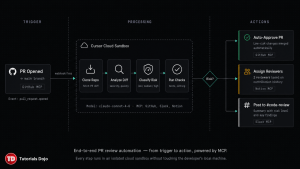
When a trigger fires, Cursor spins up an isolated cloud sandbox, clones your repository, follows the instructions you defined, uses whatever MCP integrations you connected, and can verify its own output before posting results. This is not a local process. Your laptop can be closed; the automation runs in the cloud.
Trigger Types
Cursor supports several categories of triggers:
Schedule-based triggers use cron expressions to run automations at fixed intervals, such as every hour, every morning at 9 AM, or every Monday. A common pattern is a nightly codebase summary that posts to a Slack channel so the team starts the day aligned on what changed overnight.
GitHub triggers fire on events like pull request opened, pull request merged, push to a specific branch, issue comment created, PR review submitted, or workflow run completed. This is where most teams start, automated PR reviews are the gateway use case.
Slack triggers respond to new messages in a channel, emoji reactions on a message, or new channel creation. A team can set up an automation where reacting to a Slack bug report with a specific emoji kicks off an agent that investigates the issue, checks relevant logs, and opens a draft PR with a proposed fix.
Webhook triggers accept custom HTTP payloads, which means you can wire Cursor Automations into virtually any external system, CI/CD pipeline, monitoring tool, customer support platform, or internal admin dashboard.
Linear and PagerDuty triggers connect directly to issue trackers and incident management systems. When a PagerDuty incident fires, the automation can query logs, identify error patterns, and post a summary to your incident response channel before anyone has opened their laptop.
The /automate Skill and Marketplace Templates
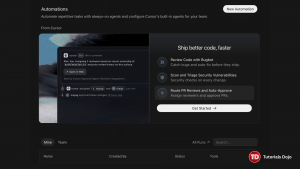
One of the most developer-friendly aspects of Cursor Automations is the /automate skill, introduced in the June 2026 update. Instead of manually configuring triggers, instructions, and tool connections through a dashboard, you can describe the workflow you want in plain language directly in a local agent session. Cursor then configures the automation’s trigger, writes the prompt instructions, and connects the necessary tools for you.
For teams that want to skip even that step, the Cursor Marketplace offers pre-built automation templates. These are community and team-contributed recipes for common workflows: PR triage, security audits, changelog generation, dependency update reviews, and more. Enterprise teams can also publish private automation templates through the Team Marketplace, creating a shared library of approved AI workflows across the organization.
Understanding the Model Context Protocol (MCP)
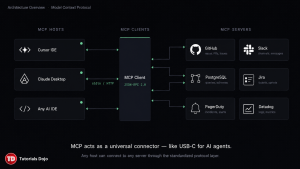
If Cursor Automations are the engine, MCP is the fuel line. The Model Context Protocol is what allows an AI agent to reach beyond the codebase and interact with real external systems, databases, APIs, issue trackers, communication platforms, monitoring tools, and more.
Released by Anthropic as an open standard in November 2024, MCP has exploded in adoption. By mid-2026, over 5,000 community-built MCP servers exist, and every major AI coding tool supports the protocol: Cursor, Claude Desktop, Claude Code, Windsurf, Zed, and others.
Why MCP Matters
Before MCP, connecting an AI agent to your GitHub repository required writing a custom API wrapper. Connecting it to Slack required another wrapper. Connecting it to your PostgreSQL database required yet another. Each integration was a one-off snowflake, tightly coupled to a specific AI vendor, brittle to API changes, and impossible to reuse across tools.
MCP solves this with a standardized protocol layer built on JSON-RPC 2.0. An MCP server exposes three types of capabilities:
Resources let the agent read data from files, databases, APIs, or any external source. An MCP server for PostgreSQL, for example, exposes your database tables as resources that the agent can query using natural language.

Tools let the agent execute actions, search the web, write files, create GitHub issues, post Slack messages, and trigger CI pipelines. Tools are the action-oriented side of MCP: the agent calls a tool, passes structured arguments, and receives a structured response.
Prompts provide predefined prompt templates with dynamic parameters, useful for standardizing how the agent interacts with a specific service.
The power of this standardization is portability. An MCP server you build for Slack works identically whether the host is Cursor, Claude Desktop, or a custom agent running on your own infrastructure. Switch from one AI model to another, and your MCP integrations carry over unchanged.
The Protocol Update
The MCP specification received its largest revision in July 2026, introducing a stateless core that eliminates the need for sticky sessions and shared session stores. Remote MCP servers can now run behind standard round-robin load balancers. The update also formalized MCP Apps (server-rendered UIs inside agent chats), the Tasks extension for long-running work, and improved OAuth/OpenID Connect alignment for authorization.
Real-World Integrations of Slack, GitHub, and Beyond
Let us walk through the integrations that are seeing the most adoption in production engineering teams right now.
GitHub: Automated PR Reviews, Risk Classification, and Auto-Approval
The most common cursor automation is the automated pull request review. When a PR is opened or new commits are pushed, the automation spins up a cloud agent that reads the diff, analyzes the changes, and posts findings as PR comments.
Cursor’s own engineering team uses a more sophisticated variant: a risk classification automation that evaluates blast radius, complexity, and infrastructure impact for every PR. Low-risk changes, documentation updates, minor refactors, and small dependency bumps get auto-approved. Higher-risk changes receive one to two reviewer assignments based on contribution history in the affected files. Every decision is logged to a Notion database via MCP for auditability.
BugBot Autofix takes this a step further. When BugBot identifies an issue during its review pass, it no longer just comments about it, it spins up a cloud agent, tests a proposed fix, and pushes the fix directly to the PR branch. Over 35% of BugBot Autofix suggestions are being merged directly, which suggests the fixes are genuinely useful rather than noise.
Slack: Triage, Notifications, and Conversational Task Delegation
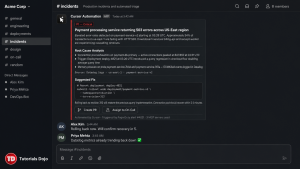
Slack integration goes both directions. Automations can post to Slack (summaries, alerts, PR links, incident analyses), and Slack messages can trigger automations.
A security review automation at Cursor’s own organization runs on every push to main, auditing the diff for vulnerabilities and posting high-risk findings to a dedicated Slack channel. The team reports this has caught multiple real vulnerabilities and critical bugs.
The emoji reaction trigger, introduced in June 2026, enables a particularly elegant workflow: a team member spots a bug report in Slack, reacts with a designated emoji (say, a wrench), and Cursor spins up an agent that investigates the issue, checks relevant logs through Datadog MCP, and either fixes it directly or opens a draft PR for review.
For teams using Cursor’s direct Slack integration, you can mention @Cursor in any channel or thread with a task description. Cursor launches an isolated virtual machine, works with your repository, and reports back. One developer described the experience: “I glance at the Slack notification on my phone, type ‘@Cursor investigate and fix this,’ and go back to sleep.”
PagerDuty: Incident Response Automation
When a PagerDuty incident fires, a Cursor automation can immediately begin an investigation. The agent queries server logs through Datadog MCP connections, identifies error patterns, correlates with recent deployments via the GitHub MCP server, and posts a structured summary to the team’s incident response Slack channel. All of this happens before the on-call engineer has even acknowledged the page.
Engineering teams at companies like Rippling have extended this concept to build automated incident triage, status report generation, and on-call handoff documentation.
Issue Lifecycle Automation
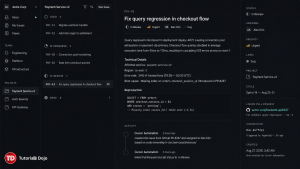
MCP servers for Linear and Jira allow automations to create issues, transition statuses, link PRs to tickets, and add comments, all as part of a larger workflow. A common pattern is the closed-loop pipeline: a Slack bug report triggers an automation that creates a Linear issue, opens a fix PR on GitHub, links the two, and posts the PR link back to the original Slack thread with reviewer assignments.
Custom MCP Servers and Webhooks
The built-in integrations cover the most common tools, but MCP’s open architecture means you can build a server for anything with an API. Teams have built custom MCP servers for Confluence (documentation lookups), Grafana (metric queries), LaunchDarkly (feature flag management), Stripe (billing data), and internal admin tools.
Webhook triggers further extend the reach. Any system that can send an HTTP POST, your CI/CD pipeline, a monitoring alerting rule, a form submission, or a database trigger can kick off a Cursor automation.
Building a Complete Automation Workflow: A Walkthrough
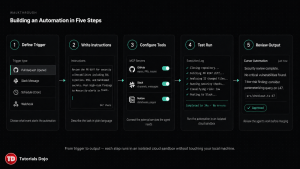
Start by proving the workflow manually in a local agent session. Open Cursor, load the repository, and ask the agent to review a specific PR using the prompt you have in mind. Refine the prompt until the output quality meets your standards. This manual iteration is critical, automating a bad prompt just produces bad results faster.
Once the prompt is validated, use the /automate command to convert it into an automation. Describe what you want: “On every PR opened against the main branch, review the diff for security vulnerabilities, code quality issues, and missing test coverage. Post findings as a PR comment. If no critical issues are found, auto-approve. If critical issues exist, assign two reviewers based on recent contribution history and post a summary to #code-review on Slack.”
Cursor will generate the trigger configuration and the instruction prompt and suggest the necessary MCP connections (GitHub for PR data and actions and Slack for notifications). Review the generated configuration, adjust thresholds or wording as needed, and activate.
For the first several runs, monitor closely. Check that the risk classification thresholds make sense, that reviewer assignments are appropriate, and that Slack messages are landing in the right channel with the right level of detail. Cursor’s persisted memory tool allows automations to learn from previous runs, the agent can write a memory file when it encounters a novel situation and reference it in future runs.
Best Practices for Cursor Automations in Production
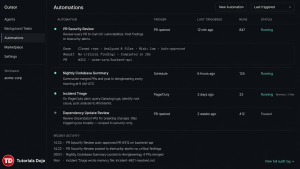
Teams that have been running automations for several months report several consistent lessons.
Start with a single, well-understood task. The temptation is to automate everything at once. Resist it. Pick one workflow, a PR review, a nightly summary, or a bug triage, and get it working reliably before adding more.
Use the persisted memory tool as a cross-run lock. When multiple automations can fire on the same event (for example, several CI-fix agents watching the same repository), prompt each run to check for an existing memory file before starting work. If another run is already handling the problem, the new run aborts early instead of duplicating effort.
Choose the narrowest trigger that carries enough context. A Slack trigger without a message filter fires on every top-level message in the channel. A GitHub trigger on “push to any branch” fires far more often than “PR opened against main.” Overly broad triggers produce noisy, low-value automation runs that waste compute and pollute your Slack channels.
Log agent decisions for auditability. Use an MCP connection to Notion, a database, or a dedicated logging service to record what the automation decided and why. This is especially important for automations that take consequential actions like auto-approving PRs, assigning reviewers, or modifying issue statuses. When something goes wrong, and it eventually will, you need a clear audit trail to diagnose the issue and adjust the instructions.
Treat automation prompts like code. Version them, review changes, and test them before deploying to production repositories. A subtle wording change in an automation’s instructions can significantly alter its behavior across hundreds of runs.
The Bigger Picture: From Tool to Infrastructure
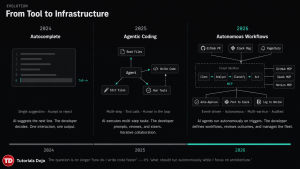
What Cursor has built with Automations, Background Agents, BugBot, and MCP is not just a feature upgrade, it is a category shift. The question for engineering teams is no longer “how do I write code faster?” but rather “what percentage of my engineering workflow should run autonomously while I focus on architecture, judgment calls, and the problems that actually require human reasoning?”
MCP is the critical enabler. Without a standardized protocol for AI agents to interact with external systems, every automation would require custom integration code, be fragile, be vendor-locked, and be expensive to maintain. With MCP, the same agent that reviews your PRs can query your database, check your monitoring dashboards, update your issue tracker, and post to your team chat, all through a consistent, portable interface.
The ecosystem is still early. MCP servers vary in quality. Automation prompts require careful tuning. Edge cases abound. But the trajectory is clear: the AI coding assistant of 2024 has become the AI engineering teammate of 2026, and the teams that learn to wield these tools effectively will operate at a fundamentally different velocity.
Cursor Automations bring event-driven, always-on AI agents into the development lifecycle, triggered by GitHub events, Slack messages, PagerDuty incidents, schedules, or custom webhooks. MCP provides the universal protocol layer that lets these agents interact with real external systems without custom integration code. Together, they enable workflows that were previously impossible or prohibitively expensive: automated PR reviews with risk classification, incident response before the on-call engineer wakes up, closed-loop bug triage from Slack to PR to merged fix.
The technology is production-ready and actively used by engineering teams at scale. The learning curve is not in the tooling, it is in developing the judgment to decide what should be automated, what should remain human, and how to write prompts that produce reliable results across thousands of runs.
Start with one workflow. Prove it manually. Automate it. Monitor it. Then scale.
References:
Cursor Automations (Official)
- https://cursor.com/blog/automations
- https://cursor.com/docs/cloud-agent/automations
- https://cursor.com/changelog/03-05-26

Cursor Automations (Press)
- https://techcrunch.com/2026/03/05/cursor-is-rolling-out-a-new-system-for-agentic-coding/
- https://thenewstack.io/cursor-agents-developer-workflows/
- https://www.learncursor.dev/guides/cursor-automations
Model Context Protocol (Official)
- https://www.anthropic.com/news/model-context-protocol
- https://modelcontextprotocol.io/specification/2025-06-18
- https://blog.modelcontextprotocol.io/posts/2026-07-28/
- https://github.com/modelcontextprotocol
- https://registry.modelcontextprotocol.io/
MCP (Press & Industry)
- https://venturebeat.com/infrastructure/mcp-just-got-its-biggest-update-ever-heres-what-changes-for-ai-agents
- https://www.theregister.com/ai-and-ml/2026/07/29/mcp-gets-an-enterprise-makeover/5280027
- https://en.wikipedia.org/wiki/Model_Context_Protocol
- https://techcrunch.com/2024/11/25/anthropic-proposes-a-way-to-connect-data-to-ai-chatbots/
- https://zuplo.com/blog/one-year-of-mcp
Slack & PR Workflow Integrations
- https://slack.com/marketplace/A08SKDT6QUW-cursor
- https://medium.com/@shahsoumil519/how-i-use-cursor-to-automate-pr-creation-with-a-business-template-assign-reviewers-based-on-2c0bc8a5f4c8
- https://dev.to/imaginex/from-ide-to-agaas-how-cursor-cloud-agents-bring-the-openclaw-model-to-your-slack-4547
- https://byteiota.com/cursor-automations-tutorial-2026-setup-guide/
⏳ Get 30% OFF on Microsoft Azure and GitHub Reviewers this Black Friday Sale!

Turn Your Team Into Cloud-Ready Professionals Today

Learn AWS with our PlayCloud Hands-On Labs
$2.99 AWS and Azure Exam Study Guide eBooks

Learn GCP By Doing! Try Our GCP PlayCloud
Learn Azure with our Azure PlayCloud
FREE AI and AWS Digital Courses

FREE AWS, Azure, GCP Practice Test Samplers

Subscribe to our YouTube Channel

Follow Us On Linkedin


Written by: Karen Pearl V. Pabilando