
You don’t need to wait for January to start improving your skills. Here’s how to make the remaining months of 2026 count, one skill, project, and learning opportunity at a time.
As the year slowly comes to an end, it’s easy to start thinking about everything you want to accomplish next year. Right now, you might be preparing a new year bucket list for next year.
Maybe you want to learn cloud computing, build a portfolio, earn an AWS certification, or prepare for your first tech job. You might even have a long list of tutorials you’ve saved throughout the year, waiting for the right time to start.
But hey, you don’t have to wait for January to begin!
As an IT student learning about cloud computing, I’ve realized that exploring technology can feel overwhelming. There are so many services to understand, tools to try, certifications to consider, and career paths to explore. Sometimes, figuring out where to begin can be just as challenging as learning the technology itself.
But the good news is that you don’t have to master everything before the year ends. Don’t be pressured to earn multiple certifications or build a complicated application in just a few weeks.
Instead, use the remaining months of 2026 to make meaningful progress toward one goal.
Whether you’re a student preparing for an internship, a fresh graduate looking for your first tech role, or a professional hoping to expand your skills, here are seven practical ways to upskill before 2027.
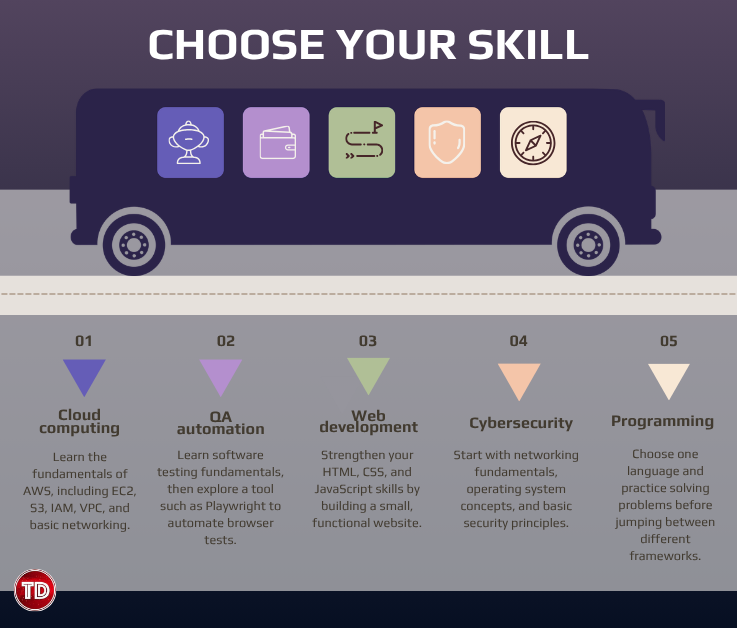
Choose One Skill to Focus On
I know it’s interesting to learn everything at once, there is many interesting things and you might also feel pressured by the time left this year.
You might start with cloud computing, become curious about cybersecurity, explore software development, and then switch to data analytics after watching a few videos. Before you know it, you’ve spent time exploring several fields without developing a strong foundation in any of them.
Exploring different technologies isn’t necessarily a bad thing. It can help you discover what you enjoy. However, if your goal is to make measurable progress before the year ends, choosing one primary skill can help you stay focused.
Start by asking yourself two questions: What do I want to learn, and why do I want to learn it?
Your answer doesn’t have to be complicated. Perhaps you want to become more comfortable with AWS because you’re interested in cloud engineering. Maybe you want to learn test automation because you enjoy finding problems and improving software quality. Or perhaps you want to understand Git and GitHub better because you want to collaborate on development projects.
Once you have a reason, choose a skill that supports that goal.
You don’t need to commit to a career path forever. Think of this as choosing your next learning milestone, not making a permanent decision about your future.
Our goal before the year end is to identify the skill that will make our steps easier.
You don’t need to learn more things at once. You need to make progress on the right thing first.
Follow a Learning Path Instead of Collecting Tutorials
Have you ever saved a YouTube tutorial, bookmarked a documentation page, or enrolled in a course because it looked interesting, only to forget about it a few days later?
It’s easy to confuse collecting learning resources with actually learning.
The internet offers an incredible amount of free educational content. You can find videos, documentation, interactive exercises, online courses, and practice questions for almost every technology. However, having access to resources doesn’t automatically give you a clear learning direction.
That’s why following a learning path can make a difference.
Instead of jumping between unrelated tutorials, organize your learning around a sequence of concepts. Start with the fundamentals, understand how the components relate to one another, and gradually move toward more practical or advanced topics.
If you’re learning AWS, for example, you could begin by understanding what cloud computing is and why organizations use it. From there, explore core services such as EC2 for computing, S3 for object storage, IAM for access management, and VPC for networking.
Once you understand these services individually, try learning how they work together in a real application.
This approach gives you context. Rather than memorizing what each service does, you begin to understand why you would use it and how it fits into a larger system.
Fortunately, you don’t have to pay for an expensive course to get started.

Here are some resources worth exploring:
- AWS Skill Builder: Explore AWS learning materials and training designed for different experience levels.
- Microsoft Learn: Find structured learning paths covering Microsoft technologies, cloud, security, and development.
- Google Cloud Skills Boost: Explore Google Cloud training and hands-on learning opportunities.
- Tutorials Dojo: Browse technical articles and study resources that can help reinforce your understanding of cloud and other IT topics.
Choose resources based on your current level and learning goal. You don’t need to complete every course you find.
It’s also worth remembering that documentation can feel difficult at first. You may encounter unfamiliar terminology or examples that assume you already understand certain concepts. When that happens, pause and review the prerequisite instead of forcing yourself to continue without understanding.
Most importantly, avoid measuring your progress by how many videos you’ve watched or courses you’ve opened.
Measure it by what you can explain, practice, and do independently.
Build One Small Project From What You’ve Learned
Learning the theory is important, but technology becomes much easier to understand when you actually use it.
You can watch an entire course about cloud computing and still feel unsure about configuring a resource yourself. You might understand what automated testing does but struggle to write your first test script. That’s where hands-on projects come in.
A project gives you an opportunity to apply concepts, encounter problems, and figure out how different components work together. It also helps you identify the areas you understand well and the ones you need to review.
The good news? Your project doesn’t have to be complicated.
If you’re learning cloud computing, you could create a simple static website and host it using an appropriate AWS service.
For web development, you might build a personal portfolio, a simple task tracker, or a website that solves a small problem you encounter in your daily life.
What matters is that your project has a clear purpose and gives you an opportunity to practice the skill you’re developing.
Don’t be afraid to make mistakes along the way. A failed deployment, an incorrect permission setting, or a test that doesn’t behave as expected can teach you something a tutorial might not fully explain.
Of course, always practice within safe environments. Review service pricing, set spending limits or billing alerts where available, and remove resources you no longer need to avoid unexpected charges.
By the end of your project, you should be able to explain what you built, why you made certain decisions, what challenges you encountered, and how you solved them.
That is much more valuable than simply saying you’ve completed a tutorial.
Use AI Tools to Learn, Not Just to Get Answers
AI tools have become useful companions for developers, or for students like me. It is very helpful explaining unfamiliar concepts, and guiding you towards the process.
However, how you use these tools matters. You know, it is so easy to ask an AI assistant to generate an entire project and simply copy the result. But here’s the catch: you might end up with something that works without understanding how it works.
… and that will become a big problem when you need to debug the application, explain your implementation, or make changes independently.
So, learn to treat AI as a learning assistant rather than a replacement for learning.
There are a few important habits to develop:
- Ask follow-up questions. If an explanation doesn’t make sense, request a simpler example or another way of explaining it.
- Verify important information. AI-generated answers can be incorrect or outdated, so check official documentation when working with technical configurations, security recommendations, or service limitations.
- Practice without assistance. After learning a concept, try explaining or implementing it independently.
- Protect sensitive information. Never paste passwords, access keys, confidential company data, or other sensitive information into tools that aren’t approved for that information.
Our goal isn’t to avoid AI. It’s to become someone who can use AI effectively while still understanding the work being done.
As these tools become more common, knowing how to evaluate their output, ask useful questions, and verify their answers is a skill worth developing alongside your technical knowledge.
Set a Certification Goal, but Don’t Rush Into an Exam
Certifications can help organize your learning and demonstrate that you’ve studied a particular area of technology. They may also help you identify relevant skills when preparing for internships or entry-level roles.
If cloud computing is your focus, an entry-level credential such as the AWS Certified Cloud Practitioner can provide a structured introduction to AWS concepts, cloud economics, security, and core services.
If you’re already familiar with cloud fundamentals, you might consider a more technical certification aligned with your experience and career goals.
However, earning a certification before the end of the year shouldn’t become a deadline that forces you to rush.
Before choosing an exam, look at its official exam guide. Review the domains covered, identify unfamiliar topics, and estimate how much preparation you’ll need. Your timeline should reflect your current knowledge, available study time, and the complexity of the exam, again, do not rush.
You can reinforce your preparation through documentation, hands-on exercises, and practice questions. For AWS exam preparation, Tutorials Dojo also provides free AWS practice test samplers that you can use as one part of your study routine.
Remember that practice questions are useful for identifying knowledge gaps, but memorizing answers isn’t the same as understanding the material. When you get a question wrong, review the explanation and revisit the underlying concept.
It’s also important to distinguish between learning for a certification and learning for a job. An exam may test your understanding of specific concepts, but employers may also want to see whether you can troubleshoot problems, work with tools, and apply what you’ve learned.
You don’t have to collect multiple certifications to prove you’re serious about technology.
One certification that aligns with your goals, supported by a solid understanding of the material and practical experience, can be a more meaningful milestone than several credentials you’ve rushed to complete.
Treat certification as a way to guide your learning, not the only measure of your progress.
Turn Your Learning Into a Portfolio
Imagine that you’ve spent several weeks learning AWS, practicing automation, or developing a website. You’ve completed exercises, solved problems, and gained a better understanding of the technology.
How can you make that progress visible to someone else? Document your work and build a portfolio.
A portfolio doesn’t have to be a polished personal website filled with impressive projects. When you’re starting out, a well-organized GitHub repository with a clear README can already be useful.
You can use GitHub to store code and documentation, track changes, and share your work. Even if your project is small, documenting your process can demonstrate how you approach technical problems.
Don’t overlook the value of explaining your decisions. A project description that says, “I built a website using AWS,” provides limited information. A description that explains why you chose particular services, how you configured access, and what you learned from troubleshooting gives readers a better understanding of your skills.
Your portfolio can also include learning notes, technical articles or even other examples of your work. You don’t need to pretend that every project is production-ready. Be honest about what you’ve completed, what you’ve tested, and what you would improve with more time.
If you’re a student or an aspiring IT professional, this is especially useful because you may not yet have extensive industry experience to discuss, but having a portfolio will five you something concrete to share when applying for internships, connecting with other professionals, or preparing for technical interviews.
Don’t wait until you feel like an expert to start documenting your work. Your learning process is worth documenting, too.
Learn With Other People and Explore Opportunities
Upskilling can sometimes feel like a solitary activity. You watch tutorials, read documentation,, and troubleshoot problems on your own.
But learning alongside other people can help you see things from different perspectives.
You might discover a more efficient way to solve a problem, learn about a tool you haven’t encountered before, or get feedback that helps you improve your project.
You can start small. Participate in a technical discussion, ask a question when you’re stuck, share a project update, or explain a concept you’ve recently learned.
You can also explore tech communities, student organizations, and local events related to your interests. Look for communities where beginners can ask questions and where members share knowledge respectfully.

But, don’t limit your learning opportunities to technical activities, either.
There are hackathons, open-source contributions, and collaborative student projects to help you practice teamwork, communication, and time management. These skills are relevant when working with technical teams, regardless of your chosen specialization. Or you can also start exploring internships and entry-level job descriptions before you’re ready to apply.
Use these patterns to guide your learning, but don’t assume you need to meet every listed requirement before applying. Job descriptions often include a mixture of essential and preferred qualifications.
If you find a skill gap, you now have a more concrete reason to learn it.
The connections you make and the opportunities you discover might not immediately lead to a job or internship. That’s okay. The purpose is to gradually understand the industry, learn from others, and become more prepared for the opportunities you want to pursue.
You don’t have to know everything before joining a community or attending an event. Being curious and willing to learn is a good place to start. So just show up!
Turning Plans Into Progress
Knowing what you want to learn is one thing. Finding the time and actually doing it is another.
If you’re balancing school, work, internships, or other responsibilities, trying to accomplish all seven goals at once can quickly become overwhelming. Instead, treat the remaining weeks of 2026 as an opportunity to work toward one clear outcome.
Start by choosing a skill and finding a learning resource that fits your current level. Set aside a few focused study sessions each week, then gradually apply what you’ve learned through exercises and a small project.
As your project develops, document your progress and use practice questions to identify concepts you need to review. You can also ask for feedback from other learners, explore relevant tech communities, and look at entry-level job requirements to help guide your next steps.
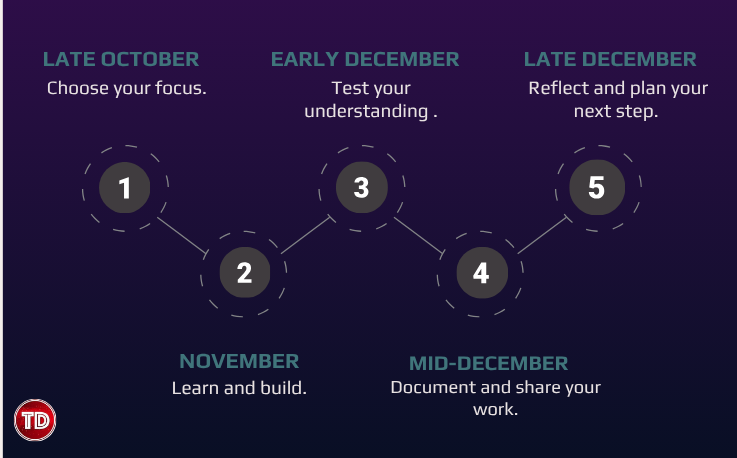
Here’s one way to organize the remaining weeks:
Late October: Choose your focus.
Review your current skills, decide what you want to improve, and find a learning path. Identify a realistic outcome you want to achieve before the year ends.
November: Learn and build.
Strengthen your fundamentals and begin a hands-on project. Focus on understanding the concepts and applying them instead of rushing through multiple courses.
Early December: Test your understanding.
Work through the challenges in your project, revisit difficult concepts, and use practice questions or exercises to identify knowledge gaps. If certification is your goal, assess whether you’re ready for the exam or need more preparation.
Mid-December: Document and share your work.
Organize your project, write clear documentation, publish what you’re comfortable sharing, and ask someone for feedback. Explain what you built and what you learned.
Late December: Reflect and plan your next step.
Review your progress, identify the skills you still need to develop, and decide what you want to focus on in 2027.
You don’t need to follow this schedule perfectly. Adjust it to your availability and the complexity of your project. If you only have a few hours each week, that’s still an opportunity to make progress.
Before the year ends, aim to have three things: a skill you’ve developed, something you’ve built or practiced, and a clearer idea of what you want to learn next.
These are realistic outcomes you can carry into the new year, regardless of whether you’ve completed a certification or mastered every concept on your learning list.
Final Thoughts: Don’t Wait for January
It’s easy to treat the end of the year as a deadline for everything you haven’t accomplished. You might look back at the goals you set in January and feel like you should have done more.
But learning doesn’t have to follow a perfect schedule.
You can start with a concept you don’t understand, spend time practicing it, make mistakes, and gradually become more comfortable with the technology. You can build a small project that teaches you more than you expected. You can discover that a career path you once considered isn’t right for you, or find a new area of IT that makes you excited to learn.
All of these experiences will help us move forward. You don’t need to transform your entire career in the last few months of 2026, you just need to make a start that you can build on.
Choose one skill. Find a resource. Practice what you learn. Build something small. Share your progress. Then decide what comes next.
When January arrives, you won’t have to begin with another list of resolutions. You’ll already have something to build on.
You don’t have to become an expert before 2027. You just have to give yourself a reason to keep growing.
References
⚡$4.99 Claude Certified Architect Foundations CCAR-F Practice Exams

Turn Your Team Into Cloud-Ready Professionals Today
Learn AWS with our PlayCloud Hands-On Labs
$2.99 AWS and Azure Exam Study Guide eBooks

Learn GCP By Doing! Try Our GCP PlayCloud
Learn Azure with our Azure PlayCloud
FREE AI and AWS Digital Courses

FREE AWS, Azure, GCP Practice Test Samplers

Subscribe to our YouTube Channel

Follow Us On Linkedin


Written by: Bryce Anrie Bombales