
Database backups are a critical component of any organization’s disaster recovery and business continuity strategy. Whether an application supports financial transactions, customer records, healthcare systems, or internal business operations, protecting its database against accidental deletion, infrastructure failures, and security incidents is essential.
Amazon Relational Database Service (Amazon RDS) simplifies database protection by providing automated backups and snapshots. These capabilities allow organizations to recover databases from previous states without manually managing the underlying backup infrastructure.
However, maintaining backups exclusively within the same AWS account introduces another consideration: What happens if the AWS account containing the production database becomes compromised, inaccessible, or subject to accidental resource deletion?
Even when an organization enables automated backups, relying entirely on the production account may not provide the desired level of administrative isolation for critical recovery assets.
One approach is to maintain independent database backups in a separate AWS account. This architecture helps establish a clearer separation between production resources and backup resources, while allowing organizations to apply dedicated security controls, access restrictions, and retention policies.
In this article, we will explore how to automate cross-account Amazon RDS snapshot backups using AWS Lambda, Amazon EventBridge, AWS Key Management Service (AWS KMS), and AWS Identity and Access Management (IAM).
Why Cross-Account Database Backups Matter
A production database may already have automated backups enabled, but automated backup functionality and administrative isolation solve different problems.
Automated backups provide recovery points for a database. Account separation, on the other hand, helps reduce the risk of a single administrative environment affecting both the production database and its recovery assets.
For example, consider a financial services company operating a customer transaction platform on Amazon RDS. The database contains critical customer information and supports applications that must remain available throughout the day.
The organization has enabled Amazon RDS automated backups, but all database resources and recovery assets are managed in the same production AWS account.
If privileged credentials are compromised, an attacker with sufficient permissions might be able to modify or delete database resources and eligible snapshots. Similarly, an incorrectly configured automation process could unintentionally remove backups that were supposed to be retained.
A dedicated backup account provides an additional administrative boundary. With the appropriate permissions and retention controls, the organization can maintain independently owned snapshots that are not governed by the same IAM roles and operational workflows used in production.
This architecture is particularly useful for organizations that require:
-
Disaster recovery and business continuity: Independent recovery points help restore critical databases following data loss or operational incidents.
-
Account-level isolation: Backup resources are maintained outside the production account’s normal administrative environment.
-
Security and ransomware resilience: Separating backup administration can reduce exposure to compromised production credentials.
-
Compliance and auditability: Dedicated backup accounts make it easier to establish distinct ownership, access controls, and retention policies.
-
Automated backup management: Event-driven processing reduces reliance on repetitive manual snapshot copying and sharing.
-
Operational consistency: Standardized Lambda functions and IAM policies help implement repeatable backup workflows across supported database instances.
Importantly, cross-account backups do not automatically provide immutability, continuous replication, or guaranteed recovery times. Those requirements must be addressed through additional controls, recovery testing, and the organization’s broader disaster recovery design.
Understanding Amazon RDS Automated and Manual Snapshots
Before building the automation workflow, it is important to understand the difference between automated backups and manual snapshots in Amazon RDS.
Amazon RDS automated backups provide database recovery capabilities based on the configured backup retention period. For supported database engines, these backups include database snapshots and transaction logs that support point-in-time recovery.
Manual DB snapshots, in contrast, are explicitly created or copied and remain available until deleted, subject to the applicable service and account controls.
|
Feature |
Automated backups |
Manual DB snapshots |
|
Creation |
Managed by Amazon RDS when enabled |
Created or copied explicitly |
|
Retention |
Based on configured backup retention |
Retained until deleted |
|
Primary purpose |
Routine recovery and point-in-time restoration |
Specific recovery points and archival copies |
|
Cross-account sharing |
Cannot be shared directly |
Supported for eligible snapshots |
|
Lifecycle management |
Managed through automated backup settings |
Requires separate retention and cleanup controls |
The distinction matters because Amazon RDS automated DB snapshots cannot be directly shared with another AWS account. A manual snapshot must first be created from the automated snapshot, after which the manual copy can be shared with an authorized account.
For encrypted snapshots, there is an additional requirement. Amazon RDS does not support sharing a snapshot encrypted with the source account’s default AWS managed KMS key (aws/rds). Such a snapshot must be copied and encrypted using an appropriate customer managed KMS key before sharing.
These restrictions establish the foundation of the architecture described in this article.
Solution Architecture: An Automated Cross-Account Backup Workflow
The proposed solution uses two AWS accounts in the same AWS Region:
-
Production account (PROD): Hosts the Amazon RDS database, receives automated backups, and prepares encrypted manual snapshots for sharing.
-
Backup account: Receives access to eligible production snapshots and creates independently owned manual copies.
The implementation uses the Ohio AWS Region (us-east-2) as an example. The same general approach can be adapted to another supported Region by updating the resource identifiers, KMS configuration, IAM policies, and Lambda settings.
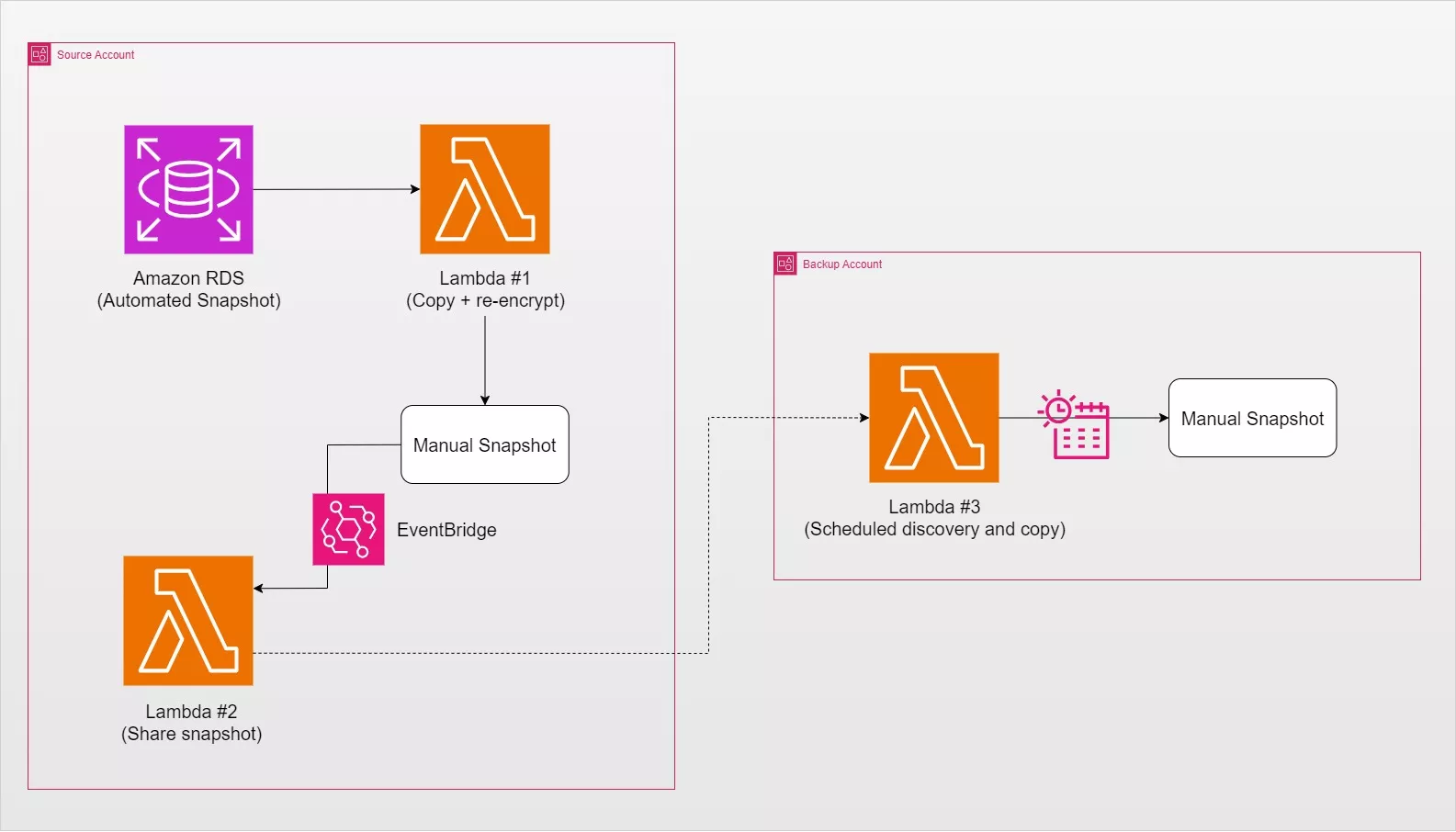
The workflow consists of five principal operations.
First, Amazon RDS creates an automated snapshot during the database’s configured backup process. Amazon EventBridge then detects the relevant RDS event and invokes the first Lambda function.
Second, Lambda Function #1 creates a manual copy of the automated snapshot, using a customer managed AWS KMS key to encrypt the resulting copy.
Third, after the manual snapshot copy becomes available, another EventBridge rule invokes Lambda Function #2. This function validates the snapshot and grants the designated backup account permission to access it.
Fourth, Lambda Function #3 runs in the backup account according to a configured EventBridge Scheduler schedule. It identifies an eligible shared snapshot and initiates a copy into the backup account.
Finally, the copied snapshot becomes an independently owned backup asset encrypted with a KMS key belonging to the backup account.
An important architectural characteristic is that snapshot copying is asynchronous. A successful CopyDBSnapshot API response means the copy operation has started; it does not necessarily mean the resulting snapshot is ready for use. The solution therefore separates snapshot creation, sharing, and destination copying into distinct operations, rather than attempting all activities in a single Lambda invocation.
Part 1: Preparing AWS KMS for Secure Cross-Account Snapshot Sharing
The first major component of this architecture is AWS Key Management Service (AWS KMS).
AWS KMS provides centralized management of encryption keys used to protect data across AWS services. Amazon RDS integrates with AWS KMS to encrypt database storage, snapshots, automated backups, and other supported database resources.
For cross-account snapshot sharing, encryption is especially important because the destination account must be authorized to access the encryption key protecting the shared snapshot.
Why a customer managed KMS key is required
Amazon RDS supports using AWS managed keys and customer managed keys for encryption.
An AWS managed key, such as alias/aws/rds, is created and managed by AWS for use with the corresponding service in an AWS account.
A customer managed key provides additional administrative capabilities, including the ability to define key policies, manage authorized principals, configure key lifecycle settings, and establish supported cross-account permissions.
For this solution, the source database’s automated snapshot may initially be encrypted with the default AWS managed RDS key.
Because snapshots encrypted with that default key cannot be shared across AWS accounts, Lambda Function #1 creates a separate manual copy using a customer managed key.
The original automated snapshot remains unchanged. The resulting manual copy is encrypted under the designated customer managed key and can be shared with the backup account once the necessary permissions are configured.
Creating the customer managed KMS key
In the production AWS account, navigate to the AWS KMS console in Ohio and create a key with the following configuration:
|
Setting |
Configuration |
|
AWS Region |
|
|
Key type |
Symmetric |
|
Key usage |
Encrypt and decrypt |
|
Key material origin |
KMS |
|
Suggested alias |
|
|
Key administrators |
Designated production security administrators |
|
Key users |
Authorized production roles |
|
Other AWS accounts |
Designated backup account |
A symmetric encryption key is appropriate because Amazon RDS uses symmetric encryption for its AWS KMS integration.
During key configuration, specify the backup AWS account under Other AWS accounts. This adds the appropriate cross-account permissions to the KMS key policy.
After creating the key, record its ARN:
arn:aws:kms:us-east-2:111122223333:key/<key-id>
In this example, 111122223333 represents the production account. Replace it with the actual production account ID.
The key ARN will be referenced by the Lambda functions and IAM policies during snapshot copying and sharing.
Understanding the KMS key policy
A KMS key policy controls which AWS principals can use or administer a particular key. Unlike an ordinary IAM policy, it is attached directly to the KMS key.
For cross-account access, AWS KMS evaluates permissions from both accounts. The source account must authorize the external account through its key policy, and the destination account must authorize its IAM principal to use the source key.
For example, the following is an illustrative key policy statement granting a designated backup role permission to use the source account’s customer managed key:
{
  "Sid": "AllowBackupRoleToUseKey",
  "Effect": "Allow",
  "Principal": {
    "AWS": "arn:aws:iam::444455556666:role/RDSBackupCopyRole"
  },
  "Action": [
    "kms:DescribeKey",
    "kms:Decrypt",
    "kms:ReEncrypt*",
    "kms:GenerateDataKey*"
  ],
  "Resource": "*"
}
Here, 444455556666 represents the backup account. This statement is intended to be incorporated into a complete, properly configured KMS key policy; it is not a replacement for the entire policy.
The Principal element identifies the external IAM role permitted to use the key. Restricting access to a dedicated backup role is more specific than granting key-use permissions to every eligible principal in the destination account.
The kms:DescribeKey permission allows the authorized role to retrieve information about the key. The kms:Decrypt and kms:ReEncrypt* permissions support cryptographic operations required during encrypted snapshot copying, while kms:GenerateDataKey* allows the generation of data keys used by integrated AWS services.
Amazon RDS may also require permissions to create KMS grants. AWS KMS grants allow integrated services to use keys on behalf of authorized principals for specific operations. A separate, appropriately restricted kms:CreateGrant permission should therefore be configured where required.
Important: Granting cross-account access in the key policy alone is insufficient. A corresponding IAM policy must also be attached to the authorized role in the backup account.
Part 2: Lambda Function #1 — Copying and Re-Encrypting Automated RDS Snapshots
Production/ Source account
The first Lambda function is responsible for transforming an automated RDS snapshot into a shareable, encrypted manual snapshot.
This function is invoked when Amazon RDS reports the successful creation of an automated snapshot.
Rather than creating backups according to a separate, fixed schedule, the function reacts to the database backup process. This reduces unnecessary polling and helps ensure that the workflow starts after the relevant automated snapshot has been created.
Understanding the Lambda function’s logic

The supplied Python implementation uses Boto3, the AWS SDK for Python, to interact with Amazon RDS and AWS KMS.
The function contains several important safeguards.
1. Validate the incoming EventBridge event
The function checks three event attributes:
event.get("source") == "aws.rds"

event.get("detail-type") == "RDS DB Snapshot Event"

detail.get("EventID") == "RDS-EVENT-0091"
The event ID RDS-EVENT-0091 identifies the creation of an automated RDS DB snapshot.
By checking the event source, detail type, and event ID, the function avoids processing unrelated events that might otherwise reach the Lambda function.
It also verifies that the event originated from the configured AWS Region.
2. Restrict processing to approved databases
The implementation uses an environment variable named ALLOWED_DB_INSTANCES.
For example:
ALLOWED_DB_INSTANCES=prod-customer-db,prod-orders-db
This variable defines which DB instances are eligible for the automated backup workflow.
When the function retrieves the snapshot’s metadata, it compares the associated DB instance identifier against the allowlist.
If the database is not included, the function logs the result and exits without creating a new snapshot.
This provides an operational safeguard against copying every snapshot generated in the AWS account.
3. Validate the source snapshot
The function calls DescribeDBSnapshots to retrieve the source snapshot’s metadata.
It checks that the snapshot is an automated snapshot and has an available status before starting the copy operation.
This validation matters because snapshot operations can fail when the source resource has not reached an appropriate state.
4. Generate a deterministic manual snapshot identifier
The function generates a snapshot name using several components:
crossacct-<database-id>-<timestamp>-<hash>
For example:
crossacct-prod-customer-db-20261109-010000-a1b2c3d4
The identifier contains the original database name, a timestamp, and a short hash derived from the source snapshot identifier.
This naming convention helps administrators determine which database and recovery point a snapshot represents.
More importantly, it supports idempotency.
An idempotent operation can be repeated without unintentionally producing additional resources for the same logical request. If EventBridge delivers the same event more than once, the Lambda function generates the same destination snapshot identifier.
Before copying, it checks whether that manual snapshot already exists. If it does, the function returns an already_exists result instead of starting another copy.
5. Validate the customer managed KMS key
The validate_kms_key() function checks several key properties through the AWS KMS DescribeKey API.
It confirms that the configured key is customer managed, enabled, symmetric, intended for encryption and decryption, and located in the expected Region.
These checks help prevent the workflow from using an incorrect or unsuitable key.
6. Copy and re-encrypt the snapshot
Once validation is complete, the function calls the Amazon RDS CopyDBSnapshot API.
The central operation is:
response = rds.copy_db_snapshot(
    SourceDBSnapshotIdentifier=snapshot_id,
    TargetDBSnapshotIdentifier=manual_snapshot_id,
    KmsKeyId=KMS_KEY_ARN,
    CopyTags=False,
    Tags=[
        {
            "Key": "BackupWorkflow",
            "Value": "CrossAccountRDS"
        },
        {
            "Key": "ManagedBy",
            "Value": "RDSBackupLambda"
        },
        {
            "Key": "SourceDBIdentifier",
            "Value": db_id
        },
        {
            "Key": "SourceSnapshotId",
            "Value": snapshot_id
        }
    ]
)
The SourceDBSnapshotIdentifier identifies the automated snapshot being copied, while TargetDBSnapshotIdentifier defines the name of the new manual snapshot.
The KmsKeyId parameter specifies the customer managed KMS key used to encrypt the destination snapshot.
Setting CopyTags=False avoids automatically inheriting all tags from the source snapshot. Instead, the function explicitly assigns workflow-related metadata.
These tags become important in the second Lambda function, where they help identify snapshots created by the expected automation process.
At this stage, the function only initiates the copy operation. The new snapshot may remain in the creating state until Amazon RDS finishes processing it.
IAM policy for Lambda Function #1
Every Lambda function executes using an IAM execution role. The execution role defines which AWS API operations the function can perform.
The first function requires permissions to inspect RDS snapshots, copy snapshots, use KMS encryption keys, create appropriate KMS grants, and tag newly created snapshots.
The supplied IAM policy contains five statements:
|
Policy statement |
Permissions |
Purpose |
|
|
|
Retrieve snapshot information and check for existing copies |
|
|
|
Initiate copying of eligible source snapshots |
|
|
KMS describe and cryptographic permissions |
Support encryption and re-encryption operations |
|
|
|
Permit supported AWS service integration with the keys |
|
|
|
Apply workflow metadata to copied snapshots |
The DescribeRDSSnapshots statement uses the aws:RequestedRegion condition to restrict the request to us-east-2.
The CopyRDSSnapshots statement uses resource ARNs to limit copy operations to the intended source and destination snapshot patterns. Both resources can be relevant to authorization during a copy operation.
The UseSnapshotEncryptionKeys statement includes permissions such as:
[
  "kms:DescribeKey",
  "kms:Decrypt",
  "kms:Encrypt",
  "kms:ReEncrypt*",
  "kms:GenerateDataKey*"
]
These operations support access to encrypted snapshot data and encryption of the copied snapshot.
The original policy uses "Resource": "*" for these KMS operations. Although this can simplify initial testing, production deployments should restrict permissions to the relevant source and destination key ARNs wherever possible.
The CreateKMSGrantsForAWSResources statement contains the condition:
"Condition": {
  "Bool": {
    "kms:GrantIsForAWSResource": "true"
  }
}
This condition restricts grant creation to requests associated with AWS resources, instead of allowing unrestricted KMS grant creation.
Finally, the tagging permission applies only to destination snapshots matching the crossacct-* naming pattern.
The execution role should also have CloudWatch Logs permissions, commonly provided by the AWS managed AWSLambdaBasicExecutionRole policy. These permissions allow the function to write execution records and errors to CloudWatch Logs.
Configuring the first Lambda function
Create the function in the production account, using the Python 3.14 runtime specified in the supplied implementation.
Configure the following:
|
Configuration |
Value |
|
Function name |
|
|
Region |
|
|
Timeout |
1 minute |
|
|
Approved DB instance identifiers |
|
|
Customer managed KMS key ARN |
The one-minute timeout is intended to allow time for validation and submission of the asynchronous RDS copy request. It does not represent the duration of the entire snapshot copy.
For large databases or environments with elevated API latency, the timeout may need adjustment.
Creating the EventBridge rule
The first Lambda function uses an EventBridge rule that matches the automated snapshot creation event.
{
  "source": ["aws.rds"],
  "detail-type": ["RDS DB Snapshot Event"],
  "region": ["us-east-2"],
  "detail": {
    "EventID": ["RDS-EVENT-0091"],
    "SourceType": ["SNAPSHOT"]
  }
}
The rule’s target is td-rds-copy-system-snapshot.
Amazon RDS emits event RDS-EVENT-0091 when an automated DB snapshot is created. The event serves as the trigger that connects the managed RDS backup process to the custom cross-account automation.
One detail worth noting is that the source implementation validates the event’s detail.SourceIdentifier and expects an automated snapshot identifier beginning with rds:. Verify the actual EventBridge event payload from the deployed RDS environment before relying on this assumption.
EventBridge must also have permission to invoke the Lambda function, typically configured when the rule is associated with its Lambda target.
Part 3: Lambda Function #2 — Sharing the Encrypted Manual Snapshot
Production account
Once the first function initiates the copy process, the next requirement is to make the resulting manual snapshot accessible to the backup AWS account.
This is the responsibility of Lambda Function #2.
Unlike the first Lambda function, which creates a new snapshot, the second function modifies the sharing permissions of an existing snapshot.
This separation is important because snapshot copying is asynchronous. Attempting to share the newly created snapshot immediately after calling CopyDBSnapshot may fail if the copy has not finished.
Understanding how Lambda Function #2 works
The supplied implementation performs the following operations.
1. Validate the destination account and encryption key
The function reads two environment variables:
BACKUP_ACCOUNT_ID
KMS_KEY_ARN
It verifies that the backup account ID contains 12 digits and differs from the configured production account ID.
It also checks that the configured KMS key is enabled, customer managed, located in the appropriate Region, and owned by the expected source account.
These validations reduce the risk of sharing snapshots with an incorrectly configured account or using an unexpected encryption key.
2. Identify the manual snapshot
Under normal operation, the function receives an Amazon RDS snapshot copy completion event from EventBridge.
The function retrieves the snapshot using DescribeDBSnapshots.
It also supports two manual execution modes in the supplied code. A test event containing a snapshot_id lets an administrator select a specific snapshot, while an empty event ({}) causes the function to search for the latest eligible manual snapshot.
These capabilities are useful for testing or reconciliation after an interrupted workflow.
3. Validate snapshot metadata and workflow tags
The function checks that the selected snapshot:
-
Uses the configured
crossacct-naming prefix. -
Belongs to the expected DB instance.
-
Is a manual snapshot with an
availablestatus. -
Is encrypted using the expected customer managed KMS key.
-
Contains the required workflow tags.
The tag validation is especially important.
For example, the first Lambda function applies:
BackupWorkflow = CrossAccountRDS
ManagedBy = RDSBackupLambda
The second function checks these values to establish that the snapshot matches the expected automation workflow.
It also verifies SourceDBIdentifier and SourceSnapshotId values.
Together with the snapshot identifier, ownership checks, and encryption checks, these validations provide a stronger selection mechanism than simply sharing the most recently created manual snapshot in the account.
However, tags are not a security boundary by themselves. IAM permissions must still restrict who can create, modify, or share sensitive database snapshots.
4. Check whether the snapshot is already shared
Before changing snapshot permissions, the function calls:
rds.describe_db_snapshot_attributes(
    DBSnapshotIdentifier=snapshot_id
)
The response includes the snapshot’s restore attribute and the AWS accounts authorized through that attribute.
If the backup account ID is already present, the function returns an already_shared result.
This provides another layer of idempotency, preventing unnecessary sharing updates when events are retried.
5. Share the snapshot with the backup account
The key API operation is:
rds.modify_db_snapshot_attribute(
    DBSnapshotIdentifier=snapshot_id,
    AttributeName="restore",
    ValuesToAdd=[BACKUP_ACCOUNT_ID]
)
The ModifyDBSnapshotAttribute API updates the sharing permissions of a manual RDS DB snapshot.
The AttributeName="restore" value refers to the snapshot attribute used to authorize another AWS account to access the snapshot for supported restore and copy operations.
The ValuesToAdd parameter specifies the AWS account ID being granted access.
Because the snapshot is encrypted, the destination account must copy it before restoring a DB instance from that copy.
Sharing the RDS snapshot also does not automatically grant all necessary KMS permissions. Both snapshot authorization and encryption-key access must be configured correctly.
IAM policy for Lambda Function #2
The second Lambda function requires fewer privileges than the first because it does not create new snapshots or perform cryptographic copy operations.
Its execution-role policy contains four statements.
|
Policy statement |
Permissions |
Purpose |
|
|
|
Retrieve the manual snapshot |
|
|
|
Validate the snapshot’s workflow metadata |
|
|
|
Inspect and update snapshot sharing permissions |
|
|
|
Verify the expected encryption key |
The most security-sensitive permission is rds:ModifyDBSnapshotAttribute, because it allows the function to change which AWS accounts can access a snapshot.
In the supplied policy, this permission is restricted to RDS snapshot ARNs matching the crossacct-* prefix.
This is significantly safer than allowing unrestricted modification of all manual snapshots in the account.
The rds:ListTagsForResource permission allows the function to inspect the metadata used in its eligibility checks, while kms:DescribeKey is limited to the specified customer managed KMS key.
Because Lambda Function #2 only validates the key’s configuration, it does not need the same broad cryptographic permissions as Lambda Function #1.
In addition to this custom policy, its execution role needs the standard CloudWatch Logs permissions for logging.
Configuring the second Lambda function
|
Configuration |
Value |
|
Function name |
|
|
Region |
|
|
Runtime |
Python 3.14 |
|
Timeout |
1 minute |
|
|
Backup AWS account ID |
|
|
Production customer managed KMS key ARN |
The supplied code also contains constants such as SOURCE_ACCOUNT_ID, DB_IDENTIFIER, and REGION.
These values must be updated to match the actual deployment before the function is used.
Creating the second EventBridge rule
The second EventBridge rule responds to the completion of a local RDS snapshot copy.
{
  "source": ["aws.rds"],
  "detail-type": ["RDS DB Snapshot Event"],
  "account": ["111122223333"],
  "region": ["us-east-2"],
  "detail": {
    "EventID": ["RDS-EVENT-0197"],
    "SourceType": ["SNAPSHOT"]
  }
}
The target is td-rds-share-manual-snapshot.
The event ID RDS-EVENT-0197 represents the completion of a local snapshot copy. This is different from RDS-EVENT-0042, which is associated with manual snapshot creation.
This distinction matters because the workflow is based on copying an existing automated snapshot into a manual snapshot, rather than creating a manual snapshot directly from the running DB instance.
When the matching completion event is delivered, Lambda Function #2 retrieves the snapshot, performs its validation checks, and grants access to the destination account.
At this point, the snapshot should become discoverable from the backup account, provided both the RDS sharing permissions and KMS access permissions are correct.
However, a shared snapshot is not yet an independently owned backup. The destination account must still copy it.
Part 4: Lambda Function #3 — Creating an Independent Snapshot in the Backup Account
Backup account
The final Lambda function completes the cross-account backup process.
This function runs inside the backup AWS account and creates a local manual snapshot from the snapshot shared by the production account.
Why copying the shared snapshot is necessary
When a manual snapshot is shared, the destination account receives permission to access the source account’s snapshot. Ownership of the original snapshot remains with the source account.
Consequently, the destination account’s access still depends on the source snapshot and the applicable sharing permissions.
If the source account deletes the snapshot or removes access, the destination account may lose the ability to use the shared resource.
Copying the shared snapshot solves this dependency by creating a new snapshot owned by the backup account.
Once the copy operation has successfully completed, the backup account maintains its own recovery asset. Using a backup-account-owned KMS key for this copy also removes the ongoing dependency on the production account’s encryption key for that copied snapshot.
This is one of the most important benefits of the entire architecture.
Understanding the Lambda function’s logic
The third Lambda function differs from the previous two because it does not directly respond to an RDS snapshot event. Instead, it runs on a schedule and searches for eligible shared snapshots.
1. Discover snapshots shared by the production account
The function uses the RDS DescribeDBSnapshots API with IncludeShared=True.
paginator = rds.get_paginator("describe_db_snapshots")

for page in paginator.paginate(IncludeShared=True):
    for snapshot in page["DBSnapshots"]:
        # Evaluate the snapshot
        pass
Using a paginator allows the function to process multiple pages of results rather than assuming that all snapshots can be returned in a single API response.
The function then checks the ARN of each discovered snapshot to determine whether it belongs to the configured production AWS account.
This prevents the workflow from accidentally selecting a snapshot shared by another account.
2. Filter eligible snapshots

The supplied implementation evaluates several conditions before choosing a snapshot.
It checks that the snapshot belongs to the expected source account, matches the configured database-specific naming prefix, has an available status, and is encrypted.
It also checks the snapshot’s age.
The code defines:
MAX_AGE_HOURS = 30
This prevents the function from selecting snapshots older than 30 hours.
For a daily backup workflow, this can be useful because it limits the possibility of repeatedly processing an outdated recovery point when the latest expected backup is missing.
However, the 30-hour value is an operational choice, not an AWS service requirement. It should be adjusted according to the organization’s backup schedule, expected processing delays, and recovery point objectives.
3. Select the most recent eligible snapshot
After evaluating the available snapshots, the function selects the newest eligible snapshot based on its creation timestamp.
This allows the backup account to automatically process newly shared snapshots without manually specifying a snapshot identifier for each execution.
The approach is suitable for a daily workflow in which the objective is to obtain the latest available recovery point.
One limitation is worth considering: if several snapshots become available between scheduled executions, this implementation copies only the newest eligible snapshot. It does not guarantee that every snapshot created in the production account will be copied.
Organizations requiring complete recovery-point coverage should implement additional reconciliation logic that processes all eligible, uncopied snapshots.
4. Generate a destination snapshot identifier
The function creates a deterministic destination identifier using the backup- prefix and a short hash based on the source snapshot ARN.
For example:
backup-crossacct-prod-customer-db-20261109-010000-a1b2c3d4
The deterministic identifier makes it possible to recognize a snapshot that has already been copied.
Before initiating the operation, the function checks whether the destination snapshot already exists.
If the existing snapshot is in the available or creating state, it returns an already_exists result.
If the snapshot exists but is in an unexpected state, the function raises an exception.
This prevents duplicate snapshots and helps expose unhealthy backup operations.
5. Copy the shared snapshot into the backup account
The central operation is:
response = rds.copy_db_snapshot(
    SourceDBSnapshotIdentifier=source_arn,
    TargetDBSnapshotIdentifier=destination_id,
    KmsKeyId=KMS_KEY,
    CopyTags=False
)
The SourceDBSnapshotIdentifier specifies the ARN of the snapshot shared by the production account.
The TargetDBSnapshotIdentifier determines the name of the new manual snapshot in the backup account.
The KmsKeyId parameter determines which AWS KMS key encrypts the destination copy.
In the supplied implementation, the key is configured as:
KMS_KEY = "alias/aws/rds"
This refers to the backup account’s AWS managed KMS key for Amazon RDS.
Using a key belonging to the destination account is important for creating an independently usable encrypted backup.
For organizations that require more control over encryption key access and lifecycle, a customer managed KMS key in the backup account is another option.
Once Amazon RDS finishes the copy, the backup account owns the resulting manual snapshot. The production account can no longer delete that destination snapshot simply by deleting the original shared snapshot.
IAM policy for Lambda Function #3
The third Lambda function needs permission to discover shared RDS snapshots, initiate snapshot copies, and use the appropriate KMS keys.
The supplied execution-role policy contains three statements.
|
Policy statement |
Permissions |
Purpose |
|
|
|
Discover shared snapshots and create destination copies |
|
|
KMS describe and cryptographic permissions |
Access the encryption key protecting the source snapshot |
|
|
|
Permit supported AWS service operations involving the source key |
The first statement grants rds:DescribeDBSnapshots and rds:CopyDBSnapshot.
These permissions allow the function to list shared snapshots and initiate copies of eligible snapshots.
The supplied policy uses "Resource": "*", which should be reviewed before production deployment. Where supported, resource-level restrictions should be applied to the source snapshot ARNs and intended destination snapshot ARNs.
The second statement grants access to the source account’s KMS key.
For example:
{
  "Sid": "UseSourceSnapshotKMSKey",
  "Effect": "Allow",
  "Action": [
    "kms:DescribeKey",
    "kms:Decrypt",
    "kms:ReEncrypt*",
    "kms:GenerateDataKey*"
  ],
  "Resource": "arn:aws:kms:us-east-2:111122223333:key/<key-id>"
}
These permissions are required because the shared snapshot remains encrypted using the source account’s customer managed KMS key until the destination copy is created.
The third statement allows the creation of KMS grants associated with supported AWS resource operations.
It restricts kms:CreateGrant using the kms:GrantIsForAWSResource condition.
An additional consideration: The supplied policy explicitly addresses the source KMS key, but a complete deployment must also ensure that the Lambda execution role has the required permissions to use the destination encryption key. The appropriate permissions depend on whether the destination key is AWS managed or customer managed, as well as the applicable key policy and account configuration.
AWS documents the KMS permissions required for encrypted RDS snapshot copying, including kms:DescribeKey, kms:CreateGrant, and the relevant cryptographic operations.
Configuring the EventBridge Scheduler
The final function runs according to an EventBridge Scheduler schedule.
Unlike an EventBridge rule that responds to a specific AWS service event, EventBridge Scheduler invokes a target based on a defined schedule.
In the supplied implementation, the scheduler uses:
|
Configuration |
Value |
|
Schedule type |
Cron-based |
|
Time zone |
|
|
Cron expression |
|
|
Target |
Lambda Function #3 |
|
Frequency |
Daily at 12:00 PM Philippine time |
The scheduled execution occurs at noon, while the example production backup process is expected to begin around 9:00 AM Philippine time.
This creates an intended interval between source backup creation and destination copying.
However, the timing is not a guarantee that the production backup, manual snapshot copy, and sharing operations will all be completed by noon. Larger snapshots may require more processing time.
EventBridge Scheduler supports time-zone-aware cron expressions, making it possible to configure schedules according to local time rather than manually converting every schedule to UTC.
For production use, the schedule should also have appropriate retry settings, an execution role that permits invoking the Lambda target, and monitoring for unsuccessful invocations.
Part 5: Verifying the Cross-Account Backup Workflow
Completing the configuration does not necessarily mean the backup architecture is functioning correctly.
Each stage should be verified independently before the workflow is relied upon for production recovery.
Cross-Account Backup Verification Checklist:
Testing Lambda Function #1
For manual testing, the supplied implementation accepts an event using the following structure:
{
  "version": "0",
  "source": "aws.rds",
  "detail-type": "RDS DB Snapshot Event",
  "region": "us-east-2",
  "detail": {
    "EventID": "RDS-EVENT-0091",
    "SourceType": "SNAPSHOT",
    "SourceIdentifier": "rds:<automated-snapshot-id>"
  }
}
Replace the placeholder with an actual automated snapshot identifier from the production account.
A successful Lambda invocation should return a result indicating that the copy has started, or that the expected copy already exists.
The newly created snapshot should subsequently appear under the manual snapshots in the Amazon RDS console.
Verifying snapshot sharing
After the manual snapshot becomes available, confirm that Lambda Function #2 has processed the completion event.
Inspect the snapshot’s sharing permissions and verify that the backup AWS account ID is present.
The encrypted snapshot should be accessible to the authorized destination account once the corresponding KMS permissions are also effective.
Verifying the independent backup
In the backup account, open the Amazon RDS Snapshots console.
Check that the copied snapshot appears under manual snapshots owned by the backup account.
Its status should eventually become Available.
For a stronger verification, perform a controlled restoration test.
A completed copy operation indicates that Amazon RDS successfully created the snapshot resource, but it does not verify that an application can resume operations from the recovered database.
A restoration test should confirm that the database can be restored, the required configuration can be applied, application connectivity works, and the restored data meets recovery expectations.
These tests are essential for assessing actual recovery time and recovery point requirements.
Part 6: Monitoring, Security, and Operational Considerations
Although the Lambda functions automate the snapshot workflow, a reliable production backup strategy requires additional operational controls.
Monitoring with Amazon CloudWatch
Each Lambda function writes operational messages and errors through its configured logging mechanism.
CloudWatch Logs provides a centralized location for inspecting function execution records.
The supplied code uses Python’s logging module to record information such as selected snapshot identifiers, successful copy initiation, duplicate snapshot detection, invalid configurations, and AWS API errors.
These records help administrators identify which stage failed.
For example, a failure in Lambda Function #1 may indicate a problem with automated snapshot discovery or KMS permissions. A failure in Lambda Function #2 may indicate a missing workflow tag or an inability to modify snapshot sharing permissions. A failure in Lambda Function #3 may indicate that no eligible shared snapshot was discovered.
Production deployments should also configure CloudWatch alarms or equivalent monitoring to detect Lambda errors, missed backup deadlines, and the absence of an available destination snapshot within the required recovery window.
A function that returns successfully is not necessarily proof that the entire backup workflow has completed. Monitoring should therefore track the status of the final RDS snapshot rather than relying only on Lambda invocation success.
Following the principle of least privilege
The IAM execution roles should contain only the permissions required for their respective functions.
This is especially important because the three functions perform different operations.
Lambda Function #1 needs snapshot copy and encryption permissions. Lambda Function #2 needs snapshot sharing permissions. Lambda Function #3 needs permissions to access shared snapshots and create destination copies.
Keeping these functions separate avoids combining all permissions into a single execution role.
AWS KMS key policies should also restrict access to authorized principals. Cross-account key usage must be reviewed carefully because permission to use an encryption key can affect access to sensitive database backups.
Protecting backups from accidental deletion
Cross-account isolation provides useful protection, but a backup account can still be compromised or misconfigured.
Organizations should consider restricting the ability to delete manual snapshots, modify backup retention configurations, disable KMS keys, and remove essential recovery resources.
These controls can be implemented through carefully designed IAM policies, AWS Organizations service control policies where applicable, and separate administrative responsibilities.
For requirements involving immutable or write-once recovery copies, evaluate additional services and controls designed for that purpose rather than assuming that an ordinary manual RDS snapshot is immutable.
Managing retention and storage costs
Manual snapshots remain available until deleted, so the automated workflow will continue accumulating backup copies unless a retention process is implemented.
This is particularly important when database sizes grow or daily snapshots are retained for long periods.
A practical retention strategy might preserve daily recovery points for a shorter period, retain selected weekly and monthly snapshots for longer periods, and remove obsolete snapshots according to approved retention requirements.
Amazon RDS snapshot storage and related operations may incur charges. These should be considered when estimating the total cost of the architecture.
Retention rules should be applied independently in the production and backup accounts to avoid unintentionally deleting recovery points that are still required.
Understanding recovery point and recovery time objectives
Two important concepts in disaster recovery planning are the Recovery Point Objective (RPO) and Recovery Time Objective (RTO).
The RPO describes the maximum acceptable amount of data loss measured in time. The RTO describes the maximum acceptable time required to restore the affected service.
For this architecture, the RPO depends on the frequency of source snapshots and the latest snapshot successfully copied to the destination account.
The RTO depends on the time needed to restore the copied snapshot, configure the database environment, establish connectivity, and resume application operations.
Because the architecture uses periodic snapshots rather than continuous cross-account replication, it may not meet recovery requirements that demand near-zero data loss.
Organizations should evaluate these limitations before selecting it as the primary disaster recovery mechanism.
Part 7: Recommendations for Production Deployment
The supplied implementation establishes a useful foundation for automating encrypted, cross-account RDS snapshot backups. Several refinements can make the architecture more resilient and easier to operate at scale.
First, consider implementing a reconciliation mechanism that discovers every eligible source snapshot that has not yet been copied to the destination account. This would provide stronger coverage than selecting only the latest shared snapshot once per day.
Second, introduce explicit monitoring for copy completion and missed backup deadlines. This can help detect failures even when individual Lambda invocations return successfully.
Third, move deployment-specific configuration values, including account IDs, database identifiers, snapshot prefixes, and Regions, into environment variables or centrally managed configuration where appropriate. This reduces code changes when extending the workflow to additional databases.
Fourth, consider adding an automated retention mechanism, with safeguards that prevent deletion of required recovery points.
Finally, conduct regular restoration exercises. Independent backup ownership is valuable, but an operationally verified recovery procedure provides stronger assurance that the organization can recover from an actual incident.
There are also AWS-managed alternatives worth evaluating. For example, AWS Backup provides centralized backup management and cross-account backup capabilities for supported resources. AWS Systems Manager includes the AWSSupport-ShareRDSSnapshot automation runbook for snapshot-sharing workflows.
These alternatives may reduce the amount of custom automation required, depending on the organization’s operational requirements.
Conclusion
That’s it! I hope this guide helped you understand how to automate cross-account Amazon RDS backups using AWS Lambda, Amazon EventBridge, and AWS KMS.
With this setup, you can automatically copy, encrypt, and share database snapshots across AWS accounts while keeping an independent backup in a separate account. This adds another layer of protection to your database and reduces the need for manual backup management.
Remember to regularly monitor your backup workflow and test your snapshots to make sure everything works as expected when recovery is needed.
Happy building!
⏳ Get 30% OFF on Microsoft Azure and GitHub Reviewers this Black Friday Sale!

Turn Your Team Into Cloud-Ready Professionals Today

Learn AWS with our PlayCloud Hands-On Labs

$2.99 AWS and Azure Exam Study Guide eBooks

Learn GCP By Doing! Try Our GCP PlayCloud
Learn Azure with our Azure PlayCloud
FREE AI and AWS Digital Courses

FREE AWS, Azure, GCP Practice Test Samplers


Subscribe to our YouTube Channel

Follow Us On Linkedin


Written by: Nestor Mayagma Jr.