
Claude Tag Cheat Sheet
Claude Tag brings Claude into Slack so teams can delegate work by mentioning @Claude in a channel. In a configured channel, Claude can use the organization’s authorized tools and shared context to complete a task and report back in the thread. Anthropic lists Claude Tag as a beta feature on Claude Team and Enterprise.
What Is Claude Tag?
Claude Tag supports three Slack surfaces: channel mentions, direct messages, and the AI assistant panel. The surface determines which identity, tools, and billing apply. The earlier Claude in Slack experience switched to Claude Tag on August 3, 2026.
The Core Concept
- Your organization provides the Slack workspace, channel access, identities, and approved tools.
- Claude provides a shared assistant in configured channels, plus personal access in Slack DMs and the assistant panel.
- Your team owns task scope, tool permissions, review, and decisions about which work belongs in shared channels.
Architecture Overview
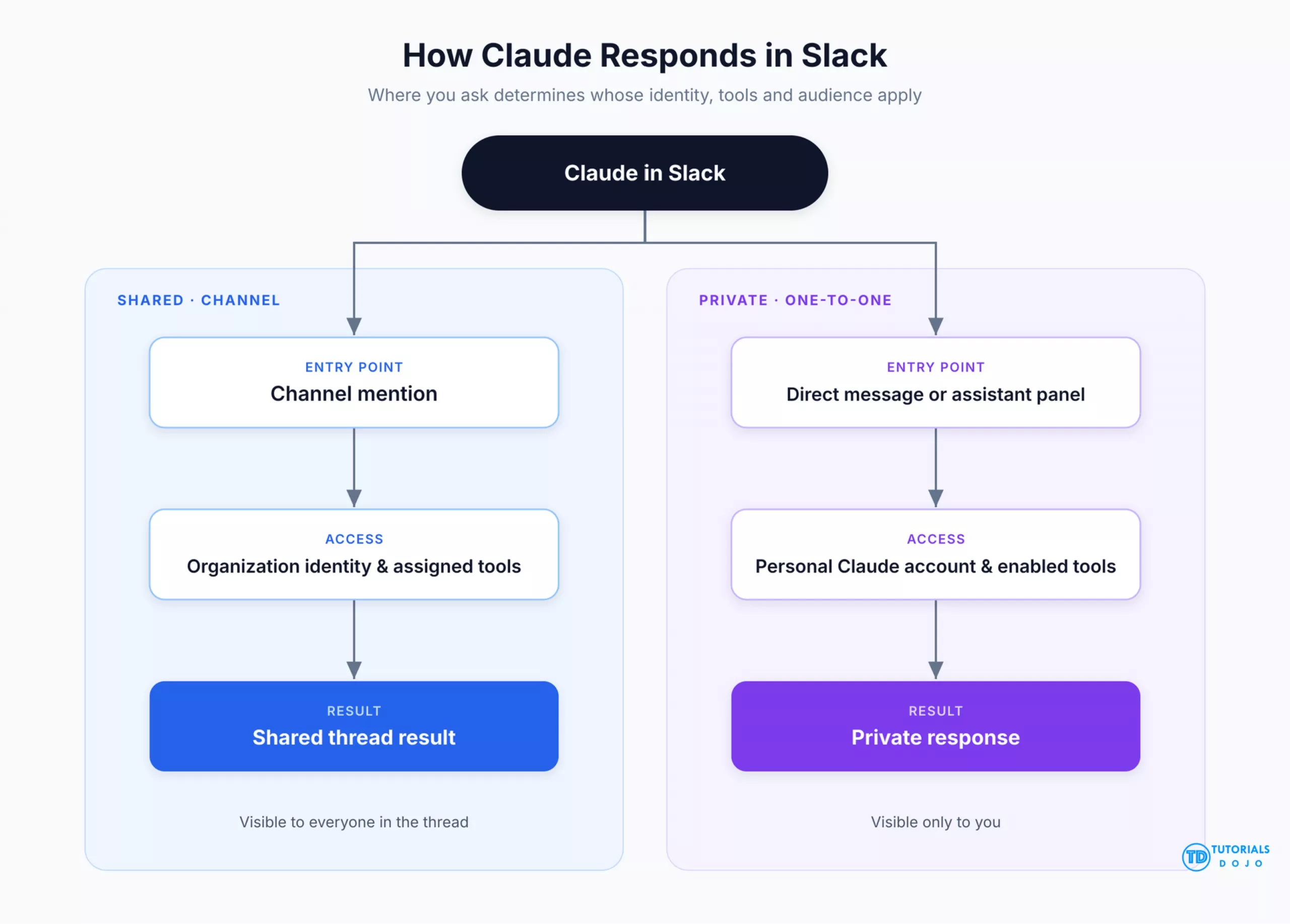
Key Components & Features
| Component | What it does |
|---|---|
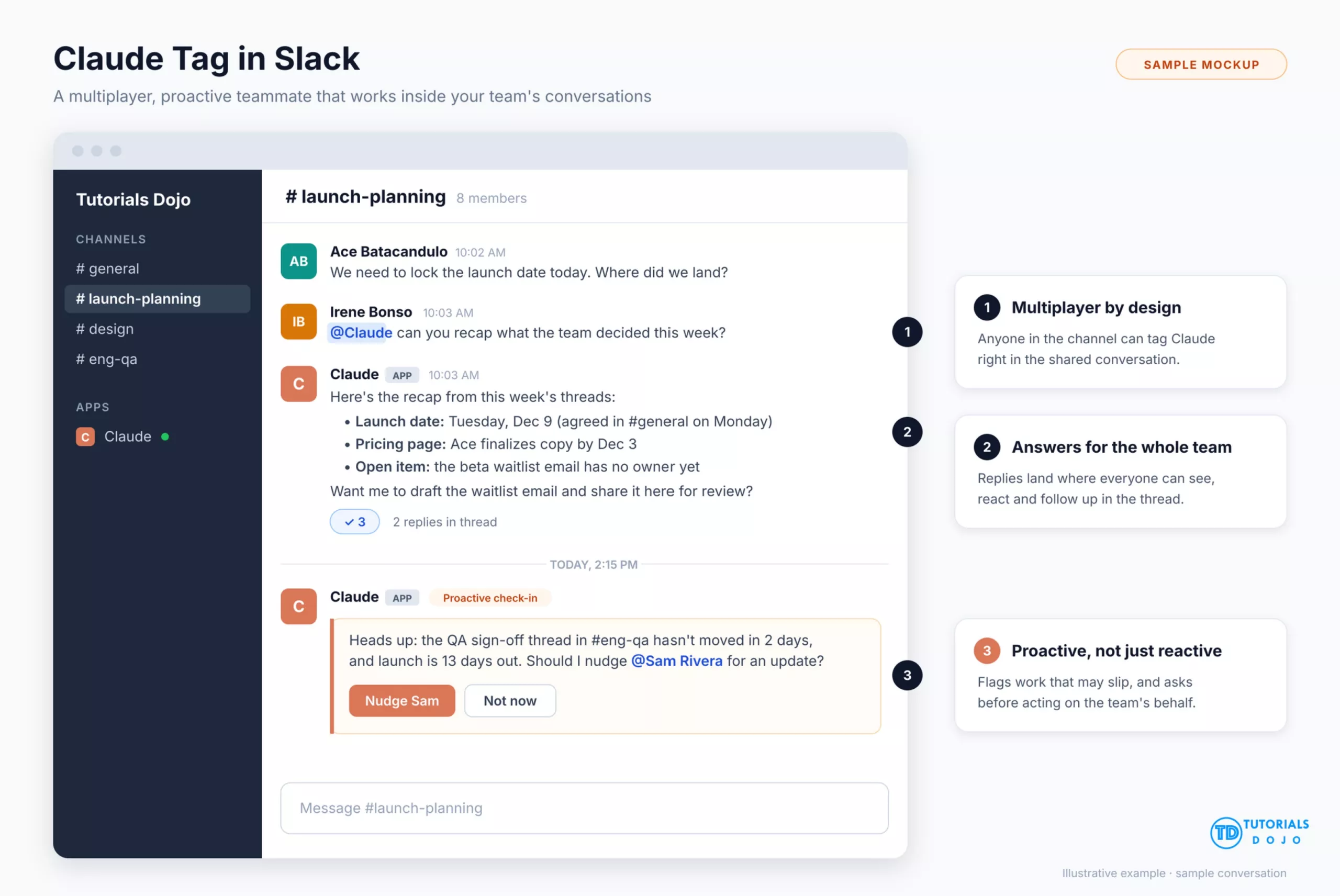
| Channel mention | Tag @Claude in a configured channel to delegate a task. Colleagues can follow and steer the work in the thread. |
| Direct message and assistant panel | Give you a private way to use Claude in Slack with capabilities enabled on your Claude account. |
| Organization identity | Determines what Claude can reach on behalf of a configured channel. Channel participants share that identity’s access. |
| Connected tools | Give Claude access to approved systems and data within the scope configured for the channel. |
| Channel context and memory | Help Claude carry relevant information across conversations in the channel. |
| Proactive follow-ups | Standing instructions can guide when Claude checks in or posts an update in a configured channel. |
Primary Use Cases
-
Ask Claude to summarize decisions, owners, deadlines, and blockers from a project thread.
-
Ask Claude to pull together an issue summary from an approved ticket source and post it in the team thread.
-
Compile updates from permitted tools into a draft for review, with links to the underlying records.
Key Benefits & Value Proposition
-
Teammates can review the request, follow the response, and refine the result in the same thread.
-
Channel context can carry forward relevant decisions and responsibilities.
-
Channel identities and connected tools let owners choose which resources Claude can access for specific teams.

Deployment Process & Timeline
| Phase | Activities | Estimated duration |
|---|---|---|
| Define scope | Pick a pilot channel, decide who can invoke Claude, and identify the tools needed for the pilot. | Depends on approvals and ownership. |
| Install and configure | Install the Claude Slack app. A Claude organization Primary Owner or Owner provisions the identity, connects approved tools, and selects channels. | Depends on Slack app approval and connector authorization. |
| Pilot | Start with a thread-summary task. Check who can invoke Claude, what it can access, and where responses appear. | Depends on the scenarios you test. |
| Expand | Review usage, update permissions, and add more channels or standing instructions as needed. | Depends on rollout scope. |
Example Prompt
@Claude, summarize this thread into decisions, open questions, and next steps. Include an owner and deadline only if someone stated them. Reply in this thread and flag anything that still needs a decision.
Ideal Customer Profile
- Teams on Slack that coordinate work in shared channels and need visible handoffs.
- Organizations on Claude Team or Enterprise with owners who can manage channel access and connected tools.
Key Considerations & Planning Factors
- Anthropic lists Claude Tag as a Slack beta for Team and Enterprise. Check current rollout and workspace settings.
- Channel tasks use the organization’s identity and are billed to the organization. DMs and the assistant panel use the member’s Claude account and enabled capabilities. Check current plan terms and usage controls before expanding.
- Organization owners can choose who can use Tag. Enterprise also supports role-based access. Review channel membership alongside tool permissions.
- Channel work is visible in Slack to that channel’s members. Review the connected identity’s scope and your Slack retention settings before using Tag for sensitive material.
- Specify the expected output, where it should go, and whether you want a draft or an action. Review permissions for any new connector or standing instruction.
Claude Tag vs. Adjacent Tools
| Factor | Claude Tag in a channel | Claude Tag in a Slack DM | Claude in the web app |
|---|---|---|---|
| Best fit | Shared tasks and team follow-ups. | Private questions or drafts from Slack. | Work in a dedicated Claude conversation. |
| Identity | Organization identity assigned to the channel. | Member’s Claude account. | Account used to sign in to Claude. |
| Context | Authorized channel context and assigned tools. | Private interaction and personally enabled capabilities. | Conversation and connected context available in Claude. |
| Output | Visible in the Slack thread. | Private Slack response. | Response in Claude. |
Conclusion
Use Claude Tag when a task starts in Slack and the team benefits from seeing the result in the same thread. A pilot channel with a narrowly scoped identity makes it easier to verify context, permissions, and billing before broadening access.
Claude Tag Cheat Sheet References:
https://claude.com/product/tag
https://support.claude.com/en/articles/15594475-what-is-claude-tag
🛍️ $0.99 eBooks Are Here and Save Up to 75% on All Practice Exams & Video Courses

Turn Your Team Into Cloud-Ready Professionals Today

Learn AWS with our PlayCloud Hands-On Labs
50% OFF ON OUR YEARLY PLAN

Learn GCP By Doing! Try Our GCP PlayCloud
Learn Azure with our Azure PlayCloud
FREE AI and AWS Digital Courses

FREE AWS, Azure, GCP Practice Test Samplers

Subscribe to our YouTube Channel

Follow Us On Linkedin
Written by: Ace Kenneth Batacandulo