
Last updated on December 26, 2025
VPC Peering Cheat Sheet
-
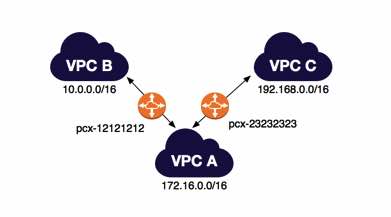
A networking connection between two VPCs that enables you to route traffic between them privately using private IPv4 addresses or IPv6 addresses. Instances in either VPC can communicate with each other as if they are within the same network.
-
You can create a VPC peering connection between your own VPCs, with a VPC in another AWS account, or with a VPC in a different AWS Region (also called Inter-Region VPC Peering).
-
A VPC peering connection is neither a gateway nor an AWS Site-to-Site VPN connection and does not rely on a separate piece of physical hardware. There is no single point of failure for communication or a bandwidth bottleneck.
Features
Tagging on Create
-
You can add tags when creating a VPC peering connection or associated route table to simplify identification and cost allocation.
ClassicLink Support
-
You can modify a VPC peering connection to enable EC2-Classic instances to communicate with instances in a peer VPC, or vice versa.

Stale Security Group Rule Detection
-
Allows you to identify if a security group is being referenced in the rules of a peer VPC.
-
Helps detect stale security group rules to maintain clean and secure configurations.
Establishing A Peering Connection
- The owner of the requester VPC sends a request to the owner of the accepter VPC to create the VPC peering connection. The accepter VPC cannot have a CIDR block that overlaps with the requester VPC’s CIDR block.
- To enable the flow of traffic between the VPCs using private IP addresses, the owner of each VPC in the VPC peering connection must manually add a route to one or more of their VPC route tables that points to the IP address range of the other VPC (the peer VPC).
- Update the security group rules that are associated with your instance to ensure that traffic to and from the peer VPC is not restricted.
- DNS Resolution: By default, if instances on either side of a VPC peering connection address each other using a public DNS hostname, the hostname resolves to the instance’s public IP address. To change this behavior, enable DNS hostname resolution for your VPC connection. This will allow the DNS hostname to resolve to the instance’s private IP address.
IPv6 Support
- VPC Peering supports both IPv4 and IPv6 traffic.
- This applies to both Intra-Region (same region) and Inter-Region (different regions) peering connections.
Limitations
- Transitive Peering: VPC Peering does not support transitive peering (e.g., if A peers with B, and B peers with C, A cannot talk to C). You must use a full mesh or Transit Gateway for this.
- You cannot create a VPC peering connection between VPCs that have matching or overlapping IPv4 or IPv6 CIDR blocks.
- You cannot have more than one VPC peering connection between the same two VPCs at the same time.
- Unicast reverse path forwarding (uRPF) is not supported.
VPC Peering Pricing
- Same-AZ Data Transfer: Data transfer between instances in peered VPCs is free if the instances are in the same Availability Zone (even if in different accounts).
- Cross-AZ Data Transfer: Standard data transfer rates apply (same as connecting across AZs within a single VPC).
- Inter-Region Data Transfer: Standard Inter-Region data transfer rates apply.
For those preparing for the AWS Certified Solutions Architect Professional exam, it’s a must to read this article as well: Longest Prefix Match: Understanding Advanced Concepts in VPC Peering
Note: If you are studying for the AWS Certified Advanced Networking Specialty exam, we highly recommend that you take our AWS Certified Advanced Networking – Specialty Practice Exams and read our Advanced Networking Specialty exam study guide.

VPC Peering Cheat Sheet References:
https://docs.aws.amazon.com/vpc/latest/userguide/vpc-peering.html
https://docs.aws.amazon.com/vpc/latest/peering/what-is-vpc-peering.html
📚 $2.99 USD Starting Price — Save 40% on All eBooks

Turn Your Team Into Cloud-Ready Professionals Today

Learn AWS with our PlayCloud Hands-On Labs

$2.99 AWS and Azure Exam Study Guide eBooks

Learn GCP By Doing! Try Our GCP PlayCloud

Learn Azure with our Azure PlayCloud

FREE AI and AWS Digital Courses

FREE AWS, Azure, GCP Practice Test Samplers


Subscribe to our YouTube Channel

Follow Us On Linkedin


Written by: Jon Bonso




