
Last updated on December 28, 2025
AWS Security Hub Cheat Sheet
- AWS Security Hub provides a comprehensive view of your security posture across AWS accounts by aggregating, organizing, and prioritizing security findings from AWS services, AWS partner tools, and automated compliance checks. It helps evaluate compliance with industry standards and best practices.
Features
- Centralized Security Findings
Aggregates security alerts (findings) across AWS services such as:- Amazon GuardDuty
- Amazon Inspector
- Amazon Macie
- AWS IAM Access Analyzer
- AWS Firewall Manager
- AWS Audit Manager
- Integrated AWS Partner security solutions
- Multi-Account Support via AWS Organizations
Integrates with AWS Organizations to manage security posture across all existing and future member accounts. - Automated Compliance Checks
Runs continuous configuration and compliance checks based on standards such as:- CIS AWS Foundations Benchmark
- Other supported compliance frameworks
- Compliance checks use AWS Config configuration items.
- Aggregated Dashboards
Consolidates findings across accounts into a unified dashboard showing security status and compliance posture. - Event Forwarding and Automation
Findings can be forwarded to ticketing, chat, email, or automated remediation systems using Amazon CloudWatch Events custom actions. - Finding Storage
Findings are stored within Security Hub for a minimum of 30 days.
(Previously documented as 90 days; current documented behavior is 30 days.) - Regional Behavior
Security Hub receives and processes findings only for the Region where it is enabled. - Security Hub CSPM released new controls (CSPM = Cloud Security Posture Management):
- New controls for FSBP: Cognito.3, Cognito.4, Cognito.5, Cognito.6, EC2.172–182, ELB.17–18, RDS.38–48, Redshift.16–18, S3.25, SSM.5–7, SageMaker.5–8, Transfer.3–7, FSx.3–5.
- Controls for NIST SP 800-53 Rev. 5: Lambda.7, ECS.17, RDS.42, RDS.45.
- Controls for AWS Resource Tagging standard: Amplify.1–2, Batch.4, DataSync.2, EC2.174–179, Redshift.17, SageMaker.6–7, SSM.5, Transfer.4–7.
- New security standards:
- CIS AWS Foundations Benchmark v5.0.0
- NIST SP 800-171 Revision 2
- Updates to finding behavior: existing control findings now update compliance status instead of generating new findings.
- Trend and Region Aggregation support added.
- AWS Security Finding Format (ASFF) now supports CodeRepository resource object.
- Third-party integrations added: Elastic, Dynatrace.
Core Concepts
- Finding — A security or compliance detection.
- Insight — A grouped view of related findings based on filters and aggregation.
- Control — Safeguards that represent security requirements.
- Compliance Standard — A set of controls mapped to frameworks or benchmarks.
- Custom Action — A mechanism for sending selected findings to CloudWatch Events for workflow automation.
Compliance Check Structure
- A standard contains multiple controls.
- A control may apply to multiple resources.
- A compliance check evaluates a control against a single resource.
Service-Linked Role
Uses a service-linked role allowing Security Hub to aggregate findings and configure necessary AWS Config components for compliance checks.
AWS Config must be enabled to run compliance checks.
How It Works
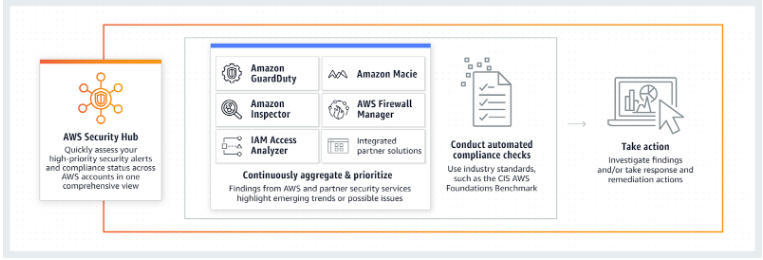
- Security Hub receives and processes only those findings from the same Region where you enabled Security Hub in your account.
Security
- Security Hub processes only security-related metadata and findings; it does not store customer secrets.
- Access to Security Hub data is controlled through IAM policies.
- Tag-based access control can be used to restrict or grant permissions.
- VPC endpoints can be used to keep Security Hub API traffic within the AWS network.
- Findings are retained for at least 30 days; exported findings can be stored externally if longer retention is needed.
- Security Hub leverages AWS Config for compliance checks, ensuring configuration history is preserved securely.
- AWSSecurityHubOrganizationsAccess – added permissions to enable and manage Security Hub across organizations.
- AWSSecurityHubFullAccess – added capabilities to manage GuardDuty, Amazon Inspector, account management, and create service-linked roles.
- AWSSecurityHubV2ServiceRolePolicy – added metering capabilities for ECR, Lambda, CloudWatch, IAM; added support for global AWS Config recorders.
Use Cases
- Centralizing security findings and alerts across AWS services.
- Monitoring compliance with CIS benchmarks or other supported standards.
- Managing multi-account security posture in an organization.
- Identifying misconfigurations or insecure resource states.
- Automating remediation workflows via CloudWatch Events integrations.
- Prioritizing security issues through consolidated dashboards and insights.
AWS Security Hub Pricing
- Pricing is based on two metered components:
-
- Number of compliance checks performed.
- Number of finding ingestion events.
- Pricing is billed monthly per account per Region.
Note: If you are studying for the AWS Certified Security Specialty exam, we highly recommend that you take our AWS Certified Security – Specialty Practice Exams and read our Security Specialty exam study guide.

AWS Security Hub Cheat Sheet References:
https://aws.amazon.com/about-aws/whats-new/2018/11/introducing-aws-security-hub/
https://aws.amazon.com/security-hub/
https://docs.aws.amazon.com/securityhub/latest/userguide/what-is-securityhub.html
https://aws.amazon.com/security-hub/faqs/
🤖 $3.74 ONLY for Claude eBooks and Get 25% OFF All Claude Reviewers

Turn Your Team Into Cloud-Ready Professionals Today

Learn AWS with our PlayCloud Hands-On Labs

$2.99 AWS and Azure Exam Study Guide eBooks

Learn GCP By Doing! Try Our GCP PlayCloud

Learn Azure with our Azure PlayCloud

FREE AI and AWS Digital Courses

FREE AWS, Azure, GCP Practice Test Samplers


Subscribe to our YouTube Channel

Follow Us On Linkedin


Written by: Jon Bonso

Jon Bonso is the co-founder of Tutorials Dojo, an EdTech startup and an AWS Digital Training Partner that provides high-quality educational materials in the cloud computing space. He graduated from Mapúa Institute of Technology in 2007 with a bachelor's degree in Information Technology. Jon holds 10 AWS Certifications and is also an active AWS Community Builder since 2020.



