
Last updated on December 26, 2025
Amazon Detective Cheat Sheet
-
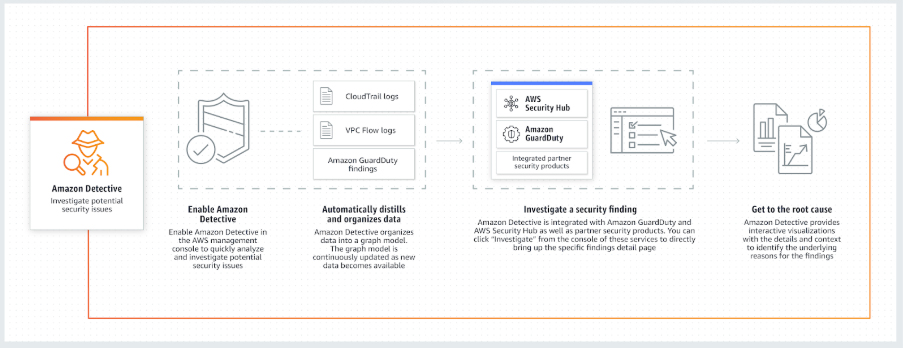
The service automatically collects log data from your AWS resources and uses machine learning, statistical analysis, and graph theory to build a linked set of data that enables you to easily conduct faster and more efficient security investigations.
-
It can be integrated with AWS security services like Amazon GuardDuty, Amazon Macie, and AWS Security Hub, as well as partner security products to identify potential security issues or findings.
-
Overview & Data Sources
-
Automatic Data Ingestion: Detective analyzes trillions of events from multiple data sources:
-
VPC Flow Logs
-
AWS CloudTrail (Management and Data Events)
-
Amazon GuardDuty findings
-
Amazon EKS Audit Logs (New)
-
AWS Security Hub findings (ASFF)
-
-
Unified View: Automatically creates a unified, interactive view of your resources, users, and the interactions between them over time.
-
EKS Investigations: Supports security investigations for Kubernetes workloads and container-based applications on Amazon EKS, allowing you to trace malicious activity down to specific pods, container images, and Kubernetes API calls.
-
Features
-
AWS PrivateLink / VPC Endpoints: Detective supports PrivateLink for secure API access through VPC endpoints.
-
Enhanced GuardDuty Integration:
-
Attack Sequence Findings for Extended Threat Detection.
-
IAM Findings alerting on restricted user credential use.
-
Runtime Monitoring Findings for EC2, ECS, containers, and Lambda.
-
Malware protection for S3 uploads.
-
-
Visualization Enhancements:
-
Timeline layout for Finding Group Visualization with play button and severity filtering.
-
Radial layout for improved interpretation of finding groups.
-
Aggregated finding groups now include Amazon Inspector vulnerability findings.
-
-
Security Lake Integration:
-
Ingests Security Lake v2 (OCSF 1.1.0) sources, including Amazon EKS Audit Logs.
-
Query raw Security Lake logs directly from Detective.
-
-
Investigations Enhancements:
-
Investigate IAM users and roles with indicators of compromise.
-
Recommended resources for investigations based on activity in findings and finding groups.
-
-
Generative AI Support: Automatic Finding Group Summaries provide natural language explanations of correlated findings.
-
GuardDuty Membership Requirement Removed: You no longer need GuardDuty enabled to use Detective.
-
Regional Expansions: New regions include Israel (Tel Aviv), Europe (Stockholm, Paris), and Canada (Central).
-
Managed Policy Updates: Detective Investigations and Finding Group Summary actions added to
AmazonDetectiveInvestigatorAccess.
How It Works
Concepts
-
-
Behavior Graph: A linked set of data generated from incoming source data associated with one or more AWS accounts. It uses the same structure of findings, entities, and relationships.
-
Delegated Administrator: The AWS account designated to manage the behavior graph for the organization. This account invites member accounts to contribute data and uses the graph for investigations. (Replaces the legacy use of the Organization Management Account for this role).
-
Member Account: An AWS account that contributes data to a behavior graph. Member accounts do not have access to view the graph or conduct investigations; only the Administrator can.
-
Entity: An item extracted from the incoming data (e.g., IP addresses, EC2 instances, AWS users, Kubernetes pods).
-
Relationship: Activity that occurs between individual entities (e.g., an IP address connecting to an EC2 instance).
-
Scope Time: The time window used to scope the data displayed on profiles.
-
Finding Profile: Default scope is the first and last time the activity was observed.
-
Entity Profile: Default scope is the previous 24 hours.
-
-
Finding Groups (Key Feature)
-
Definition: A collection of related findings that Detective has correlated using graph analysis.
-
Purpose: Instead of investigating one alert at a time, Finding Groups allow you to examine multiple related activities (e.g., a brute force attack followed by an IAM role assumption) as a single security incident.
Generative AI Support
-
Finding Group Summaries: Detective uses generative AI to analyze finding groups and automatically generate a natural language summary. This helps analysts quickly understand the “story” behind a security event, including the chain of activity and impacted resources.
-
- Entity – An item extracted from the incoming data. Each entity has a type, which identifies the type of object it represents. Examples include IP addresses, Amazon EC2 instances, and AWS users.
- For each entity, the source data is also used to populate entity properties. Property values can be extracted directly from source records or aggregated across multiple records.
- Relationship – Activity that occurs between individual entities. Relationships are also extracted from the incoming source data.
- Similar to an entity, a relationship has a type, which identifies the types of entities involved and the direction of the connection. An example of a relationship type is an IP address connecting to an Amazon EC2 instance.
- Profile – For a finding or an entity, a single page that provides a collection of data visualizations plus supporting guidance.
- For findings, profiles help analysts to determine whether the finding is of genuine concern or a false positive.
- For entities, profiles provide supporting details for an investigation into a finding or for a general hunt for suspicious activity.
-

- Service Features & Configuration
-
Regional Service: Amazon Detective needs to be enabled on a per-region basis and enables you to quickly analyze activity across all your accounts within each region.
-
Multi-Account: It is a multi-account service that aggregates data from monitored member accounts under a single management account within the same region. You can configure multi-account monitoring deployments in the same way that you configure Amazon GuardDuty and AWS Security Hub.
-
Note: If you cannot use the same management accounts across all of the services, then after you enable Detective, you can optionally create a cross-account role.
-
-
Automatic History: If you are using Amazon GuardDuty, Amazon Detective will automatically ingest and process two weeks of historical log data upon activation.
-
Disabling: The management account for a behavior graph can disable Amazon Detective. When you disable Detective, the behavior graph and its associated Detective data are deleted. Deleted behavior graphs cannot be restored.
-
IAM Role Analysis: Amazon Detective is able to analyze IAM role sessions by processing VPC flow records and CloudTrail management events. It collates data about activity performed under an IAM Role into role sessions, visualizing what users and apps performed using the assumed roles.
-
- Detective vs. GuardDuty vs. Security Hub
-
Amazon GuardDuty: A threat detection service that continuously monitors for malicious activity and unauthorized behavior to protect your AWS accounts and workloads.
-
AWS Security Hub: A single place that aggregates, organizes, and prioritizes your security alerts (findings) from multiple AWS services (GuardDuty, Inspector, Macie) and partner solutions.
-
Amazon Detective: Simplifies the process of investigating security findings and identifying the root cause by visualizing the data.
- Amazon Detective Limits
-
Data Retention: Maintains up to one year of aggregated findings and data for analysis.
-
Regional: Detective is a regional service; you must enable it in each region where you want to analyze data.
-
-
Common Use Cases
-
-
Triage Security Findings: Quickly determine if a GuardDuty finding is a false positive or a real threat.
-
Incident Investigation: Drill down into the scope of a breach (e.g., “Which other EC2 instances did this compromised IP talk to?”).
-
Threat Hunting: Proactively search for hidden security threats or anomalous patterns in your logs.
-
Amazon Detective Pricing
-
Model: You are charged based on the volume of data (in Gigabytes) ingested from your log sources (VPC Flow Logs, CloudTrail, EKS Audit Logs).
-
Tiered Pricing: The cost per GB decreases as your data volume increases (e.g., the first 1,000 GB/month is charged at the highest rate, with lower rates for the next 4,000 GB, etc.).
-
Free Trial: New accounts receive a 30-day free trial.
-
No Extra Charge for Data Sources: You do not pay extra for the enabling of the logs (like VPC Flow Logs) specifically for Detective; you only pay the Detective ingestion fee.
- Note: If you are studying for the AWS Certified Security Specialty exam, we highly recommend that you take our AWS Certified Security – Specialty Practice Exams and read our Security Specialty exam study guide.

- Amazon Detective Cheat Sheet References:
- https://aws.amazon.com/detective/
https://aws.amazon.com/detective/faqs/
https://docs.aws.amazon.com/detective/latest/adminguide/what-is-detective.html
https://docs.aws.amazon.com/detective/latest/userguide/detective-investigation-about.html

🤖 $3.74 ONLY for Claude eBooks and Get 25% OFF All Claude Reviewers

Turn Your Team Into Cloud-Ready Professionals Today

Learn AWS with our PlayCloud Hands-On Labs

$2.99 AWS and Azure Exam Study Guide eBooks

Learn GCP By Doing! Try Our GCP PlayCloud

Learn Azure with our Azure PlayCloud

FREE AI and AWS Digital Courses

FREE AWS, Azure, GCP Practice Test Samplers


Subscribe to our YouTube Channel

Follow Us On Linkedin


Written by: Jon Bonso




