
The AB-900 Copilot & Agent Administration Fundamentals certification exam is designed for IT professionals who work with Microsoft 365 and need to understand how to administer Microsoft Copilot and AI agents within their organization. The exam tests your ability to manage Microsoft 365 core services, protect and govern data in the context of AI tools, and perform essential administrative tasks for Copilot and agents.
The content of the exam will test your ability to:
- Identify the core features and objects of Microsoft 365 services
- Understand data protection and governance tasks for Microsoft 365 and Copilot
- Perform basic administrative tasks for Copilot and agents
A passing score of 700 or greater is required. This study guide provides comprehensive review materials to help you pass the exam with confidence.
Study Materials
Before taking the exam, we recommend exploring the following resources. They will help you build foundational knowledge and hands-on experience with Microsoft 365, Copilot, and the tools you will be tested on.
- Microsoft Learn – Microsoft’s official learning platform provides structured learning paths tailored specifically for the AB-900 exam. Focus on the following modules:
-
- Prerequisites and core concepts for Microsoft 365 administrators
- Managing identities and governance in Microsoft Entra
- Understanding data protection with Microsoft Purview
- Copilot fundamentals and licensing
- Administering agents in Microsoft 365 and Power Platform
- Microsoft 365 Documentation – The official Microsoft docs provide in-depth coverage of every admin center and service on the exam, including Exchange Online, SharePoint, Teams, Entra, and Purview.
- Microsoft 365 Copilot Documentation – Focused documentation on how Copilot works, how it accesses data via Microsoft Graph, and how to manage licenses and settings.
- Microsoft 365 Developer Program (Free Tenant) – Sign up for a free developer tenant to get hands-on experience with the Microsoft 365 admin center, SharePoint, Teams, Purview, and Copilot settings.
- Tutorials Dojo’s Azure Cheat Sheets – with the help of our cheat sheets, you can easily understand the information found in the Azure documentation. These are presented in bullet point format to highlight the important concepts.
- Tutorials Dojo’s AB-900 Microsoft 365 Copilot and Agent Administration Fundamentals Practice Exams – our practice exams have always been regarded as the best in the market. Each question in our practice tests contains detailed explanations at the end of each set to help you digest important concepts that will help you pass your Microsoft 365 Copilot and Agent Administration Fundamentals certification exam on your first try.
Key Topics to Focus On
Your primary source of information when studying for the AB-900 exam is the Microsoft 365 and Purview documentation. To handle the scenario-based questions on the exam, develop a strong understanding of the following topics:
Microsoft 365 Core Services & Admin Centers
- Microsoft 365 Admin Center – org settings, domain configuration, license assignment to users and groups
- Exchange Online Admin Center – mailboxes, distribution lists, and mail flow
- SharePoint Admin Center – site creation, libraries, folders, permissions, and sharing policies
- Teams Admin Center – teams, channels, meeting policies, and user access controls
- Microsoft Entra Admin Center – users, groups, guest accounts, joined devices, and app registrations

Microsoft 365 Security Principles
- Zero Trust – understand the core principles of verify explicitly, least privilege, and assume breach
- Authentication & MFA – authentication methods, multifactor authentication, and how to troubleshoot sign-in issues
- Conditional Access – how to read and interpret conditional access policies
- Single Sign-On (SSO) – benefits and purpose in an organization
- Privileged Identity Management (PIM) – role of PIM in managing elevated access
- Identity Secure Score – how to interpret and improve the score in Microsoft Entra ID
- Microsoft Defender XDR – features and capabilities for threat protection
Microsoft Purview (Data Protection & Governance)
- Sensitivity Labels – use cases, how they are applied, and how they affect Copilot responses
- Data Loss Prevention (DLP) – how to identify and respond to DLP alerts
- Insider Risk Management – identifying risky user activities and reviewing reports
- Communication Compliance – identifying policy violations in user communications
- Data Security Posture Management (DSPM) for AI – discovering and managing AI activity
- Retention Policies – understanding retention labels and lifecycle management
- Compliance Manager – identifying compliance risks and acting on recommendations
- Data Explorer & Activity Explorer – identifying sensitive data and reviewing user activity
- eDiscovery – searching for files and emails using Content Search
SharePoint Oversharing & Governance
- Data access governance reports in SharePoint
- SharePoint Advanced Management – restricted site access and oversharing tools
- Identifying and resolving oversharing risks in an organization
Microsoft Copilot Administration
- How Copilot accesses data and how Microsoft Graph influences its responses
- Copilot licensing – monthly license model vs. pay-as-you-go, including SharePoint
- Assigning and managing Copilot licenses in the Microsoft 365 admin center
- Enabling and disabling specific Copilot features
- Monitoring Copilot usage and adoption with Copilot Analytics
- Managing prompts – saving, sharing, scheduling, and deleting
- Responsible AI principles
Copilot Agents Administration
- Built-in Copilot capabilities vs. agents – understanding the differences
- Researcher and Analyst – use cases for each built-in agent
- Custom agents – when and how they are used in an organization
- Configuring user access to agents
- Creating agents and understanding the approval process
- Monitoring agents – usage, operational insights, and agent lifecycle using Microsoft 365 admin center and Power Platform admin center
We suggest that you check out Tutorials Dojo’s Azure Cheat Sheets, which provide bullet-point summaries of the most important concepts on different Azure services.
Validate Your Knowledge
If you’re feeling confident because you’ve followed the recommended materials above, it’s time to test your knowledge of various Azure concepts and services. For high-quality practice exams, you can use the Tutorials Dojo AB-900 Microsoft 365 Copilot and Agent Administration Fundamentals practice exams.
These practice tests cover the relevant topics that you can expect from the real exam. It also contains different types of questions, such as single-choice, multiple-response, hotspot, yes/no, and drag-and-drop. Every question on these practice exams has a detailed explanation and adequate reference links that help you understand why the correct answer is the most suitable solution. After you’ve taken the exams, it will highlight the areas you need to improve. Together with our cheat sheets, we’re confident that you’ll be able to pass the exam and have a deeper understanding of how Azure works.
Sample Practice Test Questions:
Question 1
Your organization has deployed Microsoft 365 Copilot to help employees get contextual answers from its work data by entering natural language prompts. Copilot accesses data such as emails, documents, chats, and calendar entries using an API that exposes information from Microsoft 365 services.
Which of the following best describes how Microsoft Graph influences Copilot’s responses?
- Microsoft Graph trains the underlying Large Language Models (LLMs) used by Copilot.
- Microsoft Graph restricts Copilot from generating any content based on user prompts.
- Microsoft Graph provides access to organizational data so that Copilot can ground its responses in context relevant to the user’s prompt.
- Microsoft Graph serves as an external internet search engine that Copilot uses for responses.
Correct Answer: 3
Microsoft Graph is the primary API layer that enables applications to access Microsoft 365 data, such as emails, calendar events, files stored in OneDrive and SharePoint, Teams conversations, and more. In Microsoft 365 Copilot, Graph plays a key role in bringing organizational data into the AI workflow. When a user submits a prompt, Copilot uses Microsoft Graph to retrieve relevant content from the user’s tenant based on their access rights. This enables Copilot to ground its responses in real work data rather than relying solely on general language patterns. Data provisioning through Graph ensures that the AI output is relevant to the user’s actual context and tasks.
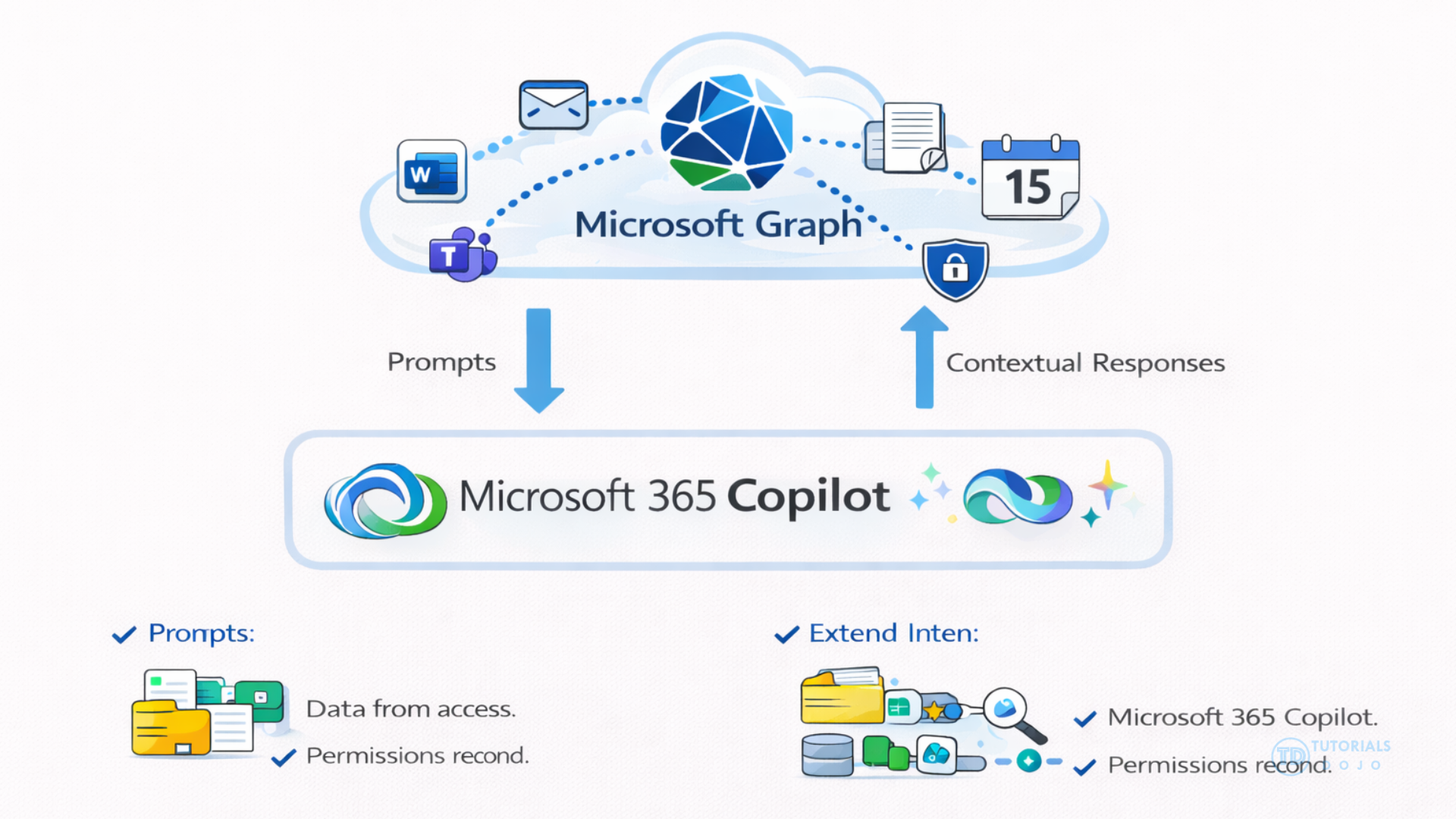
Because Microsoft Graph respects the existing permission and security model of Microsoft 365, the data Copilot retrieves is only what the user is authorized to see. This means that when Copilot generates a response, it incorporates contextual signals such as recently edited documents, emails in the user’s mailbox, or items from a SharePoint library, which improves relevance and accuracy. This grounding enhances productivity by allowing Copilot to surface precise, tenant‑specific information in responses, bridging organizational content with generative AI capabilities.
In contrast to using Graph for contextual data, Copilot’s underlying large language models are pretrained on general language patterns rather than on an organization’s private content. The integration with Microsoft Graph enriches these models by adding real‑time, tenant‑specific information that aligns with user needs while still adhering to enterprise security and compliance policies. This design ensures that Copilot’s answers are both relevant and secure.

Hence, the correct answer is: Microsoft Graph provides access to organizational data so that Copilot can ground its responses in context relevant to the user’s prompt.
The option that says: Microsoft Graph trains the underlying Large Language Models (LLMs) used by Copilot is incorrect because Microsoft Graph does not train the LLMs. The LLMs are pretrained on large datasets and are primarily fine-tuned by Microsoft, not by tenant-specific Graph data. Graph simply provides contextual organizational data to ground Copilot responses; it does not serve as a training mechanism.
The option that says: Microsoft Graph restricts Copilot from generating any content based on user prompts is incorrect because Microsoft Graph does not just block content generation. Its role is to provide access to relevant data within the user’s permissions, not to prevent Copilot from producing answers. Copilot can still generate language-based responses even if some data is inaccessible.
The option that says: Microsoft Graph serves as an external internet search engine that Copilot uses for responses is incorrect because Microsoft Graph is only an API for Microsoft 365 organizational data, not an internet search engine. Copilot may use other tools to retrieve web-based information, but Graph is primarily focused on tenant-specific content such as emails, files, and Teams conversations. It simply does not provide general internet search results.
References:
https://learn.microsoft.com/en-us/copilot/microsoft-365/microsoft-365-copilot-architecture
https://learn.microsoft.com/en-us/graph/overview
Check out these Microsoft Azure Cheat Sheets:
Question 2
You are using Microsoft 365 to reduce the risk of standing administrative permissions by enabling just-in-time privileged access for highly sensitive roles.
Which of the following should be used to meet this requirement?
- Microsoft Privileged Identity Management (PIM)
- Microsoft Entra Conditional Access
- Microsoft Defender for Endpoint
- Microsoft Purview Insider Risk Management
Correct Answer: 1
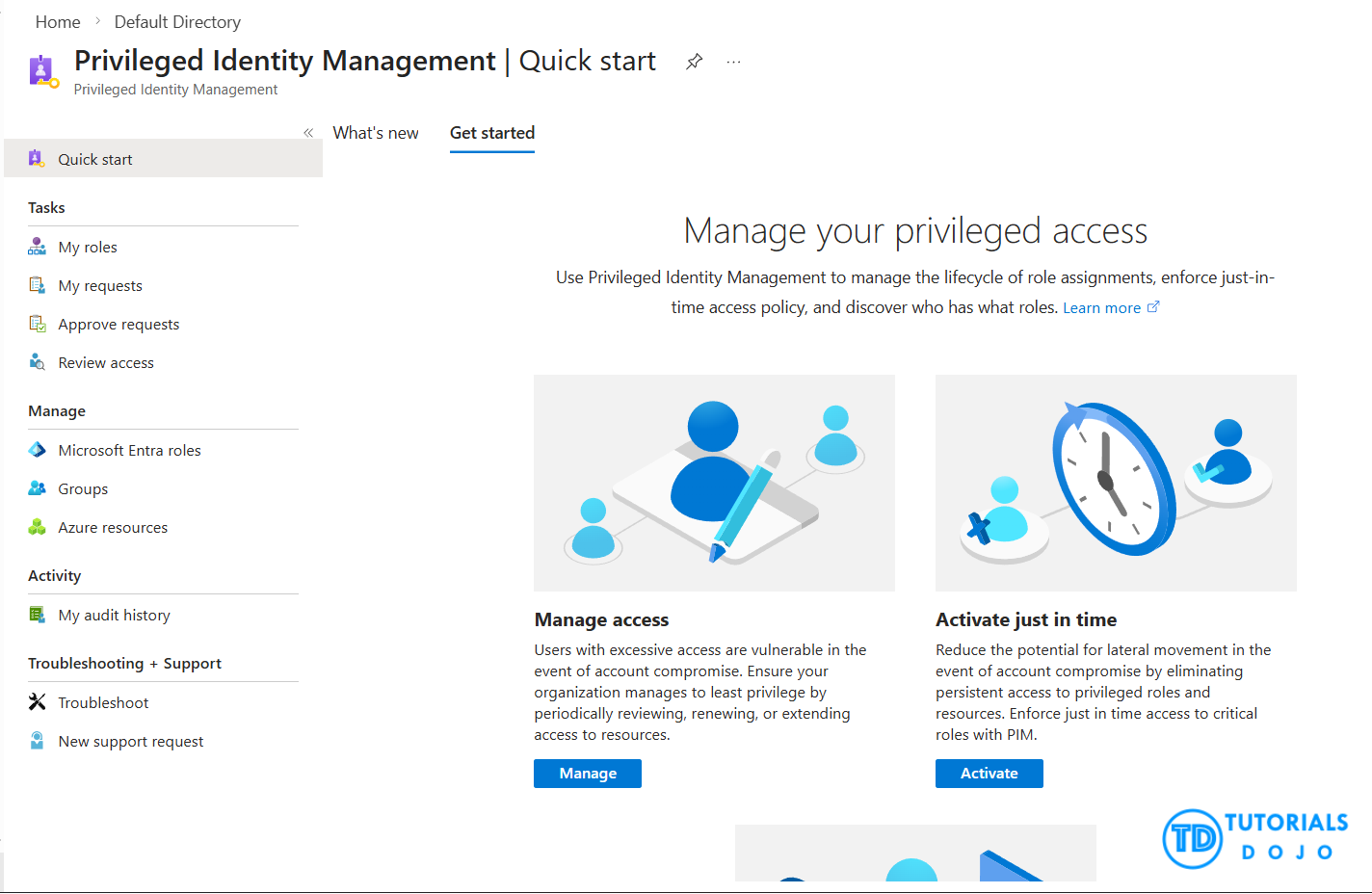
Privileged Identity Management (PIM) is a service within Microsoft Entra ID that allows organizations to manage, control, and monitor access to critical resources. These resources include those found in Microsoft Entra ID, Azure, and other Microsoft Online Services such as Microsoft 365 and Microsoft Intune.
Organizations aim to minimize the number of individuals who have access to sensitive information or resources. This approach helps reduce the risk of:
- Malicious actors gaining access
- Authorized users inadvertently affecting sensitive resources
However, users still need to perform privileged operations in Microsoft Entra ID, Azure, Microsoft 365, or other SaaS applications. To address this need, organizations can provide users with just-in-time privileged access to Azure and Microsoft Entra resources, while also monitoring their actions during this access period.
Hence, the correct answer is: Microsoft Privileged Identity Management (PIM). It provides just‑in‑time privileged access to sensitive roles in Microsoft Entra ID. PIM reduces the risk of standing administrative permissions by requiring users to activate roles only when needed, often with approval, MFA, and audit logging. This directly meets the requirement in the scenario.
Microsoft Entra Conditional Access is incorrect because Conditional Access enforces access policies based on conditions such as user, device, location, and risk signals. While it strengthens authentication and access control, it does not provide just‑in‑time privileged role activation or manage administrative permissions.
Microsoft Defender for Endpoint is incorrect because Defender for Endpoint is typically focused on endpoint protection, detection, and response against malware and advanced threats. It does not manage privileged identities or administrative role assignments.
Microsoft Purview Insider Risk Management is incorrect because Insider Risk Management primarily detects and manages risks from insider activities, such as data leaks or policy violations. It is not designed to handle privileged access or reduce standing administrative permissions.
References:
https://learn.microsoft.com/en-us/entra/id-governance/privileged-identity-management/pim-configure
https://www.microsoft.com/en-us/security/business/identity-access/microsoft-entra-privileged-identity-management-pim
Check out this Microsoft Entra ID Cheat Sheet:
For more Azure practice exam questions with detailed explanations, check out the Tutorials Dojo Portal:
Final Remarks
A surface-level understanding of the concepts is not enough for this exam. Microsoft certification exams are scenario-based, which means you need to apply your knowledge to real-world administrative situations. Get hands-on time with the Microsoft 365 admin center and Microsoft Purview portal whenever possible.
Simulate different administrative scenarios such as assigning Copilot licenses, running a data access governance report in SharePoint, reviewing DLP alerts in Purview, and exploring agent settings in the Power Platform admin center. This practical experience will be invaluable when you encounter complex scenario questions on the exam.
A few final reminders, keep an eye on the clock during the exam, review your answers before moving on, and get a full night of rest before your scheduled exam date. If you do not yet feel fully confident, you can always reschedule. Preparation and hands-on practice are your best tools. Good luck, and we wish you all the best!
🌸 25% OFF All Reviewers on our International Women’s Month Sale! Save 10% OFF All Subscriptions Plans & 5% OFF Store Credits/Gift Cards!

Learn AWS with our PlayCloud Hands-On Labs

$2.99 AWS and Azure Exam Study Guide eBooks

New AWS Generative AI Developer Professional Course AIP-C01

Learn GCP By Doing! Try Our GCP PlayCloud

Learn Azure with our Azure PlayCloud

FREE AI and AWS Digital Courses

FREE AWS, Azure, GCP Practice Test Samplers


Subscribe to our YouTube Channel

Follow Us On Linkedin


Written by: Nikee Tomas




