
As a content creator, your value lies in your vision, not in the three hours you spend renaming files, transcoding 4K footage into proxies, or manually uploading clips to five different social platforms. In the industry, we call the repetitive, soul-crushing tasks “undifferentiated heavy lifting.” In this article, we’ll show you how to use Python and AWS Step Functions to build an automated pipeline that handles the “boring stuff,” giving you more time to focus on the craft. Most multimedia artists follow a manual path: If any of these steps fail or take too long, your creative momentum dies. Automation changes the game. We can build a system where you simply drop a file into a folder, and the cloud does the rest. Here is the architecture: You upload your raw footage to an Amazon S3 bucket. This acts as your “Inbox.” The moment a file lands, it triggers a notification. Think of AWS Step Functions as your “Production Manager.” It’s a visual workflow orchestrator that tells different services what to do and in what order. If the transcoding fails, Step Functions can “retry” the task or send you an alert. Here’s a simple look at how a Python Lambda function can clean up your files automatically. This script triggers whenever a new file is uploaded to your S3 bucket. import os def lambda_handler(event, context): s3 = boto3.client('s3') # Get the bucket and file name from the event bucket = event['Records'][0]['s3']['bucket']['name'] old_key = event['Records'][0]['s3']['object']['key'] # Define your new naming convention (e.g., Project_Date_Filename) new_key = f"processed/ProjectX_{old_key}" # Copy the object to the new name and delete the old one s3.copy_object(Bucket=bucket, CopySource={'Bucket': bucket, 'Key': old_key}, Key=new_key) s3.delete_object(Bucket=bucket, Key=old_key) print(f"Renamed {old_key} to {new_key}") By implementing a “Dojo-style” automated workflow, you gain three major advantages: The most successful creators in the AI era won’t just be the ones who can prompt the best—they will be the ones who build systems to handle the volume. Using AWS to automate your workflow isn’t just a technical skill; it’s a creative superpower.
The “Creative Bottleneck” Problem

The Solution: A Serverless Media Pipeline
1. The Trigger: Amazon S3
2. The Brain: AWS Step Functions

3. The Muscles: AWS Lambda & MediaConvert
Step-by-Step: Automating File Renaming with Python
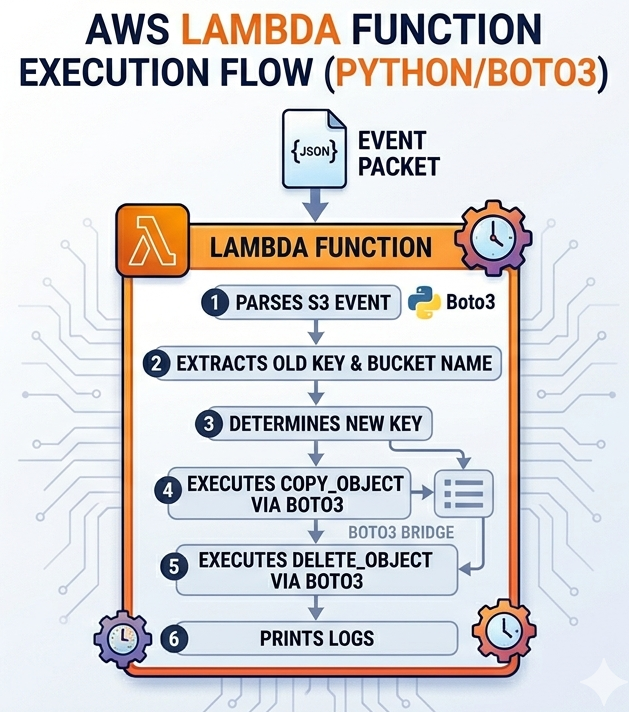
import boto3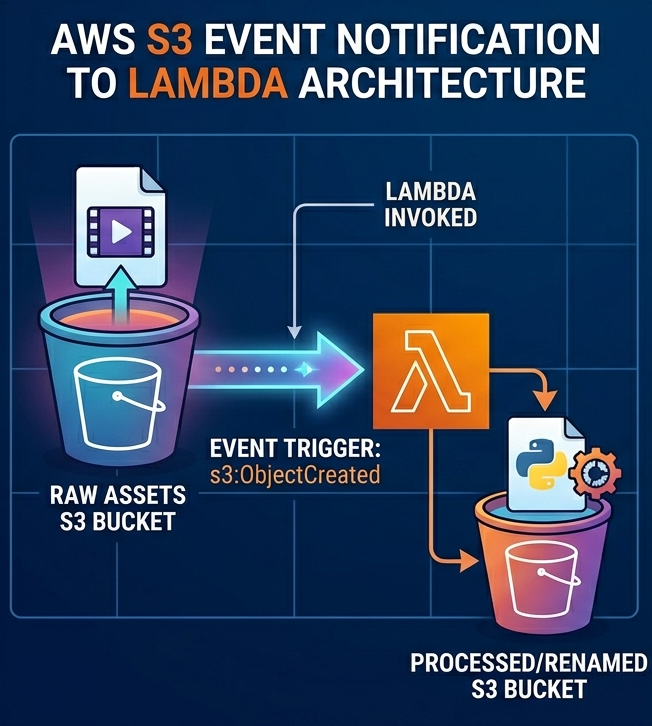
Why This Matters for the “Modern Creator”
Final Thought: Master the Tools, Free the Talent
Sources:
🤖 $3.74 ONLY for Claude eBooks and Get 25% OFF All Claude Reviewers

Turn Your Team Into Cloud-Ready Professionals Today

Learn AWS with our PlayCloud Hands-On Labs

$2.99 AWS and Azure Exam Study Guide eBooks

Learn GCP By Doing! Try Our GCP PlayCloud

Learn Azure with our Azure PlayCloud

FREE AI and AWS Digital Courses

FREE AWS, Azure, GCP Practice Test Samplers


Subscribe to our YouTube Channel

Follow Us On Linkedin


Written by: Daniel Gerodias




