Last updated on February 12, 2026
Think of AWS Identity and Access Management (IAM) as a security system for your cloud environment. Users are like employees, groups represent departments, and roles function as temporary contractors. IAM controls who can access specific parts of your AWS environment and what actions they are allowed to perform.
Controlling access is critical in the cloud. AWS IAM provides a centralized way to manage permissions and access across AWS services. A well-configured IAM setup helps prevent unauthorized access, reduces risks caused by human error, and forms the foundation of a secure AWS deployment. Even small mistakes in IAM configuration can lead to data exposure, service disruptions, or security breaches. That is why understanding and properly managing IAM is essential for both security and operational efficiency.
IAM is one of the first services new AWS users encounter, yet it is also one of the most misunderstood. Whether you are a student learning cloud fundamentals, a developer deploying applications, or an engineer preparing for AWS certification exams, IAM plays a critical role. Almost every action performed in AWS is evaluated against IAM rules, meaning a single misconfiguration can either block legitimate access or unintentionally expose sensitive resources.
Understanding Identity and Access Management in AWS
IAM manages two core concepts that determine how access works in AWS:
- Authentication verifies who you are. For example, when a user signs in to the AWS Management Console, IAM confirms their identity.
- Authorization determines what actions you are allowed to perform. For example, IAM decides whether a user can read from or write to an Amazon S3 bucket.
IAM uses identities, permissions, and policies to control access across AWS services. Proper configuration ensures that every user, application, or service has only the permissions it needs to function.
Every request sent to AWS, whether it comes from a user, an application, or another AWS service, passes through IAM before AWS allows it. IAM acts as a gatekeeper for all AWS services. Even if a resource such as an EC2 instance or S3 bucket exists and is configured correctly, access will fail if IAM permissions are missing or incorrect. This is why IAM misconfigurations are a common cause of AccessDenied errors in AWS environments.
IAM Users, Groups, and Roles Explained
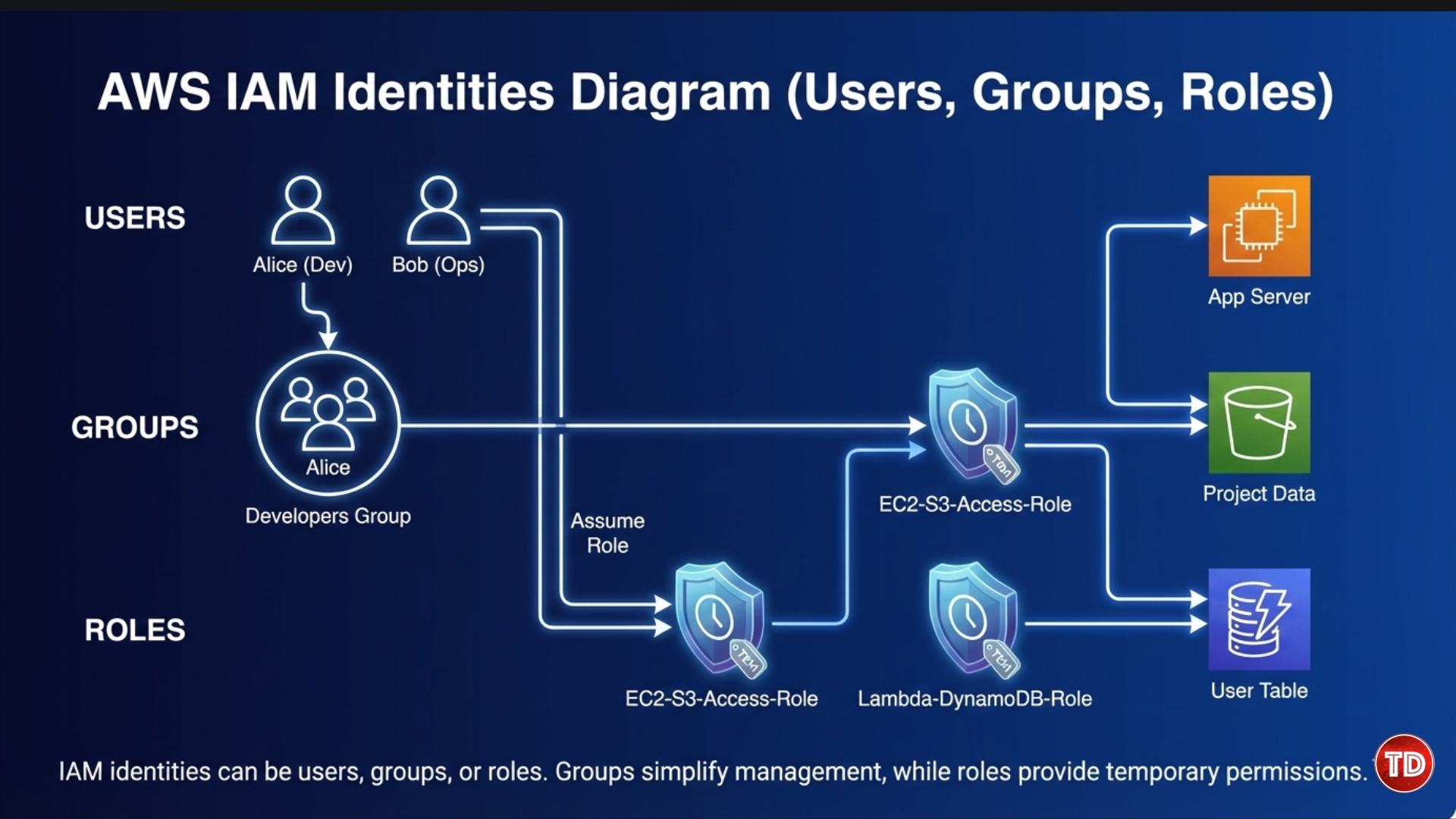
IAM provides different identity types to handle access in a flexible and secure way. For example, you can create a group named Developers and attach a policy that allows access to specific S3 buckets. Any user added to this group automatically receives those permissions. Roles offer an even more secure approach because they use temporary credentials that expire automatically.
IAM Users
An IAM user represents an individual identity with credentials for accessing AWS. Users can have:
-
Console access, which allows them to sign in through the AWS Management Console
-
Programmatic access, which allows them to interact with AWS using the AWS CLI or APIs
Tip: Avoid using the root account for daily tasks. Create individual IAM users for each person to improve security and accountability.
IAM Groups

IAM groups help you manage permissions for multiple users at once. When you attach a policy to a group, all users in that group inherit the same permissions. This approach simplifies permission management and reduces the chance of configuration errors.
IAM Roles
IAM roles provide temporary permissions that users, AWS services, or external accounts can assume when needed.
Example: An EC2 instance can assume a role to access an S3 bucket without storing permanent credentials. This approach improves security and supports the principle of least privilege.
In modern AWS environments, roles are used more frequently than long-term access keys. Users typically represent human access, such as administrators or developers, while roles are assigned to applications and AWS services. Temporary credentials automatically expire, reducing the risk of credential leakage.
IAM Policies and Permission Evaluation
IAM policies define who can do what on which resources. Each policy contains four main elements:
-
Effect: Specifies whether access is allowed or denied
-
Action: Defines the operations that are permitted, such as
s3:PutObject -
Resource: Identifies the AWS resources affected by the policy
-
Condition: Adds optional restrictions, such as IP address limits or requiring multi-factor authentication (MFA)
AWS evaluates permissions using the following logic:
-
All access is denied by default
-
Explicit allow statements grant access
-
Explicit deny statements always override allows
IAM supports different policy types:
-
Managed policies, which are reusable and maintained by AWS or your organization
-
Inline policies, which are directly attached to a specific user, group, or role
Example: A policy can allow a developer to upload files to an S3 bucket while denying permission to delete objects, helping protect important data.

Permissions often come from multiple policies at once. AWS evaluates all applicable policies together to determine the final access decision. Because of this, a single explicit deny can block access even when other policies allow the action.
IAM also supports both identity-based policies and resource-based policies. Identity-based policies attach to users, groups, or roles, while resource-based policies attach directly to resources such as S3 buckets. Together, they provide fine-grained access control across AWS services.
Trust Policies and Role Assumption
Trust policies define who is allowed to assume a role, while permission policies define what actions the role can perform.
Example: A Lambda function can assume a role that allows it to write logs to Amazon CloudWatch without using permanent access keys.
Roles also enable secure cross-account access, allowing one AWS account to access resources in another account without sharing credentials. Trust policies are especially important when collaborating with third-party vendors or managing multi-account AWS environments, as they prevent unauthorized access.
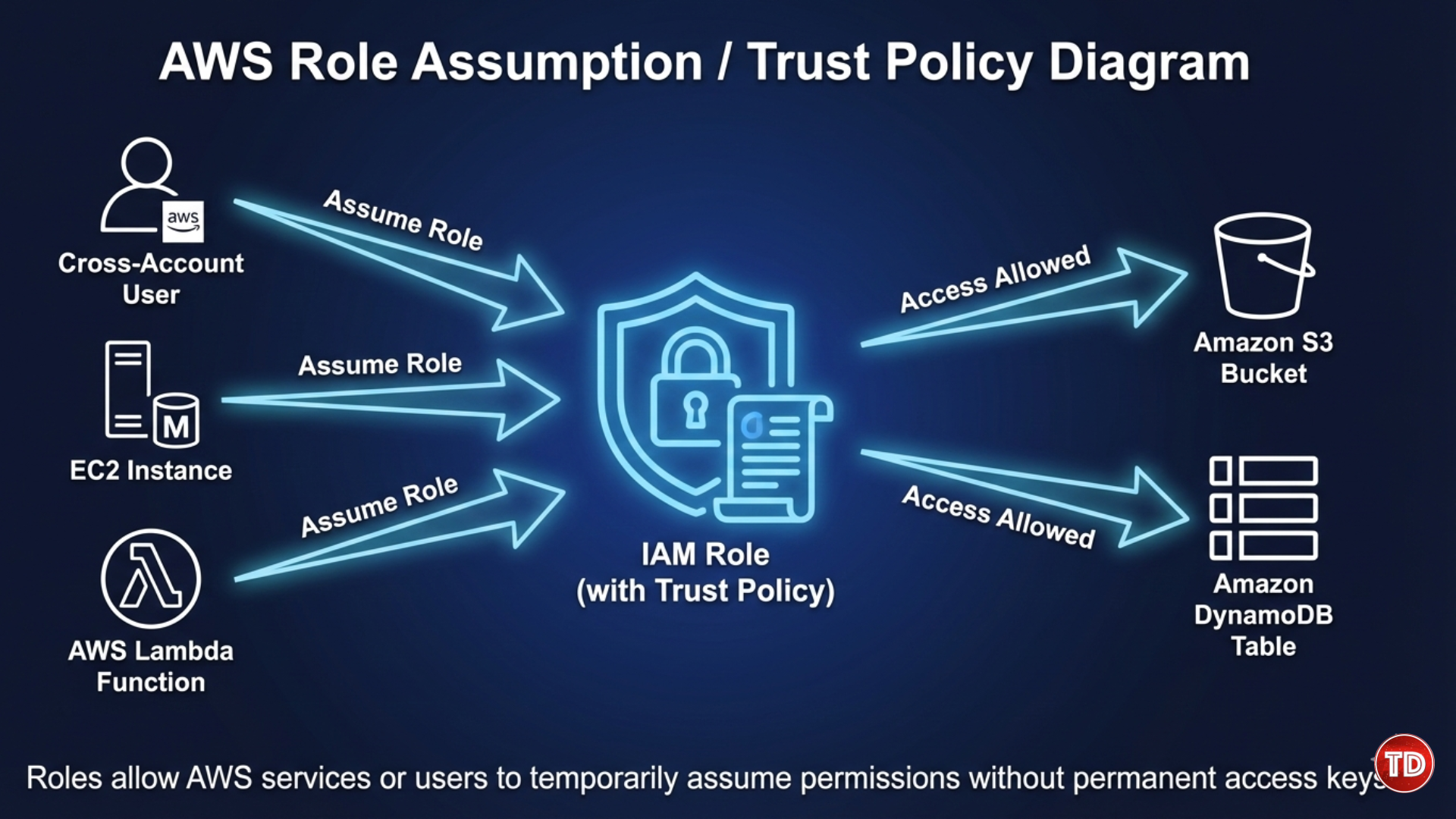
Trust policies are essential when collaborating across AWS accounts or with third-party vendors. They define exactly who can assume a role, preventing unauthorized accounts from gaining temporary access to your resources.
IAM also supports different policy types, including identity-based policies and resource-based policies. Identity-based policies are attached to users, groups, or roles and define what actions they can perform. Resource-based policies, such as S3 bucket policies, are attached directly to resources and define who can access them. Together, these policy types provide flexible and fine-grained access control across AWS services.
Common IAM Use Cases
Practical scenarios where IAM is applied:
- Developers accessing S3 buckets or DynamoDB tables
- EC2 instances reading from S3 or writing to RDS databases using roles
- Lambda functions sending logs to CloudWatch
- Temporary access for third-party contractors using AWS Security Token Service (STS)
These patterns make IAM flexible and reduce the risk of hardcoded credentials.
Scenario Example: Instead of giving a developer permanent keys for S3, you can create a role with temporary access that expires after a few hours, improving security.
Security Best Practices for IAM

To maintain a secure AWS environment:
- Principle of Least Privilege: Grant only the permissions needed
- Enable Multi-Factor Authentication (MFA): Especially for the root account
- Avoid Root Account Usage: Use individual users and roles instead
- Use Roles Instead of Access Keys: Temporary credentials reduce exposure
- Regular Credential Rotation: Rotate access keys and passwords to prevent misuse
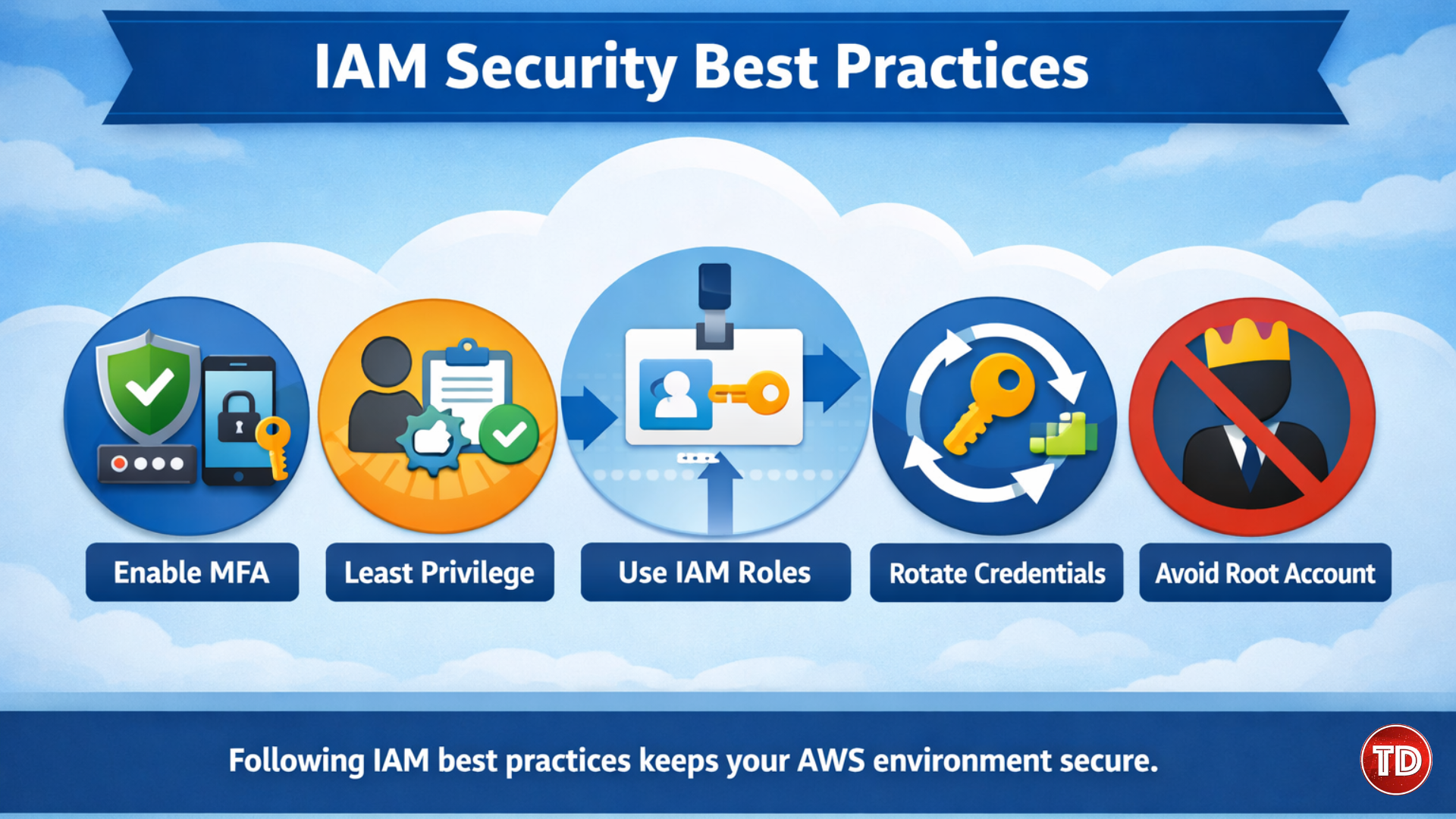
In real-world environments, IAM best practices are often overlooked due to time constraints or the need to quickly resolve access issues. This can lead to overly permissive policies that remain in place longer than intended. Regularly reviewing permissions, removing unused access, and auditing IAM configurations help prevent privilege creep and maintain a secure AWS environment over time.
Common Mistakes to Avoid
- Granting
AdministratorAccessunnecessarily - Using wildcards (
*) in policies - Hardcoding access keys in scripts or repositories
- Misconfiguring roles or trust policies
By avoiding these mistakes, you reduce the chances of accidental exposure or security breaches.
IAM as the Backbone of Cloud Security
AWS IAM is more than users and passwords. It is a powerful system that ensures only the right people and services have access to the right resources.
By understanding users, groups, roles, policies, and following best practices, you can secure your cloud environment while allowing teams to work efficiently. Proper IAM setup is continuous and should evolve with your organization’s architecture and security needs. Start small, review permissions regularly, and apply best practices to maintain a secure and organized cloud foundation.
References:
🌸 25% OFF All Reviewers on our International Women’s Month Sale! Save 10% OFF All Subscriptions Plans & 5% OFF Store Credits/Gift Cards!

Learn AWS with our PlayCloud Hands-On Labs

$2.99 AWS and Azure Exam Study Guide eBooks

New AWS Generative AI Developer Professional Course AIP-C01

Learn GCP By Doing! Try Our GCP PlayCloud

Learn Azure with our Azure PlayCloud

FREE AI and AWS Digital Courses

FREE AWS, Azure, GCP Practice Test Samplers


Subscribe to our YouTube Channel

Follow Us On Linkedin