
Last updated on December 22, 2025
Azure Application Gateway Cheat Sheet
- A web traffic load balancer.
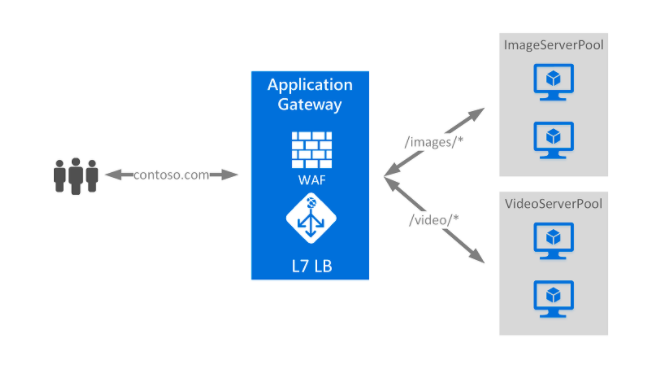
- It allows you to distribute incoming traffic based on HTTP request properties such as URL and host headers.
- Application gateway has four tiers: Standard, Standard V2, WAF, and WAF v2
- For container-based applications, Azure now offers Application Gateway for Containers as a separate, modern application load balancing service.
- You can use the same application gateway for up to 100+ websites with multi-site hosting.
- Set the minimum and maximum scale units based on your needs.
- Azure Application Gateway vs Azure Load Balancer
- An application gateway operates at layer 7.
- A load balancer functions at layer 4.
- You can use both public and private IP on the frontend. A fully Private Application Gateway (v2) deployment with no public IP endpoint is now available for internal-only traffic.

Features
- Secure your data with end-to-end SSL and mutual TLS (mTLS) passthrough.
- Route traffic based on URL path or host header-based.
- Protect your applications from common web vulnerabilities using WAF.
- Scales automatically based on your web application traffic load.
- With gateway-managed cookies, you can direct subsequent traffic from a user session to the same server.
- JWT Validation (Preview): Application Gateway can now validate JSON Web Tokens (JWT) in incoming requests, allowing you to offload authentication checks before traffic reaches your backend. It specifically validates Microsoft Entra ID (formerly Azure AD) tokens.
- Custom WAF Block Response (Preview): You can now customize the HTTP status code and HTML response body returned when the Web Application Firewall blocks a request, instead of receiving a generic blocked page. There is a 32KB size limit for the custom response body.
- mTLS Passthrough Support (GA): This extends SSL capabilities. Application Gateway can now pass through mutual TLS (mTLS) connections to the backend, allowing backend services to perform client certificate authentication.
- FIPS Compliant Mode for V2 SKUs (GA): Application Gateway V2 can operate in a FIPS 140-2 validated mode, which is a critical requirement for U.S. government, financial, and other regulated workloads.
Pricing
- You are charged per instance, per GB, and per gateway-hour.
- You are also charged with capacity units (computed hourly or partial hourly).
Azure Load Balancer vs App Gateway vs Traffic Manager:
https://tutorialsdojo.com/azure-load-balancer-vs-app-gateway-vs-traffic-manager/
Azure Application Gateway Cheat Sheet Resources:
https://docs.microsoft.com/en-us/azure/application-gateway/overview
https://azure.microsoft.com/en-us/services/application-gateway/
🌸 25% OFF All Reviewers on our International Women’s Month Sale! Save 10% OFF All Subscriptions Plans & 5% OFF Store Credits/Gift Cards!

Learn AWS with our PlayCloud Hands-On Labs

$2.99 AWS and Azure Exam Study Guide eBooks

New AWS Generative AI Developer Professional Course AIP-C01

Learn GCP By Doing! Try Our GCP PlayCloud

Learn Azure with our Azure PlayCloud

FREE AI and AWS Digital Courses

FREE AWS, Azure, GCP Practice Test Samplers


Subscribe to our YouTube Channel

Follow Us On Linkedin


Written by: Jon Bonso

Jon Bonso is the co-founder of Tutorials Dojo, an EdTech startup and an AWS Digital Training Partner that provides high-quality educational materials in the cloud computing space. He graduated from Mapúa Institute of Technology in 2007 with a bachelor's degree in Information Technology. Jon holds 10 AWS Certifications and is also an active AWS Community Builder since 2020.



