
Last updated on January 8, 2026
Azure Firewall Cheat Sheet
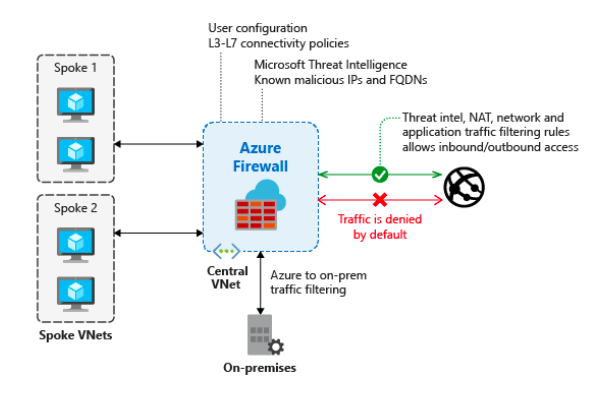
- A cloud-native, intelligent network firewall security service that protects Azure cloud workloads. It is available in three service tiers (SKUs) to meet different needs: Basic, Standard, and Premium.
- Azure Firewall is PCI, SOC, ISO, ICSA Labs, and HITRUST compliant.
Features
- Service Tiers (SKUs)
- Azure Firewall Basic: Designed for SMBs. Provides essential protection with a fixed scale unit and a recommended throughput of up to 250 Mbps. Supports Threat Intelligence in alert mode only.
- Azure Firewall Standard: Offers L3-L7 filtering and real-time Threat Intelligence that can alert and block traffic to/from known malicious IPs and domains.
- Azure Firewall Premium: Includes all Standard features and adds advanced Signature-based Intrusion Detection and Prevention System (IDPS). It uses a database of over 67,000 signatures across 50+ categories (e.g., malware, phishing) to detect and stop rapid attacks.
- Management & Governance:
- Centralized Management with Firewall Policies: Azure Firewall Manager allows central management of multiple firewalls across subscriptions. It uses firewall policies to apply a common set of network/application rules and configurations.
- A stateful firewall service.
- You can enable forced tunneling to route Internet-bound traffic to an additional firewall or virtual network appliance.
- Limit outbound traffic to a given FQDN list, including wild cards.
- Filter any TCP/UDP protocol outbound traffic.
- To use FQDNs in your rules, you must enable DNS proxy.
- Deny the traffic of a malicious IP address with threat intelligence-based filtering.
- It has the highest priority rules and will always be processed first.
- Threat intelligence (supported in Standard and Premium tiers): Modes include Alert only and Alert and deny to block traffic from known malicious IPs/domains. The Basic SKU supports Alert mode only.
- With a DNS proxy, a firewall listens to port 53 and forwards the DNS requests to a DNS server.
- You can minimize the complexity of creating a security rule using a service tag.
- Associate up to 250 public IP addresses in your firewall (Premium SKU feature).
- It supports SNAT and DNAT translation.
- SNAT – Source NAT for outbound VNet traffic.
- DNAT – Destination NAT for inbound network traffic.
- Azure Firewall diagnostic logs (JSON format):
- Application rule log
- Network rule log
- You can store all your logs in a storage account, event hubs, and Azure monitor logs.
- Azure Firewall metrics:
- Application/Network rules hit count
- Data processed
- Throughput
- Firewall health state
- SNAT port utilization
- To manage multiple firewalls, you can use Azure Firewall Manager.
- Protect your VDI deployments using Azure firewall DNAT rules and threat Intelligence filtering.

Azure Firewall Pricing
- Pricing is based on the selected SKU (Basic, Standard, Premium), deployment hours, and data processed. Each SKU has a different compute cost per hour. Review the Azure Firewall pricing page for detailed rates.
Validate Your Knowledge
Question 1
Question Type: Hotspot
For each of the following items, choose Yes if the statement is true or choose No if the statement is false. Take note that each correct item is worth one point.
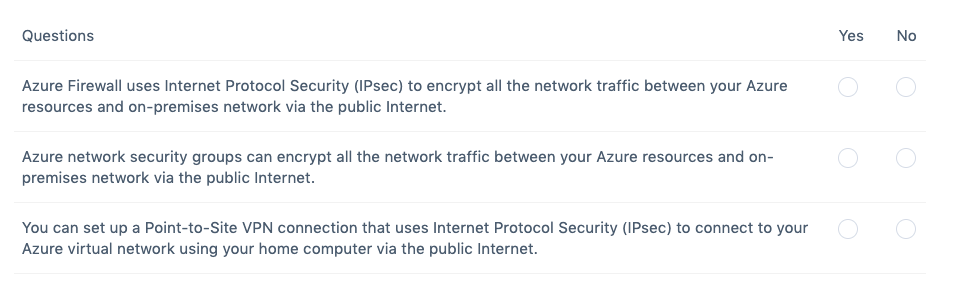
Correct Answer: No – No – Yes
Azure Firewall is a managed, cloud-based network security service that protects your Azure Virtual Network resources. It’s a fully stateful firewall-as-a-service with built-in high availability and unrestricted cloud scalability.
You can centrally create, enforce, and log application and network connectivity policies across subscriptions and virtual networks. Azure Firewall uses a static public IP address for your virtual network resources allowing outside firewalls to identify traffic originating from your virtual network. The service is fully integrated with Azure Monitor for logging and analytics.

You can use an Azure network security group to filter network traffic to and from Azure resources in an Azure virtual network. A network security group contains security rules that allow or deny inbound network traffic to, or outbound network traffic from, several types of Azure resources. For each rule, you can specify source and destination, port, and protocol.
A Point-to-Site (P2S) VPN gateway connection lets you create a secure connection to your virtual network from an individual client computer. A P2S connection is established by starting it from the client computer. This solution is useful for telecommuters who want to connect to Azure VNets from a remote location, such as from home or a conference. P2S VPN is also a useful solution to use instead of S2S VPN when you have only a few clients that need to connect to a VNet.
Hence, this statement is true: You can set up a Point-to-Site VPN connection that uses Internet Protocol Security (IPsec) to connect to your Azure virtual network using your home computer via the public Internet.
The statement that says: Azure Firewall uses Internet Protocol Security (IPsec) to encrypt all the network traffic between your Azure resources and on-premises network via the public Internet is incorrect because Azure Firewall doesn’t use IPSec and can’t be used to connect Azure resources and your on-premises network. It is just a fully stateful firewall-as-a-service that allows you to centrally create, enforce, and log application and network connectivity policies across subscriptions and Azure virtual networks.
The statement that says: Azure network security groups can encrypt all the network traffic between your Azure resources and on-premises network via the public Internet is incorrect because a network security group is primarily used to filter network traffic to and from Azure resources in an Azure virtual network. You have to establish a VPN connection if you need to connect between the Azure virtual network and your home computer via IPSec.
References:
https://docs.microsoft.com/en-us/azure/firewall/overview
https://docs.microsoft.com/en-us/azure/virtual-network/network-security-group-how-it-works
https://docs.microsoft.com/en-us/azure/vpn-gateway/point-to-site-about
Note: This question was extracted from our AZ-900 Microsoft Azure Fundamentals Practice Exams.
For more Azure practice exam questions with detailed explanations, check out the Tutorials Dojo Portal:

Azure Firewall Cheat Sheet References:
https://azure.microsoft.com/en-us/services/azure-firewall/
https://docs.microsoft.com/en-us/azure/firewall/overview
🌸 25% OFF All Reviewers on our International Women’s Month Sale! Save 10% OFF All Subscriptions Plans & 5% OFF Store Credits/Gift Cards!

Learn AWS with our PlayCloud Hands-On Labs

$2.99 AWS and Azure Exam Study Guide eBooks

New AWS Generative AI Developer Professional Course AIP-C01

Learn GCP By Doing! Try Our GCP PlayCloud

Learn Azure with our Azure PlayCloud

FREE AI and AWS Digital Courses

FREE AWS, Azure, GCP Practice Test Samplers


Subscribe to our YouTube Channel

Follow Us On Linkedin


Written by: Jon Bonso




