
Last updated on December 29, 2025
Azure Front Door Cheat Sheet
- A service that uses Microsoft’s global network to improve the availability and performance of your applications to your local and global users.
- It works at the HTTP/HTTPS layer and uses a split TCP-based anycast protocol to ensure your users connect to the nearest Front Door point of presence.
- Supports a range of traffic-routing methods and backend health monitoring options for various application needs and automatic failover models.
- With URL-based routing, it routes the traffic to backend pools based on URL paths of the request.
- You can configure more than one website on the same Front Door with multiple-site hosting.
- Use cookie-based session affinity to redirect the user session to the same application backend.
- Redirect traffic based on protocol, hostname, path, and query string with URL redirect.
- URL rewrite allows you to configure a Custom Forwarding Path that will copy any part of the incoming path that matches a wildcard path to the forwarded path.
- Front Door supports end-to-end IPv6 connectivity and HTTP/2 protocol.
- Managed TLS Certificates with Auto-Renewal: Azure Front Door can now automatically provision, manage, and renew TLS certificates from DigiCert for your custom domains at no extra cost, eliminating manual certificate management overhead.
- Private Link for Private Origins: You can now securely connect your Front Door to backends (origins) located within a private Virtual Network (VNet) using Azure Private Link. This keeps all traffic on the Microsoft backbone, never exposing your private origin to the public internet.
- Origin Response Timeout: You can now configure the maximum wait time for a response from your backend origin. This helps Front Door fail over to another healthy backend if an origin is too slow, improving application resiliency. The default is 60 seconds.

Security
- If you need your domain name to be visible in your Front Door URL, you must have a custom domain. Front Door also supports managed certificates or custom TLS/SSL certificates.
- You can create custom rules and leverage managed rule sets (like Default Rule Set and Bot Protection) to protect your HTTP/HTTPS workload from common exploits and bots using Azure Web Application Firewall.
Azure Front Door Pricing
- You are charged based on the following:
- Inbound and outbound data transfers
- The number of routing rules
- Front Door has a limit of 100 custom domains. You will be charged for additional domains.
Validate Your Knowledge
Question 1
Question Type: Matrix Sorting Choice
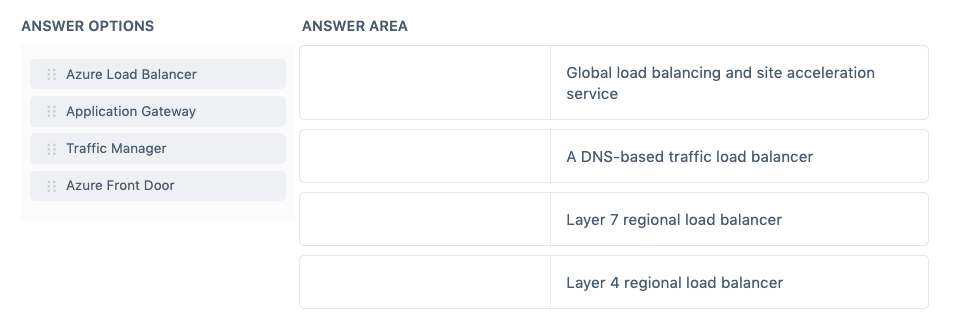
Match the Azure service to the correct description.
Instructions: To answer, drag the appropriate Azure service from the column on the left to its description on the right. Each correct match is worth one point.
Correct Answer:
- Azure Front Door – Global load balancing and site acceleration service
- Traffic Manager – A DNS-based traffic load balancer
- Application Gateway – Layer 7 regional load balancer
- Azure Load Balancer – Layer 4 regional load balancer
Azure Front Door enables you to define, manage, and monitor the global routing for your web traffic by optimizing for best performance and quick global failover for high availability.
It works at Layer 7 or HTTP/HTTPS layer and uses anycast protocol with split TCP and Microsoft’s global network for improving global connectivity. So, per your routing method selection in the configuration, you can ensure that Front Door is routing your client requests to the fastest and most available application backend.

Hence, the correct match is: Azure Front Door – Global load balancing and site acceleration service.
Azure Traffic Manager is a DNS-based traffic load balancer that enables you to distribute traffic optimally to services across global Azure regions while providing high availability and responsiveness.
Traffic Manager uses DNS to direct client requests to the most appropriate service endpoint based on a traffic-routing method and the health of the endpoints. An endpoint is any Internet-facing service hosted inside or outside of Azure. Traffic Manager is resilient to failure, including the failure of an entire Azure region.

Hence, the correct match is: Azure Traffic Manager – A DNS-based traffic load balancer.
Application Gateway is a web traffic load balancer that enables you to manage traffic to your web applications using various Layer 7 load-balancing capabilities. Traditional load balancers operate at the transport layer (OSI layer 4 – TCP and UDP) and route traffic based on source IP address and port, to a destination IP address and port. It supports TLS termination at the gateway, after which traffic typically flows unencrypted to the backend servers.

Hence, the correct match is: Application Gateway – Layer 7 regional load balancer.
Azure Load Balancer operates at layer four of the Open Systems Interconnection (OSI) model. It’s the single point of contact for clients. Load Balancer distributes inbound flows that arrive at the load balancer’s front end to backend pool instances. These flows are according to configured load balancing rules and health probes. The backend pool instances can be Azure Virtual Machines or instances in a virtual machine scale set.

Hence the correct match is: Azure Load Balancer – Layer 4 regional load balancer.
References:
https://docs.microsoft.com/en-us/azure/frontdoor/
https://docs.microsoft.com/en-us/azure/traffic-manager/traffic-manager-overview
https://docs.microsoft.com/en-us/azure/application-gateway/overview
https://docs.microsoft.com/en-us/azure/load-balancer/load-balancer-overview
Note: This question was extracted from our AZ-900 Microsoft Azure Fundamentals Practice Exams.
For more Azure practice exam questions with detailed explanations, check out the Tutorials Dojo Portal:
Azure Front Door Cheat Sheet References:
https://azure.microsoft.com/en-us/services/frontdoor/
https://docs.microsoft.com/en-us/azure/frontdoor/front-door-overview
🌸 25% OFF All Reviewers on our International Women’s Month Sale! Save 10% OFF All Subscriptions Plans & 5% OFF Store Credits/Gift Cards!

Learn AWS with our PlayCloud Hands-On Labs

$2.99 AWS and Azure Exam Study Guide eBooks

New AWS Generative AI Developer Professional Course AIP-C01

Learn GCP By Doing! Try Our GCP PlayCloud

Learn Azure with our Azure PlayCloud

FREE AI and AWS Digital Courses

FREE AWS, Azure, GCP Practice Test Samplers


Subscribe to our YouTube Channel

Follow Us On Linkedin


Written by: Jon Bonso




