
Six months ago, “AI agents on AWS” meant duct-taping together Amazon Bedrock, a Lambda function to handle tool routing, DynamoDB for session state, CloudWatch for tracing, and a LangGraph loop you prayed would recover from a network hiccup mid-reasoning. Every team was reinventing the same infrastructure. Every demo worked; most productions did not.
That changed on June 17, 2026, at AWS Summit New York, where Dr. Swami Sivasubramanian (VP of Agentic AI) announced what AWS is calling the agentic infrastructure layer: Amazon Bedrock AgentCore Harness reaching general availability, the Strands Agents 1.0 SDK going production-grade with native multi-agent primitives, and a new AWS Context knowledge graph that gives agents organizational memory without you writing a single retrieval pipeline.
This article walks you through all three, what they are technically, how they fit together architecturally, and how to build a working multi-agent pipeline using real API calls and code. Everything here is GA or public preview as of August 2026.
The Infrastructure Shift: What AgentCore Actually Is
Before diving into code, you need a mental model of how the AWS agentic stack is layered, because the naming has caused genuine confusion.
Amazon Bedrock is the managed model API layer. You pay per token; it exposes 100+ models through a uniform converse / converse_stream interface with IAM, KMS, and CloudTrail already attached.
AgentCore Runtime is the execution substrate: isolated Firecracker microVMs running on EC2 bare metal. Sessions are ephemeral and isolated per invocation and support up to 8-hour-long-running tasks with 100MB payloads. You bring your own container (LangGraph, CrewAI, or your own loop) and deploy it here.
AgentCore Harness (new at GA) is the no-orchestration-code path on top of Runtime. Two API calls, and your agent is live, the harness manages the model loop, tool dispatch, memory, provider switching, and streaming back to you. It runs as a managed abstraction inside Runtime. If the harness can’t express what you need, you export it to code (it generates the scaffold) and finish it at runtime. You never change your IAM, Memory ARN, or Gateway config, just the execution layer.
CreateHarness + InvokeHarness, The Two-Call Agent
Here is the minimal working example, using Python and boto3. You need:
- An IAM execution role the harness can assume (call it HarnessExecutionRole)
- The role needs AmazonBedrockFullAccess or a scoped equivalent, and bedrock-agentcore:* permissions
- boto3 >= 1.38.0 (the bedrock-agentcore-control and bedrock-agentcore service clients shipped in this version)
Step 1: Create the Harness
Step 2: Invoke the Harness
The invoke_harness stream delivers these event types in order:
- messageStart — role declaration
- contentBlockStart — starts a text or tool_use block
- contentBlockDelta — incremental text or tool input JSON
- contentBlockStop — block complete
- messageStop — stop_reason is end_turn, tool_use, or max_tokens
Every tool call the harness makes and every model response are automatically pushed to CloudWatch under /aws/bedrock-agentcore/runtimes/<agent_id>-<endpoint_name> a spans log stream, zero configuration is required.
Step 3: Mid-Session Provider Switch
This is the feature that caused audible surprise at the Summit demo. You can switch foundation model providers in the middle of a conversation, and the conversation context is preserved:

AWS rebuilds the conversation state into the target provider’s message format at each invocation. The model never sees a raw transcript from a different provider, it gets a properly formatted history that the harness reassembles from its memory store.
Wiring Your Own Tools via MCP
The Harness becomes genuinely powerful when you connect it to your own tooling through AgentCore Gateway, which speaks OpenAPI, Smithy, Lambda, and MCP (Model Context Protocol). Here’s how to expose an internal Ops API to the agent.
Register an MCP Server in Gateway
Every tool call the agent makes to your MCP server is authenticated automatically, the agent never sees the raw API key. The Harness pulls credentials from the Identity token vault at invocation time.
Strands Agents 1.0, When You Need More Control
The Harness is powerful but opinionated: it runs a managed agent loop, and you configure it rather than code it. When you need explicit multi-agent topologies, custom orchestration logic, or deployment on ECS/Fargate, Strands Agents 1.0 (open source, MIT license) is the AWS-endorsed path.
Install it:
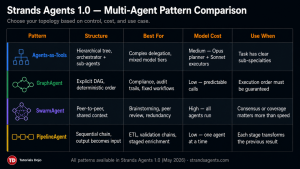
The Four Multi-Agent Primitives in Strands 1.0
Strands 1.0 introduced four primitives that cover most enterprise agent topologies.
Agents-as-Tools (Hierarchical delegation)
An orchestrator agent calls sub-agents the same way it calls any other tool, with no special wiring:
The orchestrator uses Claude Opus 4 for its reasoning (more capable planner), while the specialists use Sonnet 4.6 (faster, cheaper executors). This is a deliberate cost-performance pattern — the expensive model only touches high-level reasoning.
GraphAgent (Explicit DAG workflows)
When you need deterministic execution order, for compliance, audit trails, or tasks where agent creativity is undesirable:
SwarmAgent (Peer-to-peer collaboration)
All agents share context, and any agent can address any other. Useful for brainstorming, peer-review pipelines, or redundancy:
PipelineAgent (Sequential transformation)
One agent’s output becomes the next agent’s input, classic ETL or validation chains:
A Protocol, Cross-Boundary Agent Communication
Strands 1.0 natively implements the Agent-to-Agent (A2A) protocol, which lets agents from different teams, frameworks, or even different clouds communicate over a standard HTTP interface. This is the piece that makes true enterprise multi-agent deployments possible.
The A2A envelope carries identity (a signed JWT from AgentCore Identity), session context, and tool permissions, so a guest agent from another team only gets the tools the host explicitly exposes.
AWS Context, Organizational Knowledge Without RAG Pipelines
The hardest part of enterprise agent deployment has never been the LLM. It’s been grounding the LLM in your data without your agents hallucinating facts from their pretraining.
AWS Context is a managed knowledge graph announced at Summit New York. It indexes structured data (databases, Redshift, Athena tables), unstructured data (S3, SharePoint, Confluence, Google Drive), and domain-specific sources into a single graph that agents query with natural language. The Managed Knowledge Base in AgentCore handles ingestion, chunking, embedding, and retrieval, including an agentic retriever that breaks down complex queries into sub-queries before fetching.
Connecting AWS Context to Your Harness
Now when the harness agent reasons about an ECS incident, it automatically retrieves relevant runbooks, past postmortems, and escalation procedures from your organizational knowledge, without you writing a single retrieval function.
The agentic retriever is the key differentiator here. A conventional RAG system does a single vector similarity search. The agentic retriever decomposes the question, “How do we handle an ECS service stuck in DRAINING state during a deployment?”, into multiple sub-queries, fetches from the graph in parallel, re-ranks results, and synthesizes a grounded answer. AWS claims this closes the gap between RAG and human-expert recall on multi-hop questions.
Observability and A/B Testing in Production
Shipping an agent is the start, not the finish. AgentCore provides two production-grade capabilities that most teams skip until something goes wrong.
Distributed Tracing with Spans
Every harness invocation automatically emits OpenTelemetry-compatible spans to CloudWatch:
This gives you latency breakdown by model call vs. tool call, error rates per tool, and cost attribution, all in CloudWatch without a third-party APM.
A/B Testing Agent Versions
AgentCore’s A/B testing splits live production traffic between agent versions with no deployment risk:
This works regardless of where your agents run: AgentCore Runtime, Lambda, EKS, or non-AWS environments. The test routes real production traffic and collects outcome metrics until the sample size is met, then surfaces a statistical recommendation. It’s the same pattern as feature flags in web development, applied to agent configurations.
The Full Architecture: Putting It Together
Here’s how the components compose into a production multi-agent system:
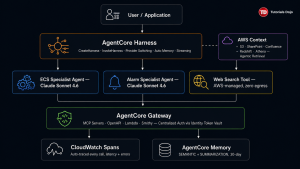
The orchestrator uses Opus for reasoning quality; the sub-agents use Sonnet for cost-efficient execution. The harness handles memory, streaming, and provider switching. Gateway centralizes tool auth. Context grounds every response in organizational knowledge. CloudWatch captures every span without additional instrumentation.
What This Changes for Engineering Teams
The old cost: 6–8 weeks
Before AgentCore Harness GA, a production-ready agent required:
- LangGraph loop with error handling, retry logic, and context truncation (~1 week)
- DynamoDB schema for session state (~3 days)
- Lambda or ECS container with health checks and IAM roles (~1 week)
- Custom CloudWatch metric emissions (~3 days)
- Vector store setup for RAG (~1 week)
- API key management and rotation (~2 days)
- Load testing and failover handling (~1 week)

The new cost: hours to days
With AgentCore Harness + AWS Context + Strands 1.0:
- CreateHarness replaces all infrastructure assembly
- Memory is auto-provisioned with sane defaults
- Context replaces your custom RAG pipeline
- CloudWatch spans are automatic
- A/B testing is a single API call
The engineering effort shifts from infrastructure plumbing to agent design: what model, what tools, what system prompt, and what multi-agent topology. That is a genuine productivity change, not marketing.
The Decisions You Still Own
AgentCore does not solve everything. Three hard problems remain yours:
- Tool design is the new API design. Agents are only as capable as the tools you expose. A poorly documented tool description causes the model to misuse the tool or skip it entirely. Treat tool description fields with the same care as API documentation.
- Evals before deployment. AgentCore’s A/B test splits live traffic — but you need a baseline eval suite to know whether task_completion_rate means what you think it means. Define success metrics before you ship, not after.
- Context poisoning at an organizational scale. AWS Context indexes everything you give it. Stale runbooks, incorrect postmortems, and contradictory SOPs degrade agent quality faster than any model limitation. Data hygiene for your knowledge graph is now an engineering concern.
Where to Go From Here
The entire ecosystem is moving fast. The concrete next steps:
- Stand up a harness today — aws bedrock-agentcore-control create-harness with just a name and IAM role. Claude Sonnet 4.6 is the default. First response in under 15 seconds.
- Add one real tool via MCP — wrap an internal API you already have, register it in Gateway, and watch the agent use it. That’s the moment it clicks.
- Read the Strands 1.0 changelog at strandsagents.com if you need multi-agent patterns beyond what the Harness expresses.
- Connect one data source to AWS Context — S3 is the easiest. Point it at a folder of markdown runbooks. The Managed Knowledge Base handles the rest.
- Set up spans dashboards before you need them — the log group is there from day one. A Logs Insights saved query on latency and errors takes twenty minutes and will save hours during incidents.
The agentic infrastructure layer is real, it is generally available, and the two-API-call path to a production agent is not a simplification, it is the actual API. The hard part is no longer standing up agents. The hard part is making them do the right thing, grounded in your organization’s knowledge, with tools you trust and evals that prove it.
That engineering problem is worth your full attention now.
All code in this article uses generally available AWS APIs as of August 2026. Region availability may vary, check the AgentCore service endpoints page for your preferred region.
References:
AWS Summit New York 2026 Keynote
https://www.aboutamazon.com/news/aws/aws-summit-nyc-2026-ai-agents
Amazon Bedrock AgentCore Documentation
- Main dev guide & release notes: https://docs.aws.amazon.com/bedrock-agentcore/latest/devguide/release-notes.html
- Get started (CreateHarness walkthrough): https://docs.aws.amazon.com/bedrock-agentcore/latest/devguide/harness-get-started.html
- CreateHarness API reference: https://docs.aws.amazon.com/bedrock-agentcore-control/latest/APIReference/API_CreateHarness.html
- Models & provider switching: https://docs.aws.amazon.com/bedrock-agentcore/latest/devguide/harness-models.html
- Skills reference: https://docs.aws.amazon.com/bedrock-agentcore/latest/devguide/harness-skills.html
Strands Agents 1.0 Announcement (AWS Open Source Blog, May 2026)
https://aws.amazon.com/blogs/opensource/introducing-strands-agents-1-0-production-ready-multi-agent-orchestration-made-simple/
AgentCore Harness GA (AWS ML Blog, June 2026)
https://aws.amazon.com/blogs/machine-learning/amazon-bedrock-agentcore-harness-is-now-generally-available-go-from-idea-to-production-grade-agent-in-minutes/
Two supplementary sources were also cited in the article:
- AgentCore broader knowledge & web search: https://aws.amazon.com/blogs/machine-learning/new-in-amazon-bedrock-agentcore-build-agents-with-broader-knowledge-and-continuous-learning/
- Strands SDK deep dive (AWS ML Blog): https://aws.amazon.com/blogs/machine-learning/strands-agents-sdk-a-technical-deep-dive-into-agent-architectures-and-observability/
⚡$4.99 Claude Certified Architect Professional CCAR-P Practice Exams

Turn Your Team Into Cloud-Ready Professionals Today
Learn AWS with our PlayCloud Hands-On Labs
$2.99 AWS and Azure Exam Study Guide eBooks

Learn GCP By Doing! Try Our GCP PlayCloud
Learn Azure with our Azure PlayCloud
FREE AI and AWS Digital Courses

FREE AWS, Azure, GCP Practice Test Samplers

Subscribe to our YouTube Channel

Follow Us On Linkedin
Written by: Karen Pearl V. Pabilando