
Claude Design Cheat Sheet
Claude Design is Anthropic’s conversational design tool for creating visual mockups, interactive prototypes, one-pagers, and microsites. Describe what you need, supply references, and refine the result through chat or on-canvas edits. Claude creates new designs as Artifacts that you can review, share, or export.
Claude Design now lives inside Claude. Anthropic says the standalone site at claude.ai/design closes on December 14, 2026. Move or download standalone projects before that date.
What Is Claude Design?
Claude Design helps turn a brief into a visual design you can iterate on with Claude. For a product prototype, for example, describe the user journey, provide an existing style reference, and ask Claude to build several screens with clickable navigation.
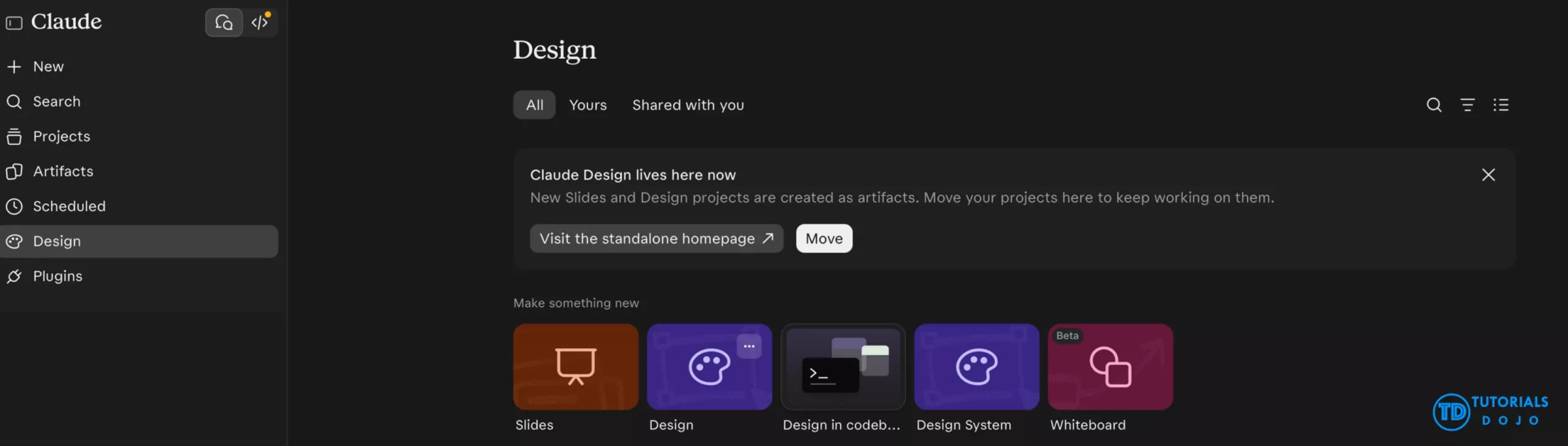
The Core Concept
- You provide the goal, audience, content, style references, and constraints.
- Claude provides a design artifact, an editing canvas, and supported sharing, export, and handoff options.
- Your team owns design approval, accessibility checks, content accuracy, and any production implementation.
Architecture Overview
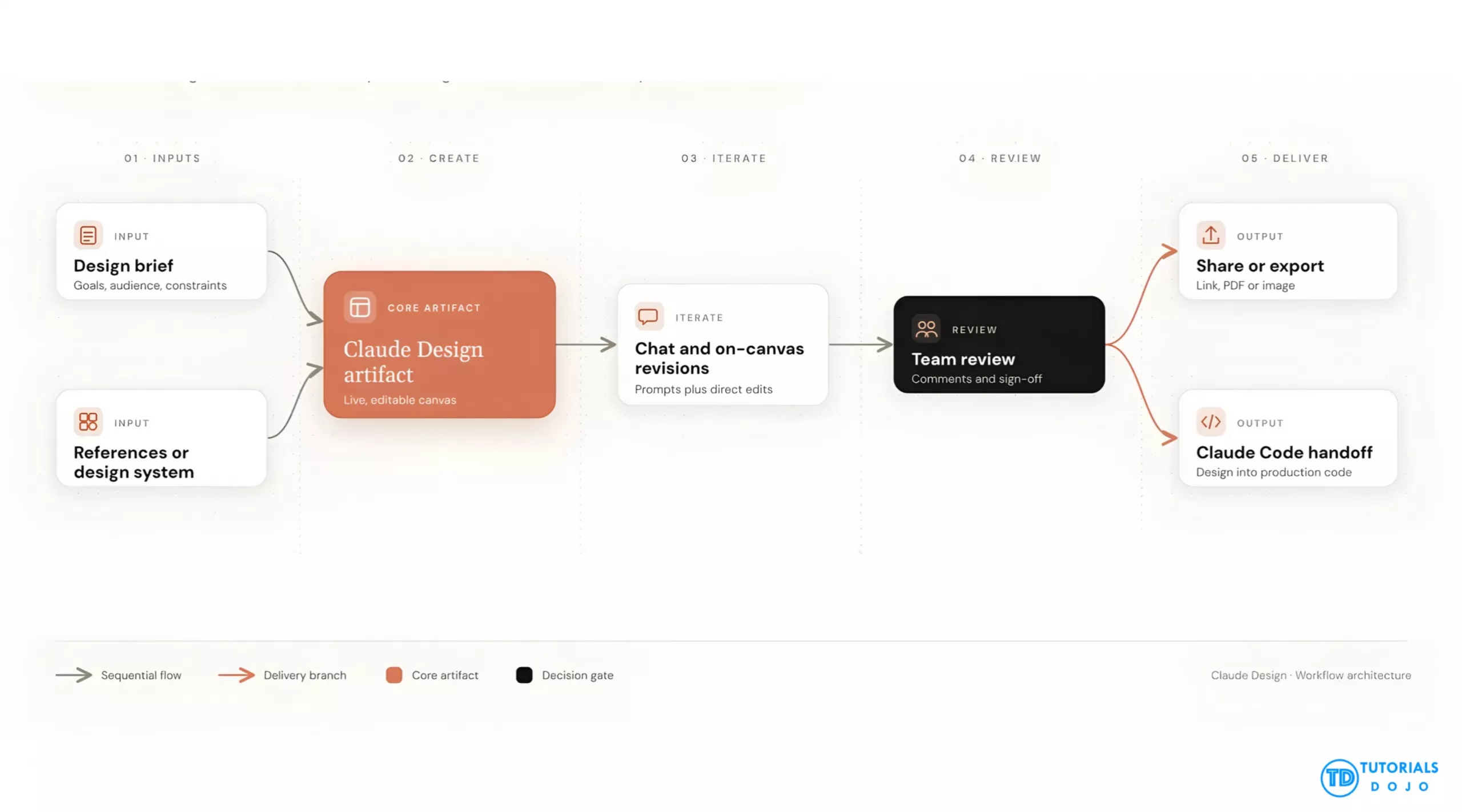
Key Components & Features
| Component | What it does |
|---|---|
| Design brief | Gives Claude the objective, intended audience, deliverable type, and constraints. |
| Artifacts | Hold the design alongside the conversation so you can open, review, and revise it. |
| On-canvas editing | Lets you adjust the design directly and use chat for broader or more detailed revisions. |
| Design systems | Capture reusable colors, typography, components, and layout patterns from supplied assets such as codebases or slide decks. Feature availability depends on plan and organization settings. |
| Sharing | Designs start private. Depending on permissions, collaborators can view, comment, or edit. |
| Export and handoff | Anthropic lists PDF, PPTX, Google Slides, standalone HTML, ZIP, supported tool integrations such as Canva, and handoff to Claude Code. Check the Export menu for your artifact. |
| Claude Slides | Anthropic now provides a dedicated presentation tool for creating and refining decks in Claude. |
Primary Use Cases
-
Build a clickable onboarding flow to review navigation, screen states, and copy before implementation.
-
Explore layout and messaging for a landing page or campaign one-pager with approved brand references.
-
Pass a reviewed design to Claude Code with implementation constraints and acceptance criteria.
Key Benefits & Value Proposition
-
Turn a written brief into a concrete design that stakeholders can respond to.
-
Reuse design-system components and typography across related projects.
-
hare the artifact for feedback, send it to a supported integration, or export it in a format suited to the next step.

Deployment Process & Timeline
| Phase | Activities | Estimated duration |
|---|---|---|
| Define the brief | Specify the audience, their task, deliverable, content, and constraints. | Depends on content and stakeholder readiness. |
| Generate | Ask Claude for a design and supply approved references or choose a design system. | Depends on the scope and number of screens. |
| Refine and review | Iterate on the canvas and in chat. Review responsiveness, accessibility, and content. | Depends on review rounds and complexity. |
| Share or hand off | Choose permissions, export the artifact, or send it to Claude Code. Validate the output in the receiving tool. | Depends on destination and acceptance checks. |
Example Prompt
Create a clickable three-screen prototype for a community event registration flow. Include an event overview, a registration form, and a confirmation screen. Use the selected design system and a mobile-first layout. Include labeled form fields, a visible keyboard focus state, and an example validation error.
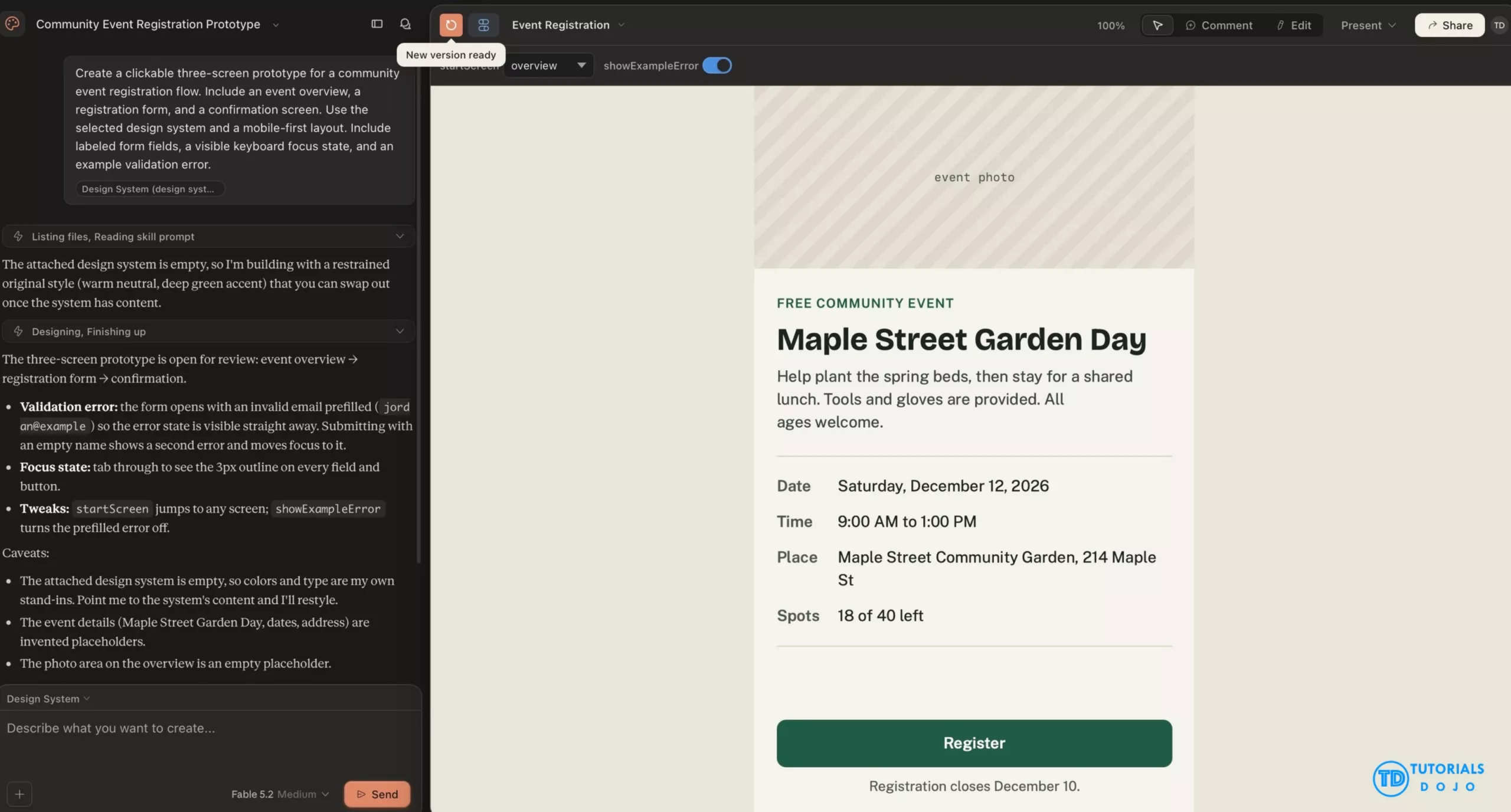
Ideal Customer Profile
-
Product and design teams that want to explore and review several design directions quickly.
-
Marketing and community teams preparing branded mockups or one-pagers.
-
Engineering teams that want a visual reference and clear acceptance criteria for implementation.
Key Considerations & Planning Factors
-
Anthropic lists Claude Design on Free, Pro, Max, Ultra, Team, and Enterprise. Design systems are a separate beta feature listed on Pro, Max, Ultra, Team, and Enterprise. Check current Claude usage limits and organization settings before a rollout.
-
Move or download standalone projects before December 14, 2026. Projects moved to Claude become Artifacts. Standalone chats and comments do not transfer.
-
Confirm sharing permissions before distributing links. Upload approved assets and use the organization’s policies for confidential material and third-party integrations.
-
Choose the format by destination. PDF is suited to fixed-layout review, standalone HTML to browser review, and Claude Code handoff to implementation. Verify the exported layout and interactions.
-
Test accessibility, responsive layout, and interaction behavior before publishing or implementing generated work.
Claude Design vs. Adjacent Tools
| Factor | Claude Design | Claude Slides | Claude Code |
|---|---|---|---|
| Best fit | Visual mockups, prototypes, and interactive microsites. | Slide decks and presentation workflows. | Implementing and testing changes in a codebase. |
| Main input | Brief, references, or design system. | Presentation brief and supporting materials. | Repository, design artifact, and implementation requirements. |
| Main output | A design artifact for review or export. | A presentation artifact. | Code changes and tests. |
| Typical handoff | Share with reviewers, export, or send to engineering. | Present or export for editing and delivery. | Review the code and ship through the team’s deployment process. |
Conclusion
Use Claude Design to turn a brief into a reviewable design and iterate with your team. Pick the review format early, then verify the artifact in its destination before using it in production.
Claude Design Cheat Sheet References:
https://claude.com/product/design
https://support.claude.com/en/articles/14604416-get-started-with-claude-design
🛍️ $0.99 eBooks Are Here and Save Up to 75% on All Practice Exams & Video Courses

Turn Your Team Into Cloud-Ready Professionals Today

Learn AWS with our PlayCloud Hands-On Labs
50% OFF ON OUR YEARLY PLAN

Learn GCP By Doing! Try Our GCP PlayCloud

Learn Azure with our Azure PlayCloud

FREE AI and AWS Digital Courses

FREE AWS, Azure, GCP Practice Test Samplers

Subscribe to our YouTube Channel

Follow Us On Linkedin


Written by: Ace Kenneth Batacandulo