
Artificial intelligence is rapidly changing how modern developers build software. Instead of manually handling every engineering task, developers can now delegate parts of the development lifecycle to autonomous AI coding agents capable of writing code, analyzing repositories, generating infrastructure, debugging errors, and orchestrating workflows directly inside development environments.
One of the most powerful combinations emerging in AI-native software engineering is Cline with Claude. Together, these tools allow developers to create autonomous development workflows capable of interacting with repositories, executing terminal commands, generating cloud infrastructure, and iterating on software systems with minimal manual intervention.
This article explores how developers can technically build AI-assisted engineering workflows using Cline and Claude while integrating modern cloud-native tooling such as Docker, GitHub, Terraform, and AWS.
What You Will Build
In this guide, we will create a modern AI-assisted development workflow capable of generating backend APIs, creating Docker environments, managing GitHub workflows, generating Terraform infrastructure, automating repetitive development tasks, assisting with debugging, and performing repository-wide code analysis. This setup transforms a traditional development environment into an AI-powered engineering workspace.
Understanding the Architecture
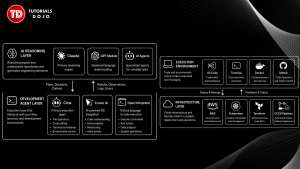
Before setting up the environment, it is important to understand how autonomous AI workflows operate. The architecture usually consists of several interconnected layers.
The AI Reasoning Layer includes technologies such as Claude, GPT models, and other AI agents responsible for understanding context, analyzing repositories, and generating engineering decisions. The Development Agent Layer consists of tools like Cline, Cursor AI, and Open Interpreter, which translate reasoning into executable actions within the development environment. Beneath these sits the Execution Environment, including Visual Studio Code, the terminal, Docker, and GitHub, where actual software development tasks take place. Finally, the Infrastructure Layer encompasses platforms and services such as AWS, Kubernetes, Terraform, and CI/CD pipelines that support deployment and operations.
In this workflow, Claude acts as the reasoning engine capable of understanding repositories and generating engineering decisions, while Cline serves as the execution layer capable of interacting with files, terminals, and development environments. Together, they create a collaborative AI engineering workflow.
Step 1 — Install Visual Studio Code
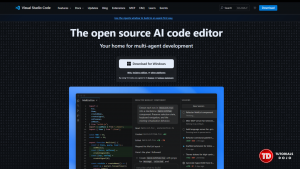
Cline works best inside Visual Studio Code because it integrates directly with the development workspace. Begin by downloading and installing VS Code from the official website. After installation, verify that the VS Code command-line interface is functioning correctly by running the command:
code --version
This ensures that VS Code CLI integration is working properly and is ready to support AI-assisted workflows.
Step 2 — Install Node.js and Git
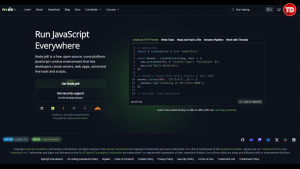
Most AI engineering tooling relies on Node.js environments. Download and install Node.js from the official website, then verify the installation using the following commands:
node -v
npm -v
Next, install Git and confirm that it has been configured successfully by running:
git --version

Git is essential because autonomous AI workflows frequently interact directly with repositories and version control systems to manage changes and coordinate development activities.
Step 3 — Install Cline in VS Code
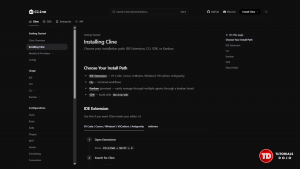
Open Visual Studio Code and navigate to the Extensions Marketplace. Search for Cline and install the extension. Cline enables AI-assisted repository interaction directly within VS Code, transforming the editor into an AI-native development environment.
Once installed, Cline can analyze project files, generate code, modify repositories, execute terminal commands, assist with debugging, and interact with Claude APIs. These capabilities allow developers to move beyond traditional coding assistance and adopt more autonomous engineering workflows.
Step 4 — Configure Claude API Access
To function effectively, Cline requires access to a large language model. Create an Anthropic account and generate an API key through the Anthropic dashboard. Within Visual Studio Code, configure the environment variable:
ANTHROPIC_API_KEY=your_api_key_here
This configuration allows Cline to communicate with Claude for reasoning tasks, repository analysis, and engineering assistance.
Step 5 — Create Your First AI Development Workspace
Create a new project directory and initialize the workspace using the following commands:
mkdir ai-dev-workflow
cd ai-dev-workflow
Initialize a Git repository:
git init
Then initialize a Node.js project:
npm init -y
Finally, open the project inside Visual Studio Code:
code .
At this stage, the AI-assisted development environment is fully prepared for use.
Step 6 — Generate a Backend API Using Cline
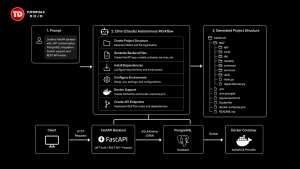
With the environment configured, developers can begin leveraging autonomous AI workflows. Within Cline, provide Claude with a prompt such as:
“Create a FastAPI backend with JWT authentication, PostgreSQL integration, Docker support, and REST API routes.”
In response, Cline may generate project structures, backend files, dependency configurations, environment settings, Dockerfiles, and API endpoints automatically. Unlike traditional autocomplete systems that focus on individual lines of code, AI agents operate across the entire repository structure. As a result, the development workflow shifts from syntax assistance toward architectural collaboration.
Step 7 — Generate Docker Infrastructure
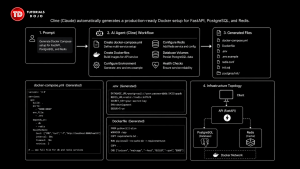
Modern AI workflows frequently integrate containerization capabilities. Developers can instruct Cline with prompts such as:
“Generate Docker Compose setup for FastAPI, PostgreSQL, and Redis.”
The AI agent may generate Docker Compose configurations, Dockerfiles, environment variable templates, Redis configurations, database volumes, and health checks. By automating environment provisioning tasks, developers can establish consistent development environments significantly faster than through manual setup.
Step 8 — Generate Terraform Infrastructure
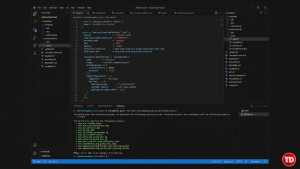
AI agents become especially powerful when integrated into cloud infrastructure workflows. For example, developers can prompt Cline with:
“Generate Terraform infrastructure for AWS ECS deployment with Application Load Balancer.”
The resulting output may include ECS clusters, task definitions, IAM roles, security groups, CloudWatch logging configurations, VPC networking components, and autoscaling policies. This enables teams to rapidly prototype and deploy cloud-native architectures through AI-assisted DevOps practices.
Step 9 — Automate GitHub Actions
Continuous integration and continuous deployment have become fundamental components of modern software engineering. Developers can request:
“Generate GitHub Actions workflow for testing and deployment.”

Cline may then produce workflow definitions capable of running automated tests, building container images, scanning for vulnerabilities, deploying infrastructure resources, and publishing Docker images. Automating these repetitive processes allows teams to focus more attention on higher-value engineering activities.
Step 10 — Use AI for Repository Debugging
One of the most valuable capabilities of autonomous AI workflows is repository-wide debugging assistance. Developers can provide prompts such as:
“Analyze why this Docker container fails during startup.”
Claude can examine logs, Dockerfiles, environment variables, dependency versions, and startup scripts to identify potential causes of failure. This approach offers a more efficient debugging experience compared to manually investigating large and complex systems.
Best Practices for Autonomous AI Development
Although AI coding agents are highly capable, maintaining strong engineering discipline remains essential. Developers should carefully review AI-generated code before deploying it to production environments, as AI systems may occasionally generate insecure configurations, outdated dependencies, incorrect assumptions, or inefficient architectural decisions.
Human oversight should continue to validate critical aspects of software systems, including security, scalability, cost efficiency, infrastructure reliability, and deployment safety. While AI can significantly accelerate engineering workflows, sound judgment and technical expertise remain indispensable.
Security Considerations
Autonomous AI workflows should never operate with unrestricted access to production systems. Organizations should adopt safeguards such as sandbox environments, restricted terminal permissions, isolated credentials, Git rollback strategies, and mandatory manual reviews of infrastructure changes.
AI agents should be viewed as highly capable assistants rather than fully trusted autonomous operators. Maintaining operational safety and governance remains a critical responsibility for engineering teams.
The Future of AI-Native Software Engineering
AI coding agents such as Cline represent an important shift toward AI-orchestrated software engineering. Modern developers are gradually evolving from manual coders into AI workflow orchestrators responsible for supervising cloud infrastructure, autonomous coding agents, deployment automation, distributed systems, and AI-assisted DevOps workflows.
The future of software engineering will likely involve developers overseeing increasingly autonomous engineering systems. Those who develop expertise in these workflows early may gain significant advantages across cloud engineering, backend development, DevOps automation, and AI-native software architecture.
Recommended Resources
🤖 $3.74 ONLY for Claude eBooks and Get 25% OFF All Claude Reviewers

Turn Your Team Into Cloud-Ready Professionals Today

Learn AWS with our PlayCloud Hands-On Labs

$2.99 AWS and Azure Exam Study Guide eBooks

Learn GCP By Doing! Try Our GCP PlayCloud

Learn Azure with our Azure PlayCloud

FREE AI and AWS Digital Courses

FREE AWS, Azure, GCP Practice Test Samplers


Subscribe to our YouTube Channel

Follow Us On Linkedin


Written by: Precious Grace Deborah Manucom




