
Git has a feature most developers have never used: Git worktrees. It has been in the codebase since 2015, documented in the official manual, and available in every installation. It lets you check out multiple branches of the same repository at once, each in its own directory, without cloning the repo again. The feature is called git worktree.
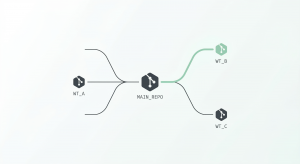
What a Git Worktree Is
Every git repository has a working tree. It is the directory where your files live, the place where you edit code, run tests, and see the results of git checkout. When you clone a repo, you get one working tree tied to one branch. If you want to look at a different branch, you switch to it, and your working tree changes to reflect that branch’s state.
Running git worktree add ../my-feature feature-branch creates a new directory at ../my-feature, checks out the feature-branch there, and links it back to your main repository. You now have two working directories. You can cd between them. Each one has its own files, its own HEAD, its own index.
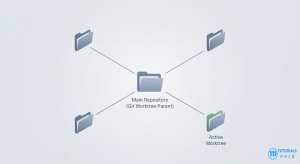
The important constraint: a single branch can only be checked out in one worktree at a time. This prevents the ambiguity of having two working trees that could both commit to the same branch with diverging changes.
.git file that points to the main repository. Git adds a .git/worktrees/<name> folder holding the per-worktree state: a HEAD, an index, and a pointer back. All other data—objects, packs, refs—is shared.
What Worktrees Replace
The most common workflow before worktrees: you are halfway through a feature, a bug comes in, you run git stash, switch branches, fix the bug, switch back, run git stash pop, and hope your stashed changes apply cleanly. This works for small interruptions. It breaks down when the interruption takes hours, when you have multiple stashes and lose track of which is which, or when the stash conflicts with changes that happened while you were away.
The Limits of Stashing
Stashing also forces you to stop what you are doing. Your dev server might be running. Your test suite might be in a specific state. You lose all of that context. With worktrees, you leave your feature directory untouched and open a new terminal in a different directory. Your dev server keeps running.
node_modules and build artifacts. Switching context is cd ../other-worktree. The build cache is warm. Nothing needs to be re-run.A Day with Worktrees
You start the day on a feature branch, user-profile-redesign. The dev server is running, you have unsaved changes in three files, and your test watcher is showing green.

A Slack message arrives: a customer is hitting a crash on the payment page.
git worktree add ../payments-crash main
cd ../payments-crash
npm install
The npm install takes about 30 seconds. You find the bug – a null check is missing on a response field. You fix it, write a test, commit, push. Total time away from your feature work: twelve minutes. Your dev server in the other terminal never stopped. Your unsaved changes are still there.
An hour later, the PR is merged. You clean up:
git worktree remove ../payments-crash
git branch -d fix/payment-null-check
Later, a colleague asks you to review their PR for a database migration. Instead of checking out their branch in your main directory (which would trigger a full rebuild), you create another worktree, run the tests, read the migration files, leave comments, and remove the worktree. Your feature branch was never noticed.
The Agentic Coding Connection
For years, worktrees were a workflow optimization. Useful, but not transformative. Then AI coding agents changed the equation.
An AI coding agent reads your codebase, makes edits, runs commands, and iterates on results. The key property that makes worktrees essential is that these agents can run in parallel. One agent writes a new feature, while another fixes a bug, while a third refactors a test suite.
The Shared State Problem
Consider what happens when two agents share a single working directory. Agent A is midway through refactoring an authentication module. It has deleted an old helper function and updated three call sites. Agent B, working on an unrelated payment feature, runs git add to stage its changes. Agent B’s staging captures Agent A’s half-finished refactor. If Agent B commits, the commit contains a mix of payment code and a broken auth module.
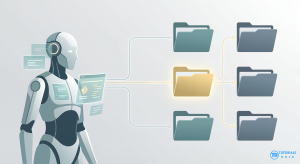
The problems compound. Agent A runs tests and sees failures from Agent B’s changes. Agent B’s build fails because Agent A deleted a function. Both agents start “fixing” errors that the other caused. This is the standard shared-mutable-state problem, applied to the filesystem.
Separate clones provide isolation, but at a high cost: cloning a large repository takes time and disk space. More importantly, each clone is disconnected—Agent A’s commits are invisible to Agent B until pushed and fetched. Worktrees solve this. Each agent has a directory and a staging area, but all share the same object database. Commits become immediately visible to everyone.
How Claude Code and Codex Use Worktrees
--worktree flag starts a session in an isolated git worktree:claude --worktree feature-auth claude --worktree bugfix-123
This creates a worktree at <repo>/.claude/worktrees/feature-auth/, branching from the default remote branch. Claude operates entirely within this worktree. Your checkout is untouched. When you exit, Claude cleans up automatically if the agent made no changes, or asks whether to keep the worktree if changes exist.
Claude Code also supports worktree isolation at the subagent level. A subagent configured with isolation: worktree gets its own temporary worktree. Multiple subagents can run in parallel, each in its own worktree, each working on an independent task.
Different Architectural Approaches
Codex takes a different architectural approach. Where Claude Code runs locally, Codex runs tasks in cloud sandbox environments. Each task gets a sandbox preloaded with a copy of your repository. Codex worktrees operate in detached HEAD state rather than as named branches, which sidesteps the one-branch-per-worktree constraint entirely. Multiple tasks can start from the same branch state without conflicts.
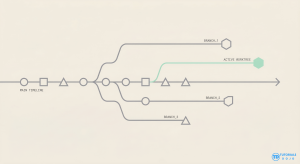
Patterns Worth Knowing
Limitations
The biggest practical limitation: worktrees do not copy untracked or ignored files. A new worktree in a Node.js project has no node_modules. A new worktree in a Python project has no virtual environment. You need to run your setup process in each new worktree. Automate this with a setup script, or with Claude Code’s WorktreeCreate hook that runs setup commands when a worktree is created.
One Branch, One Worktree
A branch can only be checked out in one worktree at a time. Codex works around this by using detached HEAD. If you need the same branch in two places, git worktree add --detach is the escape hatch.
The Bigger Shift
References
- git-worktree documentation – the official reference. Covers every subcommand, flag, and internal detail, including shared vs. per-worktree state.
- How I use git worktrees by Bill Mill – a practical workflow post. His wrapper script for reducing git worktree add friction and his copy-on-write trick for node_modules are both worth stealing.
- Claude Code: common workflows – the –worktree flag, worktree cleanup behavior, WorktreeCreate hooks, and how sessions persist across worktrees.
- Codex app: worktrees – how Codex manages worktrees in detached HEAD state, the Handoff feature, and automatic cleanup with snapshot restoration.

🌸 25% OFF All Reviewers on our International Women’s Month Sale! Save 10% OFF All Subscriptions Plans & 5% OFF Store Credits/Gift Cards!

Learn AWS with our PlayCloud Hands-On Labs

$2.99 AWS and Azure Exam Study Guide eBooks

New AWS Generative AI Developer Professional Course AIP-C01

Learn GCP By Doing! Try Our GCP PlayCloud

Learn Azure with our Azure PlayCloud

FREE AI and AWS Digital Courses

FREE AWS, Azure, GCP Practice Test Samplers


Subscribe to our YouTube Channel

Follow Us On Linkedin


Written by: Duncan Bandojo




