
Last updated on February 13, 2026
GitHub Actions Cheat Sheet
GitHub Actions is a continuous integration and continuous delivery (CI/CD) platform that allows you to automate your build, test, and deployment pipeline. You can create workflows that build and test every pull request to your repository, or deploy merged pull requests to production.
Key Components
-
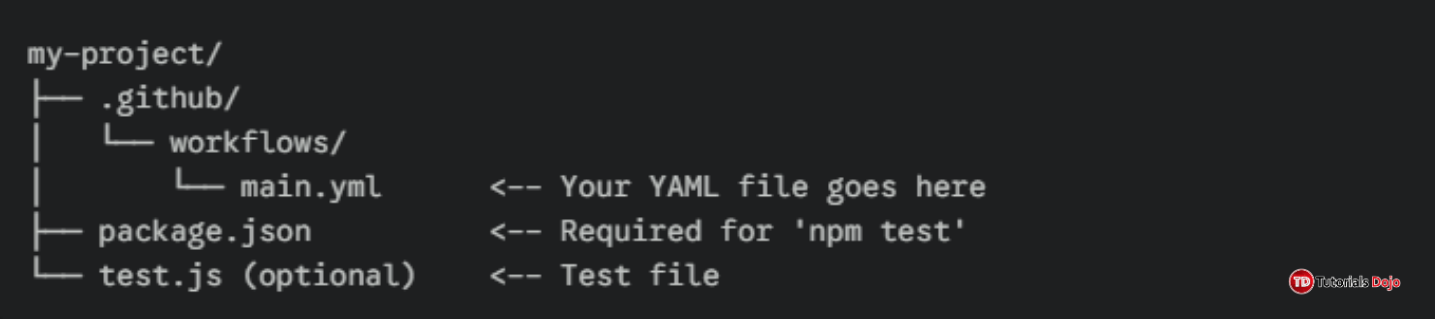
Workflow: An automated procedure that you add to your repository. Defined by a YAML file in
.github/workflows/. -
Event: A specific activity that triggers a workflow run (e.g.,
push,pull_request,release). -
Job: A set of steps that execute on the same runner. Jobs run in parallel by default.
-
Step: An individual task that can run commands or actions. Steps are executed in order.
-
Action: A custom application that performs a complex task. Can be written in JavaScript or as a Docker container.
-
Runner: A server with the GitHub Actions runner application installed. Can be GitHub-hosted or self-hosted.
-
Artifact: Files created during a workflow that can be shared between jobs or downloaded.
-
Secret: An encrypted variable stored in your repository, organization, or environment.

Workflow File Structure
yaml name: Workflow Name # Name of the workflow on: [push, pull_request] # Events that trigger the workflow env: # Environment variables for all jobs NODE_VERSION: '20' jobs: # Jobs that make up the workflow build-job: # Unique job identifier runs-on: ubuntu-latest # Runner environment steps: # Steps that define the job - name: Checkout code # Step name uses: actions/checkout@v4 # Action to use - name: Setup Node.js uses: actions/setup-node@v4 with: # Input parameters for the action node-version: ${{ env.NODE_VERSION }} - name: Run tests run: npm test # Command to executeCommon Events
Event Description Example Configuration pushTriggered on push to branches/tags on: pushoron: push: branches: [main]pull_requestTriggered on PR activity on: pull_request: types: [opened, synchronize]scheduleCron-based scheduling on: schedule: cron: '0 2 * * *'workflow_dispatchManual trigger from UI on: workflow_dispatchreleaseTriggered on release activity on: release: types: [published]Jobs and Runners
- Runner Types: GitHub provides managed virtual machines for Ubuntu Linux, Windows, and macOS. You can also deploy self-hosted runners on your own infrastructure, which can be physical machines, virtual machines, or containers. Self-hosted runners allow you to use custom operating systems, hardware specifications (like GPU), and software, and are required to run workflows in private, on-premises, or air-gapped networks.
- Job Dependencies: Use the
needskeyword to declare that a job must wait for the successful completion of other jobs before it begins. This creates explicit dependencies and allows you to model a directed acyclic graph (DAG) for your workflow, enabling sequences like build -> test -> deploy. A job with noneedsclause runs in parallel with other independent jobs at the start.- Matrix Strategy: Defined under
strategy, a matrix lets you create multiple job runs by substituting variables. For example, you can test your code against different versions of a language ([node-14, node-16, node-18]) and operating systems ([ubuntu-latest, windows-latest]) in a single job definition. Each combination runs in a separate, parallel instance, and you can reference each variable in the job using${{ matrix.variable-name }}.Actions and Marketplace
Pre-built Actions: Available in GitHub Marketplace
Common Actions:
actions/checkout@v4: Check out your repository
actions/setup-node@v4: Setup Node.js environment
actions/setup-python@v5: Setup Python environment
actions/cache@v3: Cache dependencies and build outputs
actions/upload-artifact@v4: Upload workflow artifacts
actions/download-artifact@v4: Download workflow artifactsEnvironment Variables and Secrets
- Default Variables:
- GitHub automatically sets default environment variables (like
GITHUB_REPOSITORY,GITHUB_SHA,GITHUB_REF) for every workflow run. These are part of thegithubcontext and provide immutable metadata about the run, such as the repository name, the exact commit hash that triggered it, and the branch or tag name.\- Custom Variables:
- You can define your own non-sensitive variables at the workflow, job, or step level using the
envkey. This is useful for static configuration values. Variables defined at a lower level override those defined at a higher level (step > job > workflow).- Secrets:
- These are encrypted variables you create in your repository, organization, or environment settings. They are used to store sensitive data like API tokens, passwords, or signing certificates. Secrets are not passed to workflows triggered by pull requests from forks for security, and they cannot be read or printed in plain text in workflow logs. Access them using the
secretscontext:${{ secrets.AZURE_KEY }}.- Contexts:
- Contexts are objects containing information accessible during a workflow run. You use expression syntax (
${{ }}) to access them. Key contexts includegithub(event payload, actor, SHA),job(status of the current job),steps(outputs from previous steps), andrunner(OS, name of runner). For example,${{ github.event.issue.title }}gets the title of an issue that triggered the workflow.Artifacts and Caching
- Artifacts:
- Artifacts are files produced during a workflow run that you want to persist after the job ends. Use the
upload-artifactaction to save files from a job to cloud storage linked to that workflow run. You can then use thedownload-artifactaction in a later job within the same workflow run to retrieve those files. This is essential for passing build outputs, logs, or test results between jobs (e.g., from abuildjob to adeploymentjob). Artifacts are also available for manual download from the workflow run’s summary page for a default retention period.- Caching:
- The
cacheaction is used to save and restore directories containing dependency files (likenode_modules,~/.gradle/caches,~/.nuget/packages). By creating a cache with a key (often based on a lockfile hash), subsequent workflow runs can restore these directories, avoiding the time-consuming process of re-downloading all dependencies. This dramatically reduces workflow execution time. Caches are scoped to the branch and have an upper storage limit, with least-recently-used (LRU) eviction.Best Practices
- Use Specific Action Versions: For security, stability, and reproducibility, pin actions to a full length commit SHA. If using a version tag, prefer a major version (e.g.,
actions/checkout@v4) over a default branch (@main). Pinning to a SHA guarantees you are using an immutable action, protecting you from a bad actor pushing malicious code to a tag.- Limit Permissions: The default
GITHUB_TOKENgranted to workflows has broad permissions. Use thepermissionskey at the workflow or job level to explicitly set the minimum access required (e.g.,contents: read,packages: write). This follows the principle of least privilege and is a critical security hardening step to limit the potential damage from a compromised workflow.- Clean Up Resources: Use the
if: always()conditional on a specific step within the mainsteps:block to ensure cleanup operations (like stopping services or removing containers) run even if previous steps have failed. This is the correct, documented approach for workflows.- Optimize Workflow Speed: Implement dependency caching as described. Use the
matrixstrategy to run compatible tasks in parallel instead of sequentially. For monorepos, consider usingpathsfilters on triggers to run workflows only when code in relevant directories changes.- Secure Secrets: Never log, echo, or print secrets in workflow commands. Access them only through the
${{ secrets.NAME }}syntax. Regularly audit and rotate secrets. For self-hosted runners, be aware that secrets are passed to the runner machine; you must therefore fully trust the machine’s security and its administrators.Pricing and Limits
Free Tier: 2,000 minutes/month for private repositories (500MB package storage)

Public Repositories: Unlimited minutes and runners
Self-hosted Runners: Unlimited and free
Concurrent Jobs: Up to 20 jobs on free plans, more on paid plans

🌸 25% OFF All Reviewers on our International Women’s Month Sale! Save 10% OFF All Subscriptions Plans & 5% OFF Store Credits/Gift Cards!

Learn AWS with our PlayCloud Hands-On Labs

$2.99 AWS and Azure Exam Study Guide eBooks

New AWS Generative AI Developer Professional Course AIP-C01

Learn GCP By Doing! Try Our GCP PlayCloud

Learn Azure with our Azure PlayCloud

FREE AI and AWS Digital Courses

FREE AWS, Azure, GCP Practice Test Samplers


Subscribe to our YouTube Channel

Follow Us On Linkedin


Written by: Joshua Emmanuel Santiago




