
Last updated on February 13, 2026
GitHub Packages Cheat Sheet
GitHub Packages is an integrated package hosting service that allows you to host software packages—including containers, npm modules, and Java libraries—privately or publicly alongside your source code. It leverages your existing GitHub permissions, billing, and workflows to provide a seamless experience for managing your software dependencies and distribution.
Key Concepts
- Package: A bundled unit of software (code, dependencies, metadata)
- Registry: A storage and distribution system for packages
- Scope: Organization/user namespace for packages
- Versioning: Semantic versioning support for package management
- Visibility: Public (open source) or Private (requires authentication)
Supported Package Registries
GitHub Packages supports multiple package ecosystems. Each uses a specific registry URL and naming convention.
| Package Manager / Ecosystem | Registry Host / Format | Example Package Name |
| npm (JavaScript/Node.js) | npm.pkg.github.com |
@owner/package-name |
| Docker (Containers) | ghcr.io |
ghcr.io/owner/image-name |
| Maven (Java) | maven.pkg.github.com |
com.company:artifact-name |
| NuGet (.NET) | nuget.pkg.github.com |
Package.Name |
| RubyGems (Ruby) | rubygems.pkg.github.com |
gem-name |
Authentication and Permissions
Access to packages is controlled by the permissions of the repository to which the package is connected. Private repository packages are private; public repository packages are public.
Primary Authentication Methods
| Method | Best Used For | Key Characteristics |
| Personal Access Token (PAT) | Local development, CI/CD outside GitHub Actions. | Requires manual creation with read:packages and write:packages scopes. Must be stored as a secret. |
GITHUB_TOKEN |
GitHub Actions workflows. | Automatically generated for each workflow run. Most secure for automation. Requires explicit packages: write permission in the workflow YAML. |
| Fine-Grained PAT | External services requiring granular, repository-specific access. | Provides more precise control over repository and permission access than classic PATs. |
Essential Commands by Registry
| Action | npm | Docker |
| Authenticate | npm login --registry=https://npm.pkg.github.com |
docker login ghcr.io |
| Publish | npm publish |
docker push ghcr.io/owner/image:tag |
| Install | npm install @owner/package |
docker pull ghcr.io/owner/image:tag |
Package Management
-
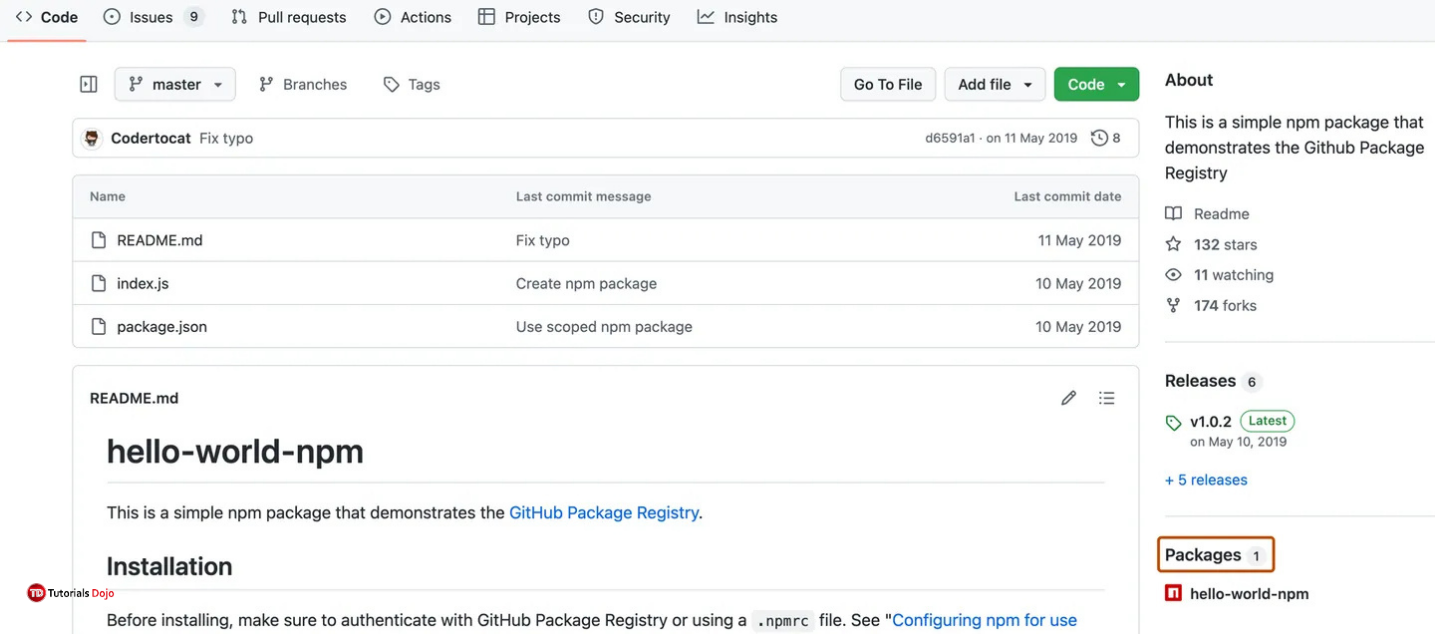
Viewing Packages: On any repository’s main page on GitHub.com, click the “Packages” link in the right sidebar.
-
Deleting Packages: Use the GitHub website UI (under package settings) or the GitHub REST API (e.g.,
DELETE /orgs/{org}/packages/{package_type}/{package_name}/versions/{package_version_id}).

Troubleshooting Common Issues
| Problem | Likely Cause | Solution |
npm ERR! 404 Not Found |
Incorrect scope or registry URL in .npmrc. |
Ensure .npmrc uses the correct scope (@owner) and registry URL. |
Error: E401 on publish in Actions |
GITHUB_TOKEN lacks permissions or npm is not configured for GitHub’s registry. |
1. Add permissions: packages: write to the workflow job.2. Use the actions/setup-node action with the registry-url parameter. |
| Cannot install a private package | The user or token lacks read access to the repository connected to the package. | Ensure the consuming account has read permission for the source repository. |
| Storage quota exceeded | Accumulation of old package versions. | Delete old package versions via the web interface or API. Implement retention policies in your workflows. |
Best Practices Checklist
-
Use the
GITHUB_TOKENfor authentication in GitHub Actions workflows instead of hardcoded Personal Access Tokens. -
Set minimal required permissions in workflow YAML (e.g.,
contents: read,packages: write). -
Configure the npm registry via
publishConfiginpackage.jsonfor reliability. -
Regularly delete old package versions to manage storage usage.
-
Consult the GitHub Community Discussions for unresolved issues or advanced scenarios.
References:
https://docs.github.com/en/packages
https://docs.github.com/en/rest/packages
https://docs.github.com/en/packages/quickstart
https://github.com/orgs/community/discussions/categories/packages
🌸 25% OFF All Reviewers on our International Women’s Month Sale! Save 10% OFF All Subscriptions Plans & 5% OFF Store Credits/Gift Cards!

Learn AWS with our PlayCloud Hands-On Labs

$2.99 AWS and Azure Exam Study Guide eBooks

New AWS Generative AI Developer Professional Course AIP-C01

Learn GCP By Doing! Try Our GCP PlayCloud

Learn Azure with our Azure PlayCloud

FREE AI and AWS Digital Courses

FREE AWS, Azure, GCP Practice Test Samplers


Subscribe to our YouTube Channel

Follow Us On Linkedin


Written by: Joshua Emmanuel Santiago




