
Last updated on June 25, 2026
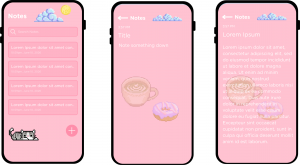
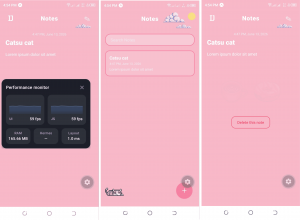
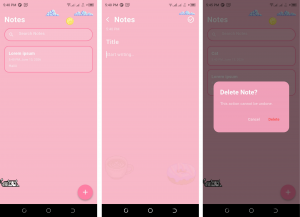
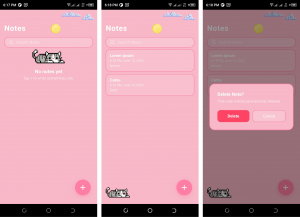
Local development setups can affect how fast you build, test, and ship web and mobile apps. This guide is for students, developers, and everyone that wants to compare three practical cross-platform options. You will see how Next.js with Expo, Flutter with Android Studio, and Next.js with Capacitor perform in setup time, developer experience, storage use, and mobile RAM usage. To keep the comparison fair, I used the same simple project idea across all three setups: a strawberry milk tea-inspired note-taking app that only needed to create and delete notes. That scope made the benchmark easier to reproduce and compare because the focus stayed on the development setup, not on complex app logic. The design direction was intentionally personal and playful. Most apps use the same corporate dashboard style which is almost boring so this test used a softer visual theme to check how each stack handles custom UI work. Strawberry milk tea note app mockup designed from Canva. The app was built with AI-assisted coding using Claude Sonnet, that generate and revise the code from written instructions. This does not remove the need for developer judgment as I still checked errors, guided the implementation, and compared the final app behavior. I used the same prompt that sets the same product goal for each stack. It also avoids overbuilding the app, which matters because a benchmark should test the platform more than the feature list. Benchmark prompt used: I scored each setup using four criteria: ease of setup, developer experience, resource efficiency, and mobile performance. Each category uses a five-star scale. A score of one means poor, three means acceptable, and five means strong for this specific test. Before starting a similar project, review basic package and version control workflows. Tutorials Dojo has helpful article for Deploying NextJS site with Github Actions. Next.js is a React framework for building web applications with routing, rendering, and project structure included while Expo is a framework and toolchain for React Native, which lets developers build native Android and iOS apps using React-style components. Finally this setup includes TypeScript which adds static typing to JavaScript, helping catch common mistakes before runtime. In this setup, Next.js handles the web side while Expo handles the mobile side. The practical benefit is familiarity. A developer who already knows React can move faster because the mental model for components, state, props, and TypeScript stays similar across web and mobile. The setup used the normal npm workflow: install dependencies, check package.json, then run the development server. Expo Go, the mobile preview app from Expo, allowed the Android device to open the project through a QR code. That removed the need to install Android Studio and a full emulator for this proof of concept. Notepad Milktea App in Expo, including the Debugging Window The total score is 16 out of 20 stars. This was the best all-around setup for fast experimentation, especially for web developers who want to reach mobile without learning a completely separate workflow. The tradeoff is mobile memory use, which can matter on older Android phones with 4 GB of RAM or less. Flutter is Google’s UI toolkit for building apps from a single codebase. It uses Dart, a programming language designed for client-side app development, and renders UI through Flutter’s own widget system. Android Studio is Google’s official integrated development environment, or IDE, for Android development. Flutter felt strongest when the project was treated as a mobile-first app. The UI was smooth, and the final Android app used much less RAM than the Expo version in this test. The cost came from setup size, install time, and the number of moving parts needed before the first build. Android Studio required installing the IDE, Flutter tooling, Dart support, Android SDK components, and build tools. On macOS, this was manageable, but Windows users may spend more time dealing with installers, paths, SDK, and environment variables. That extra setup is not wasted for serious Android work, but it feels heavy for a two-screen note app. Notepad Milktea App in Flutter The total score is 12 out of 20 stars. Flutter is a strong choice when mobile app quality is the main goal and the developer machine has enough storage and memory. For students or developers with limited SSD space, the full Android Studio setup can feel too large for small prototypes. For a related low-code mobile development article, see Tutorials Dojo’s guide on building mobile projects with FlutterFlow. Capacitor is a native runtime for web apps. In simple terms, it lets you take a built web application and run it inside a native Android or iOS container while still allowing access to selected device features through plugins. It is useful when you already have a working web app and want a mobile version without rewriting the entire interface. This setup felt closest to “web app first, mobile wrapper second.” The web app remained understandable because the core interface still used familiar HTML, CSS, and JavaScript patterns. The Android side added Gradle and Android Studio, which made the project feel heavier than the Expo route. Capacitor works best when the app is already responsive and does not depend on deep native behavior. A note app, dashboard, form app, simple e-commerce app, or internal tool can fit this model well. A camera-heavy, offline-first, animation-heavy, or background-processing app may need more native code and more testing. Notepad Milktea App in CapacitorJS The total score is 11 out of 20 stars. Capacitor is the fastest option when you already have a polished web app and only need a mobile shell. For a brand-new cross-platform project, Expo was more practical in this benchmark because it gave mobile testing without the same native build setup. Next.js with Expo and TypeScript won this review with 16 out of 20 stars. It had the best balance of setup speed, developer experience, storage use, and cross-platform flexibility. The mobile RAM usage was the main weakness, so developers targeting low-end Android devices should test early. Flutter produced the most efficient Android app in this benchmark. The app used much less RAM on the test phone, and the UI felt closer to a mobile-first product. The downside was the size of the local environment. A full Android Studio and Flutter setup can be difficult to justify when building a simple proof of concept on a storage-limited laptop. Capacitor placed third, but that does not make it a bad tool. The setup makes sense when the web app already exists and the mobile app is a companion version. For new projects, the WebView based approach and Android build overhead made it less attractive than Expo for this note app. For agility, ease of setup, and resource efficiency, choose Next.js + Expo + TypeScript. Add Supabase when the app needs authentication, a database, or file uploads. This setup is especially useful for React developers who want one familiar development style across web and mobile. For the best mobile UI and lowest mobile RAM usage in this test, choose Flutter + Dart + Android Studio. This route fits mobile-first apps where performance matters more than local setup size. It also fits teams that are already comfortable with Android tooling. For the fastest web-to-mobile conversion, choose Next.js or Vite + Capacitor. Vite is a frontend build tool that creates fast JavaScript development projects, while Capacitor packages the built web app for mobile platforms. This is the most practical route when the web app is already built and the mobile version can behave like a wrapped, responsive web experience.

Test app and scoring method
“Build a strawberry milk tea-themed note-taking app with a soft pink and cream UI. The app must let users create notes, display saved notes, and delete notes. Keep the app simple, responsive, and usable on Android and web where the stack supports it. Use clean file structure, readable component names, and minimal dependencies. Prioritize fast setup, clear errors, and smooth mobile interaction.”
Setup 1: Next.js + Expo + TypeScript

Setup 2: Flutter + Dart + Android Studio

Setup 3: Next.js + Capacitor

Results and recommendation
Final ranking

References

🤖 $3.74 ONLY for Claude eBooks and Get 25% OFF All Claude Reviewers

Turn Your Team Into Cloud-Ready Professionals Today

Learn AWS with our PlayCloud Hands-On Labs

$2.99 AWS and Azure Exam Study Guide eBooks

Learn GCP By Doing! Try Our GCP PlayCloud

Learn Azure with our Azure PlayCloud

FREE AI and AWS Digital Courses

FREE AWS, Azure, GCP Practice Test Samplers


Subscribe to our YouTube Channel

Follow Us On Linkedin


Written by: Vince Austria




