
What Is OpenAI Codex?
OpenAI Codex is an AI-powered coding agent built on top of OpenAI’s frontier models. Originally launched as a code-completion API in 2021, Codex has evolved significantly, it is no longer a simple autocomplete tool. As of 2025–2026, Codex is a full software development agent that can read your codebase, plan changes, write and edit files, run commands, review pull requests, and now even operate your computer alongside you.
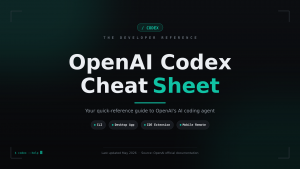
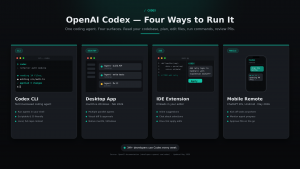
Codex is used by over 3 million developers weekly and is available as:
- A CLI (Command Line Interface) — terminal-based coding agent
- A Desktop App — for macOS and Windows (released February 2026)
- An IDE Extension — integrates into popular code editors
- A Mobile Remote — via the ChatGPT iOS/Android app
Codex Models
Codex works with several OpenAI models. You can switch models via /model in the CLI/app.
| Model | Description | Best For |
| GPT-5.5 | Flagship frontier model; strongest coding, computer use, and agentic reasoning. Token-efficient. | Complex multi-step tasks, deep refactors, research workflows |
| GPT-5.5 Pro | Extended compute variant for the toughest problems | Enterprise-grade, high-effort tasks |
| GPT-5.4 | Previous flagship; still strong for coding and debugging | Fallback if GPT-5.5 is unavailable |
| GPT-5.4-mini | Fast, lower-cost model | Routine edits, subagents, simpler tasks |
| GPT-5.3-Codex | Industry-leading dedicated coding model; powers Codex’s Auto-review feature | Code review (fixed model for this feature) |
| GPT-5.3-Codex-Spark | Near-instant, text-only research preview | Real-time iteration; Pro subscribers only |
Tip: For most tasks, start with GPT-5.5. OpenAI has tuned Codex so that GPT-5.5 uses significantly fewer tokens than GPT-5.4 to achieve comparable or better results — making it more cost-effective despite being a more capable model. Use GPT-5.4-mini to conserve credits on lighter tasks.
How to Install Codex CLI
Prerequisites:
- Node.js (current LTS recommended)
- An OpenAI account (ChatGPT Plus, Pro, Business, or Enterprise — or an API key)
- On Linux/WSL2: install bubblewrap for sandbox support (apt install bubblewrap)
Desktop App
Available on macOS and Windows (released February 2026; Windows app added April 2026). The Desktop App provides:
- A unified interface to manage parallel agent threads
- Background computer use — Codex operates your computer using its own cursor while you keep working (macOS; Windows coming soon)
- An in-app browser for frontend and game development iteration
- Image generation using GPT-image-1.5 for mockups and UI concepts
- 90+ plugins including integrations with Atlassian Jira (Rovo), GitLab, CircleCI, CodeRabbit, Microsoft Suite, Neon by Databricks, and Render
- Memory — Codex can remember your preferences and learn from prior sessions

Mobile Remote
Connect your iPhone, iPad, or Android device to a Mac running the Codex app via the ChatGPT mobile app. You can approve tasks, start new prompts, and review results from your phone while Codex works on your machine.
Sandbox and Approval Model
Codex uses two independent controls to manage agent safety:
Sandbox Modes
| Mode | What It Allows |
| workspace-write (default) | Read files, edit within the workspace, run routine local commands |
| danger-full-access | No restrictions — use only in isolated/hardened environments |
On macOS, sandboxing uses the built-in Seatbelt framework. On Windows, it uses the native Windows sandbox (PowerShell) or Linux sandbox (WSL2). On Linux/WSL2, bubblewrap must be installed.
Codex Cloud runs in isolated OpenAI-managed containers — network access is off by default during the agent phase.
Approval Policies
| Policy | Behavior |
| on-request | Codex asks before going beyond sandbox limits (default for local work) |
| never | No approval prompts — combine with danger-full-access for full automation |
| auto_review | A reviewer subagent automatically approves eligible actions |
Security note: Never use danger-full-access + approval_policy = “never” unless your environment is already hardened and isolated (e.g., a CI runner).
Key CLI Commands and Flags
| Command/Flag | What It Does |
| codex | Launch interactive TUI |
| codex “prompt” | Start session with a pre-filled prompt |
| codex exec “prompt” | Run a non-interactive, one-shot task |
| codex exec –last | Resume the most recent exec session |
| codex –cd <path> | Set working root directory |
| codex –add-dir <path> | Add a writable root outside the workspace |
| codex –model gpt-5.5 | Override model for the session |
| codex –search | Enable live web search (instead of cached) |
| codex –sandbox workspace-write | Set sandbox mode for this run |
| codex –ask-for-approval on-request | Set approval policy for this run |
| codex –yolo | Bypass all approvals and sandboxing (dangerous) |
| codex –oss | Use local open-source model via Ollama |
| codex update | Self-update the Codex CLI |
In-session slash commands
| Command | What It Does |
| /model | Switch models mid-session |
| /status | View remaining usage limits and credits |
| /permissions | Toggle to read-only mode |
| /feedback | Submit feedback to OpenAI |
| /goal | Start a persisted goal workflow |
| !<command> | Run a local shell command directly (e.g., !ls) |
Configuration (~/.codex/config.toml)
Project-level agent instructions (AGENTS.md)
Place an AGENTS.md file in your project root to give Codex persistent, project-specific instructions — like your coding standards, test commands, or preferred patterns. Codex reads this file automatically at the start of each session.
Web Search
Codex ships with a built-in web search tool:
- Default (cached): Uses OpenAI’s pre-indexed web results. Reduces prompt injection risk.
- Live: Fetches real-time results. Enable with –search or web_search = “live” in config.
- Disabled: web_search = “disabled”
If you use –yolo or danger-full-access, web search defaults to live mode automatically.
Key Concepts Summary
| Concept | Quick Definition |
| Sandbox | OS-enforced boundary limiting what files/network Codex can touch |
| Approval policy | Rules for when Codex must stop and ask before acting |
| Skills | Reusable capabilities you can add to extend what Codex can do |
| Plugins | App integrations (90+) that let Codex interact with external tools |
| Hooks | Lifecycle events that trigger custom behavior (GA as of May 2026) |
| AGENTS.md | Project-level instruction file Codex reads at session start |
| Auto-review | Reviewer subagent that automatically approves eligible actions |
| Codex Access Tokens | Tokens for trusted automation workflows (GA as of May 2026) |
| /goal | Persisted workflow feature for ongoing or repeatable tasks |
| Credits | The billing unit for Codex usage; consumed based on token usage |
Cheat Sheet: Quick Decisions
Which model should I use?
- Complex task, best quality → GPT-5.5
- Lighter task, save credits → GPT-5.4-mini
- Code review → GPT-5.3-Codex (auto-selected, not configurable)
Which sandbox mode?

- Local development → workspace-write (default)
- CI/automation pipeline in isolated runner → danger-full-access + approval_policy = “never”
Where should I put project instructions?
- Project root → AGENTS.md
- User-wide settings → ~/.codex/config.toml
- One-off override → CLI flags (e.g., –model, –sandbox)
How do I use Codex from my phone?
- Install ChatGPT on iOS or Android → Connect to a Mac running the Codex desktop app → Full remote access via SSH
Additional Resources
- Official Docs: developers.openai.com/codex
- Changelog: developers.openai.com/codex/changelog
- Pricing: developers.openai.com/codex/pricing
- Rate Card: help.openai.com – Codex Rate Card
- GitHub Repo: github.com/openai/codex
- Model Reference: developers.openai.com/codex/models
- Sandbox & Approvals: developers.openai.com/codex/agent-approvals-security
🤖 $3.74 ONLY for Claude eBooks and Get 25% OFF All Claude Reviewers

Turn Your Team Into Cloud-Ready Professionals Today

Learn AWS with our PlayCloud Hands-On Labs

$2.99 AWS and Azure Exam Study Guide eBooks

Learn GCP By Doing! Try Our GCP PlayCloud
Learn Azure with our Azure PlayCloud

FREE AI and AWS Digital Courses

FREE AWS, Azure, GCP Practice Test Samplers


Subscribe to our YouTube Channel

Follow Us On Linkedin


Written by: Karen Pearl V. Pabilando