

Reserved Instance (RI) Reporting Cheat Sheet
AWS provides built‑in tools to help you understand and manage your Reserved Instances (RIs). You can visualize RI data at an aggregate level, inspect individual subscriptions, access the most detailed usage information, and set custom utilization targets with alerts.
Reserved Instance (RI) Reporting Utilization and CoverageÂ
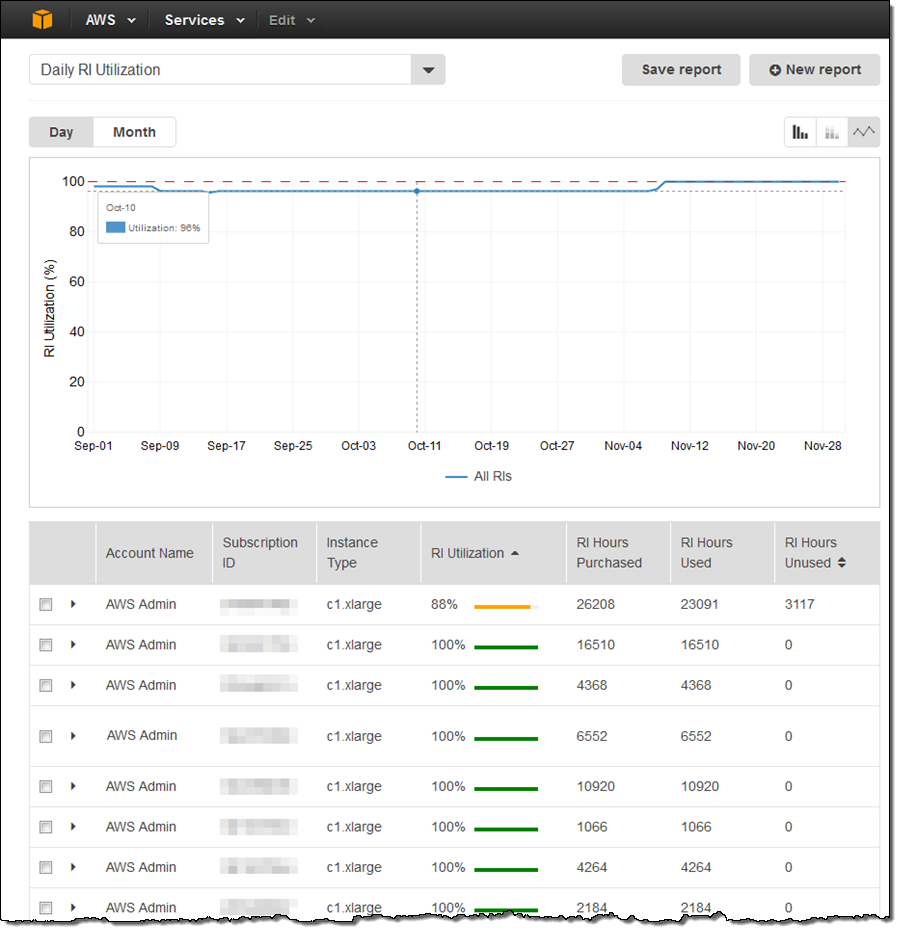
The RI Utilization and RI Coverage reports are available in AWS Cost Explorer. They let you see your RI data at an aggregate level or drill into a specific RI subscription.
-
RI Utilization – How much of your purchased RI capacity you are actually using.
-
RI Coverage – How much of your instance usage is covered by RIs versus On‑Demand
AWS Cost and Usage Report (CUR)
The AWS Cost and Usage Report provides the most detailed RI information available. It lists usage in hourly or daily line items and can be customized to aggregate data to daily or monthly levels. The recommended format is Cost and Usage Report 2.0 (CUR 2.0) , which you create using AWS Data Exports.
AWS Budgets for Reserved Instance (RI) Tracking
With AWS Budgets, you can set a custom RI utilization target and receive alerts when your utilization drops below that threshold. RI alerts are supported for Amazon EC2, Amazon RDS, Amazon Redshift, and Amazon ElastiCache reservations. Budgets can be tracked monthly, quarterly, or yearly, and you can customize start and end dates.
Reserved Instance (RI) Purchase Recommendations
AWS Cost Explorer provides context‑aware RI purchase recommendations based on your past usage. These help you identify potential savings opportunities by suggesting which reservations to purchase, in which instance families, and in which regions.
Customizing RI Discount Sharing Preferences
You can trace which AWS instances benefit from specific reservations and customize how RI discounts are shared across your AWS accounts. Discount sharing can be configured at the AWS Organization level or by custom groups of accounts.
Reserved Instance (RI) Reporting Metrics to Track
| Metric | What It Measures |
| Utilization | Percentage of purchased RI hours actually used |
| Coverage | Percentage of total instance usage covered by RIs |
| Net Savings | Difference between public On‑Demand rates and your actual charges |
Best Practices for Reserved Instance (RI) Reporting
-
Set utilization targets – Use AWS Budgets to define and monitor RI utilization goals. Receive alerts when utilization falls below your target.
-
Review coverage regularly – Monitor coverage reports in AWS Cost Explorer to identify gaps where On‑Demand usage could be converted to RIs.
-
Use CUR for detailed analysis – Export the AWS Cost and Usage Report to Amazon S3 and analyze with tools like Amazon Athena to gain custom insights.
-
Leverage purchase recommendations – Regularly review RI purchase recommendations in Cost Explorer to optimize future reservations.
References
https://aws.amazon.com/aws-cost-management/reserved-instance-reporting/
https://docs.aws.amazon.com/cur/latest/userguide/what-is-data-exports.html
🎠GET 22% OFF our AWS Security Specialty and AZ-500 Azure Security Engineer Associate Practice Exams – Master Cloud Security Now!

Learn AWS with our PlayCloud Hands-On Labs

$2.99 AWS and Azure Exam Study Guide eBooks
New AWS Generative AI Developer Professional Course AIP-C01
Learn GCP By Doing! Try Our GCP PlayCloud

Learn Azure with our Azure PlayCloud

FREE AI and AWS Digital Courses
FREE AWS, Azure, GCP Practice Test Samplers
Subscribe to our YouTube Channel
Follow Us On Linkedin








