
Last updated on January 23, 2026
- A dedicated, fully-managed metadata store and governance hub within Amazon SageMaker designed to catalog, version, track, audit, and deploy machine learning (ML) models throughout their entire lifecycle. It serves as the single source of truth for model inventory, lineage, and approval states, enabling collaboration between data scientists, ML engineers, and governance teams while enforcing consistency and compliance in model deployment workflows.
Amazon SageMaker Model Registry Core Concepts
- Model Package Group
- A logical container that organizes all iterations of a single model solving a specific business problem. It represents the “parent” entity under which all historical and current versions are grouped. For example, a
FraudDetection-V1group contains all model versions (v1.0, v1.1, v1.2) developed for that specific fraud detection task. Each group has a unique name and Amazon Resource Name (ARN).
- A logical container that organizes all iterations of a single model solving a specific business problem. It represents the “parent” entity under which all historical and current versions are grouped. For example, a
- Model Package
- An individual, immutable versioned entity registered within a Model Package Group. Each Model Package represents a specific trained model artifact (
model.tar.gz), along with all its associated metadata, inference specifications, and approval status. When you register a model, you create a new Model Package version within its designated group. A Model Package is the deployable unit within SageMaker.
- An individual, immutable versioned entity registered within a Model Package Group. Each Model Package represents a specific trained model artifact (
- Model Card
- A structured document attached to a Model Package that provides comprehensive context for governance and risk assessment. It is not just metadata; it is a rich text and data field container for documenting the model’s intended use cases, training methodology, evaluation metrics (including bias metrics), performance limitations, ethical considerations, and maintenance owners. Model Cards are integrated directly into the Model Registry interface for viewing and editing.
- Approval Status
- A controlled attribute of a Model Package that dictates its deployability. The status is set manually or via API and must be explicitly set to
Approvedbefore the model can be deployed to a production endpoint through registry-integrated tools. Other states includePendingManualApprovalandRejected.
- A controlled attribute of a Model Package that dictates its deployability. The status is set manually or via API and must be explicitly set to
- Lifecycle Stage
- A user-defined, customizable label (e.g.,
Development,Testing,Staging,Production,Archived) that represents a phase in your organization’s unique model promotion workflow. Stages are defined within the context of a Model Package Group or across the registry. You can define the sequence of stages and require approval to transition a Model Package from one stage to the next, enforcing a gated review process.
- A user-defined, customizable label (e.g.,
- Model Registry Collection
- A higher-level organizational construct introduced to categorize multiple Model Package Groups. You can create collections based on domains (e.g.,
ComputerVisionModels,NLPModels), teams, or compliance requirements. Collections improve discoverability and allow for applying broad permissions or policies across groups of models.
- A higher-level organizational construct introduced to categorize multiple Model Package Groups. You can create collections based on domains (e.g.,

Features
Centralized Model Cataloging and Versioning
-
Creates a searchable, queryable central inventory of all ML models across an organization.
-
Automatically versions each new model registration with sequential version numbers (e.g., 1.0, 2.0) within its Model Package Group, maintaining a complete history.
-
Stores not only the model artifacts but also the exact container image URI, inference scripts, and all environment dependencies, guaranteeing that any version can be reproduced or redeployed identically at any time.
Comprehensive Model Lineage and Reproducibility
-
Automatically captures and visually traces the lineage of every Model Package back to its source assets.
-
Lineage includes links to the specific SageMaker Training Job, the Amazon S3 URI of the training dataset, the processing job for data transformation, and the model evaluation report. This is critical for debugging, audit trails, and regulatory compliance, answering the question, “How was this model built?”
Integrated Governance with Model Cards
-
Provides native fields and UI to create, view, and update SageMaker Model Cards without leaving the registry.
-
Captures both technical details (algorithm, hyperparameters, validation AUC) and business context (business objective, risk rating, explainability report).
-
Ensures governance documentation evolves with the model and is permanently attached to the specific model version it describes.
Customizable Model Lifecycle and Approval Workflows
-
Allows administrators to define custom lifecycle stages that reflect their organization’s internal promotion process (e.g.,
DataScienceReview,BusinessSignOff,SecurityComplianceCheck,Production). -
Enforces that a Model Package’s approval status must be set to
Approvedbefore it can be moved to a downstream stage likeProduction. -
Enables the creation of standardized, enforceable promotion pipelines that prevent unvetted models from being deployed.
Fine-Grained Sharing and Security via Private Repositories
-
Uses AWS resource-based policies to securely share entire Model Package Groups or specific Collections with other AWS accounts or IAM principals.
-
Allows a central AI/ML team to maintain a curated “private repository” of approved models that downstream application teams in other accounts can discover and deploy, but not modify.
-
All sharing is managed through IAM policies and AWS Resource Access Manager (RAM), integrating with existing AWS security frameworks.
Deployment Automation and CI/CD Integration
-
The Model Registry is the central artifact store for SageMaker’s native CI/CD solution, SageMaker Projects.
-
Approved Model Packages can be deployed directly from the registry UI to a real-time SageMaker endpoint, a batch transform job, or a serverless inference endpoint with a single action.
-
It integrates with SageMaker Pipelines; a pipeline’s “Register Model” step automatically creates a new Model Package version, which can then trigger a downstream CI/CD pipeline upon approval.
Amazon SageMaker Model Registry Implementation
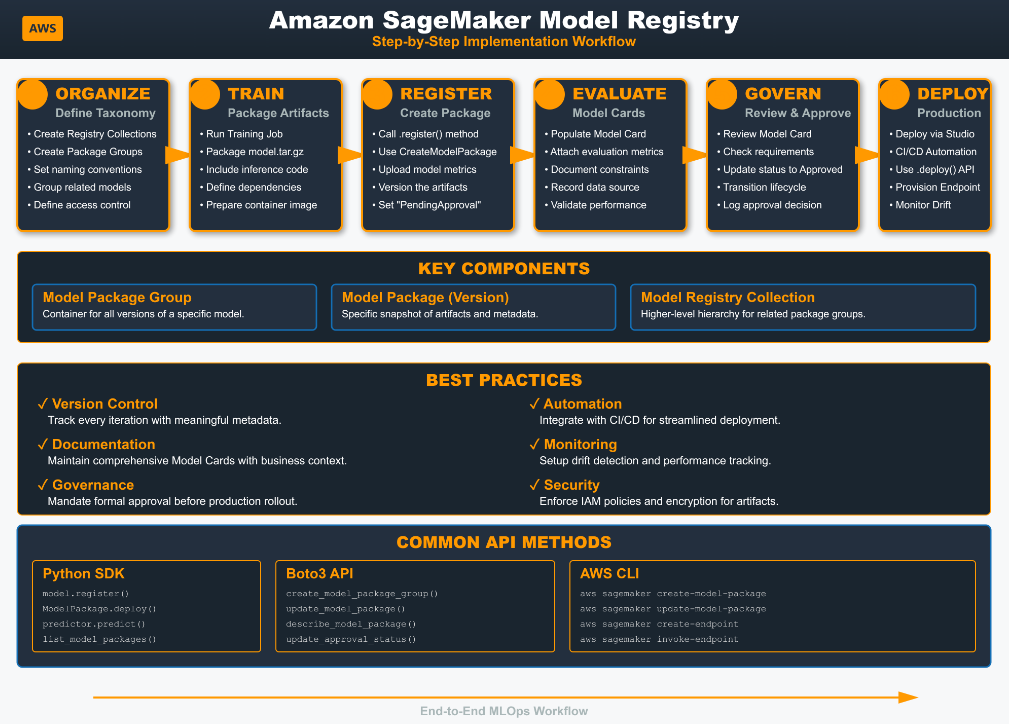
Step-by-Step Workflow
- Organize: Define your taxonomy. Create Model Registry Collections for broad categories and Model Package Groups for individual model families.
- Train & Package: Execute your training job (notebook, pipeline, etc.). Your code must package the model artifacts, inference code, and a dependency file into a supported format.
- Register: Call the
registermethod from the SageMaker SDK orCreateModelPackageAPI from AWS CLI/Boto3. This uploads metadata and creates a new versioned Model Package in your designated group. - Evaluate & Document: Populate the linked Model Card with results, metrics, and business details. Evaluate model performance against validation sets.
- Govern & Approve: A designated approver (e.g., lead data scientist) reviews the Model Card and metrics, then updates the Model Package’s approval status to
Approvedand potentially moves it to a new lifecycle stage likeStaging. - Deploy: Use the registry UI, a CI/CD pipeline, or the
deployAPI call on the approved Model Package ARN to provision the model for inference.
Key API/SDK Operations
- CreateModelPackageGroup: Establishes the container for model versions.
- CreateModelPackage: Registers a new model version. This can be done directly or via the SageMaker SDK’s
Model.register()method.UpdateModelPackage: Used to change the approval status or attach/update a Model Card. - CreateStage: Defines a custom lifecycle stage within a Model Package Group.
- PutModelPackageGroupPolicy: Attaches a resource policy to enable private repository sharing with other accounts.
Amazon SageMaker Model Registry Integration
Native SageMaker Integrations
-
SageMaker Studio: The primary UI. View registry, examine lineage graphs, edit Model Cards, and deploy models.
-
SageMaker Pipelines: The “Register Model” step is a native pipeline action. Pipeline execution metadata is automatically linked to the Model Package.
-
SageMaker Projects & CI/CD: Provides pre-built CI/CD templates (e.g., MLOps templates) that use the registry as the source for models to deploy.
-
SageMaker JumpStart: Proprietary and foundation models from JumpStart can be registered and governed within your private registry.
-
SageMaker Model Monitor: Once deployed, the endpoint is linked back to its source Model Package, allowing monitoring alerts to be traced to the exact model version.
AWS Service Integration
-
AWS Identity and Access Management (IAM): Controls who can register, approve, update, or deploy models using IAM policies attached to users or roles.
-
AWS Resource Access Manager (RAM): Facilitates sharing Model Package Groups across AWS accounts for private model repositories.
-
AWS Service Catalog: Model Packages or Groups can be packaged as “products” in Service Catalog, allowing centralized governance and consumption by compliant application portfolios.
-
Amazon EventBridge: Can trigger events on registry state changes (e.g., “Model Package status changed to Approved”), enabling custom alerting or workflow automation via AWS Lambda.

Best Practices
Strategic Organization
-
Establish a naming convention for Model Package Groups before scaling (e.g.,
[BusinessUnit]-[UseCase]-[Algorithm]-V[MajorVersion]). -
Use Collections early to partition models by domain, regulatory environment, or team ownership to simplify discovery and policy management.
Governance by Design
-
Mandate that a Model Card must be populated with minimum required fields (business objective, key metrics, limitations) before a model can be submitted for approval. This can be enforced through peer review or automated checks.
-
Define lifecycle stages that mirror your actual organizational gates (e.g.,
UnitTestPassed,IntegrationTestPassed,QAApproved,Prod-Deployed). Use the approval status as the key controlling mechanism between stages.
Automation and Pipeline Integration
-
Never manually register models from a notebook for production workflows. Always use a SageMaker Pipeline where the final step is the official registration. This ensures lineage is captured and the process is reproducible.
-
Use EventBridge rules to notify communication channels (e.g., Slack, Amazon Chime) when a new model version is registered or when its status changes to
Approved, keeping all stakeholders informed. -
Configure your CI/CD SageMaker Project to automatically deploy any model version whose status transitions to
Approvedin theStaginglifecycle stage.
Security and Sharing
-
Apply the principle of least privilege via IAM. Data scientists may have
sagemaker:CreateModelPackageandsagemaker:UpdateModelPackageonly on specific groups. Approvers needsagemaker:UpdateModelPackage(for status). Deployment engines needsagemaker:DeployModel. -
For cross-account sharing, use private repositories with resource policies rather than copying model artifacts. This maintains a single source of truth and simplifies version control.
Amazon SageMaker Model Registry Pricing
-
No additional hourly or monthly licensing fee for using the SageMaker Model Registry service itself.
-
Primary Cost – Amazon S3 Storage: You pay standard Amazon S3 rates for storing the actual model artifact files (the
model.tar.gzfiles) associated with each Model Package. Storage costs are based on your region’s S3 pricing for the amount of data stored. -
Secondary Cost – SageMaker Processing (Optional): If you use SageMaker Processing Jobs within your pipeline to evaluate the model or generate reports that are stored as part of the Model Package metadata, you pay for the processing instance time.
-
No Cost Items: Storing all metadata, version history, Model Card content, lineage graphs, and registry structure (Groups, Collections, Stages) within the Model Registry service incurs no separate charge.
Amazon Sagemaker Model Registry References:
https://docs.aws.amazon.com/sagemaker/latest/dg/model-registry.html
🚀 30% OFF All Azure Reviewers

Turn Your Team Into Cloud-Ready Professionals Today

Learn AWS with our PlayCloud Hands-On Labs

$2.99 AWS and Azure Exam Study Guide eBooks

Learn GCP By Doing! Try Our GCP PlayCloud

Learn Azure with our Azure PlayCloud

FREE AI and AWS Digital Courses

FREE AWS, Azure, GCP Practice Test Samplers


Subscribe to our YouTube Channel

Follow Us On Linkedin


Written by: Joshua Emmanuel Santiago




