
AWS Emulator Cheat Sheet
-
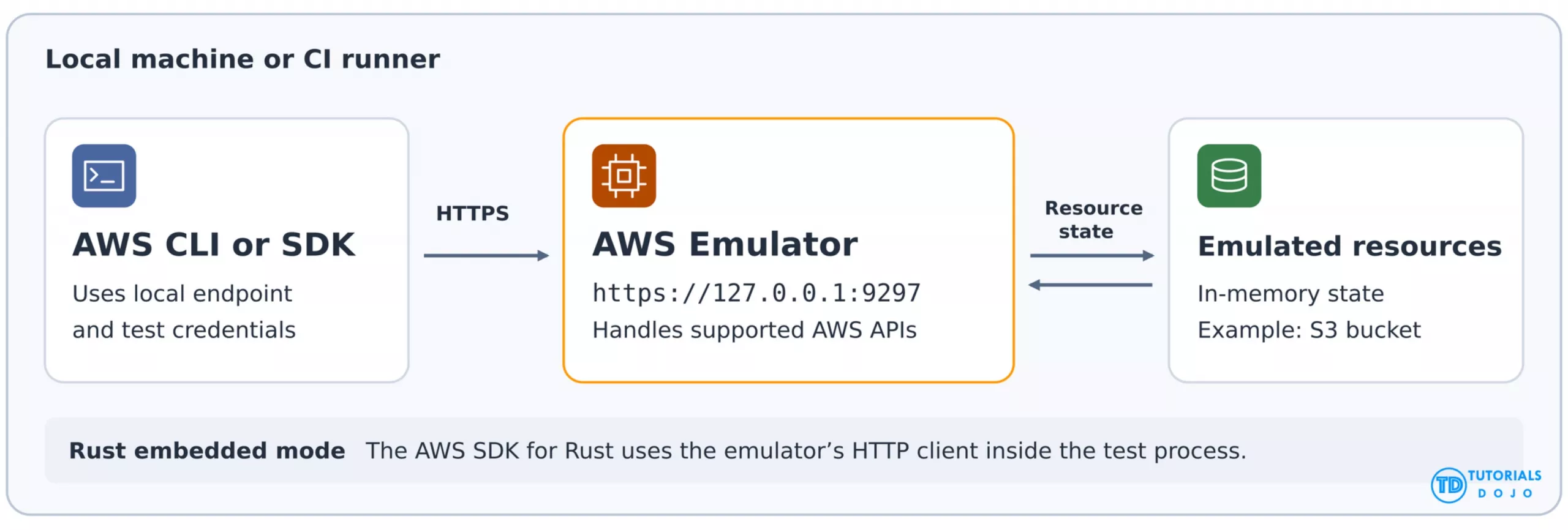
AWS Emulator is a local implementation of AWS APIs that lets you develop and test applications on your laptop, on a development server, or in a CI pipeline. Local testing requires no AWS account and carries no AWS Emulator service fee.
-
Point your tools at the emulator’s default local HTTPS endpoint,
https://127.0.0.1:9297. The emulator handles supported API calls and returns responses or errors your application can use to test its behavior. -
For example, you can create an emulated Amazon S3 bucket and confirm that a later
ListBucketscall returns it. The emulator keeps resource state in memory and clears it when it stops. -
AWS Emulator most closely matches AWS for control plane operations such as creating, listing, and describing resources. Data plane support, such as reading or writing objects, varies by service and operation.
-
Use a real AWS test environment to verify IAM permissions, resource policies, and cross-account access before deploying to production.

Features
-
AWS CLI and SDK integration
-
Point your client at the emulator endpoint and use familiar AWS API calls. For example, create and list an emulated Amazon S3 bucket using the AWS CLI.
-
-
Development and CI/CD
-
Run integration tests, exercise supported workflows across services, and prototype with AI coding agents. AWS provides an
aws-emulatorskill to set up the emulator and check project compatibility.
-
-
API fidelity
-
The emulator most closely matches AWS for control plane operations such as creating and describing resources. Data plane operations and infrastructure as code support vary by service and feature. An unimplemented operation returns HTTP 501 with the
NotImplementederror code. AWS publishes fidelity scores with each release.
-
Components
-
Standalone runtime
-
Install the RPM or Debian package on Linux for x86_64 or aarch64. On macOS and Windows, run the emulator in Docker using an image built from AWS’s Dockerfile.
-
-
Local HTTPS endpoint.
-
The default is
https://127.0.0.1:9297. SetAWS_ENDPOINT_URLin the test environment and configure the CLI or SDK to use the generated credentials and trust the local certificate. The emulator writes its configuration, credentials, and certificate under~/.aws/emulator/<port>/.
-
-
Rust embedded mode
-
Pass the emulator’s HTTP client to the AWS SDK for Rust to run it inside the test process. Each emulator instance has its own state.
-
-
In-memory resource state
-
Stopping the emulator clears its resources. Restart it for a clean test run or use
--idle-timeoutto stop it automatically after inactivity. Use one account and one Region per instance. Run separate instances on different ports to keep regional test data apart. AWS checks fidelity inus-west-2and usesus-east-1for global services.
-
AWS Emulator Security
-
The standalone runtime binds to loopback by default and generally requires SigV4 signatures. It generates a new key pair for each run. Keep authentication enabled and bind Docker-published ports to loopback. Some resources expose additional local ports that rely on the resource’s own authentication.
-
The emulator’s own key passes authorization checks. Validate IAM policies, permissions boundaries, resource policies, KMS key policies, and cross-account or cross-Region access in a real AWS test environment.
-
Configure your client to trust the emulator’s certificate and clear environment variables that supply real AWS credentials. Set and verify the local endpoint in the same test job that makes the API calls.
-
Use test data and trusted code. Emulated function code can run with the host user’s permissions. API requests, responses, and resource data stay local. Anonymous usage and error telemetry is enabled by default and can be disabled.
AWS Emulator Cheat Sheet References:
https://docs.aws.amazon.com/emulator/latest/userguide/what-is-service.html
📚 $2.99 eBooks and Get 30% OFF AWS Pro, Specialty, & Claude Practice Exams & Courses

Turn Your Team Into Cloud-Ready Professionals Today

Learn AWS with our PlayCloud Hands-On Labs
$2.99 AWS and Azure Exam Study Guide eBooks

Learn GCP By Doing! Try Our GCP PlayCloud
Learn Azure with our Azure PlayCloud
FREE AI and AWS Digital Courses

FREE AWS, Azure, GCP Practice Test Samplers

Subscribe to our YouTube Channel

Follow Us On Linkedin


Written by: Ace Kenneth Batacandulo