
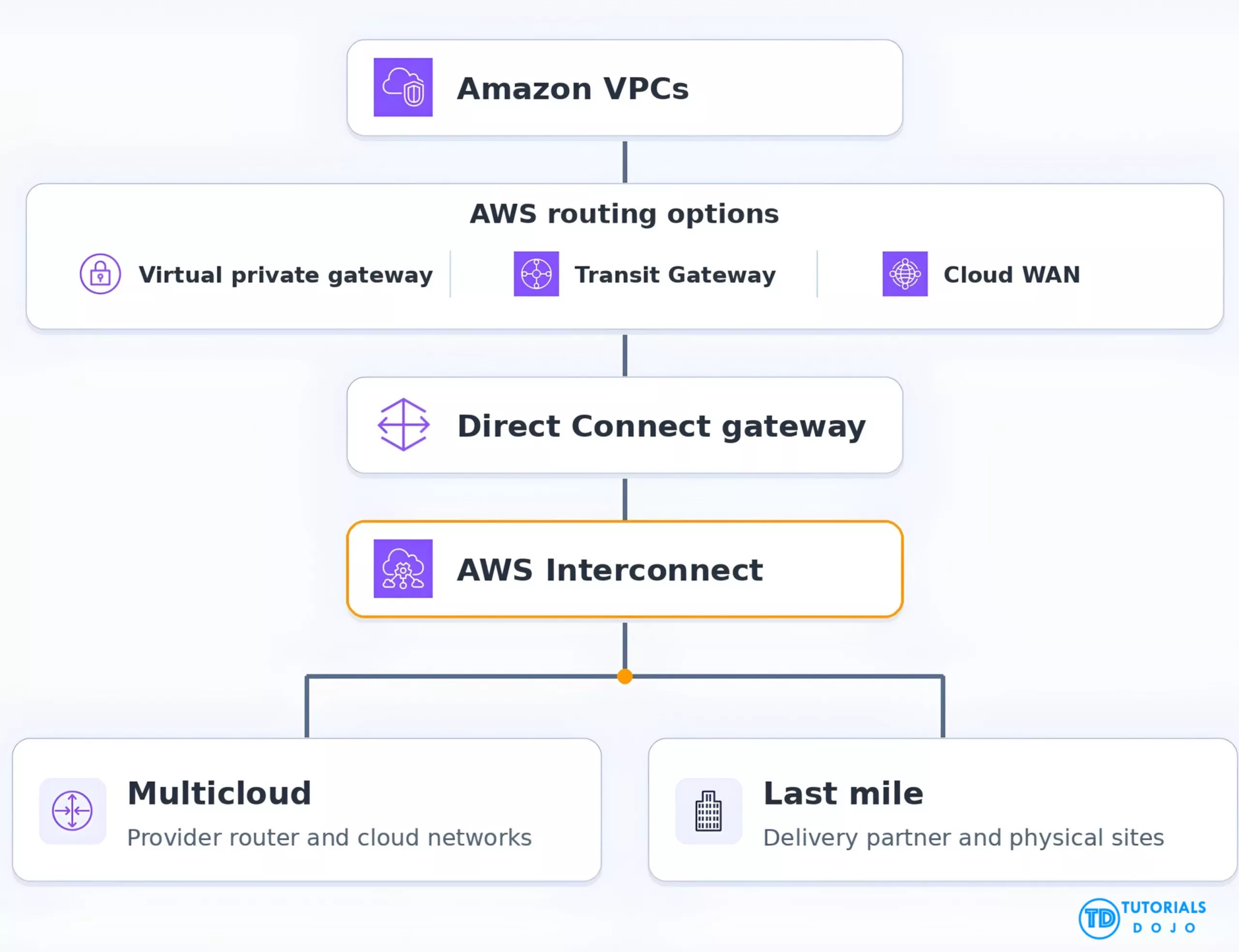
AWS Interconnect provides managed private connectivity between AWS and supported cloud providers or physical sites. AWS and its partners provision the underlying links and handle network-device configuration, while you choose the provider, location, bandwidth, and how your workloads route through the connection. Customer provides the AWS and provider account details, the required bandwidth, a Direct Connect gateway, and workload routing and access policies. AWS provides a single logical interconnect that represents multiple underlying links. AWS and the provider manage provisioning, VLANs, BGP peering for the managed links, and maintenance of the underlying connectivity. The two branches represent separate offering choices. Each interconnect uses four underlying connections with Equal-Cost Multi-Path (ECMP) across at least two physically distinct facilities. AWS exposes those connections as one object in the Direct Connect console. The AWS-side attachment point for both offerings. It links the interconnect to a supported AWS networking service. A virtual private gateway or Transit Gateway reaches an interconnect local to its Region. With AWS Cloud WAN, Core Network Edges in other Regions can reach an interconnect through the same DXGW. When one side creates the connection, it generates a key. Enter the key on the other side to accept the request and start provisioning. Change provisioned bandwidth from the console. CloudWatch reports percentage utilization, and each interconnect includes one CloudWatch Network Synthetic Monitor at no extra cost for round-trip latency and packet loss. Set alarms for thresholds relevant to your workloads. MACsec is enabled by default on links between AWS and adjacent provider devices. For end-to-end encryption requirements, use controls such as TLS between application endpoints. Privately connect an AWS application to a database or API hosted in a supported cloud region. Move or replicate data between providers over a connection sized for recurring transfer workloads. Connect offices or data centers to AWS workloads through a last-mile partner’s network. Select a supported provider, location, and bandwidth, then approve the connection on the other side using an activation key. Multiple devices and physical facilities provide redundant paths within the managed interconnect. Resize bandwidth from the console as traffic patterns change. For paid connections, AWS charges by provisioned bandwidth and pricing tier, with no per-GB data transfer charge for the interconnect itself. Platform teams operating in multiple clouds that need private access between workloads in supported region pairs. Enterprises with branch offices or data centers served by a supported last-mile delivery partner. AWS network teams with multi-Region VPCs that use Cloud WAN and want those workloads to reach a shared interconnect. Supported multicloud providers include Google Cloud, Microsoft Azure, and Oracle Cloud Infrastructure. Each has its own supported region pairs. For example, AWS Asia Pacific (Singapore) pairs with Google Cloud Singapore. For last mile, verify the partner’s metro, address coverage, and launch status. Plan advertised prefixes and check for overlapping CIDRs. Configure route tables, firewalls, and security groups on the relevant sides. With a virtual private gateway or Transit Gateway, check that the interconnect is local to the gateway’s Region. Paid interconnects are billed hourly based on bandwidth and the assigned tier. With Cloud WAN, a distant Core Network Edge can increase the tier for the entire interconnect. AWS also offers one free 500 Mbps multicloud interconnect per cloud provider per Region, subject to service terms. Check provider-side and associated networking service charges separately. Validate site access, provider-side routing, and application failover as part of your design. The redundant links cover the managed interconnect. Choose multicloud for private connectivity to another supported cloud and last mile for physical sites reached through a delivery partner. Both attach to a Direct Connect gateway. Check provider coverage, choose the AWS routing service that matches your regional topology, and confirm the resulting hourly tier before provisioning. https://docs.aws.amazon.com/interconnect/latest/userguide/what-is-interconnect.html https://docs.aws.amazon.com/interconnect/latest/userguide/region-availability.html
AWS Interconnect Cheat Sheet
What Is AWS Interconnect?
Offering
What it connects
Remote attachment
AWS Interconnect – multicloud
Amazon VPCs and virtual networks in supported cloud regions
Cloud provider router
AWS Interconnect – last mile
AWS and branch offices, data centers, or other sites reachable through a supported delivery partner
Partner-side network identifier
The Core Concept
AWS Interconnect multicloud and last-mile architecture
Key Components & Features

Primary Use Cases
Key Benefits & Value Proposition
Deployment Process & Timeline
Phase
Activities
Timing
Scope the connection
Pick multicloud or last mile. Check region pairs or partner metro coverage, bandwidth, and pricing.
Depends on provider and site readiness
Prepare attachments
Create or select a DXGW. Choose the AWS gateway or Cloud WAN topology and identify the remote attachment.
Depends on existing network setup
Create and accept
Open AWS Interconnect in the Direct Connect console. Create the request on one side and use its activation key to accept it on the other. Track provisioning status in the console.
AWS says new interconnects typically provision in minutes. Confirm last-mile timing with the partner.
Go live and scale
Configure workload routes and access controls on both sides. Test reachability and monitor latency, loss, and utilization before shifting production traffic.
Depends on validation and cutover plans
Ideal Customer Profile
Key Considerations & Planning Factors
AWS Interconnect vs. Alternatives
Factor
AWS Interconnect
AWS Direct Connect
AWS Site-to-Site VPN
Connectivity
Managed private connection through a supported cloud or last-mile provider
Private connection through a Direct Connect location, using a dedicated or hosted connection
IPsec tunnels between AWS and a customer gateway, commonly over the public internet
Time to deploy
Typically minutes after acceptance when prerequisites are ready
Depends on port, cross-connect, and carrier or partner readiness
Depends on customer gateway setup and validation
Management responsibility
AWS and partner manage the underlying links and BGP sessions
Customer or partner configures virtual interfaces, BGP, and redundancy
AWS manages its VPN endpoint. Customer configures the remote device and routing
AWS cost model
Hourly by provisioned bandwidth and assigned tier for paid connections
Port hours and data transfer out
VPN connection hours and applicable data transfer out
Best fit
Supported multicloud links or partner-managed last-mile access
Private connectivity with more control over circuit and routing design
Encrypted connectivity over an existing internet link, including backup paths
Conclusion
AWS Interconnect Cheat Sheet References:

📚 $2.99 eBooks and Get 30% OFF AWS Pro, Specialty, & Claude Practice Exams & Courses

Turn Your Team Into Cloud-Ready Professionals Today

Learn AWS with our PlayCloud Hands-On Labs

$2.99 AWS and Azure Exam Study Guide eBooks

Learn GCP By Doing! Try Our GCP PlayCloud

Learn Azure with our Azure PlayCloud
FREE AI and AWS Digital Courses

FREE AWS, Azure, GCP Practice Test Samplers


Subscribe to our YouTube Channel

Follow Us On Linkedin


Written by: Ace Kenneth Batacandulo