
AWS Inferentia is a family of AWS-designed chips for deep learning inference. Amazon EC2 Inf1 instances use first-generation Inferentia, and Inf2 instances use Inferentia2. Both use the AWS Neuron SDK to run compatible models on the accelerator. Inference is the stage where a trained model makes predictions or generates output. Inferentia accelerates that computation. The EC2 instance supplies host CPU, system memory, networking, and accelerator hardware. Neuron supplies the software needed to compile and execute supported models on that hardware. The serving application receives requests and handles tasks such as tokenization, batching, and returning responses. The Neuron runtime loads and runs compiled model computation on the accelerator. The exact compilation and packaging steps depend on the serving framework and model. The two single-chip sizes have the same accelerator memory. Choose between them based on measured host requirements such as tokenization, preprocessing, and concurrent request handling. Memory totals on multi-chip instances are aggregate capacity. A model that spans chips needs a supported partitioning strategy. Serve supported text generation, embeddings, or classification models behind an application endpoint. Process large sets of inputs where throughput and cost per successful result matter more than request latency. Split a supported model across accelerator devices when its weights and runtime memory exceed a single chip’s capacity. Benchmark compatible models for lower cost per prediction or token while meeting latency goals. Choose a single-chip instance or scale to a multi-chip size for supported serving configurations. Bring existing trained weights into a compatible Neuron serving workflow and validate outputs against the existing deployment. ML platform teams serving compatible models at enough volume to justify evaluating specialized hardware. Application teams that can benchmark production request patterns and manage Neuron software and artifact compatibility. Check the exact model architecture, serving integration, and Neuron release. Verify features such as quantization, batching, and tensor parallelism for your target configuration. Account for weights, runtime buffers, activations, and the key-value cache for LLMs. Prompt length and concurrent requests can increase cache usage. Compare hardware under the same model, precision, workload, and latency target. An hourly price comparison alone misses throughput and idle capacity. Scope instance or endpoint IAM roles to the required model artifacts. Use approved images and restrict network access to the serving endpoint. Apply storage encryption according to your data policy. Check supported Regions and instance capacity before committing to a rollout. Plan where model artifacts, logs, and deployment resources will reside. Evaluate Inf2 when your model is supported by Neuron and inference cost or capacity matters. Start with one representative model, compare quality and latency with your current platform, and size the deployment using measured throughput and accelerator memory use. https://docs.aws.amazon.com/continuum/ https://docs.aws.amazon.com/continuum/latest/APIReference/Welcome.html
AWS Inferentia Cheat Sheet
What Is AWS Inferentia?
The Core Concept
Architecture Overview
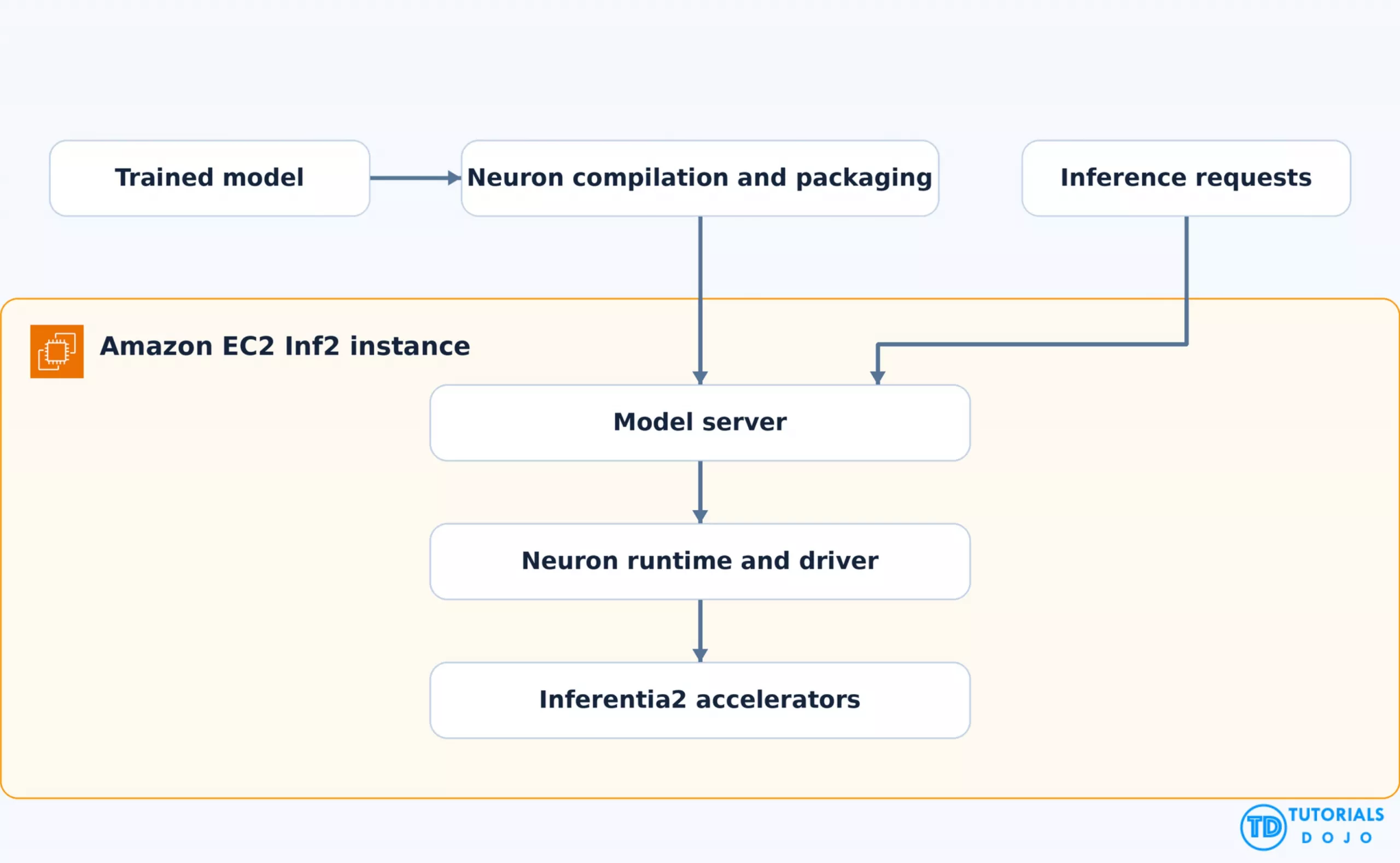
Key Components & Features
Component
What it does
Inferentia and Inf1
First-generation hardware. Check the Inf1-specific Neuron software and framework support when maintaining an existing deployment.
Inferentia2 and Inf2
Second-generation hardware with two NeuronCore-v2 cores and 32 GiB of accelerator memory per chip. Multi-chip sizes can use NeuronLink for supported distributed inference.
Neuron compiler
Converts supported model computation into executable artifacts for the target accelerator. Input shape, precision, and parallelism settings can affect what needs to be compiled.
Neuron runtime and driver
Load compiled artifacts and manage execution on Neuron devices. Keep the serving library, runtime, driver, and compiled artifacts compatible.
Inference libraries
Provide model integration and serving features. AWS documents NxD Inference as the supported path for Inf2, in maintenance status. For vLLM on Inf2, follow the NxD-backed integration documentation and verify model and release compatibility.
Neuron monitoring tools
Tools such as
neuron-top and neuron-monitor help inspect accelerator usage alongside application latency, throughput, and errors.Amazon EC2 Inf2 Sizes
Instance
Inferentia2 chips
NeuronCore-v2 cores
Total accelerator memory
inf2.xlarge1
2
32 GiB
inf2.8xlarge1
2
32 GiB
inf2.24xlarge6
12
192 GiB
inf2.48xlarge12
24
384 GiB
Primary Use Cases

Key Benefits & Value Proposition
Deployment Process & Timeline
Phase
Activities
Estimated duration
Assess
Verify model architecture, framework, operators, precision, expected input lengths, and hardware compatibility.
Depends on model and runtime support.
Prepare
Choose an Inf2 size and compatible image or stack. Verify Region, capacity, and quotas. Compile or obtain compatible artifacts.
Depends on model size and compilation configuration.
Benchmark
Compare output quality, throughput, and p95 latency under representative traffic. For LLMs, also measure time to first token and generation rate.
Depends on the test matrix and load profile.
Roll out
Deploy behind the serving endpoint, shift traffic gradually, and monitor queue depth, errors, latency, and accelerator utilization.
Depends on validation and rollout policy.
Ideal Customer Profile
Key Considerations & Planning Factors
AWS Inferentia vs. Alternatives
Factor
Amazon EC2 Inf2
Amazon EC2 G6e
Amazon EC2 Trn2
Accelerator
AWS Inferentia2
NVIDIA L40S GPU
AWS Trainium2
Best fit
Compatible inference workloads on Neuron.
Inference workloads that rely on CUDA or NVIDIA-specific libraries.
Supported large-model training or inference workloads on Neuron.
Deployment effort
Verify Inf2 compatibility and prepare Neuron artifacts.
Verify CUDA, driver, container, and serving runtime compatibility.
Verify the Trn2-specific Neuron and serving path.
Scaling
Scale replicas or partition supported models across chips.
Scale replicas or use supported multi-GPU serving.
Use supported distributed training or inference configurations.
Cost model
EC2 compute and related resources. Benchmark cost per prediction or token.
EC2 compute and related resources. Compare at the same service targets.
EC2 compute and related resources. Account for the model’s scaling and utilization.
Conclusion
AWS Inferentia Cheat Sheet References:

🎁 $1.99 ONLY for All eBooks and Get Up to 70% OFF All Practice Exams & Video Courses

Turn Your Team Into Cloud-Ready Professionals Today

Learn AWS with our PlayCloud Hands-On Labs

50% OFF ON OUR YEARLY PLAN

Learn GCP By Doing! Try Our GCP PlayCloud
Learn Azure with our Azure PlayCloud
FREE AI and AWS Digital Courses

FREE AWS, Azure, GCP Practice Test Samplers


Subscribe to our YouTube Channel

Follow Us On Linkedin


Written by: Ace Kenneth Batacandulo