
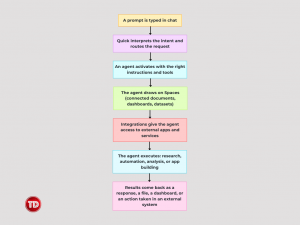
AI is no longer just a tool that answers questions. It is becoming something that takes action, runs workflows, and works alongside teams the way a capable colleague would. Amazon Quick is AWS’s take on what that looks like in practice, and this article breaks down what it is, how it works, and why the infrastructure behind it matters. Imagine asking one platform to pull your sales data, automate a workflow, build you a web app, and research your competitors. That’s Amazon Quick. It’s AWS’s agentic AI platform, and it does a lot. Six things, specifically: What makes this more than a feature list is how they fit together. Same chat interface. Same agent architecture. Same AWS backbone. You’re not switching between six tools. You’re having one conversation with a platform that figures out which combination of capabilities you need. That’s the pitch: less setup, less switching, more done. The word “agentic” gets thrown around a lot right now. In the context of Quick, here is what it actually means. Behind every interaction is an agent. Agents are configured with instructions that define their behavior, knowledge sources that ground their responses, and tools that let them take action. Quick provides a default agent out of the box, and teams can create custom agents tuned for specific domains or workflows. The difference between an agent and a regular chatbot is what happens after a message is sent. A chatbot reads the prompt and generates a reply. An agent reads the goal and starts executing. It checks what tools are available, decides which ones to use, takes action in external systems, and keeps going until the task is done or it needs human input to proceed. The “teammate” framing in Quick is deliberate. Teams do not operate an agent step by step. They brief it, the way they would a capable colleague, and it takes it from there. That is what makes multi-step workflows possible without anyone having to manually stitch every step together. Every capability Quick has relies on infrastructure that has to live somewhere. The AI models that power agents, the storage that holds indexed documents, the compute that executes workflows, the security layer that keeps data where it belongs: none of that runs on a local machine. Quick is fully managed, which means there is no infrastructure to provision, no models to host, and no machine learning expertise required on the user’s end. AWS handles all of it. The foundational models run in Amazon Bedrock. Documents get indexed and stored in AWS-managed storage. Workflows scale up or down based on demand without anyone ever touching a server. The part that matters most for organizations: Quick runs on AWS with the same identity, network, and compliance controls that enterprise security teams already trust. When internal knowledge bases and business applications are connected to an AI assistant, the AWS backbone is what backs up the security guarantees. None of it needs to be managed directly. But knowing it is there explains why Quick can do what it does at the speed and scale it does. The interface is straightforward. Quick is accessible from the web, the desktop application, or directly inside Chrome, Slack, Microsoft Teams, and Microsoft 365 applications. For teams that live in Slack, there is no need to pull anyone out of it. Quick surfaces right where the work already happens. Getting started is low-friction. Anyone can sign up at quick.aws.com with a Google, Apple, Amazon, or GitHub account. No AWS account is required, and there is a free plan available. Organizations already on AWS can provision Quick through the Management Console and tie it to their existing IAM Identity Center setup. Day to day, most interaction happens in chat. Users type what they need in plain language. Quick figures out which combination of agents, integrations, and features to activate. That is the whole interface. Everything else is happening underneath it. Here is a concrete example. A team has a strategy meeting tomorrow and needs a competitive overview of three cloud providers for enterprise analytics workloads. A week ago, that task meant a few hours of research, tab management, and manual writing. With Quick, the prompt looks something like this: “Research the key differences between AWS, Google Cloud, and Azure for enterprise data analytics. Give me a cited report with a comparison summary.” Quick interprets that request and routes it to Quick Research. It searches the web, pulls relevant sources, cross-references any connected knowledge bases the organization has set up, and returns a structured, cited report. No tabs. No copy-pasting. No manually formatting a summary at midnight. That is what the first workflow experience looks like. An outcome was described. Quick handled the how. Here is the full picture in one flow: Spaces are the context layer. They bring together the documents, dashboards, knowledge bases, and action connectors that an agent needs to work. When a Space is assigned to an agent, it draws on everything inside it. Teams share Spaces so everyone is working from the same context instead of isolated silos. Integrations are how Quick reaches outside of itself. Knowledge bases pull in content from sources like SharePoint, Google Drive, Confluence, and Amazon S3. Action connectors let agents read data, trigger workflows, and update records in external services. Extensions embed Quick directly into Chrome, Slack, Teams, and Microsoft 365. Each layer handles exactly one job. Together, they make the whole thing feel like one seamless assistant. Amazon Quick is a platform, not a feature. Six integrated capabilities covering research, automation, analytics, app building, and AI agents, all sharing the same architecture and interface. Agents are what make the “agentic” part real. They do not just respond. They plan, act, and execute across tools and systems. That is the difference between a chatbot and a teammate. Spaces give agents context. An agent without context is generic. An agent with a well-organized Space knows the team’s data, documents, and connected tools. That is where the actual value kicks in. AWS is the foundation, not just the branding. The managed infrastructure, the Bedrock models, the enterprise security controls: these are what make Quick scalable, fast, and trustworthy enough to connect to real organizational data. Teams work where they already work. Slack, Teams, Chrome, desktop, web. Quick meets users there instead of pulling them away. The architecture is the insight. Once it is understood that chat is the interface, agents are the brains, Spaces are the context, and AWS is the foundation, every feature and every new term slot into place naturally. Amazon Quick is not magic. It is a well-architected stack where each layer does exactly what the one above it needs. Once that structure is visible, the complexity stops being intimidating and starts being legible. The demos show what Quick can do. This article shows why it works. And that understanding is the difference between following a tutorial and actually knowing what is being built. Amazon Quick Sight – AI-Powered BI- AWS. (n.d.). Amazon Web Services, Inc. https://aws.amazon.com/quick/quicksight/ Announcing Amazon Quick Suite: your agentic teammate for answering questions and taking action | Amazon Web Services. (2025, October 9). Amazon Web Services. https://aws.amazon.com/blogs/aws/reimagine-the-way-you-work-with-ai-agents-in-amazon-quick-suite/ How Amazon Quick works – Amazon Quick. (n.d.). https://docs.aws.amazon.com/quick/latest/userguide/how-quicksuite-works.html Setting up and signing into Amazon Quick – Amazon Quick. (n.d.). https://docs.aws.amazon.com/quick/latest/userguide/setting-up.html What is Amazon Quick? – Amazon Quick. (n.d.). https://docs.aws.amazon.com/quick/latest/userguide/what-is.html
What is Amazon Quick?

What Are Agentic Teammates?

Why Does Amazon Quick Need AWS Behind It?
Where Users Actually Work: The Quick Interface
Running the First Workflow
How Everything Works Together
Key Takeaways

Conclusion
References
🔔 20% OFF All Reviewers + 10% OFF PlayCloud’s First Billing Use Code: TDPLAYCLOUD-101326

Turn Your Team Into Cloud-Ready Professionals Today

Learn AWS with our PlayCloud Hands-On Labs

$2.99 AWS and Azure Exam Study Guide eBooks

Learn GCP By Doing! Try Our GCP PlayCloud

Learn Azure with our Azure PlayCloud

FREE AI and AWS Digital Courses

FREE AWS, Azure, GCP Practice Test Samplers


Subscribe to our YouTube Channel

Follow Us On Linkedin


Written by: Mary Jean Navarro




