
Last updated on April 12, 2026
Hello, Dojos! If you’re a student or an aspiring architect, you know Amazon S3 is the “infinite warehouse” of the cloud. It’s perfect for storing massive datasets, but it can be slow to grab one small file when your code is running.
Traditionally, you had to manually copy data between S3 and a hard drive (EBS) just to use it. Amazon S3 Files changes the game. By using Amazon EFS technology, it puts a high-speed “Desk” right in front of your S3 warehouse, letting your apps talk to S3 like a regular folder.
What is Amazon S3 Files?
Amazon S3 Files is the first cloud object store to provide fully featured, high performance file system access to your data. It connects your S3 bucket directly to your applications, enabling them to read and write all your S3 data as files and folders with full file system semantics.
How it Works: The 3-Step Flow
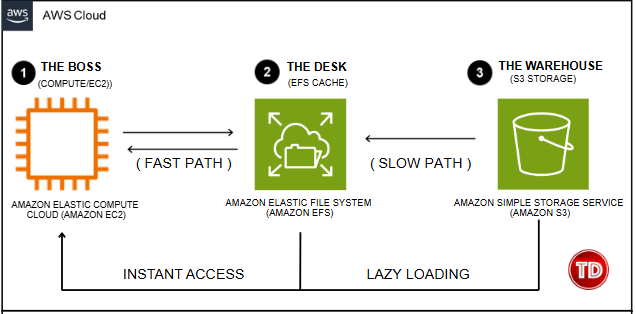
As shown in the diagram, the system works through a simple relationship between three key components:
How it Works Internally
This solution is built on the proven technology of Amazon EFS to create a durable, high-performance caching layer on top of S3. To understand the flow, think of a student (the Boss) sitting at a desk (the Cache) in a giant library (S3).
-
1. The Boss (Compute): Your EC2 instance or Lambda function. It accesses data using standard file commands. It doesn’t need to know S3 APIs; it just sees a local folder.
-
2. The Desk (EFS Cache): This is the Performance Tier.
-
Instant Access: Small, frequently used files stay here for sub-millisecond latency (Fast Path).
-
Lazy Loading: If a file isn’t on the desk, the system “lazily” fetches it from the warehouse only when you ask for it (Slow Path).
-
-
3. The Warehouse (S3): This is the Capacity Tier. It is the permanent “Source of Truth” for all your objects.
-
Write-Back Consistency: When you save a file, it stores to the high-performance EFS tier immediately and is automatically synchronized back to S3 in the background.

Why This Matters for Students and Architects
For students and aspiring solutions architects, this service removes the “infrastructure tax” often associated with complex learning projects:
-
Accelerated ML Training: If you’re training models on massive datasets, you can keep petabytes in S3 and mount them as a file system. This eliminates the need for expensive, oversized EBS volumes or manual data movement.
-
Collaborative AI Agent Workspaces: Build multi-agent systems where each agent reads and writes logs, state, and memory to the same shared S3 directory in real-time. Up to 25,000 resources can connect to a single file system.
-
Unified Storage Layer: You no longer need to manage separate silos. Your data lives in S3 and stays in S3, accessible via both object APIs and file interfaces simultaneously.
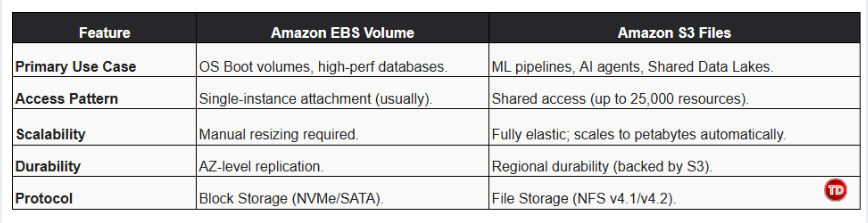
Strategic Comparison: Amazon S3 Files vs. EBS Volumes
Choosing the right storage tier is critical for balancing performance and cost. While Amazon EBS is the go-to for low-latency block storage, Amazon S3 Files offers superior flexibility for shared and data-intensive workloads.
Costing and Efficiency
The service operates on a simple pay-as-you-go model. Your bill is split between standard S3 storage rates and a performance fee based on your active working set (the data currently on your “Desk”).
-
128 KB Threshold: Small files use the cache for speed. Large files (128 KB+) are streamed directly from S3 to maximize throughput and save you money on cache access charges.
-
Automatic Expiration: Data not read within a set window (default 30 days) expires from the cache but remains safe in S3.
Conclusion
Amazon S3 Files represents a landmark shift in cloud storage, collapsing complex multi-step workflows into a seamless research loop. It allows us to focus on innovation—building better models and smarter agents rather than managing data movement.
Whether you are a student building your first portfolio project or an architect designing an enterprise-scale data lake, this technology ensures your data is always exactly where you need it.
Happy building and see you in the clouds!
References:
-
AWS User Guide: Working with Amazon S3 Files
-
AWS News Blog: Mount S3 Buckets as High-Performance File Systems
-
AWS Documentation: Performance Specifications for S3 Files
-
AWS Pricing Page: Amazon S3 Files Pricing
-
Tutorials Dojo Cheat Sheet: Amazon S3 Fundamental Concepts
🐰 25% OFF Easter Sale! Use code TDPLAYCLOUD-04022026 for 10% OFF ALL PlayClouds Subscription & 5% OFF gift cards!

Learn AWS with our PlayCloud Hands-On Labs

$2.99 AWS and Azure Exam Study Guide eBooks

New AWS Generative AI Developer Professional Course AIP-C01

Learn GCP By Doing! Try Our GCP PlayCloud

Learn Azure with our Azure PlayCloud

FREE AI and AWS Digital Courses

FREE AWS, Azure, GCP Practice Test Samplers


Subscribe to our YouTube Channel

Follow Us On Linkedin


Written by: Rixzel Avendaño




