
Last updated on August 19, 2026
Every business that runs a social media page knows the same repetitive cycle. Pick a topic. Write a caption. Design a graphic. Post it on schedule. Repeat tomorrow. Multiply that by every campaign, every seasonal push, every recurring content series, and it becomes a real operational cost, not just a marketing task.
That repetitive cycle is exactly what a project called Automating Publications was built to solve. It is a working, experimental content pipeline built with Claude, Canva, Slack, Google Drive, and n8n, and it is a useful reference for any business or enterprise team thinking about applying AI to its own content operations.
This is not a finished, one-size-fits-all product. It is a proof of concept for a specific kind of workflow: AI-generated content, reviewed and approved by a real person, and published only after that approval. That structure is what makes it worth studying, because it maps cleanly onto how most marketing and content teams already prefer to work.
Why brand identity and consistency matter more than ever
Before getting into how the system works, it is worth pausing on why this problem is worth automating at all.
According to Canva’s own guide on brand identity, a defined brand identity acts as a compass that keeps every marketing, communication, and product decision aligned with a company’s purpose, and it plays a key role in helping a business stand out in a crowded, competitive market (Canva, “What is brand identity?”). The same guide notes that a brand kit does more than keep visuals consistent. It also speeds up content creation and removes bottlenecks for teams producing content regularly.
That last point is the real business case for a system like Automating Publications. Three reasons brand consistency and good UI/UX matter for any content operation:
- Consistency compounds. A brand that looks and sounds the same across every post builds recognition faster than any single standout piece of content.
- Quality slips under pressure. Marketing and content teams are often stretched across many responsibilities, and design or messaging consistency is usually the first thing to suffer when time is tight.
- Design is a retention lever. Consistent, on-brand content is part of why an audience keeps following a page rather than scrolling past it, not just a finishing touch.

By keeping visual design and caption voice within reusable, shared templates rather than in one person’s head, a business can automatically keep every post on-brand, regardless of who on the team is producing content that week.
The five systems behind the pipeline
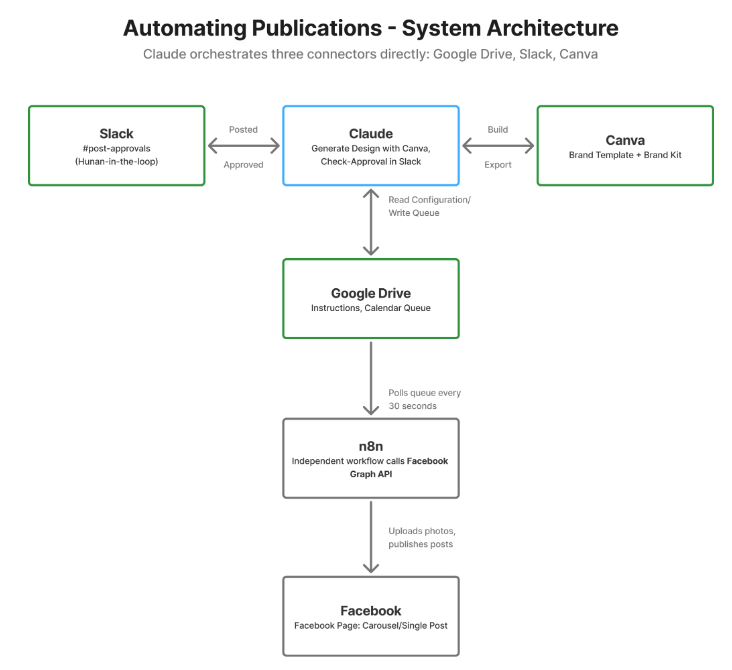
Automating Publications works because five tools each handle one clear responsibility, and hand off cleanly to the next one in line.
- Claude Pro acts as the content brain and orchestrator. It decides what to post, writes every caption and on-slide text, drives the design edits inside Canva, posts the result to Slack for review, monitors for approval, re-exports the final artwork, and writes the approved post to Google Drive.
- Canva Pro is the design engine. It hosts reusable brand templates along with a brand kit covering logo, colors, and fonts, and executes the actual text and image edits Claude requests.
- Google Drive functions as shared memory and the handoff point. It holds an editable instructions library, a content calendar, and a queue of approved posts waiting to be published.
- Slack is the human checkpoint. Every generated design is posted to a dedicated review channel before anything goes public, so a reviewer can open an editable Canva link, make changes, and approve or send it back for revisions.
- n8n is the publisher. It independently monitors the approved queue, uploads images to the target platform, and combines them into a single live post through the relevant API.
How the daily workflow runs
On a normal day, a scheduled task checks a shared content calendar ahead of time. If nothing special is planned, the system builds standard recurring content: it selects a topic that has not been covered recently, writes the caption, and builds a multi-page design inside Canva using the brand template and brand kit.
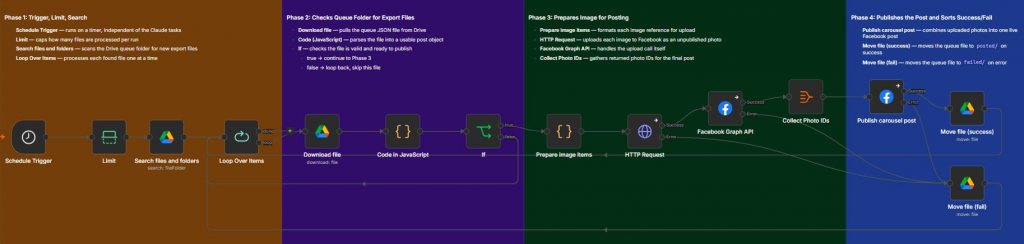
That design gets posted to Slack with an editable link and a preview image. A reviewer checks it, optionally tweaks the design directly in Canva, and approves it. Shortly after, a second scheduled task detects the approval, re-exports the final artwork fresh so any last-minute edits are captured, and writes a queue file to Drive. From there, the publishing automation takes over, uploads the images, and publishes the finished post.
Handling campaign and occasion-based content
Some days call for something different. If a date on the calendar matches a planned campaign, milestone, or seasonal occasion, the system checks that it has not already covered that occasion recently, and confirms the content is meant for public audiences rather than internal use only. If both checks pass, it replaces the standard recurring post entirely and builds from a separate template instead, using details pulled directly from the calendar entry rather than invented on the spot. The same Slack approval step still applies before anything goes live.
Customizing the system without writing code
A key design goal was making sure non-technical team members could maintain the system long after the people who built it move on to other projects.
Adding a new campaign or occasion just means adding a row to a shared spreadsheet: a date, a name, a short context and angle description, and a category.
Changing the brand voice means editing a plain text file in Drive. There is no code involved, and the next scheduled run picks up the update automatically.
Redesigning templates happens directly inside Canva. The system reads each template’s live structure at generation time, so a redesign takes effect on the very next run, with no separate integration step.
Adjusting timing is as simple as changing the scheduled tasks or the publishing automation’s trigger, independently of one another.
Being honest about the limitations
Because this is explicitly an experiment, it comes with real limitations worth naming rather than hiding.
Design export links in tools like Canva typically expire within a day, which is why a pipeline like this should always export images right before they are needed, not far in advance. Queue and archive folders need active management, since files that are not moved out after publishing could be reprocessed on a later run. A content calendar is only as useful as how far ahead it has been filled in, so it needs regular upkeep. Running this kind of system on a single account and a single API token is fine for a demo or pilot, but any team scaling this up should revisit account tiers and access ownership first.
The bigger takeaway for business teams
The goal of a system like Automating Publications is never to remove people from publishing decisions. It is to remove the repetitive layer: the blank page every morning, the daily design bottleneck, so that the people running a content operation can spend their limited time on judgment calls instead of repetitive execution. Every piece of content still gets generated first, reviewed by a real person, and published only after explicit human approval.
For businesses and enterprises exploring how tools like Claude, Canva, and n8n can work together, the advice is the same regardless of company size. Start with one repetitive content task. Define clear brand rules in a shared, editable file rather than in one person’s head. And keep a human approval step in the loop from day one.
References
- Canva. “What is brand identity? 5 key elements (with real examples).” Canva Resources. https://www.canva.com/resources/brand-identity/
- Canva. “Creating a brand style guide: templates, how to, tips.” Canva Learn. https://www.canva.com/learn/your-brand-needs-a-visual-style-guide/
- n8n. “n8n Documentation.” https://docs.n8n.io/
- Meta for Developers. “Graph API Documentation.” https://developers.facebook.com/docs/graph-api/
- Slack. “Slack API Documentation.” https://api.slack.com/docs
- Anthropic. “Claude Documentation.” https://docs.claude.com/

Resources
- Handoff Document (Gdocs). Automating Publications – Project Document | Francine Dalida
- Video Reference. Automating Publications Demonstration Video | Francine Dalida
- Canva Presentation. Automating Publications Presentation Link | Francine Dalida
🤖 $3.74 ONLY for Claude eBooks and Get 25% OFF All Claude Reviewers

Turn Your Team Into Cloud-Ready Professionals Today

Learn AWS with our PlayCloud Hands-On Labs
$2.99 AWS and Azure Exam Study Guide eBooks

Learn GCP By Doing! Try Our GCP PlayCloud

Learn Azure with our Azure PlayCloud

FREE AI and AWS Digital Courses

FREE AWS, Azure, GCP Practice Test Samplers

Subscribe to our YouTube Channel

Follow Us On Linkedin
Written by: Francine Ysabel B. Dalida