
AWS App Studio is a generative AI–powered low-code service for building internal business applications. Teams can replace spreadsheet-based workflows with authenticated web apps for tasks such as tracking inventory, submitting requests, and reviewing approvals. Builders describe an app in natural language or start in the visual editor. They refine its pages, data model, and business logic, then publish it to a managed environment. AWS lists US West (Oregon) and Europe (Ireland) as App Studio Regions and supports cross-Region calls to data sources. Customer provides an AWS account, IAM Identity Center groups, business requirements, connected resources and permissions, and app-level access rules. AWS provides an AI-assisted visual builder, reusable components, automations, entities, and connectors. AWS manages the App Studio infrastructure and published app hosting. Your team owns the app’s rules, data access, and validation. Authorized users sign in through IAM Identity Center and open the published app. Pages display data and capture inputs. User actions can trigger automations that work with entities or use connectors to call supported services. Entities model records. Connectors configure access to external systems. Capture purchase requests in a form, route them for review, and display status to authorized staff. List stock records, update counts, and flag items that need replenishment. Bring data from supported services into a single interface for an internal team. Use an AI-generated draft and visual components to build the first version, then verify its rules and permissions. Work with supported data sources and APIs through admin-configured connectors. Preview the UI, validate live integrations in Testing, and publish the approved version to Production. Business and operations teams building authenticated internal apps with forms, tables, and approval workflows. AWS platform teams that can manage identity groups, connectors, and the permissions for underlying resources. Preview uses sample data and does not connect to live external services. Testing can reach connected services, so use test resources or tightly scoped permissions when validating write actions. App sharing controls who can open the app. Connector IAM permissions control what operations can reach AWS resources. Scope connector roles and validate what each user group can read or modify. App Studio encrypts stored service data by default using AWS-managed KMS keys and protects connections with TLS. Review cross-Region integrations and the documented use of CloudFront edge locations when evaluating residency requirements. AWS documents a two-minute automation runtime limit, up to 3,000 rows returned per query, and six published Testing or Production deployments per instance. Publishing one app to both environments counts as two. AWS App Studio fits internal workflows that can use its visual components, automations, and supported connectors. Before adopting it, confirm your users can sign in, test connector permissions against real workflows, and estimate published app usage alongside connected-service costs. https://aws.amazon.com/appstudio/ https://docs.aws.amazon.com/appstudio/latest/userguide/welcome.html
AWS App Studio Cheat Sheet
What Is AWS App Studio?
The Core Concept

Architecture Overview
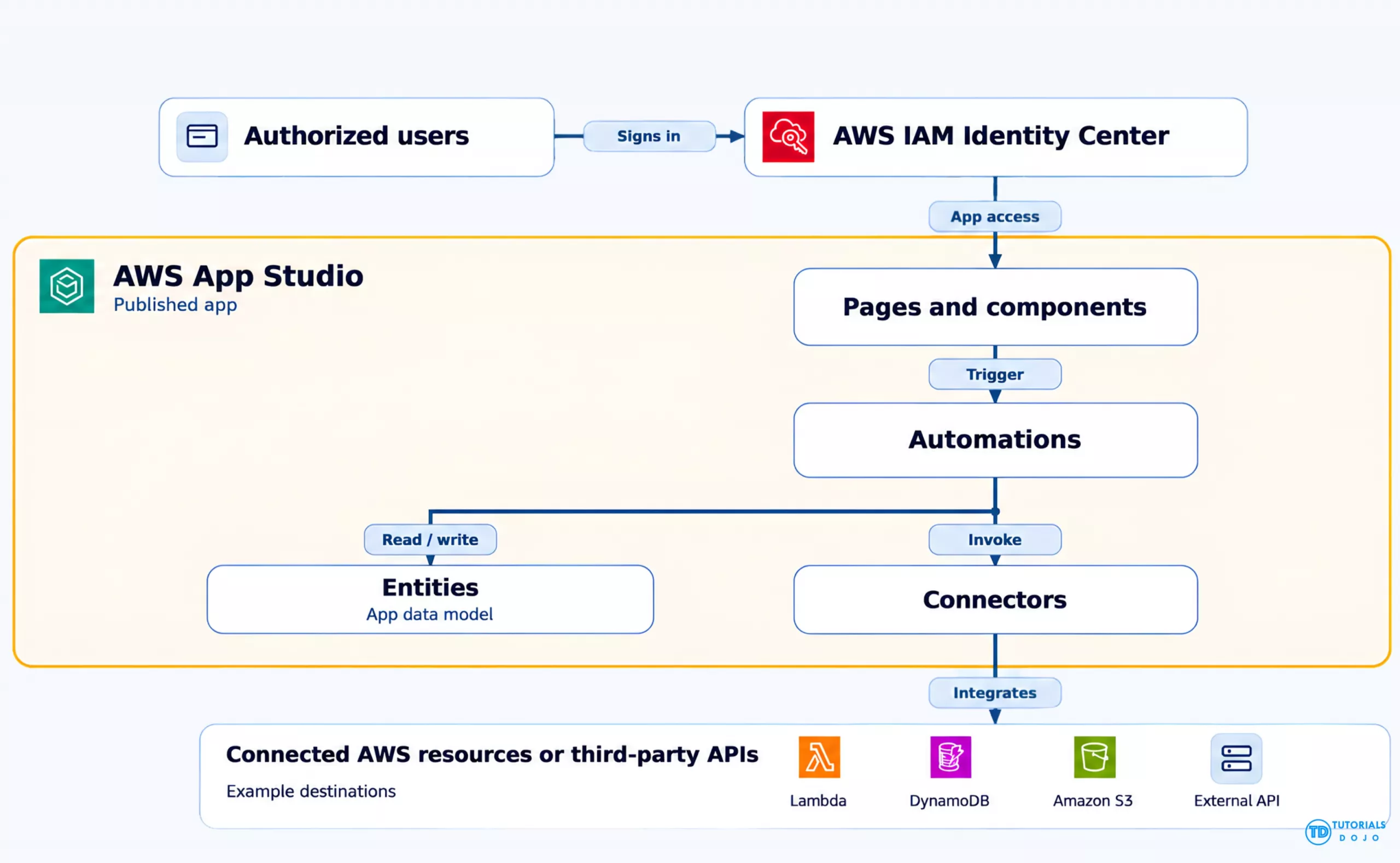
Key Components & Features
Component
What it does
AI assistant and visual builder
Draft an app from a prompt, then edit pages and components such as forms and tables.
Automations and actions
Run business logic as a sequence of actions. An automation has triggers, can accept inputs, and can return output.
Entities
Define fields and data actions for records such as requests or inventory items. Use managed entities or map entities to supported external data sources.
Connectors
Integrate with services such as AWS Lambda, Amazon DynamoDB, Amazon S3, or supported third-party APIs. App Studio admins configure connectors for builders.
Environments
Development and Preview support building and checking the interface. Published Testing supports live integrations and user acceptance testing. Production serves authorized users.
Identity and observability
Map IAM Identity Center groups to App Studio roles, share published apps with authorized groups, and inspect published app logs in Amazon CloudWatch Logs.
Primary Use Cases
Key Benefits & Value Proposition
Deployment Process & Timeline
Phase
Activities
Estimated duration
Define the workflow
Identify users, inputs, approval rules, and the system of record.
Depends on workflow scope.
Set up access and integrations
Create the App Studio instance, assign IAM Identity Center groups, and configure connectors with least-privilege permissions.
Depends on identity and data-source readiness.
Build and test
Define entities, add pages and automations, preview the UI, and publish to Testing for live integration checks.
AWS documents up to 15 minutes for an initial Testing publish. Build and validation time vary.
Publish and monitor
Publish to Production, share with authorized groups, and inspect logs and usage.
Depends on rollout and acceptance testing.
Ideal Customer Profile
Key Considerations & Planning Factors
AWS App Studio vs. Alternatives
Factor
AWS App Studio
AWS Amplify
Custom serverless web app
Time to deploy
Visual build and managed publishing.
Git-based deployment after the application is built.
Depends on frontend, API, infrastructure, and permissions setup.
Data residency
Choose a supported instance Region and review edge processing and connected resources.
Select backend resource Regions and review CDN delivery.
Choose backend resource Regions and review any global services used.
Management responsibility
AWS manages the platform. Your team configures app logic, sharing, and connectors.
AWS manages hosting. Your team owns the application code and backend configuration.
Your team assembles and operates the application across managed AWS services.
Cost model
Published app user-hours plus connected services.
Build and hosting usage plus backend service charges.
Charges by service, such as API requests, compute, storage, and hosting.
Scalability
Managed hosting with documented limits for apps, queries, and automations.
Managed delivery with capacity and limits that depend on hosting and backend choices.
Configure scaling and service quotas for each component.
Expertise required
Visual composition, data modeling, and integration configuration.
Web development and AWS backend configuration.
Full-stack development, AWS architecture, and operations.
Conclusion
AWS App Studio Cheat Sheet References:

🎁 $1.99 ONLY for All eBooks and Get Up to 70% OFF All Practice Exams & Video Courses

Turn Your Team Into Cloud-Ready Professionals Today

Learn AWS with our PlayCloud Hands-On Labs

50% OFF ON OUR YEARLY PLAN

Learn GCP By Doing! Try Our GCP PlayCloud

Learn Azure with our Azure PlayCloud
FREE AI and AWS Digital Courses

FREE AWS, Azure, GCP Practice Test Samplers


Subscribe to our YouTube Channel

Follow Us On Linkedin


Written by: Ace Kenneth Batacandulo