AWS Elemental Cheat Sheet
- AWS Elemental helps you process and deliver video content at any scale.
- What it offers:
- Cloud-based services that run entirely on AWS without needing your own servers
- On-premises equipment and software for situations where you need local video processing
- Professional video quality suitable for TV broadcasts, streaming apps, and websites
- Powers major streaming events like Netflix NFL streams, the Super Bowl on Tubi, and the Olympics on Peacock
- Pay only for what you use with no upfront costs or long-term contracts.
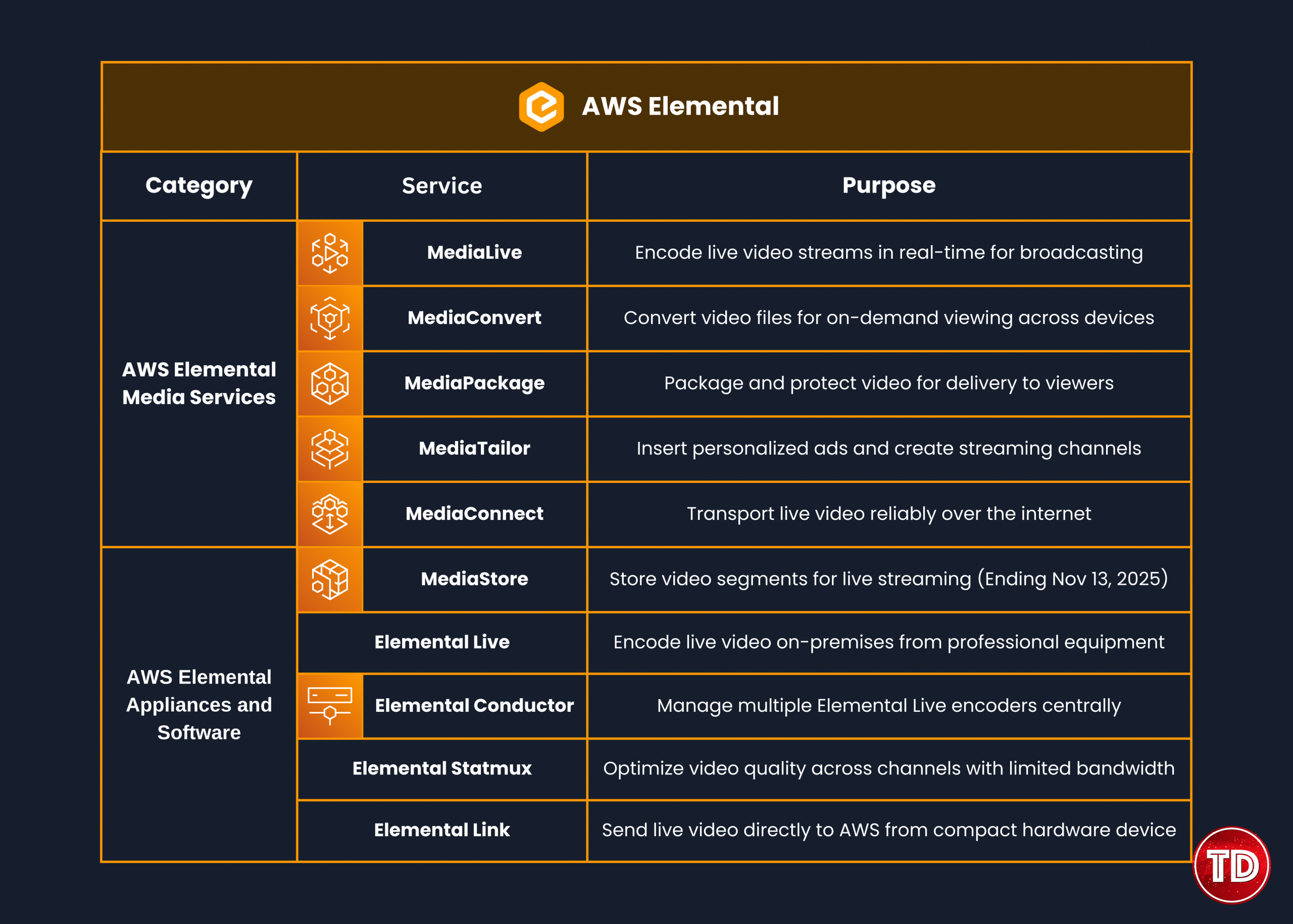
AWS Elemental Media Services
AWS Elemental MediaLive
What it does: Processes live video in real-time and prepares it for streaming to viewers.
Main capabilities:
- Takes live video (like from cameras or encoders) and compresses it into smaller sizes that work better for internet delivery
- Supports both always-on channels (like 24/7 news networks) and one-time events (like concerts or sports games)
- Creates multiple versions of the same video at different quality levels so viewers get the best quality their internet can handle
- Built-in backup systems across multiple data centers mean your stream stays online even if something fails.
- Automatically manages all the technical infrastructure, scaling, and monitoring without you needing to do anything.
Video formats it supports:
- H.264/AVC: Works on almost every device, most commonly used
- H.265/HEVC: A Newer format that uses less bandwidth but provides the same quality
- MPEG-2: Older format still used in traditional broadcasting
- Input types: Can accept video from various sources, including RTP, HLS, RTSP, and RTMP
- Quality levels: Supports everything from standard definition up to ultra-high definition 4K
TV broadcast features:
- Inserts ad markers (SCTE-35) that tell systems exactly when to show commercials
- Adds closed captions for deaf and hard-of-hearing viewers (supports CEA-608 and CEA-708 standards)
- Handles multiple language audio tracks for international audiences
- Includes audio descriptions for visually impaired viewers
- Automatically fixes volume levels to prevent ads from being too loud (follows FCC rules)
Advanced features:
- Statistical Multiplexing (Statmux): Smartly shares available bandwidth across multiple channels to maximize quality for satellite, cable, or over-the-air broadcasts
- MediaLive Anywhere: Lets you run encoding on your own equipment, but control everything from AWS, useful when you need video processing to happen locally
- Workflow Monitor: Shows a visual map of all your video workflows and how they connect, making it easier to understand and troubleshoot your setup
Pricing:
- Pay-as-you-go: Charged by the hour for what you use (minimum 10 minutes)
- Reserved pricing: Save up to 70% by committing to use it for 12 months (good for 24/7 channels)
- Small fees apply even when not actively encoding to keep everything ready.
AWS Elemental MediaConvert
What it does: Converts video files into formats optimized for different devices like phones, tablets, and smart TVs.
Main capabilities:
- Takes your source video files and creates versions that play smoothly on iPhones, Android phones, web browsers, smart TVs, and more
- Handles any size video library from a few files to millions automatically
- Provides broadcast-quality output comparable to traditional TV
- Automatically adjusts resources based on how many videos you’re processing.
- Monitors jobs and automatically retries if something goes wrong
Video formats it handles:
- Input and output codecs: H.264 (most common), H.265 (better compression), AV1 (newest), Apple ProRes (for professional editing), MPEG-2 (legacy)
- Professional color handling with 10-bit 4:2:2 support for high-quality productions
- HDR support, including Dolby Vision, HDR10, and HLG, for enhanced picture quality
- Resolutions from standard definition up to 8K ultra-high definition
- Frame rates up to 120 frames per second for smooth motion and slow-motion playback
- Output packaging: HLS (Apple devices), DASH (cross-platform), CMAF (works with both), Smooth Streaming (Microsoft)

Professional features:
- Add logos, watermarks, or graphics anywhere on the video
- Automatically normalize audio volume across all your videos
- Insert markers for ad placement in on-demand content
- Add custom metadata to video manifests
- Protect content with DRM: Widevine (Android/Google), PlayReady (Microsoft/Xbox), FairPlay (Apple devices)
- Include closed captions as separate files or embedded in the video
Job organization:
- Job: One video conversion task that takes source files and creates output files
- Preset: Saved settings you can reuse for consistent output across many jobs
- Job Template: Complete job configuration you can use repeatedly with just a few changes
- Queue: Manages which jobs run first and how many run at the same time
Speed boost option:
- Accelerated Transcoding: Process videos up to 25 times faster by using more computing power, great when you need videos ready quickly
Pricing:
- Charged per minute of video processed
- Extra fees for advanced features like faster processing, newer codecs (HEVC, AV1), and HDR
AWS Elemental MediaPackage
What it does: Prepares and packages video content on-the-fly for delivery to viewers across different devices and platforms.
Main capabilities:
- Takes live or on-demand video and packages it instantly in formats that work on different devices and content delivery networks
- Provides broadcast-quality viewing that automatically handles sudden audience growth from thousands to millions of viewers
- Built-in redundancy across multiple data centers ensures your stream stays up.
- No need to predict audience size—it scales automatically based on actual viewers.
Output formats:
- HLS: Works great on Apple devices and most platforms (industry standard)
- Low-latency HLS (LL-HLS): Near real-time streaming with only 2-6 seconds delay for interactive experiences
- DASH: Universal format that works across different platforms and devices
- CMAF: Single format that serves both HLS and DASH viewers, reducing costs
Video quality support:
- H.264: Works everywhere with good compression
- H.265/HEVC: Better compression for newer devices (available with CMAF)
- HDR-10: Enhanced picture quality with better colors and contrast
- Captions: Supports CEA-608, CEA-708 (TV standards), and WebVTT (web subtitles)
Content protection:
- DRM encryption that prevents unauthorized copying or sharing
- Works with Apple FairPlay (iOS devices), Google Widevine (Android), and Microsoft PlayReady (Windows/Xbox)
- Controls which content delivery networks can access your content
- Restricts access based on IP addresses for added security
DVR-like features for live streams:
- Start over: Viewers can restart a live program from the beginning
- Pause and resume: Watch live content on your own schedule
- Catch-up TV: Watch shows that aired earlier
- Time delay: Add controlled delays for compliance or content review
- Convert live to on-demand: Automatically save live streams for later viewing
Reliability features:
- Accepts two video feeds from MediaLive, so if one fails, it automatically switches to the backup
- Monitors video quality in real-time and switches to backup sources if quality drops
- Works with CloudFront Origin Shield to reduce server load when serving multiple content delivery networks
Pricing:
- Live streams: Pay per gigabyte going in and per gigabyte going out
- On-demand content: Pay per gigabyte, packaged and delivered
AWS Elemental MediaTailor
What it does: Inserts personalized ads into video streams and creates 24/7 streaming channels from your video library.
Ad insertion features:
- Inserts ads on the server side before the video reaches the viewer, making ad-blocking impossible
- Shows different ads to different viewers based on their interests, location, and viewing history
- Ads blend seamlessly into content with no buffering or quality differences
- Automatically converts ads to match your content quality (resolution, bitrate, etc.)
Channel assembly:
- Create 24/7 streaming channels from existing on-demand videos without re-encoding
- Only modifies playlists, not the actual video files, keeping costs low
- Add commercial breaks anywhere without special markers in your source videos
- Cost-effective for channels that don’t have huge audiences
- Schedule content like a traditional TV channel with flexible programming
Supported formats:
- Apple HLS: Best for Apple devices and broad compatibility
- MPEG-DASH: Industry standard for cross-platform streaming
- CMAF: Single format that works for both HLS and DASH players
Ad tracking:
- Client-side tracking: Detailed viewer analytics from video players
- Server-side tracking: Ad metrics for older devices that don’t support modern tracking
- Follows IAB (Interactive Advertising Bureau) standards for standardized reporting
- Real-time dashboards showing ad performance and revenue
How it works with other systems:
- Works with any standard content delivery network
- Compatible with most ad servers that follow industry standards (VAST/VMAP)
- Connects to any video origin accessible via standard web protocols
- Automatically scales to handle audience surges without configuration
Pricing:
- Pay based on how many ads you insert and how much content you assemble
- No upfront costs or commitments
AWS Elemental MediaConnect
What it does: Reliably transports live video over the internet with quality guarantees, replacing expensive satellite connections.
Main capabilities:
- Adds a quality layer on top of regular internet to ensure reliable video delivery
- Automatically detects and fixes transmission problems like packet loss and network congestion
- Encrypts video during transport to protect your content
- Monitors connection quality in real-time with detailed metrics
- Costs 30% or more less than traditional satellite distribution
Transport options it supports:
- Zixi: High-quality error correction for reliable delivery
- SRT (Secure Reliable Transport): Open-source with built-in encryption
- RIST: Industry standard for reliable internet streaming
- RTP: Basic real-time protocol for video delivery
- RTP-FEC: Adds error correction without needing retransmission
- NDI: Popular in production environments
- AWS CDI: AWS’s own protocol for uncompressed video
- ST 2110 JPEG XS: Broadcast standard with light compression
Types of video it handles:
- Transport Streams: Regular compressed video with audio and data combined
- CDI Flows: Uncompressed or lightly compressed video for professional production quality
- Supports bitrates over 120 Mbps for high-quality feeds
Useful features:
- Send one video source to multiple destinations at once
- Share video streams between different AWS accounts securely
- Industry-standard monitoring that alerts you to common broadcast problems
- Integrates with CloudWatch for monitoring and EventBridge for automation
Hybrid setup:
- MediaConnect Gateway software lets you connect on-premises equipment to AWS seamlessly

Pricing:
- Charged per hour, your connections are active, plus data transfer
- No charges for transfers between MediaConnect and other AWS services in the same region
AWS Elemental MediaStore
Important: Service ending November 13, 2025
What’s happening:
- Current users can continue using it normally until November 13, 2025
- After November 13, 2025, you won’t be able to access your containers or the console
- AWS recommends migrating to Amazon S3 combined with MediaPackage
What it was designed for:
- Fast, reliable storage specifically optimized for live streaming
- Stored video segments and playlist files with very low latency
- Positioned between the live encoder (MediaLive) and content delivery network (CloudFront)
What to use instead:
- Amazon S3: For storing video segments with automatic deletion of old files
- MediaPackage: For live stream packaging and just-in-time delivery
- This combination provides better performance and lower costs
AWS Elemental Appliances and Software
- Physical equipment and software you install in your own facilities for situations where cloud processing isn’t suitable.
When you need on-premises equipment:
- Direct connections to professional cameras and video equipment (SDI cables)
- Video must be processed on private networks within your building
- Internet bandwidth is limited or unreliable
- Integration with existing local storage systems
- Regulatory requirements mandate local processing
Two options available:
- Pre-built appliances: Ready-to-use hardware delivered and installed
- Software licenses: Install on your own servers and equipment
AWS Elemental Live
What it does: Encodes live video on your premises from professional cameras and equipment.
Key features:
- Accepts professional video inputs directly from cameras via SDI connections
- Creates high-quality video suitable for sending to AWS or other destinations
- Works with MediaConnect to send video securely to the cloud
- Available in different models (L800 and L900 series) with varying capabilities
Common uses:
- Encoding video locally before sending to the cloud
- Backup encoding for critical broadcasts
- Hybrid workflows combining local and cloud processing
AWS Elemental Conductor
What it does: Central management system for controlling multiple Elemental Live encoders.
Key features:
- Control multiple encoders from one interface
- Schedule live events across different locations
- Distribute workload across multiple encoders
- Provides failover if one encoder fails
Common uses:
- Large broadcast facilities with many encoding systems
- Multi-location setups requiring central control
- Complex productions with scheduling needs
AWS Elemental Statmux
What it does: Optimizes video quality when distributing multiple channels over limited bandwidth.
Key features:
- Combines multiple video channels into one stream
- Dynamically allocates bandwidth to channels that need it most based on content complexity
- Maximizes overall quality within bandwidth limits
- Used for satellite, cable, and over-the-air distribution
Common uses:
- Satellite distribution to cable providers
- Cable systems with limited capacity
- Broadcast networks with fixed bandwidth
AWS Elemental Link
What it does: A Simple hardware device that sends live video directly to AWS.
Key features:
- Small, portable device that connects to video sources
- Sends video directly to MediaLive or MediaConnect
- Available in HD and UHD versions
- Manage and monitor remotely through the AWS console
Common uses:
- Remote event coverage (concerts, sports, conferences)
- News reporting in the field
- Corporate events and meetings
- Educational institution streaming
Pricing:
- Link HD: Contact AWS for pricing
- Link UHD: $4,995 per device (plus tax and shipping)
Best Practices
Setup recommendations
- Always use CloudFront with Media Services for better performance and cost savings
- Set up services across multiple data centers for reliability
- Use dual video feeds for live streams to prevent outages
- Use MediaConnect for critical video transport
Encoding tips
- Use Quality-Defined Variable Bitrate (QVBR) mode to balance quality and bandwidth
- Create multiple quality levels that match your viewers’ devices
- Test different settings with sample content before going live
Operations
- Use reserved pricing for 24/7 channels to save money
- Monitor everything with CloudWatch dashboards
- Set up automatic alerts for problems
- Review and optimize settings regularly
AWS Elemental References:
https://aws.amazon.com/media-services/elemental/
https://aws.amazon.com/medialive/
https://aws.amazon.com/mediaconvert/
https://aws.amazon.com/mediapackage/
https://aws.amazon.com/mediatailor/
https://aws.amazon.com/mediaconnect/
https://aws.amazon.com/mediastore/
https://aws.amazon.com/elemental-appliances-software/
🌸 25% OFF All Reviewers on our International Women’s Month Sale! Save 10% OFF All Subscriptions Plans & 5% OFF Store Credits/Gift Cards!

Learn AWS with our PlayCloud Hands-On Labs

$2.99 AWS and Azure Exam Study Guide eBooks

New AWS Generative AI Developer Professional Course AIP-C01

Learn GCP By Doing! Try Our GCP PlayCloud

Learn Azure with our Azure PlayCloud

FREE AI and AWS Digital Courses

FREE AWS, Azure, GCP Practice Test Samplers


Subscribe to our YouTube Channel

Follow Us On Linkedin


Written by: Ostline Casao